



Overview

It's no secret that adding photos to your blog posts is one of the most effective ways to enhance your blog and attract attention to your writing. Flickr has millions of photos available in its database. A simple FREE tool called Flickr Gallery allows you to create a custom image gallery with a cool slide show of the most recent and most interesting photos from Flickr on your website or blog in a few easy steps. Just visit Flickr website and find photostream, photoset or a single photo you like. Enter the address of flickr page to add all photos from this page in your gallery, select the style of thumbnails and the overlay window and add the HTML embed code on your website or blog.
A few clicks and you'll see a stylish photo gallery with beautifull lightbox and zoom effects on your own website or blog!


Flickr Gallery for Windows   Flickr Gallery for MAC

Want more?

Example

Lightbox gallery sample

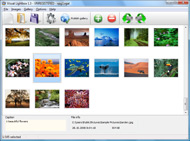
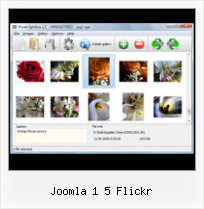
The following image set is generated by Flickr Gallery tool. Click any picture to run Lightbox gallery.

The example above is an in-page usage demo of Lightbox script with Flickr images. The photo gallery created with Flickr Gallery tool is placed inside the html page. You can also check the full-page demo web gallery. This example takes whole browser area to show the web gallery.Flickr Api Feed Sets Gallery Jquery

How to Use

Step 1. Adding flickr images to your own gallery.


Locate the photo, photoset or photostream you want to use in your Flickr slideshow. Click on it to see the photo on its own page.

Copy URL of the flickr page.

Select Add images from Flickr... from the 'Add' button on the Toolbar.

Add images from Flickr

In the appeared window paste URL of the flickr page. Specify also the number of photos you want to add from the flickr page. Flickr Gallery will now include these photos in your project.

Add images from Flickr

If you have included the photos that you do not wish to be in your web gallery, you can easily remove them. Select all images that you wish to remove from photo gallery, and select Delete images. from the Images menu. You can pick and choose pictures by holding the CTRL while clicking the pictures you like.

Step 2. Adding caption.

The name of the photo on flickr page will automatically appear in the caption. When you select a photo you'll see the various info about it, such as: Path, Size, date of last change and Caption. You can add any comment or text about the photo (up to 512 symbols).

Step 3. Gallery properties.

Change the name of your flickr album, the size and quality of your pictures with Flickr Gallery. From the Gallery menu, select Properties or use "Edit Gallery Properties" button on the toolbar.

On the first tab of the Gallery Properties window you can change the name of your photo album and enable/disable the following properties: Slide Show, Auto play Slide Show, Zoom effect, Overlay Shadow. You can also set the Overlay shadow color and select the Engine you want to use (jQuery or Prototype + script.aculo.us).

On the second tab of the Gallery Properties window you can select the thumbnail you want to use, set the Thumbnails Resolution, Thumbnails Quality, Thumbnails Titles. Select Thumbnails Format (save in PNG or JPG format). Specify the Number of columns in you photo album and the Page color.

On the third tab of the Gallery Properties window you can select the template, Image resolution and Image quality of your pictures and change the Watermark.

You can set up the various sizes for exported images.

Control the quality of output PNG or JPEG format image by defining output "Image quality" and "Thumbnail quality" parameters (0%…100%).

Step 4. Save your photo gallery as project file.

When you exit Flickr Gallery application, you'll be asked if you want to save your project. The project consists of the pictures you choose to put on your web photo gallery and all your settings. It's a good idea to save the project, because that will allow you to change the project in case you decide to do something different with future galleries. So click Yes, then enter a name for your project. To select the location of your project, just click the Browse folders button and choose a different location. Then click Save.

Plagin Widgets Slideflickr Joomla 1 5 Flickr

Download Flickr Gallery


Download Flickr Gallery Download Free Edition
for Windows
Download Flickr Gallery Download Free Edition
for MAC

Flickr Gallery is free for non - commercial use.

A small fee is required for business use. Flickr Gallery Business Edition additionally provides an option to remove the Flickr Gallery. Com credit line as well as a feature to put your own logo to images. After you conclude the payment via the secure order form, you will receive a license key instantly by e-mail that turns the Flickr Gallery Free Edition into a Business one. You can select the most suitable payment mode: bank transfer, check, credit card, PayPal etc. Also you can get Business Edition for free if you help with translating Flickr Gallery into your native language, please contact us at for more info.

Integrating Flickr In Website 2009

Buy Flickr GalleryBuy Business Edition
for Windows

$49
Single Website
$69
Unlimited Websites
Buy Flickr GalleryBuy Business Edition
for MAC

$49
Single Website
$69
Unlimited Websites

Support

For feature requests, troubleshooting, general help contact Customer Support at . Make sure to include details on your Flickr Gallery version, browser, a link (or relevant code) and operating system.Embed Flicr Gallery Php

Feedback

    * This looks like EXACTLY what I need for my site. It would make my job much faster! Love your program. Thank you!!

    * Let me start just congratulating you, good job, really. I am trying out the free version before I buy it. It works great.

    * I tried Flickr Gallery and for me its a very cool and usefull application. Its so easy to manage my galleries and it looks very nice.Flickr Lightbox Mac

    * First of all, your product is fantasitc. I looked at the others and your code generator app was insanely easy to use.

FAQ

Q:I would like to center all the thumbnails and I cannot figure out how.Can you please help?

A:Try to use <div> tag or <table> tag to center your thumbnails. Flickr Gallery generates a special code.
Just paste it in <div> tag.
You can also place in <dierates a special code.
Just paste it in <div> tag.
You can also place in <div> tag your iframe.
And then use the alignment that you ned.


RELATED

Paul Thompson's Joomla Code {flickr-album}Type=Search, Tags=joomla, Cols=5, Rows=3{/flickr-album} {flickr-album}Type=User, User=35939596@N00{/flickr-album} {flickr-album}Type=User, User=35939596@N00, Tags=geyser{/flickr-album} {flickr-album}Title=Everyone Love's Kittens, Type=Group, Group=365105@N23{/flickr-album}

New "Joomla! Picasa" and "Joomla! Flickr" " Roberto Aloi 1. rss albums. 2. sort pictures by tags, rss tag album. 3. sort albums by tags, rss tag gallery. 4. in one gallery can be flickr and picasa albums, and if i sort by tags then no matter are they flickr or picasa 5:20 pm. I have tried your newest joomla! flickr and if i press the Joomla Flickr link

Frontpage Joomla! - le portail dynamique et système de gestion de contenu Overall you can choose from 4 background styles, 5 background colors, 7 content colors and 5 font families including google fonts for headlines

Search - Joomla! Extensions Directory Assuming flickr is required, the following results were found. You can also specify up to 5 images instead of using a RSS feed. I did just integrate the Flickr widget from RoyTanck.com as a Joomla module. This version do not depend on Roy's site, and run fully offline as i did rewrite the

Lifestream 1.1 Released: New support for Flickr, Youtube and Joomla templates by Joomlashack, a provider of custom, free and commercial Joomla Templates Lifestream 1.1 for Joomla integrates your social network feeds and displays them ALL on 1 website! Version 1.1 adds Flickr, Youtube and Tumblr support to Lifestream for a total of 6 social network integrations

Joomla 1 5 Flickr : Flickr Gallery Joomla 1 5 Flickr. Flickr Gallery is a ready-made, professional solution that allows webmasters to create superior, cross-browser, fast-loading website photo galleries.. How To Save Photo From Flickr

HyBing - HyBing Hybing, joomla country block, joomla Ajax stock, Joomla Country Block, joomla easy paypal, Joomla EZ Paypal Country Procing, Country Pricing, Joomla EZ Paypal Gift Certificate, Paypal Gift Certificate, easypaypal, Quick IPN, report genie,

Book Review: Joomla 1.5 Multimedia | MyTestBox.com :: web Joomla! is an award winning Content Management System(CMS) with a wide range of features. It's a prolific CMS which is suitable for designing and maintaining

ARI Pretty Photo is Joomal! lightbox extension for Flickr ARI Pretty Photo is Joomla! popup and lightbox component, plugin, module, extension for showing Flickr photos, YouTube videos, external pages, image galleries, generating thumbnails

Universal Playground Joomla Extentions - News We have 5 guests and no members online. News. New plugin (v3.0), new We are excited to let you know we have just released version 3.0 of the Flickr Slideshow plugin. It is available for Joomla 1.5 and Joomla 1.6, and has a major performance boost compared to older versions of the plugin

Fiji Web Design - Joomla PHP Module Fiji Web Design - Enterprise Web Design and Development, Joomla PHP Module is a Joomla module that allows you to embed PHP, HTML, JavaScript and CSS in a Joomla module position. It is based on the Joomla HTML Module (mod_html) which allows

Frontpage Joomla! - the dynamic portal engine and content management system Overall you can choose from 4 background styles, 5 background colors, 7 content colors and 5 font families including google fonts for headlines

Embed Flickr Plugin | The atareao En fin, empiezo de nuevo. Bueno, bueno, bueno, no podía hacerse esperar, tanto tiempo con el plugin de Picasa, que finalmente tenía que hacer uno para Flickr

Photofeed fo Joomla - Walter Cedric Wiki This is a small content plugin for Joomla! 1.5 that allow you to inline a set of images from your favorite online gallery: Smugmug, Flickr, Picasa or any RSS feed in any smugmug.com/hack/feed.mg?Type=gallery&Data=4311718_bRCBj&format=rss200 limit=5}

JFlickr free Joomla Flickr image module | joomla 1.5 modules free joomla templates,also some free tutorials on howto creating joomla templates,design and install joomla 1.6 template,joomla 1.5 templates and joomla themes

Flickr: Joomla! Flickr is almost certainly the best online photo management and sharing application in the world. Show off your favorite photos and videos to the world, securely and privately show content to your friends and family, or blog the photos and videos

ARI Colorbox is Joomla! lightbox module with slideshow ARI Colorbox is module for Joomla! which shows image galleries, flickr galleries, external pages in nice popup. It supports slideshow

Joomla! Event Calendar - RSEvents! from RSJoomla! RSEvents! is a Joomla event and calendar manager. Easily create events for Joomla, sell tickets, calendar view, web 2.0 events for Youtube, Flickr

Best of Joomla - Art Colorbox Commercial and Free Joomla templates, Joomla 1.6 Templates, Joomla 1.5 Templates, Joomla Extensions, Joomla Resources,Joomla Hosting, Tutorials and news

Universal Playground Joomla Extentions - Demo & Tutorial The Flickr Slideshow plug-in for Joomla is a plug-in to display Displaying video's from your flickr account. 64. Privacy options. 111. Powered by Universal

Flickr Video Plugin - Antonio's Forum labanex.com is a site of everything that I am.. Flickr Video Plugin - Joomla! Flickr Video Plugin 1 Year, 5 Months ago. Karma: 0. This is the forum where you can discuss the Flickr Video Plugin. Just insert the video ID, width, and height like

Issue 8 - google-highly-open-participation-joomla - Create a Create a Joomla! v 1.5 plugin for Flickr Images. 5 people starred this issue and may be One line summary Create a Joomla! v 1.5 plugin for Flickr Images. Description Using the plugins/content/loadmodule.php and loadmodule.xml files as an example, create a plugin that will load a Flickr image when

Joomla Mambots Joomla Mambots download - SORT BY: Date Submitted, Title, Score, Rating, Votes, Downloads, Author; ORDER BY: Descending, Ascending; ITEMS/PAGE; VIEW OPTIONS: Full Details, Less Details

Joomla! 1.5 Multimedia " Free Ebooks magazines Review and Joomla! 1.5 Multimedia Packt Publishing | 2010-02-17 | ISBN: 1847197701 | Index & review ebookw.net | 376 pages | PDF | 19 MBBuild media-rich Joomla! web sites by learning to embed an

Flickr Photos Realizzato dall'esperto in Ozio AlexRed il componente Ozio Gallery permette di visualizzare immagini all'interno di interessanti applicazioni flash

roberto.aloi / joomla-flickr / overview — bitbucket.org Mercurial hosting - we're here to serve. Followers (1) RSS. Atom. pull request. fork. patch queue. follow. get source " zip. gz. bz2. branches " default. tags " tip. zip. gz. bz2. roberto.aloi / joomla-flickr (http://aloiroberto.wordpress.com/) This Joomla! 1.5 component allows you to create an eye

Announcing Joomla! photowidget for Smugmug, Picasa, Flickr RSS Creative senior software engineer acting in open source world, and having a lot of hobbies..too much for being listed here

