


Overview

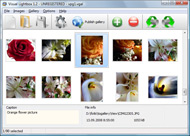
It's no secret that adding photos to your blog posts is one of the most effective ways to enhance your blog and attract attention to your writing. Flickr has millions of photos available in its database. A simple FREE tool called Flickr Gallery allows you to create a custom image gallery with a cool slide show of the most recent and most interesting photos from Flickr on your website or blog in a few easy steps. Just visit Flickr website and find photostream, photoset or a single photo you like. Enter the address of flickr page to add all photos from this page in your gallery, select the style of thumbnails and the overlay window and add the HTML embed code on your website or blog.
A few clicks and you'll see a stylish photo gallery with beautifull lightbox and zoom effects on your own website or blog!


Flickr Gallery for Windows   Flickr Gallery for MAC

Want more?

Example

Lightbox gallery sample

The following image set is generated by Flickr Gallery tool. Click any picture to run Lightbox gallery.

The sample above is an in-page usage demo of Lightbox tool with Flickr images. The slideshow created with Flickr Gallery software is placed inside the website page. You can also check the full-page demo web gallery. This example takes whole browser area to show the slideshow.Flickr Photos On Website

How to Use

Step 1. Adding flickr images to your own gallery.


Locate the photo, photoset or photostream you want to use in your Flickr slideshow. Click on it to see the photo on its own page.

Copy URL of the flickr page.

Select Add images from Flickr... from the 'Add' button on the Toolbar.

Add images from Flickr

In the appeared window paste URL of the flickr page. Specify also the number of photos you want to add from the flickr page. Flickr Gallery will now include these photos in your project.

Add images from Flickr

If you have included the photos that you do not wish to be in your web gallery, you can easily remove them. Select all images that you wish to remove from photo gallery, and select Delete images. from the Images menu. You can pick and choose pictures by holding the CTRL while clicking the pictures you like.

Step 2. Adding caption.

The name of the photo on flickr page will automatically appear in the caption. When you select a photo you'll see the various info about it, such as: Path, Size, date of last change and Caption. You can add any comment or text about the photo (up to 512 symbols).

Step 3. Gallery properties.

Change the name of your flickr album, the size and quality of your pictures with Flickr Gallery. From the Gallery menu, select Properties or use "Edit Gallery Properties" button on the toolbar.

On the first tab of the Gallery Properties window you can change the name of your photo album and enable/disable the following properties: Slide Show, Auto play Slide Show, Zoom effect, Overlay Shadow. You can also set the Overlay shadow color and select the Engine you want to use (jQuery or Prototype + script.aculo.us).

On the second tab of the Gallery Properties window you can select the thumbnail you want to use, set the Thumbnails Resolution, Thumbnails Quality, Thumbnails Titles. Select Thumbnails Format (save in PNG or JPG format). Specify the Number of columns in you photo album and the Page color.

On the third tab of the Gallery Properties window you can select the template, Image resolution and Image quality of your pictures and change the Watermark.

You can set up the various sizes for exported images.

Control the quality of output PNG or JPEG format image by defining output "Image quality" and "Thumbnail quality" parameters (0%…100%).

Step 4. Save your photo gallery as project file.

When you exit Flickr Gallery application, you'll be asked if you want to save your project. The project consists of the pictures you choose to put on your web photo gallery and all your settings. It's a good idea to save the project, because that will allow you to change the project in case you decide to do something different with future galleries. So click Yes, then enter a name for your project. To select the location of your project, just click the Browse folders button and choose a different location. Then click Save.

Templates Flickr Free Photoshop Photo Gallery Flickr Photo Gallery Wordpress

Download Flickr Gallery


Download Flickr Gallery Download Free Edition
for Windows
Download Flickr Gallery Download Free Edition
for MAC

Flickr Gallery is free for non-commercial use.

A small fee is required for business use. Flickr Gallery Business Edition additionally provides an option to remove the Flickr Gallery. Com credit string as well as a feature to put your own logo to images. After you conclude the payment via the secure form, you will receive a license key instantly by e-mail that turns the Flickr Gallery Free Edition into a Business one. You can select the most suitable payment procedure: PayPal, credit card, bank transfer, check etc. Also you can get Business Edition for free if you help with translating Flickr Gallery into your native language, please contact us at for more info.

Insert Flickr Blogspot Credit

Buy Flickr GalleryBuy Business Edition
for Windows

$49
Single Website
$69
Unlimited Websites
Buy Flickr GalleryBuy Business Edition
for MAC

$49
Single Website
$69
Unlimited Websites

Support

For general help, troubleshooting and feature requests contact Customer Support at . Make sure to include details on your Flickr Gallery version, a link (or relevant code), operating system and a browser.Flickr Integration Jquery

Feedback

    * I downloaded your trial version to see if I could get it to work with my website, and I am almost there (I have been looking for something like this for ages)..

    * Great product by the way and saved me loads of time. I really like your Flickr Gallery program! Very nice.

    * I ran into your website wile looking for a JavaScript to manage a personal Photo Gallery. I downloaded the trial version and immediately fell in love with your Flickr Gallery, it is one of the best products I’ve ever found; it is very user friendly and easy to use and creates great Photo Galleries.Flickr Feed Slider Jquery Slideshow

    * I tried Flickr Gallery and for me its a very cool and usefull application. Its so easy to manage my galleries and it looks very nice.

FAQ

Q:In previewing some of my own slides on the browser, I find the background (thumb nails visible) too busy and distracting. Is there a way to darken the background?

A:You may set the following parameter in engine\js\visuallightbox.js file in a such way:

overlayOpacity: 1, // controls transparency of shadow overlay


RELATED

Wordpress Photo Gallery Plugins | Wordpress Directory There are some great Wordpress photo gallery plugins out there, and we just added a few here on WP Directory you should know about. Flick Gallery WordPress plugin: Flickr gallery does just what you would expect it to – it allows you to create a gallery of pictures stored in flickr (Yahoo!) accounts

Flickr Photo Gallery | bavatuesdays I have been meaning to write about just how easy it was to include the eight Flickr images I used for the In Jim's Chair post. Tan Tan Noodles' Flickr Photo Gallery plugin for WordPress (and WPMu) is often associated with the awesome Photo Gallery

Flickr tools for WordPress bloggers | WereWP PhotoDropper: A lightbox-type interface for adding photos to your posts. We have spoken about Zemanta in a previous post, and this free WordPress plugin brings it to another level by browsing all flickr pictures with Creative Commons license and including the keyword you searched for

Flickr Photo Album For Wordpress If you are looking for a way to add your Flickr photos to Wordpress, then you have found the solution. This plugin will add a photo album to your Wordpress blog

Flickr Photo Album for WordPress : tan tan noodles – msg free On the backend, this plugin will also add a new Flickr icon to your WordPress edit screen which will allow you to easily insert your Flickr photos into your blog posts with just a couple clicks. You can either have your inserted photos link

Still Not Perfect " Blog Archive " Flickr Gallery 0.7 Flickr Gallery 0.7. This project is now closed. Please use the much superior FAlbum if you want to integrate Wordpress and Flickr. This plugin allows users of WordPress (and other clever people who can figure out how to make it work without WP) to display their Flickr photos on their own site

dannyman.toldme.com : Photos Flickr Photos Flickr is a development version of a plugin that I am writing for WordPress blog software to display a user's Flickr photos within their blog. Someone with a WordPress blog can now have a basic interface to let readers view their Flickr images, using their own web site and design

WordPress and photos 5: Flickr photo album plugins " Anne Helmond WordPress and photos 5: Flickr photo album plugins. 05.01.07Posted by Anne in MA Thesis, Photography 6 Comments Flickr Photo Album for WordPress. This was the first plugin I found and it is quite good. It automatically removes your blog sidebar to use the whole width of your blog to display albums and

Flickr Gallery in WordPress 1.5 by decoding galvin Flickr Gallery plugin for WordPress 1.5 is yet the best photo gallery plugins so far. Flickr is an online photo management and sharing application. If you don't have an account yet, go register an account now. If you already have an account and wish to integrate it into WordPress, here's

WordPress " Flickr Gallery " WordPress Plugins Using the "shortcodes" system in WordPress 2.5 and up, this plugin will allow you to quickly and easily incorporate your Flickr photos into your WordPress pages and posts. Features include: A quick gallery of your recent photos, photosets and most popular photos

Flickr Wordpress : Flickr Gallery Just visit Flickr website and find photostream, photoset or a single photo you like. Flickr Gallery – codememe Using the "shortcodes" system in WordPress 2.5 and up, this plugin will allow you to

8 Best Wordpress Photo Gallery Plugins " Tips Blogger You can turn your wordpress into a photoblog using some wordpress photo gallery themes given here or using some photo gallery plugins for wordpress

Wordpress and Flickr " Sadhas Blog Flickr Photo Album for WordPress: This Flickr plugin for WordPress will allow you to pull in your Flickr photosets and display them as albums on your WordPress site. You can either have your inserted photos link back to your WordPress Flickr photo album or directly to your Flickr.com photo page

7 Superb Wordpress Photo Gallery Plugins Use our list of 7 Wordpress photo gallery plugins for ways to incorporate photos into your Wordpress blog. 1. Flickr Photo Album - This WordPress Photo Gallery plugin is my all time favorite, as it allows for the integration of your Flickr photos into

Top 10 Best WordPress Photo Gallery Plugins For Your WP Blog List of best wordpress photo gallery plugins and wordpress picture plugins including Lazyest Gallery, YAPB, Shutter Reloaded, Picasa, and more

Wordpress Plugins for Photo Galleries - Photoblogging Part II " Wordpress Plugins for Photo Galleries - Photoblogging Part II. Web design blog with graphics and web design resources, lists of graphic design tools, utilities, and other web site design resources, including Web Design and Development articles

Fotobook – A WordPress Plugin to Import Facebook Photos 21款Wordpress图片相册插件/ Gallery Plugins | 天生宠才. Wordpress Eklentileri | İki Dostun Kişisel Günceleri pics from Flickr to Picasa, added links to Facebook & Picasa photos

Top 10 WordPress Gallery Plugins - image gallery plugin WordPress is by far the most popular blogging platform and anyone using it would have surely found a need for an effective and working WordPress Gallery plugin at some point of time. 5. Flickr Photo Album

7 Wordpress Photo Image Plugins Some great Wordpress photo and image plugins. I had used all of them and they work well. Flickr Photo Album – This Flickr plugin for WordPress will allow you to pull in your Flickr photosets and display them as albums on your WordPress

Flickr Feed Gallery Flickr Feed Gallery. Using Flickr Feed Gallery plugin, blog writers can easily embed Flickr photos to a WordPress blog. Only publicly available Flickr photo streams can be configured. Please see Flickr feed page for more details on the various feeds available

Flickr Gallery – codememe Using the "shortcodes" system in WordPress 2.5 and up, this plugin will allow you to quickly and easily incorporate your Flickr photos into your WordPress pages and posts. Features. A quick gallery of your recent photos, photosets and most popular photos

WordPress photo gallery Plugin - Flickr | Wordpress4Dummies This Flickr plugin for WordPress will allow you to pull in your Flickr photosets and display them as albums on your WordPress site. There is a pretty simple

Monkey Gastello Photo Gallery Outdoor fashion, Portraits, Landscape, Urban, Industrial, Sexy Girls Filed under: Black & White Portraits, Flickr photos, Outdoor fashion, Photography, Portraiture, Sexy Girls | Leave a Comment

10 Amazing Wordpress Plugins for Flickr Description: Slickr Gallery is a very fast, bandwidth-friendly photo gallery plugin for WordPress. Flickr Gallery for WordPress. Description: Using the "shortcodes" system in WordPress 2.5 and up, this

Flickr: WordPress Flickr is almost certainly the best online photo management and sharing application in the world. Show off your favorite photos and videos to the world, securely and privately show content to your friends and family, or blog the photos and videos

Slickr Flickr WordPress Gallery Plugin When it comes to image gallery plugins, there are tons of options available. In this article we will be sharing with you a plugin that displays your Flickr photos into WordPress posts, pages, and/or sidebar widgets

Flickr Photo Album WordPress Plugin Flickr Photo Album WordPress Plugin. By Scott Beale on October 31, 2006. I recently came across my all-time favorite WordPress plugin, Flickr Photo Album. It pulls in all of your Flickr photos, galleries and photo information, using the Flickr

