




Overview

It's no secret that adding photos to your blog posts is one of the most effective ways to enhance your blog and attract attention to your writing. Flickr has millions of photos available in its database. A simple FREE tool called Flickr Gallery allows you to create a custom image gallery with a cool slide show of the most recent and most interesting photos from Flickr on your website or blog in a few easy steps. Just visit Flickr website and find photostream, photoset or a single photo you like. Enter the address of flickr page to add all photos from this page in your gallery, select the style of thumbnails and the overlay window and add the HTML embed code on your website or blog.
A few clicks and you'll see a stylish photo gallery with beautifull lightbox and zoom effects on your own website or blog!


Flickr Gallery for Windows   Flickr Gallery for MAC

Want more?

Example

Lightbox gallery sample

The following image set is generated by Flickr Gallery tool. Click any picture to run Lightbox gallery.

The example above is an in-page usage demo of Lightbox script with Flickr images. The lightbox gallery created with Flickr Gallery wizard is placed inside the page layout. You can also check the full-page demo gallery. This example takes whole browser area to show the website gallery.Transfer Photos To Another Flickr User

How to Use

Step 1. Adding flickr images to your own gallery.


Locate the photo, photoset or photostream you want to use in your Flickr slideshow. Click on it to see the photo on its own page.

Copy URL of the flickr page.

Select Add images from Flickr... from the 'Add' button on the Toolbar.

Add images from Flickr

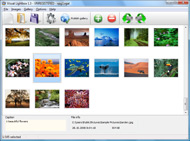
In the appeared window paste URL of the flickr page. Specify also the number of photos you want to add from the flickr page. Flickr Gallery will now include these photos in your project.

Add images from Flickr

If you have included the photos that you do not wish to be in your web gallery, you can easily remove them. Select all images that you wish to remove from photo gallery, and select Delete images. from the Images menu. You can pick and choose pictures by holding the CTRL while clicking the pictures you like.

Step 2. Adding caption.

The name of the photo on flickr page will automatically appear in the caption. When you select a photo you'll see the various info about it, such as: Path, Size, date of last change and Caption. You can add any comment or text about the photo (up to 512 symbols).

Step 3. Gallery properties.

Change the name of your flickr album, the size and quality of your pictures with Flickr Gallery. From the Gallery menu, select Properties or use "Edit Gallery Properties" button on the toolbar.

On the first tab of the Gallery Properties window you can change the name of your photo album and enable/disable the following properties: Slide Show, Auto play Slide Show, Zoom effect, Overlay Shadow. You can also set the Overlay shadow color and select the Engine you want to use (jQuery or Prototype + script.aculo.us).

On the second tab of the Gallery Properties window you can select the thumbnail you want to use, set the Thumbnails Resolution, Thumbnails Quality, Thumbnails Titles. Select Thumbnails Format (save in PNG or JPG format). Specify the Number of columns in you photo album and the Page color.

On the third tab of the Gallery Properties window you can select the template, Image resolution and Image quality of your pictures and change the Watermark.

You can set up the various sizes for exported images.

Control the quality of output PNG or JPEG format image by defining output "Image quality" and "Thumbnail quality" parameters (0%…100%).

Step 4. Save your photo gallery as project file.

When you exit Flickr Gallery application, you'll be asked if you want to save your project. The project consists of the pictures you choose to put on your web photo gallery and all your settings. It's a good idea to save the project, because that will allow you to change the project in case you decide to do something different with future galleries. So click Yes, then enter a name for your project. To select the location of your project, just click the Browse folders button and choose a different location. Then click Save.

Joomla Image Slideshow Flickr Tumblr Widget Flickr

Download Flickr Gallery


Download Flickr Gallery Download Free Edition
for Windows
Download Flickr Gallery Download Free Edition
for MAC

Flickr Gallery is free for non-commercial use.

A small fee is required for business use. Flickr Gallery Business Edition additionally provides an option to remove the Flickr Gallery. Com credit string as well as a feature to put your own logo to images. After you conclude the payment via the secure order form, you will receive a license key instantly by e-mail that turns the Flickr Gallery Free Edition into a Business one. You can select the most suitable payment method: credit card, check, bank transfer, PayPal etc. Also you can get Business Edition for free if you help with translating Flickr Gallery into your native language, please contact us at for more info.

Select All Flickr Pictures Near Longitude

Buy Flickr GalleryBuy Business Edition
for Windows

$49
Single Website
$69
Unlimited Websites
Buy Flickr GalleryBuy Business Edition
for MAC

$49
Single Website
$69
Unlimited Websites

Support

For general help, feature requests, troubleshooting contact Customer Support at . Make sure to include details on your Flickr Gallery version, browser, operating system and a link (or relevant code).Flickr Profile Name Symbols

Feedback

    * Great product by the way and saved me loads of time. I really like your Flickr Gallery program! Very nice.

    * I find Flickr Gallery (and lightbox2) a great tool and was about to proceed in its purchase.

    * I have just bought this product and think it is great. As it is extremely easy to use it is something I could get my clients to purchase to upload their own portfolio and latest projects etc.Get Codes For Flickr

    * Just bought the business version of Flickr Gallery and I just had to write and say how impressed I am with it. Really easy to use, intuitive interface and generates a truly professional presentation. Seldom have I been so pleased with a software purchase. Thank you.

FAQ

Q:How do I embed the lightbox image gallery into an existing page?

A:To install Flickr Gallery gallery on your page you should:

1. Create your gallery in Flickr Gallery and publish it on a local drive in any test folder.
2. Open index.html file from the saved folder in any text editor.
3. Copy code for the HEAD section and paste it inside the HEAD section of you own webpage, for example:

<head>
...
<!-- Start Flickr Gallery.com HEAD section -->
<link rel="stylesheet" href="engine/css/vlightbox.css" type="text/css" />
<style>#vlightbox a#vlb{display:none}</style>
<link rel="stylesheet" href="engine/css/Flickr Gallery.css" type="text/css" media="screen" />
<script src="engine/js/jquery.js" type="text/javascript"></script>
<script src="engine/js/jquery.tools.min.js" type="text/javascript"></script>
<script src="engine/js/visuallightbox.js" type="text/javascript"></script>
<!-- End Flickr Gallery.com HEAD section -->

...
</head>


4. Copy code for the BODY section and paste it inside the Body section of you own webpage in the place where you want to have a gallery, for example:

<body>
...
<!-- Start Flickr Gallery.com BODY section -->
<div id="vlightbox">
<a rel="lightbox_vlb" href="data/images/dscn6831.jpg" title="DSCN6831"><img src="data/thumbnails/dscn6831.png"><span></span></a>
<a rel="lightbox_vlb" href="data/images/dscn6823.jpg" title="DSCN6823"><img src="data/thumbnails/dscn6823.png"><span></span></a>
<a rel="lightbox_vlb" href="data/images/dscn6819.jpg" title="DSCN6819"><img src="data/thumbnails/dscn6819.png"><span></span></a>
<a id="vlb" href="http://Flickr Gallery.com">Photo Gallery For Web by Flickr Gallery.com v2.1</a>
</div>
<!-- End Flickr Gallery.com BODY section -->

...
</body>


5. Copy 'data' folder with images and thumbnails and 'engine' folder with .css and .js files into the same folder with your own webpage.
You can find the example on our website:
http://www.Flickr Gallery.com/#example


RELATED

Insert Flickr Slideshow Tumblr : Free SlideShow Software Free Slideshow Creator! Insert Flickr Slideshow Tumblr. Flash SlideShow Maker is a ready-made, professional solution that allows webmasters to create superior, cross-browser, fast-loading website photo galleries.. Windows Slideshow Software

27 Great Free Tumblr Widgets and Tools " Ijaar Tumblr is continuous growing in popularity as a personal blogging platform due to its and even enhanced for productivity by using widgets and tools

A Tumblr Widget For Myspace This tumblr tip will teach you how to embed Tumblr into MySpace with a widget that's just needs to be inserted into Myspace html

Premium WordPress Themes - Part 59 The theme works like Tumblr allowing you to easily post a variety of multimedia elements interaction, 11 alternative colour schemes, custom widgets, theme options panel and more

50 Incredible Premium Tumblr Themes | inspirationfeed.com A huge advantage that Tumblr holds, is the ability to get free hosting. If you stop and think about it, there is no point what so ever to pay for monthly hosting. Instead you can purchase a beautiful theme that fits you needs, and publish a rotating flickr widget by Roy Tanck

My First Dashboard Widget - Blog on a Stick I've created my first Dashboard Widget :) Thanks to a nice tutorial from Josh Nimoy I was able to walk though the steps and see how easy it is to create a Flickr. YouTube. Tumblr. My First Dashboard Widget. I've created my first Dashboard Widget. Thanks to a nice tutorial from Josh Nimoy

Wink Widget Flickr. Tumblr. Kickstarter. VHX. mlkshk. Vimeo. blip.tv. Google Buzz. Digg The Wink Widget is one of the many projects that my friend Beach has been working on at Wink (he's their director of product management) and you can read more about it on his blog. Share on Tumblr. Follow @laughingsquid. Here are a

Transcender Premium Tumblr Theme | Transcender Transcender Premium Tumblr Theme $49 With subtle glowing edges and high-contast elements, Transcender is a futuristic yet simple three column premium theme from Style Hatch. Choose either the light or

20 Great Widgets to Enhance Your Tumblr Blog With the right combination of theme and widgets, you can maintain Tumblr's minimalism and bring your readers more value. Here are 20 to enhance your Tumblr blog

Blogging - Casey - ThemeForest A clean, highly customisable theme for tumblr. Features include: Custom colours for text, links and footer sections. Use your own logo or background image. Integrated twitter, flickr & last fm Integrated twitter, flickr & last fm widgets – show recent tweets,

Tumblr Widget -- TUAW Widget Watch: Tumblr widget 2.0. by David Chartier (RSS feed) on Jun 9th, 2007. Tumblr is a unique 'tumble blog' service that gives users a no hassles, no frills blog, and a simple bookmarklet with which to quickly post text, videos, pictures and even chats

Join 1Goal Get the Flickr: join1goal's Photostream widget and many other great free widgets at Widgetbox! a widget? ( More info) My Blog. All of Tumblr. Follow on Tumblr. RSS

Latest News Flickr. Latest News. Original reporting about the Pilsen community. Blog Summary Widget. Go Tumblr. By Alex V. Hernandez. Editor in Chief. Cinco de Mayo commemorates the Mexican army's

My Flickr widget will make your photostream fly... - Roy Roy Tanck's Flick Widget requires Flash Player 9 or better.If you like, you can now try the Flickr widget I blogged about a little while ago. This is the f

What Is In Your Tumblr? - SOMEWHAT FRANK Looking for a place to aggregate your thoughts in a scrapbook fashion online? Tumblr is a simple microblog platform and might be just what you are looking for to post your thoughts, images and videos. Tumblr offers a six different types of posts

Blogger Buster: A Simple Flickr Photostream Widget for Blogger After posting about Roy Tanck's animated Flickr widget, I realized that I'd never actually written up a tutorial for the simple Flickr Photostream widget which I use in many of my premium This version of the Flickr Photostream is a static widget designed to display thumbnails

Flickr Widget For Tumblr : Flickr Gallery Flickr Widget For Tumblr. High Quality and Professional ajax picture gallery with Minimum Effort!. Embed Code For Flickr Slideshow

Ribbon Section Tumblr Theme Select and try our Ribbon Section Theme which is one of our favourite Premium Tumblr Templates - Obox Design. Showcase all your latest images with the Flickr sidebar widget

PYP Exhibition Resources The Odysen start page, Leatherback Turtle, includes a news search widget, a website bookmarker widget, Flickr photos, an Amazon book search, and YouTube videos. Like iGoogle - an easily created, interesting " Tumblr will display anything with an rss feed: blogs, bookmarks

Yuki Sao (yukisao) on Twitter Widget — Widgetbox Get the Yuki Sao (yukisao) on Twitter widget on Widgetbox.com! Anything and Everything under the sun =) Help spread the word about environmental awareness. yukisao, yukisaoable, yukisaoholic, twitter, tumblr, widget, yahoo, google, typepad, flickr, youtube, blogger

Flickr: The Help Forum: tumblr Flickr is almost certainly the best online photo management and sharing application in the world. Show off your favorite photos and videos to the world, securely and privately show content to your friends and family, or blog the photos and videos

Quite Useful: Hack Your Tumblr Blog This description block is a good area to add things like blog rolls and widgets from social networks, it's the right-hand-side block that appears on all of your Tumblr pages. The template wraps up blocks for the search page and posts. This means you can control the way search results appear

ERICK-PARDUS * B * Get this widget at roytanck.com ABOUT ME Roy Tanck's Flickr Widget requires Flash Player 9 or better. Get this widget at roytanck.com. ABOUT ME. archive and a feed if you want

