
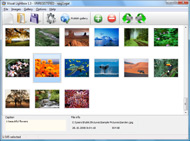




Overview

It's no secret that adding photos to your blog posts is one of the most effective ways to enhance your blog and attract attention to your writing. Flickr has millions of photos available in its database. A simple FREE tool called Flickr Gallery allows you to create a custom image gallery with a cool slide show of the most recent and most interesting photos from Flickr on your website or blog in a few easy steps. Just visit Flickr website and find photostream, photoset or a single photo you like. Enter the address of flickr page to add all photos from this page in your gallery, select the style of thumbnails and the overlay window and add the HTML embed code on your website or blog.
A few clicks and you'll see a stylish photo gallery with beautifull lightbox and zoom effects on your own website or blog!


Flickr Gallery for Windows   Flickr Gallery for MAC

Want more?

Example

Lightbox gallery sample

The following image set is generated by Flickr Gallery tool. Click any picture to run Lightbox gallery.

The sample above is an in-page usage demo of Lightbox gallery that uses images from Flickr. The slideshow created with Flickr Gallery wizard is placed inside the page layout. You can also check the full-page demo slideshow. This example takes whole browser area to show the Lightbox gallery that uses images from Flickr.Flickr Gallery Embed

How to Use

Step 1. Adding flickr images to your own gallery.


Locate the photo, photoset or photostream you want to use in your Flickr slideshow. Click on it to see the photo on its own page.

Copy URL of the flickr page.

Select Add images from Flickr... from the 'Add' button on the Toolbar.

Add images from Flickr

In the appeared window paste URL of the flickr page. Specify also the number of photos you want to add from the flickr page. Flickr Gallery will now include these photos in your project.

Add images from Flickr

If you have included the photos that you do not wish to be in your web gallery, you can easily remove them. Select all images that you wish to remove from photo gallery, and select Delete images. from the Images menu. You can pick and choose pictures by holding the CTRL while clicking the pictures you like.

Step 2. Adding caption.

The name of the photo on flickr page will automatically appear in the caption. When you select a photo you'll see the various info about it, such as: Path, Size, date of last change and Caption. You can add any comment or text about the photo (up to 512 symbols).

Step 3. Gallery properties.

Change the name of your flickr album, the size and quality of your pictures with Flickr Gallery. From the Gallery menu, select Properties or use "Edit Gallery Properties" button on the toolbar.

On the first tab of the Gallery Properties window you can change the name of your photo album and enable/disable the following properties: Slide Show, Auto play Slide Show, Zoom effect, Overlay Shadow. You can also set the Overlay shadow color and select the Engine you want to use (jQuery or Prototype + script.aculo.us).

On the second tab of the Gallery Properties window you can select the thumbnail you want to use, set the Thumbnails Resolution, Thumbnails Quality, Thumbnails Titles. Select Thumbnails Format (save in PNG or JPG format). Specify the Number of columns in you photo album and the Page color.

On the third tab of the Gallery Properties window you can select the template, Image resolution and Image quality of your pictures and change the Watermark.

You can set up the various sizes for exported images.

Control the quality of output PNG or JPEG format image by defining output "Image quality" and "Thumbnail quality" parameters (0%…100%).

Step 4. Save your photo gallery as project file.

When you exit Flickr Gallery application, you'll be asked if you want to save your project. The project consists of the pictures you choose to put on your web photo gallery and all your settings. It's a good idea to save the project, because that will allow you to change the project in case you decide to do something different with future galleries. So click Yes, then enter a name for your project. To select the location of your project, just click the Browse folders button and choose a different location. Then click Save.

Photoset Flickr Lightbox Flickr Photos On Blog

Download Flickr Gallery


Download Flickr Gallery Download Free Edition
for Windows
Download Flickr Gallery Download Free Edition
for MAC

Flickr Gallery is free for non - commercial use.

A small fee is required for business use. Flickr Gallery Business Edition additionally provides an option to remove the Flickr Gallery. Com credit bar as well as a feature to put your own logo to images. After you conclude the payment via the secure order form, you will receive a license key instantly by e-mail that turns the Flickr Gallery Free Edition into a Business one. You can select the most suitable payment procedure: PayPal, bank transfer, credit card, check etc. Also you can get Business Edition for free if you help with translating Flickr Gallery into your native language, please contact us at for more info.

Get Dynamic Content With Jquery Flickr

Buy Flickr GalleryBuy Business Edition
for Windows

$49
Single Website
$69
Unlimited Websites
Buy Flickr GalleryBuy Business Edition
for MAC

$49
Single Website
$69
Unlimited Websites

Support

For general help, feature requests, troubleshooting contact Customer Support at . Make sure to include details on your Flickr Gallery version, a link (or relevant code), browser and operating system.Start Flickr Slideshow Automatically

Feedback

    * I ran into your website wile looking for a JavaScript to manage a personal Photo Gallery. I downloaded the trial version and immediately fell in love with your Flickr Gallery, it is one of the best products I’ve ever found; it is very user friendly and easy to use and creates great Photo Galleries.

    * Great product by the way and saved me loads of time. I really like your Flickr Gallery program! Very nice.

    * I have installed Flickr Gallery to trial. All good, loving it!! I want to get an business version of your great programm. I love it - soo easy to use!!Flickr Sign Generator

    * First of all, I love you Flickr Gallery. I think it's beautiful! I purchased the lightbox “business edition” yesterday, and I’m very happy how easy it is to use. Found this to be one of the fastest ways to get a gallery on the web. Thanks.

FAQ

Q:I would like to center all the thumbnails and I cannot figure out how.Can you please help?

A:Try to use <div> tag or <table> tag to center your thumbnails. Flickr Gallery generates a special code.
Just paste it in <div> tag.
You can also place in <dierates a special code.
Just paste it in <div> tag.
You can also place in <div> tag your iframe.
And then use the alignment that you ned.


RELATED

Add Flickr Photos to Your Wordpress Blog with Photo Dropper by admin on February 20, 2008. photo credit: eisenrah. It's no secret that adding photos to your blog posts is one of the most effective ways to Oh this is a true keeper, i use photos on every blog post and i have several blogs. So you can imagine the time this will save me

How to Monitor Your Flickr Album - loose wire blog The best way to keep tabs on who is linking to your Flickr photo album is through Technorati, the blog-tracking service. But it's not as straightforward as it could be, so here's a guide, based almost entirely on that provided

Flickriver: Photos tagged with blogs A Greasemonkey script that adds Flickriver links to various Flickr photo pages - user photos, favorites, pools etc, allowing to quickly open the corresponding Flickriver view. Also, allows quickly viewing any Flickr photo on black background in large size

Flickr Photos | Bigsnit Blog For the back story on the photos in the set, please visit blog.bigsnit.com/index.php/2007/10/07/764 In my home town, one of my former teachers started up a photo studio and he was kind enough to give me on the job training in his photo lab

Options for Easily Adding Flickr Photos to Your Website This page shows a number of the leading options for quickly and easily adding your Flickr photos to your website or blog (WordPress, Joomla, TextPattern). They all offer some options and customizations. Many Flickr users also want to display their photos on their website or blog

Flickr - Wikipedia, the free encyclopedia Early versions of Flickr focused on a multiuser chat room called FlickrLive with real-time photo exchange capabilities. The other photos that were uploaded are still stored on the site and links to these images in blog posts remain active

Blogs That Flickr - Blog Tested flickr Listing Flickr members who blog. For those who love the community of fellow Flickr users. And that wish to let it be known. International Members & Non-Eng

dannyman.toldme.com : Photos Flickr Photos Flickr is a development version of a plugin that I am writing for WordPress blog software to display a user's Flickr photos within their blog. Someone with a WordPress blog can now have a basic interface to let readers view their Flickr images, using their own web site and design

Flickr Flickr is almost certainly the best online photo management and sharing application in the world. Show off your favorite photos and videos to the world, securely and privately show content to your friends and family, or blog the photos and videos

SquaredPeg " Blog Archive " Flickr, your electronic photo (Updated 7/31/2009) It's no secret that I love Flickr. It's a perfect blend of community and functionality in the web 2.0 world, and it's an extremely

Flickrista.com - The Best Fashion Photography on Flickr Thousands of inspiring photos from the best fashion photographers and models. Fashion inspiration, digital photography, beautiful portraits, styling, nudes, studio and editorial photos featured daily

How Every Flickr Photo Ended Up on Sale This Weekend " JMG Flickr RSS via the Flickr API has enabled others to blog my photography outside of the safeguards set in place through the "Blog This" button on Note: Flickr RSS is often used to provide image thumbnails on blogs and I have no problem with this, but medium size photos enable a resolution

Give Each Blog Post a Pretty Face With Flickr Here's a quick run-through of how I use photos on this site, and some more about Flickr. The photos that I use on Flickr for this blog are licensed to be used under Creative Commons

Flickr Blog Companion blog to Flickr features downtime status, daily photos, and news and updates about new photo and video sharing features

Download Flickr Photos Protected by Transparent spaceball.gif When a Flickr member has set download permissions to disallow his/her photos from being downloaded, a transparent image is overlaid on the actual photo so the right-click method fails. You may either use the good-old Print Screen or any of the methods below to defeat the Flickr image protection:

Flickr Blog : Flickr Gallery Flickr has millions of photos available in its database. A simple FREE tool called Flickr Gallery allows you to create a custom image gallery with a cool slide show of the most recent and most interesting photos from Flickr on your website or blog in a few easy steps

Code: Flickr Developer Blog " Panda Tuesday; The History of The second call (flickr.panda.getList) tells you which of the Mystical Flickr Pandas are around to request photos from. Ling Ling and Hsing Hsing both return photos they are currently interested in, both have slightly different tastes in photos depending on their mood

Flickr " Williamo's Blog This post on Useful Flickr Userscripts has been submitted by Martin Gommel. Although the algorithm is secret, Flickr has stated that many factors go into calculating Interestingness including: a photo's tags, how many groups the photo is in, views, favorites, where click-throughs are

1.2 million Flickr Photos Geotagged in 24 Hours Look for a post on the Flickr Blog later today announcing that 1,234,384 photos were geotagged in the first 24 hours after the new feature launched yesterday (159 of Flickr Geotagging, which allows users to drag photos on to a Yahoo

How to: Add a Styled Flickr Photo Stream to Your Blog Adding uniquely-styled Flickr photo streams to your blog is easy, and it's just another thing you can leverage to make your blog stand out among the crowd. Today, my goal is simply to walk you through the process of creating

" How to import flickr photos into tumblr " jongarcia.info/blog How to import flickr photos into tumblr. Posted by jon on March 5th, 2009. I've been updating my log, the place where all the content feeds I create join with the superb If you already had been importing the flickr feed you'll have to delete it, or you'll have all your photos twice on your tumblerlog

My Flickr App Blog My Flickr App Blog - Blog for the My Flickr web application (on Facebook, for now). Posting new features, neat new Flickr items, and popular Flickr photos

The best flickr – photo blog Blog Stats. 3,219 hits. Search. My links. Follow me on Twitter. My Flickr photos. My Creative photos. about. About. Category Cloud. Uncategorized. Theme: Contempt by Vault9. Blog at WordPress.com

Blogs That Flickr | Weblog Blogging webring for Flickr members. You can create a profile to further promote your blog - add photos, video and widgets to your page, plus add your blog post links on the blog!

10 Amazing Wordpress Plugins for Flickr And just to make things that little bit easier here are 10 WP Plugins to integrate Flickr directly into your blog. Flickr Photo Album for WordPress. Description: This Flickr plugin for WordPress will allow you to pull in your Flickr photosets and display them as albums on your WordPress site

Nature Blog Network " How Do You Use Flickr? For example, is Flickr a community unto itself or do you find admirers of your photos visiting your blog as well? Is it easier to add a photo to Flickr and link to it than to upload a photo right to your blog? This entry was written by Mike, posted on October 22, 2009 at 1:50 PM

Flickr Photo Blog - BrushedPixels BrushedPixels lets photographers share their images through a personalized blog. BrushedPixels integrates directly with Flickr so you don't have to upload your photos again. How is this different from Flickr? Publish your photos from Flickr with one click. Or, better yet, turn on automatic posting

