


Overview

It's no secret that adding photos to your blog posts is one of the most effective ways to enhance your blog and attract attention to your writing. Flickr has millions of photos available in its database. A simple FREE tool called Flickr Gallery allows you to create a custom image gallery with a cool slide show of the most recent and most interesting photos from Flickr on your website or blog in a few easy steps. Just visit Flickr website and find photostream, photoset or a single photo you like. Enter the address of flickr page to add all photos from this page in your gallery, select the style of thumbnails and the overlay window and add the HTML embed code on your website or blog.
A few clicks and you'll see a stylish photo gallery with beautifull lightbox and zoom effects on your own website or blog!


Flickr Gallery for Windows   Flickr Gallery for MAC

Want more?

Example

Lightbox gallery sample

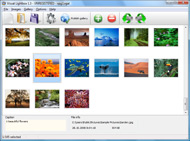
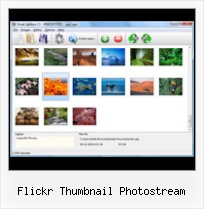
The following image set is generated by Flickr Gallery tool. Click any picture to run Lightbox gallery.

The photo gallery above is an in-page usage demo of Lightbox script with Flickr images. The photo gallery created with Flickr Gallery application is placed inside the html page. You can also check the full-page demo web gallery. This example takes whole browser area to show the gallery.Add Flickr Albums To Iweb

How to Use

Step 1. Adding flickr images to your own gallery.


Locate the photo, photoset or photostream you want to use in your Flickr slideshow. Click on it to see the photo on its own page.

Copy URL of the flickr page.

Select Add images from Flickr... from the 'Add' button on the Toolbar.

Add images from Flickr

In the appeared window paste URL of the flickr page. Specify also the number of photos you want to add from the flickr page. Flickr Gallery will now include these photos in your project.

Add images from Flickr

If you have included the photos that you do not wish to be in your web gallery, you can easily remove them. Select all images that you wish to remove from photo gallery, and select Delete images. from the Images menu. You can pick and choose pictures by holding the CTRL while clicking the pictures you like.

Step 2. Adding caption.

The name of the photo on flickr page will automatically appear in the caption. When you select a photo you'll see the various info about it, such as: Path, Size, date of last change and Caption. You can add any comment or text about the photo (up to 512 symbols).

Step 3. Gallery properties.

Change the name of your flickr album, the size and quality of your pictures with Flickr Gallery. From the Gallery menu, select Properties or use "Edit Gallery Properties" button on the toolbar.

On the first tab of the Gallery Properties window you can change the name of your photo album and enable/disable the following properties: Slide Show, Auto play Slide Show, Zoom effect, Overlay Shadow. You can also set the Overlay shadow color and select the Engine you want to use (jQuery or Prototype + script.aculo.us).

On the second tab of the Gallery Properties window you can select the thumbnail you want to use, set the Thumbnails Resolution, Thumbnails Quality, Thumbnails Titles. Select Thumbnails Format (save in PNG or JPG format). Specify the Number of columns in you photo album and the Page color.

On the third tab of the Gallery Properties window you can select the template, Image resolution and Image quality of your pictures and change the Watermark.

You can set up the various sizes for exported images.

Control the quality of output PNG or JPEG format image by defining output "Image quality" and "Thumbnail quality" parameters (0%…100%).

Step 4. Save your photo gallery as project file.

When you exit Flickr Gallery application, you'll be asked if you want to save your project. The project consists of the pictures you choose to put on your web photo gallery and all your settings. It's a good idea to save the project, because that will allow you to change the project in case you decide to do something different with future galleries. So click Yes, then enter a name for your project. To select the location of your project, just click the Browse folders button and choose a different location. Then click Save.

Desktop Flickr Organizer Select All Flickr Thumbnail Photostream

Download Flickr Gallery


Download Flickr Gallery Download Free Edition
for Windows
Download Flickr Gallery Download Free Edition
for MAC

Flickr Gallery is free for non-commercial use.

A small fee is required for business use. Flickr Gallery Business Edition additionally provides an option to remove the Flickr Gallery. Com credit string as well as a feature to put your own logo to images. After you finish the payment via the secure form, you will receive a license key instantly by e-mail that turns the Flickr Gallery Free Edition into a Business one. You can select the most appropriate payment method: PayPal, check, bank transfer, credit card etc. Also you can get Business Edition for free if you help with translating Flickr Gallery into your native language, please contact us at for more info.

Add A Flickr Gallery

Buy Flickr GalleryBuy Business Edition
for Windows

$49
Single Website
$69
Unlimited Websites
Buy Flickr GalleryBuy Business Edition
for MAC

$49
Single Website
$69
Unlimited Websites

Support

For general help, feature requests, troubleshooting contact Customer Support at . Make sure to include details on your browser, operating system, a link (or relevant code) and Flickr Gallery version.Flickr Rss Feed Generator

Feedback

    * I have installed Flickr Gallery to trial. All good, loving it!! I want to get an business version of your great programm. I love it - soo easy to use!!

    * I have purchased the business and LOVE IT..Your product appears easy to use and close to what I need to help several of my clients..

    * I ran into your website wile looking for a JavaScript to manage a personal Photo Gallery. I downloaded the trial version and immediately fell in love with your Flickr Gallery, it is one of the best products I’ve ever found; it is very user friendly and easy to use and creates great Photo Galleries.Flickr Galleries In Websites

    * I'm absolutely loving Flickr Gallery Business and Video LightBox. Amazing, quick and painless, to create a custom, browser independent gallery. And it works first time - every time! Best value for money I've seen in quite a while...

FAQ

Q:Instead of making one page with 40 photos, is there no property to make 2 or more pages?

A:You can do it in the following way:

1. Create your gallery in Flickr Gallery and publish it on a local drive in any test folder.
2. Make two copies of the generated index.html file (for example index1.html and index2.html).
3. Open index.html, index1.html and index2.html files in any text editor.
4. Find code for the gallery inside the BODY tag and cut some part of the images, so you'll have different images on each page.

<!-- Start Flickr Gallery.com BODY section -->
<div class="gallery">
<!-- leave the following code on index.html page -->
<a href="./data/images/1.jpg" rel="lightbox[sample]" title="Best Toy Ever"><img src="./data/thumbnails/1.png" /></a>
<a href="./data/images/8.jpg" rel="lightbox[sample]" title="PrueaMacro"><img src="./data/thumbnails/8.png" /></a>

<!-- leave the following code on index1.html page -->
<a href="./data/images/3.jpg" rel="lightbox[sample]" title="Macro Leaf."><img src="./data/thumbnails/3.png" /></a>
<a href="./data/images/11.jpg" rel="lightbox[sample]" title="Bell Pepper"><img src="./data/thumbnails/11.png" /></a>

<!-- leave the following code on index2.html page -->
<a href="./data/images/5_0.jpg" rel="lightbox[sample]" title="5"><img src="./data/thumbnails/5_0.png" /></a>
<a href="./data/images/6_0.jpg" rel="lightbox[sample]" title="6"><img src="./data/thumbnails/6_0.png" /></a>

<!--[if lte IE 6]><script src="engine/js/pngfix_vlb.js" type="text/javascript"></script><![endif]-->
<a id="vlightbox" href="http://Flickr Gallery.com/">Online Photo Album Sharing by Flickr Gallery.com</a>
</div>
<!-- End Flickr Gallery.com BODY section -->

5. Create links to switch between your pages, for example:
<a href="index.html">1</a>  <a href="index1.html">2</a>  <a href="index2.html">3</a> 


Q:I want to change color of the overlay shadow? How can I do this?

A:Open engine\css\Flickr Gallery.css and find the following code:

#overlay{
position: absolute;
top: 0;
left: 0;
z-index: 90;
width: 100%;
height: 500px;
background-color: #FFF;
filter:alpha(opacity=60);
-moz-opacity: 0.6;
opacity: 0.6;
}

set the background-color parameter :

#overlay{
position: absolute;
top: 0;
left: 0;
z-index: 90;
width: 100%;
height: 500px;
background-color: #FF00FF;
filter:alpha(opacity=60);
-moz-opacity: 0.6;
opacity: 0.6;
}


RELATED

Flickr Thumbnail Photostream Wordpress plugin v1.1 The Flickr Thumbnail Photostream Wordpress plugin makes including and linking to photos on a Flickr account simple and flexible. The links come in the form of thumbnail images that link to their larger, normal formats within the Flickr website

New Flickr Is Bigger, Wider and Uncut | Epicenter | Wired.com The new Flickr sidebar shows a map and EXIF data. The sidebar has been similarly cleaned For example, if you land on a photo page while browsing a user's photostream, then the photostream thumbnails are shown

flickr Software - Free Download flickr - Top 4 Download flickr Software - Free Download flickr - Top 4 Download - Free Download Software the most recent and most interesting photos from Flickr on your website or blog in a few easy steps. Just visit Flickr website and find photostream, photoset or a single

Build a Photo Gallery Using CakePHP and Flickr " SitePoint Is the Flickr interface doing justice to your stunning snaps? It's time to consider customization! Jonathan shows us the ropes in his hands-on tutorial, as he uses CakePHP and the Flickr API to build an attractive, fully customized gallery that

10 Amazing Wordpress Plugins for Flickr Flickr Thumbnail Photo stream for WordPress. Description: The Flickr Thumbnail Photostream WordPress plugin makes including and The links come in the form of thumbnail images that link to their larger, normal formats within the Flickr website

Fuddland | Archives | 2005 | 04 | 06 | Use a Flickr feed to Use a Flickr feed to include any photostream on your site via PHP and MagpieRSS In order to display a Flickr photostream on a remote webpage, most

How to add a Flickr PhotoStream to your Wordpress Blog | Blog Flickr is without a doubt one of the most thriving community amongst photographers, bloggers and in general who is interested in sharing the photos with friends

Flickr Photobar Gallery | Codrops When a thumbnail is clicked, a full image view appears as an overlay. For our demo we used the awesome photostream by tibchris. Mary Lou, is it possible to have the images in a set display right away when the "Flickr Photostream" tab is clicked?

How to Send Flickr Photos Easily in Yahoo! Mail - About Email If you don't want to spend that time, how about browsing your Flickr photostream right in Yahoo! Mail? How about picking multiple images and send them easily in a new message — thumbnails, automatic guest passes for private photos and all? Send Flickr Photos Easily in Yahoo! Mail

Flickr tools for WordPress bloggers | WereWP 2. Flickr in your sidebar. Lots of different WordPress plugins were created to have a small thumbnail gallery of your flickr pictures in your sidebar. Flickr Thumbnail Photostream on the contrary displays pictures thanks to the Flickr API

Flickr Live Feeds Now Included in Yahoo Image Search Flickr photos have now been added to Yahoo's Image search function, granting easier access to the hundreds of millions of images from Flickr. Whi

How To Leave A Flickr Group : Flickr Gallery Just visit Flickr website and find photostream, photoset or a single photo you like. Enter the address of flickr page to add all photos from this page in your gallery, select the style of thumbnails and the overlay window and add the HTML embed code on your website or blog

Flickr: Eric Fischer's Photostream Flickr is almost certainly the best online photo management and sharing application in the world. Show off your favorite photos and videos to the world, securely and privately show content to your friends and family, or blog the photos and videos

WordPress " Flickr Thumbnails Photostream " WordPress Plugins Flickr Thumbnails Photostream. The Flickr Thumbnails Photostream plugin makes including and linking to photos on a Flickr account simple and flexible. to a Flickr account and storing information on the photo thumbnails, can be achieved through the "Flickr Control" GUI in

Flickr It responds very well to mouse / scrolls & has a built-in preloader while switching from thumbnails to large images that makes the visuality flawless. Flash Gallery is a free flash gallery application with Flickr photostream & auto-thumbnail creation support

Wordpress Plugins for Photo Galleries - Photoblogging Part II The Flickr Thumbnail Photostream Wordpress plugin makes including and Features include Gallery generated automatically from the images uploaded, flickr or folder, AJAX loading to display the page faster, a thumbnail navigation bar, pagination, you can enable / Disable slideshow presentation

Boo! It's me! The Flickr Thumbnail Photostream Wordpress plugin makes including and linking to photos on a Flickr account simple and flexible. The links come in the form of thumbnail images that link to their larger, normal formats within the Flickr website

Mobile Fotos – Flickr Browser and Uploader for iPhone | The Price: $2.99 Score: 9/10 by Steve Greenhalgh Mobile Fotos - Flickr Browser & Uploader from XK72 is exactly what it says it is. I like I have a Flickr photostream with a bit of content, but really just enjoy browsing other streams. As we all know – a picture can tell a thousand words and stumbling

Methods Of Adding Your Flickr Photostream To Your Site – WebM Webmag is a web design magazine with useful tips, freebies and tools for web designers, developers, graphic designers and illustrators. Flickr is an incredibly popular tool, its really easy to add your images to your Flickr photostream and with the app for iPhone for instance you can even upload to

WordPress Tutorial – How to Add Flickr Photo Widget to This Intermediate-level WordPress Tutorial shows how to add Flickr Photo Widget to your WordPress blog's sidebar so that you can display thumbnails of your Flickr photos. The Flickr Widget comes with WordPress 2.5+ on the WordPress.com hosting site

Wordpress and Flickr " Sadhas Blog Flickr Thumbnail Photo stream for WordPress. Description: The Flickr Thumbnail Photostream WordPress plugin makes including and The links come in the form of thumbnail images that link to their larger, normal formats within the Flickr website

Creativity Fine-Tuning: Best of PSD Vault Flickr Group – Vol Welcome to the sixth volume of "Creativity Fine-Tuning: Best of PSD Vault Flickr Group", which is a showcase I run fortnightly here on psdvault.com featuring some fantanstic, highly-creative design works in the PSD Vault Flickr Group. Hope you

Wordpress plugin III (Flickr section) | Beat Fly Blog Ho largamente parlato in questo blog di alcuni tra i migliori plugin per la piattaforma Wordpress e con estremo piacere ho notato il vostro interesse. Oggi he Flickr Thumbnail Photostream WordPress plugin makes including and linking to photos on a Flickr account simple and flexible

20 Top Flickr Plugins For Wordpress Flickr is one of the best places to find cool pictures for your blog. There are a lot of folks who don't mind allowing you to use their pictures on WordPress Flickr Manager: a decent plugin that makes easy to upload photos and manage your Flickr account. Flickr Thumbnails Photostream: a cool

Flickorama - 3D Flickr Photostream Viewer Flickorama - 3D Flickr PhotoStream Viewer: Search and view Flickr photos in cool 3D layouts: Cover Flow, Carousel, Photo Album, Grid, Spiral, Roller Coaster, and Time Machine. Includes large photo view, full screen mode, thumbnail strip and photo

12 Flickr Wordpress Plugins | blueblots.com One of the most effective ways of attracting your visitor's attention is to add photos to your blog. Flickr is a photo management website best for storing, sorting and sharing your photos with others either through a link to the site or by Flickr Thumbnails Photostream

Mac OS X Flickr Photostream Photos Downloader Do you use Flickr to share photos with your friends, family and the world? Or maybe to just host your images in general? With Flickr Pro accounts so cheap,

Flickr Module Bulletproof Templates ~ Based in the quiet Scottish town of Cumnock, nestled in the Ayrshire countryside, close to Ayr, Kilmarnock, Glasgow and Edinburgh, we design and develop Joomla websites. Contact us now on +44 (0) 1290 429141

