



Overview

It's no secret that adding photos to your blog posts is one of the most effective ways to enhance your blog and attract attention to your writing. Flickr has millions of photos available in its database. A simple FREE tool called Flickr Gallery allows you to create a custom image gallery with a cool slide show of the most recent and most interesting photos from Flickr on your website or blog in a few easy steps. Just visit Flickr website and find photostream, photoset or a single photo you like. Enter the address of flickr page to add all photos from this page in your gallery, select the style of thumbnails and the overlay window and add the HTML embed code on your website or blog.
A few clicks and you'll see a stylish photo gallery with beautifull lightbox and zoom effects on your own website or blog!


Flickr Gallery for Windows   Flickr Gallery for MAC

Want more?

Example

Lightbox gallery sample

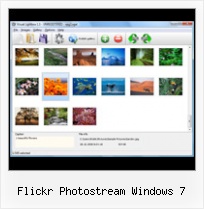
The following image set is generated by Flickr Gallery tool. Click any picture to run Lightbox gallery.

The example above is an in-page usage demo of Lightbox tool with Flickr images. The website gallery created with Flickr Gallery tool is placed inside the website page. You can also check the full-page demo web gallery. This example takes whole browser area to show the gallery.Jquery And Flickr Lightbox

How to Use

Step 1. Adding flickr images to your own gallery.


Locate the photo, photoset or photostream you want to use in your Flickr slideshow. Click on it to see the photo on its own page.

Copy URL of the flickr page.

Select Add images from Flickr... from the 'Add' button on the Toolbar.

Add images from Flickr

In the appeared window paste URL of the flickr page. Specify also the number of photos you want to add from the flickr page. Flickr Gallery will now include these photos in your project.

Add images from Flickr

If you have included the photos that you do not wish to be in your web gallery, you can easily remove them. Select all images that you wish to remove from photo gallery, and select Delete images. from the Images menu. You can pick and choose pictures by holding the CTRL while clicking the pictures you like.

Step 2. Adding caption.

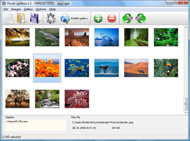
The name of the photo on flickr page will automatically appear in the caption. When you select a photo you'll see the various info about it, such as: Path, Size, date of last change and Caption. You can add any comment or text about the photo (up to 512 symbols).

Step 3. Gallery properties.

Change the name of your flickr album, the size and quality of your pictures with Flickr Gallery. From the Gallery menu, select Properties or use "Edit Gallery Properties" button on the toolbar.

On the first tab of the Gallery Properties window you can change the name of your photo album and enable/disable the following properties: Slide Show, Auto play Slide Show, Zoom effect, Overlay Shadow. You can also set the Overlay shadow color and select the Engine you want to use (jQuery or Prototype + script.aculo.us).

On the second tab of the Gallery Properties window you can select the thumbnail you want to use, set the Thumbnails Resolution, Thumbnails Quality, Thumbnails Titles. Select Thumbnails Format (save in PNG or JPG format). Specify the Number of columns in you photo album and the Page color.

On the third tab of the Gallery Properties window you can select the template, Image resolution and Image quality of your pictures and change the Watermark.

You can set up the various sizes for exported images.

Control the quality of output PNG or JPEG format image by defining output "Image quality" and "Thumbnail quality" parameters (0%…100%).

Step 4. Save your photo gallery as project file.

When you exit Flickr Gallery application, you'll be asked if you want to save your project. The project consists of the pictures you choose to put on your web photo gallery and all your settings. It's a good idea to save the project, because that will allow you to change the project in case you decide to do something different with future galleries. So click Yes, then enter a name for your project. To select the location of your project, just click the Browse folders button and choose a different location. Then click Save.

Simple Flickr Gallery In Wordpress Flickr Photostream Windows 7

Download Flickr Gallery


Download Flickr Gallery Download Free Edition
for Windows
Download Flickr Gallery Download Free Edition
for MAC

Flickr Gallery is free for non - commercial use.

A small fee is required for business use. Flickr Gallery Business Edition additionally provides an option to remove the Flickr Gallery. Com credit line as well as a feature to put your own logo to images. After you complete the payment via the secure form, you will receive a license key instantly by e-mail that turns the Flickr Gallery Free Edition into a Business one. You can select the most suitable payment procedure: bank transfer, credit card, check, PayPal etc. Also you can get Business Edition for free if you help with translating Flickr Gallery into your native language, please contact us at for more info.

Flickr Hack Get Original Picture

Buy Flickr GalleryBuy Business Edition
for Windows

$49
Single Website
$69
Unlimited Websites
Buy Flickr GalleryBuy Business Edition
for MAC

$49
Single Website
$69
Unlimited Websites

Support

For feature requests, troubleshooting, general help contact Customer Support at . Make sure to include details on your Flickr Gallery version, browser, a link (or relevant code) and operating system.Flickr Charges Pro

Feedback

    * Let me start just congratulating you, good job, really. I am trying out the free version before I buy it. It works great.

    * I downloaded your trial version to see if I could get it to work with my website, and I am almost there (I have been looking for something like this for ages)..

    * I'd like to express my gratitude to your efforts on creating such a nice piece of program and best of all it's free! Keep out the good work and I hope to see new features in the near coming future to rate you 5 star!Customize Photostream Flickr

    * Just bought the business version of Flickr Gallery and I just had to write and say how impressed I am with it. Really easy to use, intuitive interface and generates a truly professional presentation. Seldom have I been so pleased with a software purchase. Thank you.

FAQ

Q:How do I embed the lightbox image gallery into an existing page?

A:To install Flickr Gallery gallery on your page you should:

1. Create your gallery in Flickr Gallery and publish it on a local drive in any test folder.
2. Open index.html file from the saved folder in any text editor.
3. Copy code for the HEAD section and paste it inside the HEAD section of you own webpage, for example:

<head>
...
<!-- Start Flickr Gallery.com HEAD section -->
<link rel="stylesheet" href="engine/css/vlightbox.css" type="text/css" />
<style>#vlightbox a#vlb{display:none}</style>
<link rel="stylesheet" href="engine/css/Flickr Gallery.css" type="text/css" media="screen" />
<script src="engine/js/jquery.js" type="text/javascript"></script>
<script src="engine/js/jquery.tools.min.js" type="text/javascript"></script>
<script src="engine/js/visuallightbox.js" type="text/javascript"></script>
<!-- End Flickr Gallery.com HEAD section -->

...
</head>


4. Copy code for the BODY section and paste it inside the Body section of you own webpage in the place where you want to have a gallery, for example:

<body>
...
<!-- Start Flickr Gallery.com BODY section -->
<div id="vlightbox">
<a rel="lightbox_vlb" href="data/images/dscn6831.jpg" title="DSCN6831"><img src="data/thumbnails/dscn6831.png"><span></span></a>
<a rel="lightbox_vlb" href="data/images/dscn6823.jpg" title="DSCN6823"><img src="data/thumbnails/dscn6823.png"><span></span></a>
<a rel="lightbox_vlb" href="data/images/dscn6819.jpg" title="DSCN6819"><img src="data/thumbnails/dscn6819.png"><span></span></a>
<a id="vlb" href="http://Flickr Gallery.com">Photo Gallery For Web by Flickr Gallery.com v2.1</a>
</div>
<!-- End Flickr Gallery.com BODY section -->

...
</body>


5. Copy 'data' folder with images and thumbnails and 'engine' folder with .css and .js files into the same folder with your own webpage.
You can find the example on our website:
http://www.Flickr Gallery.com/#example


RELATED

Top 30+ Flickr Tools to Enhance your Flickr Journey flickr uploadr flickr photo flickr flickr share flickr photostream like flickr youtube flickr better than flickr flickr flickr download flickr groups best flickr flickr group flickr map using flickr flickr video flickr mobile flickr tools flickr

Flickr Manager (Multi Image Uploader) Windows Phone 7 Flickr Manager allows you to access your Flickr.com account from your Windows Phone 7. Using Flickr Manager you can: • View/Manage your Photostream. Windows Phone 7 Applications and Marketplace. Twitter Facebook. AppsFuze - About - Windows Phone 7 Applications and Marketplace

Flickr API for Windows Phone 7 – Part 14 – People | .NET Zone Flickr is not only tied to pictures, but also to people – they are the main content providers. What if your friends have a Flickr account? Then, most likely

Windows: Backup Flickr Photos In One Step - Tekzilla Daily Backup your Flickr photos in just one click. Watch Video about Computers,Tips,Tricks by Metacafe.com

Add Flickr Images in Windows Live Writer, Outlook & Word Today i Find 3 Flickr Tools Which Helps you to Add Flickr Images in Windows Live Writer, Outlook and Micrsoft word. All these Tools are free and easy to use

royalcitrus: Windows 7 shortcuts My flickr Photostream. Windows 7 shortcuts. Wednesday, November 25, 2009 at 1:15 AM | Posted by varun. Windows XP Run Commands and Tskill - reduced version of Taskkill from Windows XP Home. Tracert - Traces and displays all paths required to

Flickr Flickr is almost certainly the best online photo management and sharing application in the world. Show off your favorite photos and videos to the world, securely and privately show content to your friends and family, or blog the photos and videos

5 Little Mac Apps That Flickr Will Thank You For When it comes to photo-sharing, Flickr is definitely leading the game. It's interface is simple and easy to use but for those of us who need more from it than

Cyber Crimes India, Technology Crimes India, Tech Crime Updates Windows 7 borrowing Mac look and feel' Written by Cyber Crimes India / Filed in Cyberterrorism. 1 2 3 4 5. Lorem ipsum dolor sit Flickr Photo Stream - See all photos. Windows 7 borrowing Mac look and feel' Lorem ipsum dolor sit amet, conse ctetur adipis

Flickr - Wikipedia, the free encyclopedia blogs and social media.[2] In September 2010, it reported that it was hosting more than 5 billion images.[3] For mobile users, Flickr has an official app for iPhone[4], BlackBerry[5] and for Windows Phone 7, but not for other mobile devices

Show The Flickr Photo Stream On Your Blog In A Stylish Flash Flickr and Picasa are used widely to upload and maintain a photo album. If you have created a photo stream on any of them and want to share those pictures on your blog or website then try Roytanck’s Widget for the same

Windows Phone 7 RTM = Funeral for iPhone, and Microsoft Holds Microsoft really isn't that good at being snarky (witness the Bill Gates / Jerry Seinfeld ads), but they try. Windows Phone 7 has gone RTM, and thus the company decided it was time for a funeral, not for Windows 6.5 (which might have been

Creating a Flickr Photostream - PCWorld Flickr is a model of Web 2.0 simplicity and easy to navigate. 7. You can invite friends and family to view your photostreams by email or by uploading the link to your blog (if you have one). We set up a custom link for our photostream so that friends could search our

New Windows Live Photo Gallery Includes Flickr Uploader Microsoft just launched Windows Live Photo Gallery Beta 2, and just like the previous version it is available for both Windows XP SP2 and Vista. In order to get the update you must have the first Beta already installed, and then you must perform

How to create a Flickr photostream - PC Advisor A picture may tell a thousand words, but all too often it's not that flattering a story. As many of us have learned

Flickr for Windows 7 tablets and Windows Phone 7 officially Originally unveiled back in January, Flickr has now officially introduced its apps for Windows Phone 7 and Windows 7 tablets. You'll find the Flick

Windows 7 Enterprise 90-day Trial Darren Straight's Blog Feed Darren Straight's LinkedIn Profile Darren Straight's Facebook Page Darren Straight's Flickr Photostream. Home " Received my copy of Windows 7 Professional. Version 2 of the Windows 7 Upgrade Advisor released " Windows 7 Enterprise 90-day Trial

Download Windows 7 Search Connectors for Twitter eBay Amazon Download Windows 7 Search Connectors for Twitter eBay Amazon Youtube Friendfeed and more. Windows 7 search federation new feature. For example Searching Flickr photo stream right from your Windows 7 Desktop, Now can you image potential of Open Search ?

Download Photos From Flickr Using Flickr AutoDownloadr Flickr AutoDownloadr is a simple Windows utility, which allows you to download photographs from any one's Flickr stream

Desktop Flickr Organizer = Best Flickr Backup, Period | PCMech This is the first time I've found something Linux can do that Windows (or OS X for that matter) cannot, that being to backup a large Flickr account. I'll

Mac OS X Flickr Photostream Photos Downloader Do you use Flickr to share photos with your friends, family and the world? Or maybe to just host your images in general? With Flickr Pro accounts so cheap,

Flickr -- Engadget Flickr headed to Windows 7 and Windows Phone 7. by Laura June Jan 6th 2011 at 3:12PM UNC researchers develop a system for creating 3D models using images pulled from Flickr, off-the-shelf components

How To Save Flickr Photos : Flickr Gallery How To Save Flickr Photos. Don't allow your web site visitors to get lost! Try Flickr Slideshow!. Tools To Integrate Flickr Into Website Flickr Photostream Windows 7

