
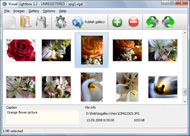
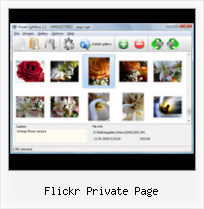



Overview

It's no secret that adding photos to your blog posts is one of the most effective ways to enhance your blog and attract attention to your writing. Flickr has millions of photos available in its database. A simple FREE tool called Flickr Gallery allows you to create a custom image gallery with a cool slide show of the most recent and most interesting photos from Flickr on your website or blog in a few easy steps. Just visit Flickr website and find photostream, photoset or a single photo you like. Enter the address of flickr page to add all photos from this page in your gallery, select the style of thumbnails and the overlay window and add the HTML embed code on your website or blog.
A few clicks and you'll see a stylish photo gallery with beautifull lightbox and zoom effects on your own website or blog!


Flickr Gallery for Windows   Flickr Gallery for MAC

Want more?

Example

Lightbox gallery sample

The following image set is generated by Flickr Gallery tool. Click any picture to run Lightbox gallery.

The photo gallery above is an in-page usage demo of Lightbox with images from Flickr. The web gallery created with Flickr Gallery tool is placed inside the website page. You can also check the full-page demo slideshow. This example takes whole browser area to show the slideshow.Slickr Flickr Tag Gallery

How to Use

Step 1. Adding flickr images to your own gallery.


Locate the photo, photoset or photostream you want to use in your Flickr slideshow. Click on it to see the photo on its own page.

Copy URL of the flickr page.

Select Add images from Flickr... from the 'Add' button on the Toolbar.

Add images from Flickr

In the appeared window paste URL of the flickr page. Specify also the number of photos you want to add from the flickr page. Flickr Gallery will now include these photos in your project.

Add images from Flickr

If you have included the photos that you do not wish to be in your web gallery, you can easily remove them. Select all images that you wish to remove from photo gallery, and select Delete images. from the Images menu. You can pick and choose pictures by holding the CTRL while clicking the pictures you like.

Step 2. Adding caption.

The name of the photo on flickr page will automatically appear in the caption. When you select a photo you'll see the various info about it, such as: Path, Size, date of last change and Caption. You can add any comment or text about the photo (up to 512 symbols).

Step 3. Gallery properties.

Change the name of your flickr album, the size and quality of your pictures with Flickr Gallery. From the Gallery menu, select Properties or use "Edit Gallery Properties" button on the toolbar.

On the first tab of the Gallery Properties window you can change the name of your photo album and enable/disable the following properties: Slide Show, Auto play Slide Show, Zoom effect, Overlay Shadow. You can also set the Overlay shadow color and select the Engine you want to use (jQuery or Prototype + script.aculo.us).

On the second tab of the Gallery Properties window you can select the thumbnail you want to use, set the Thumbnails Resolution, Thumbnails Quality, Thumbnails Titles. Select Thumbnails Format (save in PNG or JPG format). Specify the Number of columns in you photo album and the Page color.

On the third tab of the Gallery Properties window you can select the template, Image resolution and Image quality of your pictures and change the Watermark.

You can set up the various sizes for exported images.

Control the quality of output PNG or JPEG format image by defining output "Image quality" and "Thumbnail quality" parameters (0%…100%).

Step 4. Save your photo gallery as project file.

When you exit Flickr Gallery application, you'll be asked if you want to save your project. The project consists of the pictures you choose to put on your web photo gallery and all your settings. It's a good idea to save the project, because that will allow you to change the project in case you decide to do something different with future galleries. So click Yes, then enter a name for your project. To select the location of your project, just click the Browse folders button and choose a different location. Then click Save.

Flickr Stream Example Flickr Private Page

Download Flickr Gallery


Download Flickr Gallery Download Free Edition
for Windows
Download Flickr Gallery Download Free Edition
for MAC

Flickr Gallery is free for non - commercial use.

A small fee is required for business use. Flickr Gallery Business Edition additionally provides an option to remove the Flickr Gallery. Com credit bar as well as a feature to put your own logo to images. After you complete the payment via the secure order form, you will receive a license key instantly by e-mail that turns the Flickr Gallery Free Edition into a Business one. You can select the most appropriate payment method: check, credit card, bank transfer, PayPal etc. Also you can get Business Edition for free if you help with translating Flickr Gallery into your native language, please contact us at for more info.

Picasa Flickr Panoramio

Buy Flickr GalleryBuy Business Edition
for Windows

$49
Single Website
$69
Unlimited Websites
Buy Flickr GalleryBuy Business Edition
for MAC

$49
Single Website
$69
Unlimited Websites

Support

For general help, feature requests, troubleshooting contact Customer Support at . Make sure to include details on your Flickr Gallery version, browser, operating system and a link (or relevant code).Post Flickr To Tumblr

Feedback

    * Another programmes have incredible functionality but no fantastic interface like your product!

    * I tried Flickr Gallery and for me its a very cool and usefull application. Its so easy to manage my galleries and it looks very nice.

    * I am thrilled with what this tool can do for me thanks for all the hard work that must have gone into it.Flickr Com Autoplay Slideshow

    * Just a quick thank you for the software though, It's not often you get a free software version of this quality and style! Well done and please continue this amazing gallery. Hope to see more advances.

FAQ

Q:I would like to have a few galleries in one website and even on one page.

A:To create several galleries on your page you should change following parameter in A tag for different galleries:

rel="lightbox_vlb"

For example, for the first gallery you should set rel="lightbox_vlb":

<!-- Start Flickr Gallery.com BODY section -->
<div id="vlightbox">
<a rel="lightbox_vlb" href="data/images/dscn6831.jpg" title="dscn6831" >
<img src="data/thumbnails/dscn6831.png" ><span></span></a>
<a rel="lightbox_vlb" href="data/images/dscn6823.jpg" title="dscn6823">
<img src="data/thumbnails/dscn6823.png"><span></span></a>
<a id="vlb" href="http://Flickr Gallery.com">Photo Gallery For Web by Flickr Gallery.com v2.0</a>
</div>
<!-- End Flickr Gallery.com BODY section -->

and for the second gallery rel="lightbox_vlb1":

<!-- Start Flickr Gallery.com BODY section -->
<div id="vlightbox">
<a rel="lightbox_vlb1" href="data/images/img_0501.jpg" title="img_0501">
<img src="data/thumbnails/img_0501.png"><span></span></a>
<a rel="lightbox_vlb1" href="data/images/img_0481.jpg" title="img_0481">
<img src="data/thumbnails/img_0481.png"><span></span></a>
<a id="vlb" href="http://Flickr Gallery.com">Photo Gallery For Web by Flickr Gallery.com v2.0</a>
</div>
<!-- End Flickr Gallery.com BODY section -->


RELATED

Online Photo Sharing with Flickr The Flickr upload page will. show you a list of the files you have Flickr that have not been marked as private can be searched using the tags asso

Funky Flickr Flex Widgets " SitePoint In this tutorial, Jack demonstrates how to create a small Flex widget to display a set of location-based Flickr photos, and embed it so that it doesn't interfere with your web page content

Free Gallery Site: Flickr ThePhotoFinishes.com - Helpful information about digital photography, digital cameras, digital imaging software, photo manipulation, photo editing with links to the best digital imaging sofware sites

dannyman.toldme.com : Photos Flickr Reference Manual Print a link to Flickr photo page. photos_photo_date_taken() Print the date photo was Print link to Photos Flickr page for next photo in stream

How Nonprofits Can Get the Most out of Flickr | Techsoup Canada The physicians document the impact of their work through photos that they upload to the organization's private Flickr group. your photos private unless you decide otherwise. Simply edit your account default settings in the Account Privacy & Permissions tab on your account management page

Flickr Authentication – phpFlickr If that session variable exists, calling the auth() function will return the permissions that the user granted your app on the Flickr page instead of redirecting to an external page. To authenticate the app to your account to show your private pictures:

Flickr + jQuery + Salesforce = Awesome^5 [Part 1] " The You'll see on the page that details the Flickr API that there are a number of libraries for the common languages e.g. C# and Java, although there isn't any for Apex. Noticing that, I thought I should write a very basic Apex public with sharing class FlickrDemoController { private String

Review: Flickr apps for iPhone Review | Mobile | iOS Central A trio of Flickr apps for the iPhone offer ways to view and contribute to the popular photo-sharing Web site. Flickr accounts, it can play many Flickr videos, and it offers a setting for hiding your private photos. All About You: Mobile Fotos' You page shows

Create a Flickr Viewer using Flex - The Tech Labs In this tutorial, you will learn how to integrate photos from Flickr in your Flex application, using as3flickrlib. private var flickr:FlickrService; private var api_key:String = "enter you Flickr API key here"; private var maxResult:Number = 50;

Flickriver: Photos from naturealbeing A Greasemonkey script that adds Flickriver links to various Flickr photo pages - user photos, favorites, pools etc, allowing to quickly open the While viewing any Flickr photos page, click on the bookmarklet to open the same view on Flickriver

Argote's Flickr-to-Dyxum posting WebApp - Dyxum forums - Page 1 This is a place-holder to keep the sticky in place - if the sticky is removed this post can be deleted. BobEdited For example, my flickr page is http://flickr.com/photos/argote/ so I'd enter argote into the box and click on the button

Flickr Private Photos Exposed Using Google Images is helping find private photos on Flickr. Today, I searched for "Strange Pictures" on Google Images. This brought up a photo thumbnail that I clicked on titled "Strange Little Girl". That link took me to a page that had the

Bernie Kerik's Flickr Page New York's former top cop languishes in jail, but you can revisit the highlights of his life and some private moments on his voluminous Flickr page, which for some reason exists. That's Kerik doing martial arts in Korea in 1975

Flickr Safety Guide Private Profile Settings By default, Flickr community members under the age of 18 have hidden profiles that will not come up in people searches. private group is a great way to share photos and videos with friends and family. Only people you've invited will be able to view the group page

How to Use Flickr: Basics and Beyond Flickr is one of the most popular photo-sharing sites on the Internet. Owned by Yahoo!, Flickr offers its users a website where they can create free accounts that let them store, share, and explore digital photos. Flickr is also an online social

Flickr: XO Private's Photostream Flickr is almost certainly the best online photo management and sharing application in the world. Show off your favorite photos and videos to the world, securely and privately show content to your friends and family, or blog the photos and videos

How Nonprofits Can Get the Most out of Flickr Don't keep your organization's compelling photographs hidden away in files. Share them with each other — and with the world — through online photo-sharing community Flickr

Flickr.com - A site that allows you to upload photos securely Find detailed information about Flickr.com - like contact info, an SEO analysis and more - on AboutUs.org

How to Create a Flickr Group - wikiHow wikiHow article about How to Create a Flickr Group. Go to Flickr .com. If you are logged in, it will take you to your 'Home' page. If not, sign in. Click on "Group". 2. From Groups, scroll down to Create a New Group. 3. Choose the type of group setting (private, public (invitation only), or public)

Flickr Safety Guide - Yahoo! Product Safety Guides – Yahoo! These guides will help you use Yahoo! products safely. Creating a private group is a great way to share photos and videos with friends and family. Only people you've invited will be able to view the group page. Check out Flickr's tips for running a group. Block another member

Flickr - Bazaar Wiki The main goal of Flickr is to help people make their content available to the people who matter to them, whether they want to keep it private to share photos of their kids with their family or whether they want to show off their best pictures to the whole world. [edit] What it does

Flickr Pro Account: Features and Review | MrinTech Someday back I bought for myself a Flickr Pro Account (for Personal Photo and Video Collection) and Flickr Pro Services are just awesome! In this post we

Private vs Design Flickr photos and pictures Private vs DesignFlickr Photo Fight results - Compare the image results for two competing keywords

Flickr - Photography and Photojournalism - LCC Research Resources for photography and photojournalism classes at LCC. Sponsored by LCC photography teachers Susie Morrill, Dick Lennox, and Jenny Salzman. In November 2006 Flickr created a "guest pass" system that allows private photos to be shared with non Flickr members. For instance, a person could

OAuth / iPhoto to Flickr iPhoto to Flickr. Page history last edited by Chris Messina 2 years, 3 months ago. This page demonstrates authorizing iPhoto to iPhoto defaults to completely private uploads by default. iPhoto - post upload. Once you've finished

Flickr See Private : Flickr Gallery Flickr See Private. Online photo albums created with Flickr Slideshow are fully compatible with all modern Windows and MAC browsers!. Jquery Flickr Slideshow Demo Enter the address of flickr page to add all photos from this page in your gallery, select the style of thumbnails and the overlay

Flickr - Wikipedia, the free encyclopedia If a group is private all the members of that group can see the photo. In November 2006 Flickr created a "guest pass" system that allows private photos to be

GM Script: Flickr PM - Steeev's Flickr Projects It also allows you to send a flickr mail to a user without actually leaving the page you are on. Allows sending of private flickr mails to Flickr users without leaving the page you are viewing (this function currently works in Firefox and Opera

