



Overview

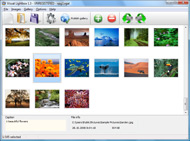
It's no secret that adding photos to your blog posts is one of the most effective ways to enhance your blog and attract attention to your writing. Flickr has millions of photos available in its database. A simple FREE tool called Flickr Gallery allows you to create a custom image gallery with a cool slide show of the most recent and most interesting photos from Flickr on your website or blog in a few easy steps. Just visit Flickr website and find photostream, photoset or a single photo you like. Enter the address of flickr page to add all photos from this page in your gallery, select the style of thumbnails and the overlay window and add the HTML embed code on your website or blog.
A few clicks and you'll see a stylish photo gallery with beautifull lightbox and zoom effects on your own website or blog!


Flickr Gallery for Windows   Flickr Gallery for MAC

Want more?

Example

Lightbox gallery sample

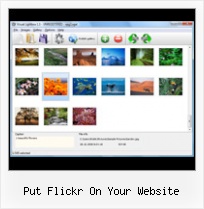
The following image set is generated by Flickr Gallery tool. Click any picture to run Lightbox gallery.

The example above is an in-page usage demo of Lightbox script with Flickr images. The photo gallery created with Flickr Gallery tool is placed inside the html page. You can also check the full-page demo web gallery. This example takes whole browser area to show the web gallery.Integrate Flickr Into Wordpress

How to Use

Step 1. Adding flickr images to your own gallery.


Locate the photo, photoset or photostream you want to use in your Flickr slideshow. Click on it to see the photo on its own page.

Copy URL of the flickr page.

Select Add images from Flickr... from the 'Add' button on the Toolbar.

Add images from Flickr

In the appeared window paste URL of the flickr page. Specify also the number of photos you want to add from the flickr page. Flickr Gallery will now include these photos in your project.

Add images from Flickr

If you have included the photos that you do not wish to be in your web gallery, you can easily remove them. Select all images that you wish to remove from photo gallery, and select Delete images. from the Images menu. You can pick and choose pictures by holding the CTRL while clicking the pictures you like.

Step 2. Adding caption.

The name of the photo on flickr page will automatically appear in the caption. When you select a photo you'll see the various info about it, such as: Path, Size, date of last change and Caption. You can add any comment or text about the photo (up to 512 symbols).

Step 3. Gallery properties.

Change the name of your flickr album, the size and quality of your pictures with Flickr Gallery. From the Gallery menu, select Properties or use "Edit Gallery Properties" button on the toolbar.

On the first tab of the Gallery Properties window you can change the name of your photo album and enable/disable the following properties: Slide Show, Auto play Slide Show, Zoom effect, Overlay Shadow. You can also set the Overlay shadow color and select the Engine you want to use (jQuery or Prototype + script.aculo.us).

On the second tab of the Gallery Properties window you can select the thumbnail you want to use, set the Thumbnails Resolution, Thumbnails Quality, Thumbnails Titles. Select Thumbnails Format (save in PNG or JPG format). Specify the Number of columns in you photo album and the Page color.

On the third tab of the Gallery Properties window you can select the template, Image resolution and Image quality of your pictures and change the Watermark.

You can set up the various sizes for exported images.

Control the quality of output PNG or JPEG format image by defining output "Image quality" and "Thumbnail quality" parameters (0%…100%).

Step 4. Save your photo gallery as project file.

When you exit Flickr Gallery application, you'll be asked if you want to save your project. The project consists of the pictures you choose to put on your web photo gallery and all your settings. It's a good idea to save the project, because that will allow you to change the project in case you decide to do something different with future galleries. So click Yes, then enter a name for your project. To select the location of your project, just click the Browse folders button and choose a different location. Then click Save.

Wordpress Flickrrss Change Image Size Put Flickr On Your Website

Download Flickr Gallery


Download Flickr Gallery Download Free Edition
for Windows
Download Flickr Gallery Download Free Edition
for MAC

Flickr Gallery is free for non - commercial use.

A small fee is required for business use. Flickr Gallery Business Edition additionally provides an option to remove the Flickr Gallery. Com credit line as well as a feature to put your own logo to images. After you complete the payment via the secure form, you will receive a license key instantly by e-mail that turns the Flickr Gallery Free Edition into a Business one. You can select the most appropriate payment method: credit card, bank transfer, check, PayPal etc. Also you can get Business Edition for free if you help with translating Flickr Gallery into your native language, please contact us at for more info.

Free Flickr Rss Url

Buy Flickr GalleryBuy Business Edition
for Windows

$49
Single Website
$69
Unlimited Websites
Buy Flickr GalleryBuy Business Edition
for MAC

$49
Single Website
$69
Unlimited Websites

Support

For feature requests, troubleshooting, general help contact Customer Support at . Make sure to include details on your Flickr Gallery version, a link (or relevant code), browser and operating system.Wensites Like Flickr

Feedback

    * I would like to say that Flickr Gallery is a stunning lil program! Its almost too good to be true i'd say! I've been looking for tutorials to create a lightbox gallery, but just couldnt come right. Im so glad i found Flickr Gallery!

    * I am thrilled with what this tool can do for me thanks for all the hard work that must have gone into it.

    * Great product by the way and saved me loads of time. I really like your Flickr Gallery program! Very nice.Flickr Photos Texas

    * I have purchased the business and LOVE IT..Your product appears easy to use and close to what I need to help several of my clients..

FAQ

Q:Can this be adapted so only one image is shown and then the gallery opens to flick through the rest of the images..

A:You can use the following parameter to hide thumbnails you don't want to display on the page:

style="display: none;"

for example:

<!-- Start Flickr Gallery.com BODY section -->
<div id="vlightbox">
<a rel="lightbox_vlb" href="data/images/dscn6831.jpg" title="dscn6831" ><img src="data/thumbnails/dscn6831.png" ><span></span></a>
<a rel="lightbox_vlb" href="data/images/dscn6823.jpg" title="dscn6823"><img src="data/thumbnails/dscn6823.png" style="display: none"><span></span></a>
<a rel="lightbox_vlb" href="data/images/dscn6819.jpg" title="dscn6819"><img src="data/thumbnails/dscn6819.png" style="display:none"><span></span></a>
<a id="vlb" href="http://Flickr Gallery.com">Photo Gallery For Web by Flickr Gallery.com v2.0</a>
</div>
<!-- End Flickr Gallery.com BODY section -->


RELATED

Get the Most Out of Flickr - Wired How-To Wiki Photo sharing site Flickr is much more than just a website to put your vacation snaps. In fact, Zazzle can put your images on just about any surface your heart desires

My Flickr widget will make your photostream fly... - Roy I've set up a page on this blog where you can enter your Flickr feed, along with some other details, and create your personalized It's generates an HTML code snippet that you can copy-paste into your website

Flickr Gallery On My Website : Flickr Gallery Flickr Gallery On My Website. Web photo album? With Flickr Gallery, you need just 4 simple steps to get your web photo album ready!. Iphoto 09 Sync Movies To Flickr

Exploring Flickr - Find your photos in Flickr's explore section Find your photos in flickr's explore. Photos, Videos and more. Flickr? Everyday, Flickr picks up 500 photos from the public pool based on an 'interestingness' algorithm and displays it in the explore section of the flickr website

Top 30+ Flickr Tools to Enhance your Flickr Journey flickrSLiDR allows you to easily embed the classic flickr slideshows on your website or blog. Chasr is a mini web application that allows you to display your photos from Flickr on your own website for absolutely free

A Simple Guide To Flickr This Flickr Guide will teach you everything you need to know about Flickr: the account, uploading, groups, services, Facebook applications Flickr Photosets: This is probably the easiest way to put your Flickr photo's on Facebook

Make a Flickr pic Link to Your Website Video – 5min.com Make a Flickr pic Link to Your Website - Learn how to Make Flickr pic or jpg link to your website on your Craigslist or Backpage ad. This video shows you a neat little trick on how to make a Flickr pic on Craigslist redirect to your website of

Photo Sharing Website Part II: Tips for Creating & Optimizing According to Alexa, it reaches approximately 10% of all Internet users and is the 42nd most popular website on the Internet. Flickr is a convenient place to share photos of your hotel or lodging property, and lets you create slideshows to put on your website

Bring Flickr to Your Website Using JSON and jQuery | The Flickr is a great website for hosting and sharing your photos. If you are an amateur photographer who likes to share photos from your latest outdoor adventure,

Big Oak SEO Blog " Flickr is NOT useless for SEO I do not know this trick can be use when flickr take out dofollow attribute in their website. Now, with your tips, i can include HTML code in flickr to include do follow attribute for the flickr personal page. 5 stars for the tips. By Enlarge Media (1 comments.) on Aug 27, 2008 | Reply

Useful Tools for Flickr Desktop Applications Flickr Finder - Mac OS X application for browsing your photos. 1001 for Mac OS X is a desktop client to be used in conjunction Chasr is a mini web application that allows you to display your photos from Flickr on your own website for absolutely free

Integrating Flickr into your rails website - Pixellated Visions How to use flickr_fu to show your flickr images on your rails website or blog

Max Dunn's Web Site - RoR and Flickr But after studying the source code and playing with it, you can generally get it to do what you want, so that is what we will use here. Rails Flickr Files. Now let's put Flickr in our web site. Main Files. First get the flickr rails files add them to your Rails home directory:

Should I Put My Photos On My Website or On Flickr? This post is part of the Friday Q&A section. If you want to ask a question, just write a comment below. Mary H. asks: I blog about animal training, and end up with quite a few good photos I'd like to share with my readers. I put a few photos in

Using Flickr for Your Organization | Future Majority A search for that tag will result in showing all the pictures uploaded of your event. You can put the Flickr tag in your event's program, on the Facebook event, send the tag to people that have signed up, or just make an announcement at the event about it

Using WordPress to Manage Your Web Site Content, Part 1 As a small business owner and a Web site marketer, I'm always trying to find ways to get things done without having to hire someone to do it for me. I'm Some plug-ins allow you to put a photo feed from Flickr on your Web site

flickr add Software - Free Download flickr add - Top 4 Download your blog and attract attention to your writing. Flickr has millions of photos available in its database. A simple FREE tool called Flickr Gallery allows you to create a custom image the most recent and most interesting photos from Flickr on your website or blog in a few easy steps

60+ Tools To Enhance Your Flickr Experience Being a popular online image platform, Flickr has enabled Internet users to manage and share digital photos easily as long as there's an Internet connection. flickrSLiDR allows you to easily embed the classic flickr slideshows on your website or blog

CIC " Integrating a Flickr photo map on your website Fear not, you do not need to be a big web wizard to unleash the power of Flickr and put great photo effects on your website. Today I will be looking at the various options available to allow picture browsing on a map. Prerequisite: you need to tell Flickr where pictures have been shot

Flickr: Increase your visibility online! | MyCharityConnects Using Flickr to host your photos saves you space on your website! You can also connect with your supporters with a Flickr group. Use the tools Flickr provides to put images and slideshows on your website or blog

Embed Flickr slideshow on your website in minutes with Flickr A simple FREE tool called Flickr Gallery allows you to embed a custom image gallery, or a cool slideshow with beautiful lightbox and zoom effects of the most interesting photos from Flickr.com on your website or blog in a few easy steps

Flickr: Help: On the Flickr website Flickr is almost certainly the best online photo management and sharing application in the world. Show off your favorite photos and videos to the world, securely and privately show content to your friends and family, or blog the photos and videos

Pulling Your Flickr Feed with jQuery | Viget Inspire There are many different types of feeds, such as RSS or Atom, and many different ways display them on your site, such as using MagpieRSS to parse an RSS feed in PHP. YOU HAVE TO PUT THE CODE in flickr-feed.js or else create a new .js file with new name picasa-feed.js and include in your page

How To Upload to a Website Via FTP | How To Do Things Using FTP (File Transfer Protocol) to upload to a website,you always need to upload (add) something to your website such as images, music, topics, etc. To do so, you need FTP software

Accessing Images On Flickr From An ASP.NET Website Using The This article, by Scott Mitchell, shows how to integrate with Flickr from an ASP.NET website using the Flickr.Net library

Learning How to Embed Flickr Slideshows onto Your Website or Blog Learn the easy Flickr slideshow codes for how to embed flicker slideshows and customizing the slideshow on your site or blog. You can display your favorite family vacation photos on a social network blog, or display an ongoing slide of your business's products on a professional website

How to Add Flickr photos on my web site | eHow.com How to Add Flickr photos on my web site. If you have some pictures of your own, or photos from a group you admire from Flickr, you can make a badge to put in your website or blog, and this will add to your blog or website greatly

FlickrHelpr - Show your flickr photos on your website FlickrHelpr is the super simple way to put your flickr photos on your website. Because your website URL is easy to remember, but your flickr URL isn't

