
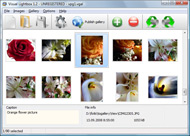



Overview

It's no secret that adding photos to your blog posts is one of the most effective ways to enhance your blog and attract attention to your writing. Flickr has millions of photos available in its database. A simple FREE tool called Flickr Gallery allows you to create a custom image gallery with a cool slide show of the most recent and most interesting photos from Flickr on your website or blog in a few easy steps. Just visit Flickr website and find photostream, photoset or a single photo you like. Enter the address of flickr page to add all photos from this page in your gallery, select the style of thumbnails and the overlay window and add the HTML embed code on your website or blog.
A few clicks and you'll see a stylish photo gallery with beautifull lightbox and zoom effects on your own website or blog!


Flickr Gallery for Windows   Flickr Gallery for MAC

Want more?

Example

Lightbox gallery sample

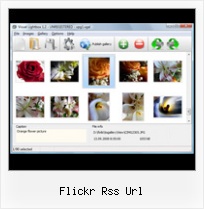
The following image set is generated by Flickr Gallery tool. Click any picture to run Lightbox gallery.

The sample above is an in-page usage demo of Lightbox gallery that uses images from Flickr. The slideshow created with Flickr Gallery software is placed inside the page layout. You can also check the full-page demo website gallery. This example takes whole browser area to show the web gallery.Creating Gallery From Flickr Feed Website

How to Use

Step 1. Adding flickr images to your own gallery.


Locate the photo, photoset or photostream you want to use in your Flickr slideshow. Click on it to see the photo on its own page.

Copy URL of the flickr page.

Select Add images from Flickr... from the 'Add' button on the Toolbar.

Add images from Flickr

In the appeared window paste URL of the flickr page. Specify also the number of photos you want to add from the flickr page. Flickr Gallery will now include these photos in your project.

Add images from Flickr

If you have included the photos that you do not wish to be in your web gallery, you can easily remove them. Select all images that you wish to remove from photo gallery, and select Delete images. from the Images menu. You can pick and choose pictures by holding the CTRL while clicking the pictures you like.

Step 2. Adding caption.

The name of the photo on flickr page will automatically appear in the caption. When you select a photo you'll see the various info about it, such as: Path, Size, date of last change and Caption. You can add any comment or text about the photo (up to 512 symbols).

Step 3. Gallery properties.

Change the name of your flickr album, the size and quality of your pictures with Flickr Gallery. From the Gallery menu, select Properties or use "Edit Gallery Properties" button on the toolbar.

On the first tab of the Gallery Properties window you can change the name of your photo album and enable/disable the following properties: Slide Show, Auto play Slide Show, Zoom effect, Overlay Shadow. You can also set the Overlay shadow color and select the Engine you want to use (jQuery or Prototype + script.aculo.us).

On the second tab of the Gallery Properties window you can select the thumbnail you want to use, set the Thumbnails Resolution, Thumbnails Quality, Thumbnails Titles. Select Thumbnails Format (save in PNG or JPG format). Specify the Number of columns in you photo album and the Page color.

On the third tab of the Gallery Properties window you can select the template, Image resolution and Image quality of your pictures and change the Watermark.

You can set up the various sizes for exported images.

Control the quality of output PNG or JPEG format image by defining output "Image quality" and "Thumbnail quality" parameters (0%…100%).

Step 4. Save your photo gallery as project file.

When you exit Flickr Gallery application, you'll be asked if you want to save your project. The project consists of the pictures you choose to put on your web photo gallery and all your settings. It's a good idea to save the project, because that will allow you to change the project in case you decide to do something different with future galleries. So click Yes, then enter a name for your project. To select the location of your project, just click the Browse folders button and choose a different location. Then click Save.

Flickr Gallery Step By Step Wordpress Flickr Rss Url

Download Flickr Gallery


Download Flickr Gallery Download Free Edition
for Windows
Download Flickr Gallery Download Free Edition
for MAC

Flickr Gallery is free for non-commercial use.

A small fee is required for business use. Flickr Gallery Business Edition additionally provides an option to remove the Flickr Gallery. Com credit string as well as a feature to put your own logo to images. After you finish the payment via the secure order form, you will receive a license key instantly by e-mail that turns the Flickr Gallery Free Edition into a Business one. You can select the most suitable payment method: bank transfer, PayPal, check, credit card etc. Also you can get Business Edition for free if you help with translating Flickr Gallery into your native language, please contact us at for more info.

Flickr Galleries Embed Customizable

Buy Flickr GalleryBuy Business Edition
for Windows

$49
Single Website
$69
Unlimited Websites
Buy Flickr GalleryBuy Business Edition
for MAC

$49
Single Website
$69
Unlimited Websites

Support

For general help, troubleshooting and feature requests contact Customer Support at . Make sure to include details on your operating system, browser, a link (or relevant code) and Flickr Gallery version.Php Flickr Gallery

Feedback

    * I am thrilled with what this tool can do for me thanks for all the hard work that must have gone into it.

    * I have purchased the business and LOVE IT..Your product appears easy to use and close to what I need to help several of my clients..

    * Just a quick thank you for the software though, It's not often you get a free software version of this quality and style! Well done and please continue this amazing gallery. Hope to see more advances.Iframe Con Album Flickr

    * First of all, I love you Flickr Gallery. I think it's beautiful! I purchased the lightbox “business edition” yesterday, and I’m very happy how easy it is to use. Found this to be one of the fastest ways to get a gallery on the web. Thanks.

FAQ

Q:I would like to have a few galleries in one website and even on one page.

A:To create several galleries on your page you should change following parameter in A tag for different galleries:

rel="lightbox_vlb"

For example, for the first gallery you should set rel="lightbox_vlb":

<!-- Start Flickr Gallery.com BODY section -->
<div id="vlightbox">
<a rel="lightbox_vlb" href="data/images/dscn6831.jpg" title="dscn6831" >
<img src="data/thumbnails/dscn6831.png" ><span></span></a>
<a rel="lightbox_vlb" href="data/images/dscn6823.jpg" title="dscn6823">
<img src="data/thumbnails/dscn6823.png"><span></span></a>
<a id="vlb" href="http://Flickr Gallery.com">Photo Gallery For Web by Flickr Gallery.com v2.0</a>
</div>
<!-- End Flickr Gallery.com BODY section -->

and for the second gallery rel="lightbox_vlb1":

<!-- Start Flickr Gallery.com BODY section -->
<div id="vlightbox">
<a rel="lightbox_vlb1" href="data/images/img_0501.jpg" title="img_0501">
<img src="data/thumbnails/img_0501.png"><span></span></a>
<a rel="lightbox_vlb1" href="data/images/img_0481.jpg" title="img_0481">
<img src="data/thumbnails/img_0481.png"><span></span></a>
<a id="vlb" href="http://Flickr Gallery.com">Photo Gallery For Web by Flickr Gallery.com v2.0</a>
</div>
<!-- End Flickr Gallery.com BODY section -->


RELATED

10 Amazing Wordpress Plugins for Flickr URL: http://stimuli.ca/slickr/. FlickrRSS for WordPress. Description: This plugin for WordPress allows you to display Flickr The advantage of this plugin is that it does not use RSS feeds and uses the Flickr API instead

Eric's Archived Thoughts: Forgetful Flickr If one of my contacts has marked me as a Friend, and they post a photo that's visible only to Friends & Family, that photo does not appear in my RSS feed of photos from my friends and family. These same pictures show up if I go to the "Photos from your Contacts" page on the Flickr site

Wordpress Flickr – embed Flickr photos in Wordpress blog Then, you click on the right side of the Flickr Widget, which opens up a dialog window, and you add your Flickr RSS feed. Copy and paste the URL of your Flickr RSS feed. Comment by JoeDuck

bbum's weblog-o-mat " Blog Archive " Quartz Composer based defaults write net.bbum.FlickrFeeds FlickrURL url can be used to change the RSS URL that the saver downloads images from. It should be able to parse any Flickr RSS or Atom feed, but maybe not even that. Out of the box, it is aimed at my flickr photo feed

KnowledgeBase - Flickr - Technical Support on PhotoVu Premium The PhotoVu wireless picture frame is capable of working with your Flickr account and public photos. Upon entering the Flickr RSS URL, you can access the photos containe. Last Modified - 2008-09-25 - Similar Articles. Which image sizes are supported in a Flickr RSS Feed?

How to add / integrate a flickr gallery to Wordpress without Search the above code and replace "your-flickr-feed" with your actual Flickr RSS feed URL. If you don't know how to find your Feed URL, then go to "Your Photostream", scroll down to "Subscribe to 's photostream and copy the geoFeed URL

Trouver la page photo de Flickr Flickr Photo URL Do you have a direct link to a Flickr photo and need to find the Flickr web page showing that image? You may require web page URL to link to it, find larger

PSP + PSPMM + Flickr = Photocasting ~ Chris Pirillo You can do it quickly and easily with a PSP, the PSPMM, and a properly encoded Flickr RSS URL: Copy the Flickr RSS 2.0 URL to the clipboard (example) In the PSPMM, flip to the Feeds

4 Unique Tools to Monitor Flickr via RSS If you often browse Flickr to find inspiration, you may be wondering if there are any good tools to monitor the resource for regular interesting updates. One

full size images in Flickr RSS feeds " Manifest Density full size images in Flickr RSS feeds. Something that JP and I just figured out at work: how to change a Flickr RSS feed so that it returns images larger than the default, Just get the URL you currently use for your contacts feed out of your RSS reader (or Flickr) and paste it into the text box

RSS Feeds for Photos With Multiple Tags in Flickr | Just a In its RSS feeds, Flickr doesn't let you get photos tagged with all 'multitags.php', and you put it on your site, say example.com, the URL would look something like http://www.example.com/multitags.php?tags=vancouver+seawall That would get you an RSS feed (in a format very similar to the format

Bram.us " How to find the original Flickr Photo URL and User How to find the original Flickr Photo URL and User from a Static Flickr Image URL/Permalink (My priceless Flickr Tip) a Static Flickr Image URL If you came across a photo hosted by Flickr but only have the direct image url, you

Liz Castro on HTML, XHTML, and CSS: How to create a Flickr The answer lies in Flickr RSS feeds. An RSS feed is way of subscribing to an often It's a text file, and generally you link to it by referencing its URL

Consuming Flickr RSS feeds using ASP by Nick Dunn, published 'URL of your RSS feed (copy from the "Feed" link of your Flickr gallery. Dim strXMLURL : This line should contain the path to the RSS feed of your photos

Reading RSS with PHP In this tutorial, we'll use SimpleXML and a custom PHP class to load and parse a user's Flickr RSS feed, isolate the pieces of information we need, and output the data as HTML. In a moment we'll use this URL to load our Flickr page into our website

Get Flickr Images Using SimpleXML Let's create a reusable class called FlickrImages which can parse any provided Flickr RSS url in constructor and generates an array containing list of all images of the user who's RSS url is parsed. Following code make use of above class to parse Flickr RSS

Custom Yahoo Pipes/ Flickr Slideshows For Your Blog | Tubetorial Use the Flickr module in Yahoo Pipes to grab X images tagged with tag Y. Initially, I'm getting 50 images tagged "dogs" ( Defaults will show.) Save the dynamically-generated RSS feed URL for the Pipe

Tumblr photolog with Flickr - dmitry kichenko Go into Edit Source, and change the URL of the Feed module to your own flickr RSS feed URL. Save the pipe, and copy the URL which the Get as RSS button on the pipe page links to

Create a Slick Flickr Gallery with SimplePie | Nettuts+ I've wanted to write a tutorial for quite some time now, and APIs have always been a particular interest of mine. library to handle the RSS feed for us. Also, the second and third lines create a new feed object. based on the RSS URL for your Flickr feed. Step 3. Now we can start littering our HTML with

PhotoViewer Object used to set up the Flickr RSS reader. Attribute. Value. Description. id. String. The Flickr nsid used to You can get it from your RSS feed URL (http://api.flickr.com/services

Consuming Flickr via RSS — Another Blogger Let's take a look at making the most of Flickr's RSS feeds. The easiest way to get the URL for your recent comments feed is to go to your recent comments page (while logged into Flickr) and finding the Feed link near the lower left corner (look for the feed symbol )

Flickr API Fun - Rasmus' Toys Page That lets you do a whole class of cool things that something like the RSS feed mechanism doesn't provide. the media:thumbnail url attribute of the Flickr RSS feed, which uses

Flickr RSS Feeds as Photocasts in iPhoto '06 Flickr RSS Feeds as Photocasts in iPhoto '06. I assume everybody who is interested has found out by now, that you can subscribe to Flickr RSS feeds with the new iPhoto '06 to have them show up as what Apple calls Photocast. if copying the RSS URL from Safari you need to change the "feed:" to "

How to Integrate Flickr Photos into Your Wordpress Blog | New If you are a Flickr user, you can integrate your photos by using the Flickr Badge, Flickr plugins, or using the Flickr RSS Feed. The focus in this case will be what a RSS Feed (Flickr RSS Feed) is and how to integrate the Flickr Paste the RSS URL (in part 1, you went to your Flickr account and

Flickr: Photos & video from everyone in Flickr Flickr is almost certainly the best online photo management and sharing application in the world. Show off your favorite photos and videos to the world, securely and privately show content to your friends and family, or blog the photos and videos

Dear Flickr, what the RSS hell? However, the URL I get contains a secret variable and I'm sure it's not wise to share its value. Maybe it's safe. Maybe it isn't. I've no idea. What Flickr need to do is simply and automatically upgrade the old public RSS addresses to the new public RSS addresses. It should be faff free

rss or url for flickr " The Edublogs Forums I am having a problem posting my pictures to my flickr widget. I can't seem to find the url or rss feed it's asking for.I looked at the bottom of the home page like the directions said, but just can't find it. I can post my pictures to my posts, but not my widget button

Wrox Article : Flickr Mashups: Visualizing the News - Wrox The RSS Format. Flickr offers RSS as one of the formats used for the feeds it offers, but The tag contains elements that define the title of the feed, its description, and a URL to the feed's web site

Flickr Rss Url : Flickr Gallery Flickr Rss Url. High Quality and Professional ajax picture gallery with Minimum Effort!. Remove Welcome To Joomla Flickr rss or url for flickr " The Edublogs Forums I am having a problem posting my pictures to my flickr widget

