



Overview

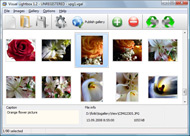
It's no secret that adding photos to your blog posts is one of the most effective ways to enhance your blog and attract attention to your writing. Flickr has millions of photos available in its database. A simple FREE tool called Flickr Gallery allows you to create a custom image gallery with a cool slide show of the most recent and most interesting photos from Flickr on your website or blog in a few easy steps. Just visit Flickr website and find photostream, photoset or a single photo you like. Enter the address of flickr page to add all photos from this page in your gallery, select the style of thumbnails and the overlay window and add the HTML embed code on your website or blog.
A few clicks and you'll see a stylish photo gallery with beautifull lightbox and zoom effects on your own website or blog!


Flickr Gallery for Windows   Flickr Gallery for MAC

Want more?

Example

Lightbox gallery sample

The following image set is generated by Flickr Gallery tool. Click any picture to run Lightbox gallery.

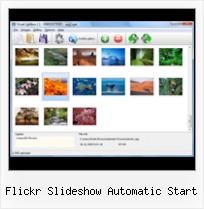
The photo gallery above is an in-page usage demo of Lightbox script with Flickr images. The website gallery created with Flickr Gallery application is placed inside the website page. You can also check the full-page demo web gallery. This example takes whole browser area to show the slideshow.Sharing Static Sets Flickr

How to Use

Step 1. Adding flickr images to your own gallery.


Locate the photo, photoset or photostream you want to use in your Flickr slideshow. Click on it to see the photo on its own page.

Copy URL of the flickr page.

Select Add images from Flickr... from the 'Add' button on the Toolbar.

Add images from Flickr

In the appeared window paste URL of the flickr page. Specify also the number of photos you want to add from the flickr page. Flickr Gallery will now include these photos in your project.

Add images from Flickr

If you have included the photos that you do not wish to be in your web gallery, you can easily remove them. Select all images that you wish to remove from photo gallery, and select Delete images. from the Images menu. You can pick and choose pictures by holding the CTRL while clicking the pictures you like.

Step 2. Adding caption.

The name of the photo on flickr page will automatically appear in the caption. When you select a photo you'll see the various info about it, such as: Path, Size, date of last change and Caption. You can add any comment or text about the photo (up to 512 symbols).

Step 3. Gallery properties.

Change the name of your flickr album, the size and quality of your pictures with Flickr Gallery. From the Gallery menu, select Properties or use "Edit Gallery Properties" button on the toolbar.

On the first tab of the Gallery Properties window you can change the name of your photo album and enable/disable the following properties: Slide Show, Auto play Slide Show, Zoom effect, Overlay Shadow. You can also set the Overlay shadow color and select the Engine you want to use (jQuery or Prototype + script.aculo.us).

On the second tab of the Gallery Properties window you can select the thumbnail you want to use, set the Thumbnails Resolution, Thumbnails Quality, Thumbnails Titles. Select Thumbnails Format (save in PNG or JPG format). Specify the Number of columns in you photo album and the Page color.

On the third tab of the Gallery Properties window you can select the template, Image resolution and Image quality of your pictures and change the Watermark.

You can set up the various sizes for exported images.

Control the quality of output PNG or JPEG format image by defining output "Image quality" and "Thumbnail quality" parameters (0%…100%).

Step 4. Save your photo gallery as project file.

When you exit Flickr Gallery application, you'll be asked if you want to save your project. The project consists of the pictures you choose to put on your web photo gallery and all your settings. It's a good idea to save the project, because that will allow you to change the project in case you decide to do something different with future galleries. So click Yes, then enter a name for your project. To select the location of your project, just click the Browse folders button and choose a different location. Then click Save.

Free Flickr Alternative Script Flickr Slideshow Automatic Start

Download Flickr Gallery


Download Flickr Gallery Download Free Edition
for Windows
Download Flickr Gallery Download Free Edition
for MAC

Flickr Gallery is free for non - commercial use.

A small fee is required for business use. Flickr Gallery Business Edition additionally provides an option to remove the Flickr Gallery. Com credit bar as well as a feature to put your own logo to images. After you complete the payment via the secure form, you will receive a license key instantly by e-mail that turns the Flickr Gallery Free Edition into a Business one. You can select the most appropriate payment mode: PayPal, check, credit card, bank transfer etc. Also you can get Business Edition for free if you help with translating Flickr Gallery into your native language, please contact us at for more info.

Flickr Album In Joomla With Captions

Buy Flickr GalleryBuy Business Edition
for Windows

$49
Single Website
$69
Unlimited Websites
Buy Flickr GalleryBuy Business Edition
for MAC

$49
Single Website
$69
Unlimited Websites

Support

For feature requests, troubleshooting, general help contact Customer Support at . Make sure to include details on your browser, operating system, Flickr Gallery version and a link (or relevant code).Flickr Organize Desktop

Feedback

    * I ran into your website wile looking for a JavaScript to manage a personal Photo Gallery. I downloaded the trial version and immediately fell in love with your Flickr Gallery, it is one of the best products I’ve ever found; it is very user friendly and easy to use and creates great Photo Galleries.

    * Just a quick thank you for the software though, It's not often you get a free software version of this quality and style! Well done and please continue this amazing gallery. Hope to see more advances.

    * I downloaded your trial version to see if I could get it to work with my website, and I am almost there (I have been looking for something like this for ages)..Flickr Mini Gallery Wordpress

    * I have installed Flickr Gallery to trial. All good, loving it!! I want to get an business version of your great programm. I love it - soo easy to use!!

FAQ

Q:Is it possible to load a gallery from within image? So the gallery loads externally?

A:You should start the gallery onClick:

1) Add the following function into the <head> tag:

<script type="text/javascript">
function showLightBox()
{ Lightbox.start(document.getElementById('firstImage'));}
</script>

2) Specify the onClick event for the image (or link):
<img src="thumbnail_gr.jpg" onClick="javascript:showLightBox()" title="Click to see the demo" style="cursor: pointer;">
3) Set the ID for any image in your gallery (id="firstImage"), for example add it to the first image:
<a rel="lightbox_vlb" href="data/images/dscn6831.jpg" title="dscn6831" id="firstImage">
4) Use 'display: none;' property for your gallery in engine\css\vlightbox.css. Just change the following code:

#vlightbox a{
display:-moz-inline-stack;
display:inline-block;
zoom:1;
*display:inline;
position:relative;
vertical-align:top;
margin:3px;
width:160px;
font-family:Trebuchet,Tahoma,Arial,sans-serif;
font-size:11px;
font-weight:normal;
text-align:center;
opacity:0.87;
}

to:

#vlightbox a{
display:-moz-inline-stack;
display:none;
zoom:1;
*display:inline;
position:relative;
vertical-align:top;
margin:3px;
width:160px;
font-family:Trebuchet,Tahoma,Arial,sans-serif;
font-size:11px;
font-weight:normal;
text-align:center;
opacity:0.87;
}

RELATED

PlayMeNext - The jukebox and photo app for parties Setup a special owner passcode that lets you remote control (start/stop music, change volume etc) the player from another device Login to Facebook and Flickr and setup album for automatic photo upload (you may do this later if you want to review photos

Most 40+ Tools And Tips For Flickr Lovers How to embed a Flickr slideshow in your blog: There's a lot of ways to get your Flickr photos onto a web page Now that Greasemonkey is solidly back in effect, you can all too easily start geotagging your life by combining your Flickr photos with Google Maps via the magic that is Geobloggers.com

plugins:flickr - Geeklog France Vous êtes ici: start " plugins " flickr. Flickr plugin. This is a simple Flickr plugin for Geeklog. All it does right now is to will embed the same super slideshow that you can see on flickr site. This is the documentation page

Slickr Flickr Wordpress Plugin News Updates May 2010 Find out what's new in Slickr Flickr – Video tutorials, Caching issues resolved, new LightBox support

Download Free Photo SlideShow Software Free - Graphic Apps Create a slideshow and start photo sharing with your friends and Free Slideshow Builder Features: * Flickr & PhotoBucket Support - Use photos directly from Flickr or PhotoBucket in your ajax slideshow. * Mootools plugin - SlideShow based on famous

ImageFlow 1.0 javascript slideshow with youtube, dailymotion ImageFlow with youtube, dailymotion , Picasa and Flickr javascript slideshow Added some options like starting picture, change small to big picture. these options can be set in a seperate js. Added an optional automatic Slideshow with play again button. On every (click or mouse) event in

Multimedia Animated Slideshow Creators And Remixing Tools Multimedia animated slideshow creators are web-based services which allow you to remix pictures, photos, video clips and music to create visually impactful showcases, slideshows or just memories of a great holiday. In this guide I

Flickr Gallery 3.2.3 Freeware Download - Add Flickr Slideshow Download Freeware Flickr Gallery. A simple FREE tool called Flickr Gallery allows you to embed a custom image gallery, or a cool slideshow with beautiful lightbox and zoom effects of the most interesting photos from Flickr.com on your website or

Active Suite Vista download - Automatic wallpaper, retouch Active Suite Vista download - Automatic wallpaper, retouch, slideShow. - Best Free Vista Downloads - Free Vista software download - freeware, shareware and trialware downloads

Flickr: The Help Forum: [Official Topic] Slideshow: Bugs and Flickr is almost certainly the best online photo management and sharing application in the world. Show off your favorite photos and videos to the world, securely and privately show content to your friends and family, or blog the photos and videos

Flickr Gallery Downloads by Flickr-Gallery.com at Software Add Flickr Slideshow on your website! It's no secret that adding photos to your blog posts is one of the most effective ways to enhance your blog and attract attention to your writing

Make Slideshow : Free SlideShow Software Free Slideshow Creator! Make Slideshow. Improve your online photo gallery with Flash SlideShow Maker!. Photo Slide Show Software Gadget Flickr Slideshow Problems. Slideshow Embed Automatic Start Loop Html Code For Photo Slideshow Tinypic Slideshows Free Slideshow Online Free Html Slideshow Software

Flickr Gallery Plus! - Robert's talk One of the most popular photo sharing web sites on the web is Flickr, and it does indeed have some very nice features. Their set/gallery view, however, is in my

Art Colorbox - Joomla! lightbox extension that can display Art Colorbox - Joomla! lightbox extension that can display photos, photo groups, slideshow, external pages, Flickr photos in highly customizable popup window slideshowAuto - if true slideshow will automatically start to play

How to Put Your Pictures on the Web with Flickr - Associated Organize, upload and fine-tune your Flickr picture set, step by step. It features a bulk-uploading tool, automatic resizing and a nice slide-show viewer

Flickr Slideshow Embed | Flickr Slideshow Flickr Slideshow Embed. Create superior online photo galleries for your Website with jQuery Thickbox Alternative! bbcode flickr album

MAGIX Photo Software Free Photo software by MAGIX. Download now for free and start immediately Then upload your finished slideshow as a video to YouTube, Flickr, or Facebook, present it in your personal

Flickr See Private : Flickr Gallery Flickr See Private. Online photo albums created with Flickr Slideshow are fully compatible with all modern Windows and MAC browsers!. Jquery Flickr Slideshow Demo

60+ Tools To Enhance Your Flickr Experience Being a popular online image platform, Flickr has enabled Internet users to manage and share digital photos easily as long as there's an Internet connection

Client List Flash : Free Flash SlideShow Maker Flash SlideShow w/o Flash! Client List Flash. Enhance your web site with Flickr Slideshow!. automatic full screen flash gallery

WordPress " Slickr Flickr " WordPress Plugins Reinstated automatic use of API key if more than 20 photos are requested Automatic slideshow option for the galleria. Slickr Flickr Resources Menu on the admin

Web 2.0 tools and applications: flickr photographs; utilities findr Find photos on flickr by browsing and refining related tags. Flappr is a flash based interface to Flickr. Fleace, the Flickr-Enabled Automatic Changer for Everyone, is a free wallpaper Flickr Slideshow Generator allows you to generate the HTML necessary to embed a custom Flickr Slideshow in

Create a Yahoo Photo album I suggest you first start with the free subscription and then upgrade You can also create a slideshow of the Flickr sets using services such as Flickr Slideshow or flickrSLiDR

Free SlideShow Maker. Visual JavaScript SlideShow Free SlideShow Maker. Create awesome web slideshows in second without a line of code. For Mac and Windows!

Automatic desktop wallpaper changer - Wallpaper Slideshow Pro Automatic desktop wallpaper changer - Wallpaper Slideshow Pro With RssFeeds plugin WallpaperSS can download photos from most online photo galleries such as Flickr, Picasa, Panoramio, Smugmug and others

