



Overview

It's no secret that adding photos to your blog posts is one of the most effective ways to enhance your blog and attract attention to your writing. Flickr has millions of photos available in its database. A simple FREE tool called Flickr Gallery allows you to create a custom image gallery with a cool slide show of the most recent and most interesting photos from Flickr on your website or blog in a few easy steps. Just visit Flickr website and find photostream, photoset or a single photo you like. Enter the address of flickr page to add all photos from this page in your gallery, select the style of thumbnails and the overlay window and add the HTML embed code on your website or blog.
A few clicks and you'll see a stylish photo gallery with beautifull lightbox and zoom effects on your own website or blog!


Flickr Gallery for Windows   Flickr Gallery for MAC

Want more?

Example

Lightbox gallery sample

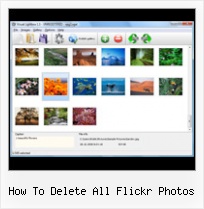
The following image set is generated by Flickr Gallery tool. Click any picture to run Lightbox gallery.

The example above is an in-page usage demo of Lightbox gallery that uses images from Flickr. The web gallery created with Flickr Gallery wizard is placed inside the html page. You can also check the full-page demo slideshow. This example takes whole browser area to show the website gallery.Flickr Slideshow Embed Speed Faster

How to Use

Step 1. Adding flickr images to your own gallery.


Locate the photo, photoset or photostream you want to use in your Flickr slideshow. Click on it to see the photo on its own page.

Copy URL of the flickr page.

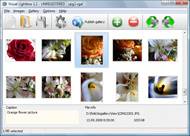
Select Add images from Flickr... from the 'Add' button on the Toolbar.

Add images from Flickr

In the appeared window paste URL of the flickr page. Specify also the number of photos you want to add from the flickr page. Flickr Gallery will now include these photos in your project.

Add images from Flickr

If you have included the photos that you do not wish to be in your web gallery, you can easily remove them. Select all images that you wish to remove from photo gallery, and select Delete images. from the Images menu. You can pick and choose pictures by holding the CTRL while clicking the pictures you like.

Step 2. Adding caption.

The name of the photo on flickr page will automatically appear in the caption. When you select a photo you'll see the various info about it, such as: Path, Size, date of last change and Caption. You can add any comment or text about the photo (up to 512 symbols).

Step 3. Gallery properties.

Change the name of your flickr album, the size and quality of your pictures with Flickr Gallery. From the Gallery menu, select Properties or use "Edit Gallery Properties" button on the toolbar.

On the first tab of the Gallery Properties window you can change the name of your photo album and enable/disable the following properties: Slide Show, Auto play Slide Show, Zoom effect, Overlay Shadow. You can also set the Overlay shadow color and select the Engine you want to use (jQuery or Prototype + script.aculo.us).

On the second tab of the Gallery Properties window you can select the thumbnail you want to use, set the Thumbnails Resolution, Thumbnails Quality, Thumbnails Titles. Select Thumbnails Format (save in PNG or JPG format). Specify the Number of columns in you photo album and the Page color.

On the third tab of the Gallery Properties window you can select the template, Image resolution and Image quality of your pictures and change the Watermark.

You can set up the various sizes for exported images.

Control the quality of output PNG or JPEG format image by defining output "Image quality" and "Thumbnail quality" parameters (0%…100%).

Step 4. Save your photo gallery as project file.

When you exit Flickr Gallery application, you'll be asked if you want to save your project. The project consists of the pictures you choose to put on your web photo gallery and all your settings. It's a good idea to save the project, because that will allow you to change the project in case you decide to do something different with future galleries. So click Yes, then enter a name for your project. To select the location of your project, just click the Browse folders button and choose a different location. Then click Save.

Flickr Embed Slideshow Small How To Delete All Flickr Photos

Download Flickr Gallery


Download Flickr Gallery Download Free Edition
for Windows
Download Flickr Gallery Download Free Edition
for MAC

Flickr Gallery is free for non - commercial use.

A small fee is required for business use. Flickr Gallery Business Edition additionally provides an option to remove the Flickr Gallery. Com credit string as well as a feature to put your own logo to images. After you complete the payment via the secure form, you will receive a license key instantly by email that turns the Flickr Gallery Free Edition into a Business one. You can select the most suitable payment method: bank transfer, check, credit card, PayPal etc. Also you can get Business Edition for free if you help with translating Flickr Gallery into your native language, please contact us at for more info.

Xbmx For Mac Plugins Flickr

Buy Flickr GalleryBuy Business Edition
for Windows

$49
Single Website
$69
Unlimited Websites
Buy Flickr GalleryBuy Business Edition
for MAC

$49
Single Website
$69
Unlimited Websites

Support

For general help, troubleshooting and feature requests contact Customer Support at . Make sure to include details on your Flickr Gallery version, operating system, browser and a link (or relevant code).Flickr Slideshow Plugin For Joomla

Feedback

    * I LOVE your free Lightbox2 software tool and will purchase the business version shortly. I have seen the Lightbox JS effect used with video tutorials and I was hoping you have a version for video that I can purchase.
Video LightBox: http://videolightbox.com

    * I find Flickr Gallery (and lightbox2) a great tool and was about to proceed in its purchase.

    * I just tried the application, It is wonderful idea. Like you said in the website "few clicks without writing a single line of code" because most of the people is not web designers".Customized Flickr Account

    * I have installed Flickr Gallery to trial. All good, loving it!! I want to get an business version of your great programm. I love it - soo easy to use!!

FAQ

Q:I would like to have a few galleries in one website and even on one page.

A:To create several galleries on your page you should change following parameter in A tag for different galleries:

rel="lightbox_vlb"

For example, for the first gallery you should set rel="lightbox_vlb":

<!-- Start Flickr Gallery.com BODY section -->
<div id="vlightbox">
<a rel="lightbox_vlb" href="data/images/dscn6831.jpg" title="dscn6831" >
<img src="data/thumbnails/dscn6831.png" ><span></span></a>
<a rel="lightbox_vlb" href="data/images/dscn6823.jpg" title="dscn6823">
<img src="data/thumbnails/dscn6823.png"><span></span></a>
<a id="vlb" href="http://Flickr Gallery.com">Photo Gallery For Web by Flickr Gallery.com v2.0</a>
</div>
<!-- End Flickr Gallery.com BODY section -->

and for the second gallery rel="lightbox_vlb1":

<!-- Start Flickr Gallery.com BODY section -->
<div id="vlightbox">
<a rel="lightbox_vlb1" href="data/images/img_0501.jpg" title="img_0501">
<img src="data/thumbnails/img_0501.png"><span></span></a>
<a rel="lightbox_vlb1" href="data/images/img_0481.jpg" title="img_0481">
<img src="data/thumbnails/img_0481.png"><span></span></a>
<a id="vlb" href="http://Flickr Gallery.com">Photo Gallery For Web by Flickr Gallery.com v2.0</a>
</div>
<!-- End Flickr Gallery.com BODY section -->


RELATED

Flickr Safety Guide Review Flickr's safety features below, learn how to report abuse, and all ages. Flickr members are required to flag their content depending upon what the photo or video is about – "safe", "moderate" or "restricted". Unfortunately, there are some people who don't feel that the rules apply to them

How to Delete a Flickr Account - wikiHow wikiHow article about How to Delete a Flickr Account. This means that all the photos and videos that you have added will now be removed. Think carefully before you click delete. Once you click delete, you account is closed

Flickr: Help: Photos Flickr is almost certainly the best online photo management and sharing application in the world. Show off your favorite photos and videos to the world, securely and privately show content to your friends and family, or blog the photos and videos

How to Delete Any Photo on Flickr Yahoo deleted a controversial caricature of "Joker" Barack Obama from its creator's Flickr account. Why? Someone with an obviously fake name filed a copyright complaint

Post photos from Flickr to your Facebook account We show you how to easily publish your Flickr photos on Facebook

Flickr - Wikipedia, the free encyclopedia If a group is private all the members of that group can see the photo. Photos on September 20, 2007, after which all photos would be deleted.[46][47] During the interim, users had the ability to migrate their photos to Flickr or other services (including Shutterfly, Kodak Gallery, Snapfish, and

3 Tools To Easily Backup Your Flickr Photos Flickr is one of the largest and most popular photo sharing websites around. They let you upload photos for free - till a certain limit - and if you pay the

Clean Your Flickr Comments and Groups Video – 5min.com Clean Your Flickr Comments and Groups - Want to manage a whole batch of comments on your Flickr photos all at once? Veronica shows you how to use FlickrCleanr on today's Tekzilla Daily, a neat webapp that lets you delete comments, favorites, or

How to Access Flickr Photos on Apple iPad – Download App Now, accessing the flickr photos on your Apple iPad is lot more easier as an all new application caller FlickPad has arrived exclusively for the Apple iPad. How to Access Flickr Photos on Apple iPad – Download App

Flickr: How to Delete Set - Tech-Recipes Frequently deleting a set of pictures is the quickest way to thin down a flickr account. This describes how to delete a set of pictures. Warning: D

Flickr saves deleted photos for more 90 days - PanARMENIAN.Net The new update will also store metadata, comments, and "all the bits of an account," after something is deleted, according to Flickr. Most Flickr users have been in the position where they've deleted a photo or a set of photos and then regretted it a few days later

How Nonprofits Can Get the Most out of Flickr | Network for <p>How Nonprofits Can Get the Most out of Flickr</p> 3.666665 By Beth Kanter : Mar 5, 2008 Flickr is a popular online photo-sharing community that allows anyone to share and organize their digital photos with friends, family,

How To Batch Download Flickr Photos Using Bulkr Backup Flickr Pictures and Batch Download Flickr Photos Using Bulkr. It will take some time to download all the images. It also depends upon your internet speed and the number of images to download. How to download Flickr photos of any user in bulk

How to find Flickr's best photos Flickr.com, the amazing photo sharing website, is filled with wonderful, amazing, brilliant, and simply stunning photographs from photographers of all walks

Mass delete your Flickr tags If you've tired of that pesky "naked" tag on all your Flickr photos, Tech Recipes has a quick way to do a clean sweep:

Dailymotion - How to Backup Flickr Photos in One Step - a Tekzilla's Veronica Belmont shows you how to backup your Flickr photos in just one click. How to Find and Delete Empty Windows Folders. Do you have a ton of empty folders all over your system? On today's Tekzilla Daily, Veronica shows you how RED will find and delete for you

How To Download Flickr Album Of Any User in PDF Format There is a tool available known as RSS 2 PDF for Flickr users which directly converts the Flickr albums into PDF format. To convert the photo, you can enter Flickr username, Flickr user email address, or Flickr ID

How to Cancel Your Flickr Account | eHow.com How to Cancel Your Flickr Account. Canceling your Flickr account is easy to do, but you may want to consider the reasons why you want to cancel your account. If you are having problems with your account and its features, the

How to Delete Contacts on Flickr At some point you may want to delete contacts from your Flickr contact list. The way Flickr is set up, deleting contacts is relatively easy to do with little risk that you will accidentally delete

Flickr Accidentally Deletes a User's 3,400 Photos and Can't UPDATE: Mr. Wilhelm's 3,410 photos have been restored and Flickr extended his Pro account to 2036. Original post follows. Major, major stumble from Flickr today--a Zurich-based photoblogger says Flickr deleted his account by mistake and lost his

How To Delete Photos From Flickr : Flickr Gallery How To Delete Photos From Flickr. Just drag and drop your photos or folders with photos and press

How to delete / remove flickr account permanently? Delete or remove Flickr account permanently. Go to flickr account settings page and click on delete your flickr account link. How to delete / remove flickr account permanently? ADVERTISEMENTS. Flickr is aƂ free photo hosting and sharing website. You can create a free account to upload and share

Flickr Will Keep Photos for 90 Days When You Delete Your Not sure why anyone would want to delete their carefully nurtured Flickr account. You just lost all your Flickr photos. This led to a lot of publicized horror stories when people lost their Flickr photos. Even if it wasn't Flickr's fault all the time

How to Monitor Your Flickr Album - loose wire blog The best way to keep tabs on who is linking to your Flickr photo album is through Technorati, the blog-tracking service. But it's not as In the description box of the photo delete all existing descriptions (copy them if you like to a text file -- you can always paste them back

