



Overview

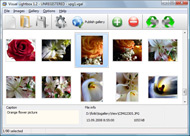
It's no secret that adding photos to your blog posts is one of the most effective ways to enhance your blog and attract attention to your writing. Flickr has millions of photos available in its database. A simple FREE tool called Flickr Gallery allows you to create a custom image gallery with a cool slide show of the most recent and most interesting photos from Flickr on your website or blog in a few easy steps. Just visit Flickr website and find photostream, photoset or a single photo you like. Enter the address of flickr page to add all photos from this page in your gallery, select the style of thumbnails and the overlay window and add the HTML embed code on your website or blog.
A few clicks and you'll see a stylish photo gallery with beautifull lightbox and zoom effects on your own website or blog!


Flickr Gallery for Windows   Flickr Gallery for MAC

Want more?

Example

Lightbox gallery sample

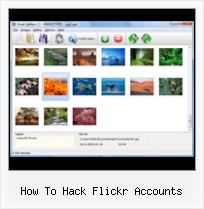
The following image set is generated by Flickr Gallery tool. Click any picture to run Lightbox gallery.

The example above is an in-page usage demo of Lightbox script with Flickr images. The lightbox gallery created with Flickr Gallery application is placed inside the page layout. You can also check the full-page demo gallery. This example takes whole browser area to show the website gallery.Geotag Album Flickr

How to Use

Step 1. Adding flickr images to your own gallery.


Locate the photo, photoset or photostream you want to use in your Flickr slideshow. Click on it to see the photo on its own page.

Copy URL of the flickr page.

Select Add images from Flickr... from the 'Add' button on the Toolbar.

Add images from Flickr

In the appeared window paste URL of the flickr page. Specify also the number of photos you want to add from the flickr page. Flickr Gallery will now include these photos in your project.

Add images from Flickr

If you have included the photos that you do not wish to be in your web gallery, you can easily remove them. Select all images that you wish to remove from photo gallery, and select Delete images. from the Images menu. You can pick and choose pictures by holding the CTRL while clicking the pictures you like.

Step 2. Adding caption.

The name of the photo on flickr page will automatically appear in the caption. When you select a photo you'll see the various info about it, such as: Path, Size, date of last change and Caption. You can add any comment or text about the photo (up to 512 symbols).

Step 3. Gallery properties.

Change the name of your flickr album, the size and quality of your pictures with Flickr Gallery. From the Gallery menu, select Properties or use "Edit Gallery Properties" button on the toolbar.

On the first tab of the Gallery Properties window you can change the name of your photo album and enable/disable the following properties: Slide Show, Auto play Slide Show, Zoom effect, Overlay Shadow. You can also set the Overlay shadow color and select the Engine you want to use (jQuery or Prototype + script.aculo.us).

On the second tab of the Gallery Properties window you can select the thumbnail you want to use, set the Thumbnails Resolution, Thumbnails Quality, Thumbnails Titles. Select Thumbnails Format (save in PNG or JPG format). Specify the Number of columns in you photo album and the Page color.

On the third tab of the Gallery Properties window you can select the template, Image resolution and Image quality of your pictures and change the Watermark.

You can set up the various sizes for exported images.

Control the quality of output PNG or JPEG format image by defining output "Image quality" and "Thumbnail quality" parameters (0%…100%).

Step 4. Save your photo gallery as project file.

When you exit Flickr Gallery application, you'll be asked if you want to save your project. The project consists of the pictures you choose to put on your web photo gallery and all your settings. It's a good idea to save the project, because that will allow you to change the project in case you decide to do something different with future galleries. So click Yes, then enter a name for your project. To select the location of your project, just click the Browse folders button and choose a different location. Then click Save.

Flickr Slideshow Website Integration How To Hack Flickr Accounts

Download Flickr Gallery


Download Flickr Gallery Download Free Edition
for Windows
Download Flickr Gallery Download Free Edition
for MAC

Flickr Gallery is free for non-commercial use.

A small fee is required for business use. Flickr Gallery Business Edition additionally provides an option to remove the Flickr Gallery. Com credit line as well as a feature to put your own logo to images. After you conclude the payment via the secure form, you will receive a license key instantly by e-mail that turns the Flickr Gallery Free Edition into a Business one. You can select the most suitable payment mode: bank transfer, credit card, PayPal, check etc. Also you can get Business Edition for free if you help with translating Flickr Gallery into your native language, please contact us at for more info.

Download My Flickr Pictures

Buy Flickr GalleryBuy Business Edition
for Windows

$49
Single Website
$69
Unlimited Websites
Buy Flickr GalleryBuy Business Edition
for MAC

$49
Single Website
$69
Unlimited Websites

Support

For feature requests, troubleshooting, general help contact Customer Support at . Make sure to include details on your Flickr Gallery version, operating system, browser and a link (or relevant code).Flickr Embed Apps

Feedback

    * Great product by the way and saved me loads of time. I really like your Flickr Gallery program! Very nice.

    * I LOVE your free Lightbox2 software tool and will purchase the business version shortly. I have seen the Lightbox JS effect used with video tutorials and I was hoping you have a version for video that I can purchase.
Video LightBox: http://videolightbox.com

    * Just a quick thank you for the software though, It's not often you get a free software version of this quality and style! Well done and please continue this amazing gallery. Hope to see more advances.Flickr Square Badge

    * Just bought the business version of Flickr Gallery and I just had to write and say how impressed I am with it. Really easy to use, intuitive interface and generates a truly professional presentation. Seldom have I been so pleased with a software purchase. Thank you.

FAQ

Q:I would like to center all the thumbnails and I cannot figure out how.Can you please help?

A:Try to use <div> tag or <table> tag to center your thumbnails. Flickr Gallery generates a special code.
Just paste it in <div> tag.
You can also place in <dierates a special code.
Just paste it in <div> tag.
You can also place in <div> tag your iframe.
And then use the alignment that you ned.


RELATED

Flickr Hack: How to Allow Users to Search Your Flickr Account Want users of your blog to be able to search through your flickr account? Oh, yeah… wouldn’t that be coool! Well, here’s the code

Most 40+ Tools And Tips For Flickr Lovers How to embed a Flickr slideshow in your blog: There's a lot of ways to get your Flickr photos onto a web page Publish Photos to Flickr from your Nokia Phone: Did you know that it is possible to upload pictures from your Nokia N series phone to your Flickr account ? A lot of Nokia N series mobile

30+ Top Flickr Hacks for Bloggers, Photographers, and blogging hacks, creative commons, creative commons license, dave weinberger, del.icio.us hacks, delicious, digg, flickr dna, flickr education, flickr hacks, flickr how to, flickr tips, flickr tools, free photography tips, free tips, keynote Enclosed you will find 30+ flickr hacks, tips, and how-tos

Flickr Hacks: Top 10 Tips and Tricks Flickr is the most popular photo-sharing service. There's a lot you can do with your Flickr account using some Tips from us which includes use of 3rd party

Top 10 Flickr Hacks I have a Flickr account, and I take plenty of photos, but I find myself not using it as much as I feel I ought I have a Flickr account, and I take plenty of photos, but I find myself not using it as much as I feel I ought to. Maybe Thomas Hawk's list of Top 10 Hacks on Flickr will help remedy that

GeekTonic: The Ultimate Flickr Tools Hacks and Scripts Database This entry was posted on 9/19/2007 01:16:00 AM and is filed under flickr , hack , How To , media center , photos , Recommended Links . You can follow any responses to this entry through the RSS 2.0 feed. or trackback from your own site. The Ultimate Flickr Tools Hacks and Scripts Database

Flickr as a Business Tool I was puzzling over a note in Dave Gray's Flickr account, and by note, I mean a photo of a note he'd taken at a conference, when it struck me: Flickr is

Flickr Guide: How to Do Everything with Flickr Flickr Guide will show you how to do everything on Flickr. You can download and backup flickr pictures, set them as rotating wallpapers, browse pictures in 3D, make a screensaver and more

Flickr Hack – How to Backup Your Flickr Photos! For those of you Flickr-obssesed pro users, you will definitely need to look into how to backup your Flickr photos using FlickrEdit, a free Java-based

Flickr: Discussing I need to hack into my flickr account in Flickr is almost certainly the best online photo management and sharing application in the world. Show off your favorite photos and videos to the world, securely and privately show content to your friends and family, or blog the photos and videos

How To Hack A Flickr : Flickr Gallery How To Hack A Flickr. Don't allow your web site visitors to get lost! Try Flickr Slideshow!. How To Get Photos Off Flickr

Backup Your Flickr Photos With Flickrfs - Wired How-To Wiki The creator of Flickrfs, who goes by tuxmann on Flickr, uploads all of his photos using his hack. What's Flickr doing to you now? Pondering a possible purchase at the hands of Microsoft? How to Proceed. Flickrfs is a virtual filesystem which mounts your Flickr account on a Linux machine, allowing

Find Flickr Pro account Videos at 5min.com Now that you've signed up for your Flickr account, it's time to get personal. If you have a mobile phone and a Flickr account, it's easy to post to your photostream from anywhere, no computer required

10 Best Flickr Upload Tools For those who are using flickr to upload there images, i have made some best tool list which helps them to upload there pictures on Flickr.com. UploadrXL

Post to Twitter from Flickr (the official way) | Webware - CNET If you've been waiting for an official way to post your Flickr photos to Twitter, Flickr has an answer, and may be providing hosting for Twitter users with a new service. Read this blog post by Josh Lowensohn on Webware

Thomas Hawk Digital Connection " Blog Archive " Top 10 Hacks Some companies like SmugMug make this customization part of how they diferentiate from Flickr. Flickr is torn because while you might like to give users more control over the design of the photos, if you're not careful, the next Nice hack for uploading photo booth photos to flickr if you happen to

Flickr Hacks It allows you to easily upload your Photo Booth photos to your Flickr account with the click of a button. that is quite fun to play around with. The app was created by Yahoo Research Berkley and is a really good example of a well done mashup. | 0 comments. Flickr Hacks

iPhone Tips & Tricks: Upload photos from your iPhone to If you want to upload the photos from your iPhone to your Flickr account then here is some good news. Thanks to an iPhone tip from Erica @ Tuaw; you can easily upload the latest photo that you have clicked using your iPhone's 2.0 mega pixel

Flickr " Wonder How To Flickr | Watch how to videos & articles tagged "flickr" on Wonder How To, like Upload iPhoto pictures directly to Flickr and Facebook, Use Flickr to share photos on the Internet, and Import Flickr photos to Facebook

Flickr Hacks - O'Reilly Media Flickr Hacks expands the fun and the utility of Flickr, Yahoo!'s popular digital photo-sharing service, by customizing this cutting-edge technology to store, sort, and share photos. The book adopts the game-like appeal of the Flickr site, in

How to Connect Facebook Account with Your Flickr Account Simple step to connect Facebook and Flickr account using official Flickr Facebook connect service

10 More Flickr Hacks - Strategic Public Relations One of my most popular posts is 10 Flickr Hacks. Here are 10 more Flickr Hacks that you'll find just as useful. 1) Flickr Mashup: Create a Flickr music video using PhotoStory 3 or iPhoto. Putting a slide show to music is easy and can really help

Automatically upload a folder's photos to Flickr I love Flickr, but I'm terrible at uploading pics to my Flickr account. It's not that there aren't already a lot of great tools for getting photos into Flickr (there are); but I need a way to monitor my pictures folder to upload everything I

Add Watermarks For Flickr Photos [How To] The integration of Flickr and Picnik has just make things greater, now you can add watermarks to your Flickr photos inside your Flickr account. Here's how you

Amazon.com: Flickr Hacks: Tips & Tools for Sharing Photos Hack #6 shows how that works, and it explains how Flickr can often serve as a real-time For those new to Flickr, Flickr Hacks introduces you to the basics of setting up an account, uploading your photos to the site, sharing your

QTSaver Relevant Micro Content Search Engine Results: Flickr Guide Note: This page tells you how to set up an account with Flickr, and how to get the most out of your account once it's up and running. How to Create a Flickr Account By: expertvillage * How to Pay For Your Flickr Prints By: eHow Internet Editor

