



Overview

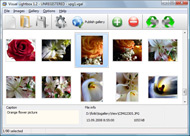
It's no secret that adding photos to your blog posts is one of the most effective ways to enhance your blog and attract attention to your writing. Flickr has millions of photos available in its database. A simple FREE tool called Flickr Gallery allows you to create a custom image gallery with a cool slide show of the most recent and most interesting photos from Flickr on your website or blog in a few easy steps. Just visit Flickr website and find photostream, photoset or a single photo you like. Enter the address of flickr page to add all photos from this page in your gallery, select the style of thumbnails and the overlay window and add the HTML embed code on your website or blog.
A few clicks and you'll see a stylish photo gallery with beautifull lightbox and zoom effects on your own website or blog!


Flickr Gallery for Windows   Flickr Gallery for MAC

Want more?

Example

Lightbox gallery sample

The following image set is generated by Flickr Gallery tool. Click any picture to run Lightbox gallery.

The photo gallery above is an in-page usage demo of Lightbox gallery that uses images from Flickr. The gallery created with Flickr Gallery application is placed inside the page layout. You can also check the full-page demo slideshow. This example takes whole browser area to show the Lightbox gallery that uses images from Flickr.Link A Set Flickr Web

How to Use

Step 1. Adding flickr images to your own gallery.


Locate the photo, photoset or photostream you want to use in your Flickr slideshow. Click on it to see the photo on its own page.

Copy URL of the flickr page.

Select Add images from Flickr... from the 'Add' button on the Toolbar.

Add images from Flickr

In the appeared window paste URL of the flickr page. Specify also the number of photos you want to add from the flickr page. Flickr Gallery will now include these photos in your project.

Add images from Flickr

If you have included the photos that you do not wish to be in your web gallery, you can easily remove them. Select all images that you wish to remove from photo gallery, and select Delete images. from the Images menu. You can pick and choose pictures by holding the CTRL while clicking the pictures you like.

Step 2. Adding caption.

The name of the photo on flickr page will automatically appear in the caption. When you select a photo you'll see the various info about it, such as: Path, Size, date of last change and Caption. You can add any comment or text about the photo (up to 512 symbols).

Step 3. Gallery properties.

Change the name of your flickr album, the size and quality of your pictures with Flickr Gallery. From the Gallery menu, select Properties or use "Edit Gallery Properties" button on the toolbar.

On the first tab of the Gallery Properties window you can change the name of your photo album and enable/disable the following properties: Slide Show, Auto play Slide Show, Zoom effect, Overlay Shadow. You can also set the Overlay shadow color and select the Engine you want to use (jQuery or Prototype + script.aculo.us).

On the second tab of the Gallery Properties window you can select the thumbnail you want to use, set the Thumbnails Resolution, Thumbnails Quality, Thumbnails Titles. Select Thumbnails Format (save in PNG or JPG format). Specify the Number of columns in you photo album and the Page color.

On the third tab of the Gallery Properties window you can select the template, Image resolution and Image quality of your pictures and change the Watermark.

You can set up the various sizes for exported images.

Control the quality of output PNG or JPEG format image by defining output "Image quality" and "Thumbnail quality" parameters (0%…100%).

Step 4. Save your photo gallery as project file.

When you exit Flickr Gallery application, you'll be asked if you want to save your project. The project consists of the pictures you choose to put on your web photo gallery and all your settings. It's a good idea to save the project, because that will allow you to change the project in case you decide to do something different with future galleries. So click Yes, then enter a name for your project. To select the location of your project, just click the Browse folders button and choose a different location. Then click Save.

Pulling Flickr Api Image Gallery How To Become Popular On Flickr

Download Flickr Gallery


Download Flickr Gallery Download Free Edition
for Windows
Download Flickr Gallery Download Free Edition
for MAC

Flickr Gallery is free for non-commercial use.

A small fee is required for business use. Flickr Gallery Business Edition additionally provides an option to remove the Flickr Gallery. Com credit line as well as a feature to put your own logo to images. After you complete the payment via the secure form, you will receive a license key instantly by email that turns the Flickr Gallery Free Edition into a Business one. You can select the most suitable payment method: credit card, bank transfer, check, PayPal etc. Also you can get Business Edition for free if you help with translating Flickr Gallery into your native language, please contact us at for more info.

Flickr Slideshow To Repeat

Buy Flickr GalleryBuy Business Edition
for Windows

$49
Single Website
$69
Unlimited Websites
Buy Flickr GalleryBuy Business Edition
for MAC

$49
Single Website
$69
Unlimited Websites

Support

For general help, troubleshooting and feature requests contact Customer Support at . Make sure to include details on your Flickr Gallery version, browser, operating system and a link (or relevant code).Image Slider Flickr Like

Feedback

    * Great product by the way and saved me loads of time. I really like your Flickr Gallery program! Very nice.

    * This looks like EXACTLY what I need for my site. It would make my job much faster! Love your program. Thank you!!

    * I tried Flickr Gallery and for me its a very cool and usefull application. Its so easy to manage my galleries and it looks very nice.Tumblr Type Of Blog Flickr

    * Another programmes have incredible functionality but no fantastic interface like your product!

FAQ

Q:I would like to have a few galleries in one website and even on one page.

A:To create several galleries on your page you should change following parameter in A tag for different galleries:

rel="lightbox_vlb"

For example, for the first gallery you should set rel="lightbox_vlb":

<!-- Start Flickr Gallery.com BODY section -->
<div id="vlightbox">
<a rel="lightbox_vlb" href="data/images/dscn6831.jpg" title="dscn6831" >
<img src="data/thumbnails/dscn6831.png" ><span></span></a>
<a rel="lightbox_vlb" href="data/images/dscn6823.jpg" title="dscn6823">
<img src="data/thumbnails/dscn6823.png"><span></span></a>
<a id="vlb" href="http://Flickr Gallery.com">Photo Gallery For Web by Flickr Gallery.com v2.0</a>
</div>
<!-- End Flickr Gallery.com BODY section -->

and for the second gallery rel="lightbox_vlb1":

<!-- Start Flickr Gallery.com BODY section -->
<div id="vlightbox">
<a rel="lightbox_vlb1" href="data/images/img_0501.jpg" title="img_0501">
<img src="data/thumbnails/img_0501.png"><span></span></a>
<a rel="lightbox_vlb1" href="data/images/img_0481.jpg" title="img_0481">
<img src="data/thumbnails/img_0481.png"><span></span></a>
<a id="vlb" href="http://Flickr Gallery.com">Photo Gallery For Web by Flickr Gallery.com v2.0</a>
</div>
<!-- End Flickr Gallery.com BODY section -->


RELATED

How do i find my most popular Flickr photos? - Yahoo! Answers I've seen some people who have sets of their most if you don't know which of your photos are the most popular on flickr then sign in to flickr, click on 'You' button on the menu and then click on the option 'Popular'. hope this helps. Source(s): more than three years on flickr

iPhone 4 Set To Become Most Popular Camera On Flickr iPhone 4 Set To Become Most Popular Camera On Flickr. Apple's mobile juggernaut is currently storming the charts, and ready to unseat the venerable Flickr keeps track of which camera models are the most popular amongst its users, and for the first time a cellphone is set to take the top spot

How to Use Flickr, Using Flickr, Steps to Use Flickr By knowing how to use Flickr you can do photo sharing. Photo sharing is the new trend of communicating over online communities. Flickr has become a popular tool in providing free photo hosting and sharing services online. This article serves as a

How to be popular and have lots of friends. For Christians Christian teens -- want to be popular and have a lot of Christian friends? Here's how you can increase your popularity

Flickr 13: How to Download Flickr Photos in a Batch. All pictures will download to your hard disk in one go. The content is copyrighted to Amit Agarwal and may not be reproduced on other websites

IPhone 4 Becoming Most Popular 'Camera' on Flickr - NYTimes.com Data from the photo Web site Flickr shows the iPhone 4 quickly becoming the most popular camera on the site. According to a series of graphs that show the top cameras used on Flickr, the social photo Web site, the iPhone 4 is quickly becoming the No. 1 camera among its users

Soon, The iPhone 4 Will Be Flickr's Most Popular Camera how to sponsor us. Soon, The iPhone 4 Will Be Flickr's Most Popular Camera. BY Joe White on Mon April 18th, 2011 flickr. In the coming months, the iPhone 4 will become Flickr's most popular camera – overtaking the Nikon D90, which currently holds the top spot

iPhone to Become #1 Camera on Flickr For the longest time, the Canon EOS Digital Rebel XTi has been the most widely used camera on Flickr. With a 10.1 MP Lens, an image sensor vibration clean

iPhone: the most popular camera in the world - PHOTO.BLORGE iPhone: the most popular camera in the world If you argue the point look at the sad that on Flickr the most popular camera phone for providing shots is the iPhone. Of course, you would not be surprised that it is more popular as a digital phone than Nokia or even Sony Ericsson with its K600i

Richard's Notes " Blog Archive " Flickr Explore I know there are many more ways to game Explore and the more technically sophisticated flickr users have come up with ways that are both ingenious and fascinating and maybe sick at the same time (how far will people go to become popular?). Flickr Scout and trophy walls

iPhone 4 set to become most popular camera on Flickr As if you didn't need more proof that mobile phones are killing the point-and-shoot market: the iPhone 4 is about to become the most popular camera used on Flickr. Flickr's camera finder shows a graph of the most popular cameras in the Flickr community

Flickr Expert Tips: How to Make the Photo Site Work for You Managing and sharing your photos at Flickr will become easier and more fun with these tips and tricks. Flickr is the most popular place on the Web for people to share and manage their photos, and to view images taken by others

iPhone Has Become The Most Popular Camera On Flickr The iPhone's camera may not be perfect, but it's quickly become the most popular camera on Flickr. Add to it the fact that I always have the camera with me and you'll find me a very happy consumer. It seems that's the case with

iPhone one of the most popular cameras on Flickr - MAC.BLORGE The Flickr function that tracks camera usage is called the Flickr Camera Finder, and it shows that the iPhone has become not only the most popular cell phone camera, but also one of the most popular of all cameras used to take the photos that you see on Flickr!

How to Use Flickr - Associated Content from Yahoo! Flickr is an online community where users upload photos and join groups, this post will teach you about some of the different features of Flickr and how to use them. 1-- Upload photos. Once How to Become a Photographer Photography is a field that is becoming increasingly popular these days. Some

How to Become a Ninja | Flickr - Photo Sharing! Now armed in present day Tokyo with Ninja armory and a Ninja license. Still more to come from Edo Wonderland in Nikko! Sparks by Static. View more at www.dannychoo.com/post/en/25848/How+to+Become+a+Ninja.html

How to Become Popular on Tumblr Internet fame is the new reality fame. Everyone's doing it! People are becoming known on the up and coming blog, Tumblr. Here's how to go about achieving that fame!

Getting Started With Flickr - Learn What The Popular Photo You've heard about Flickr.com, but you have no idea how to use it. This article series takes you from getting started and making an account on Flickr and adding your first digital photo, all the way to finding and adding friends and joining

Flickr Map Embed : Flickr Gallery Flickr Map Embed. Make professional online photo album software in minutes with Flickr Slideshow!. Integrate Flickr Slideshow Jquery Add interactivity to your pages: How to put a Google Map This means that although the map, video or photos actually exists on Google, YouTube, Odeo or Flickr--you can

How you can use Flickr to drive huge traffic to your blog? Flickr is one of the great way to drive traffic to your blog and you can easily attain it by giving a link back to your blog with anchor text on comments or pic Remember my post on how to become Digg power user?

How to Become Popular While being popular may not be the most important thing in the world, it's always nice to know that people like you. But how does one boost their ability to make friends and be loved by everybody? This page will show you how to

Last.fm: The Most Popular Music API? ProgrammableWeb.com keeps you up to date with web mashups and APIs: what's new, interesting, useful and important. Hundreds of mashups and APIs. Contribute, search, view, and chart them

Apple's iPhone 4 Will Soon Become the Most Popular Camera on Apple's iPhone 4 Will Soon Become the Most Popular Camera on Flickr According to the graphs on Flickr's Camera Finder, iPhone 4 which is currently #2 is nudging closer to Nikon's D90 to become the most popular camera on the popular image sharing site. Here are some of the reasons why iPhone 4 is

iPhone 4 about to be most popular camera on Flickr | Phones As if you didn't need more proof that cell phones are killing the point-and-shoot market: the iPhone 4 is about to become the most popular camera used on the Flickr photo-sharing service

