



Overview

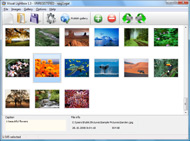
It's no secret that adding photos to your blog posts is one of the most effective ways to enhance your blog and attract attention to your writing. Flickr has millions of photos available in its database. A simple FREE tool called Flickr Gallery allows you to create a custom image gallery with a cool slide show of the most recent and most interesting photos from Flickr on your website or blog in a few easy steps. Just visit Flickr website and find photostream, photoset or a single photo you like. Enter the address of flickr page to add all photos from this page in your gallery, select the style of thumbnails and the overlay window and add the HTML embed code on your website or blog.
A few clicks and you'll see a stylish photo gallery with beautifull lightbox and zoom effects on your own website or blog!


Flickr Gallery for Windows   Flickr Gallery for MAC

Want more?

Example

Lightbox gallery sample

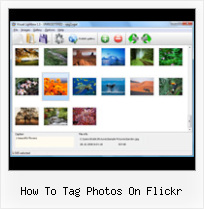
The following image set is generated by Flickr Gallery tool. Click any picture to run Lightbox gallery.

The example above is an in-page usage demo of Lightbox script with Flickr images. The photo gallery created with Flickr Gallery tool is placed inside the html page. You can also check the full-page demo web gallery. This example takes whole browser area to show the web gallery.Flickr Gallery Implementation

How to Use

Step 1. Adding flickr images to your own gallery.


Locate the photo, photoset or photostream you want to use in your Flickr slideshow. Click on it to see the photo on its own page.

Copy URL of the flickr page.

Select Add images from Flickr... from the 'Add' button on the Toolbar.

Add images from Flickr

In the appeared window paste URL of the flickr page. Specify also the number of photos you want to add from the flickr page. Flickr Gallery will now include these photos in your project.

Add images from Flickr

If you have included the photos that you do not wish to be in your web gallery, you can easily remove them. Select all images that you wish to remove from photo gallery, and select Delete images. from the Images menu. You can pick and choose pictures by holding the CTRL while clicking the pictures you like.

Step 2. Adding caption.

The name of the photo on flickr page will automatically appear in the caption. When you select a photo you'll see the various info about it, such as: Path, Size, date of last change and Caption. You can add any comment or text about the photo (up to 512 symbols).

Step 3. Gallery properties.

Change the name of your flickr album, the size and quality of your pictures with Flickr Gallery. From the Gallery menu, select Properties or use "Edit Gallery Properties" button on the toolbar.

On the first tab of the Gallery Properties window you can change the name of your photo album and enable/disable the following properties: Slide Show, Auto play Slide Show, Zoom effect, Overlay Shadow. You can also set the Overlay shadow color and select the Engine you want to use (jQuery or Prototype + script.aculo.us).

On the second tab of the Gallery Properties window you can select the thumbnail you want to use, set the Thumbnails Resolution, Thumbnails Quality, Thumbnails Titles. Select Thumbnails Format (save in PNG or JPG format). Specify the Number of columns in you photo album and the Page color.

On the third tab of the Gallery Properties window you can select the template, Image resolution and Image quality of your pictures and change the Watermark.

You can set up the various sizes for exported images.

Control the quality of output PNG or JPEG format image by defining output "Image quality" and "Thumbnail quality" parameters (0%…100%).

Step 4. Save your photo gallery as project file.

When you exit Flickr Gallery application, you'll be asked if you want to save your project. The project consists of the pictures you choose to put on your web photo gallery and all your settings. It's a good idea to save the project, because that will allow you to change the project in case you decide to do something different with future galleries. So click Yes, then enter a name for your project. To select the location of your project, just click the Browse folders button and choose a different location. Then click Save.

Image Slider With Flickr How To Tag Photos On Flickr

Download Flickr Gallery


Download Flickr Gallery Download Free Edition
for Windows
Download Flickr Gallery Download Free Edition
for MAC

Flickr Gallery is free for non-commercial use.

A small fee is required for business use. Flickr Gallery Business Edition additionally provides an option to remove the Flickr Gallery. Com credit line as well as a feature to put your own logo to images. After you finish the payment via the secure form, you will receive a license key instantly by email that turns the Flickr Gallery Free Edition into a Business one. You can select the most suitable payment mode: bank transfer, check, credit card, PayPal etc. Also you can get Business Edition for free if you help with translating Flickr Gallery into your native language, please contact us at for more info.

Insert Flickr On Sidebar Script

Buy Flickr GalleryBuy Business Edition
for Windows

$49
Single Website
$69
Unlimited Websites
Buy Flickr GalleryBuy Business Edition
for MAC

$49
Single Website
$69
Unlimited Websites

Support

For general help, feature requests, troubleshooting contact Customer Support at . Make sure to include details on your Flickr Gallery version, operating system, browser and a link (or relevant code).Flickr Photostream Gadget Blogger

Feedback

    * Just a quick thank you for the software though, It's not often you get a free software version of this quality and style! Well done and please continue this amazing gallery. Hope to see more advances.

    * Let me start just congratulating you, good job, really. I am trying out the free version before I buy it. It works great.

    * I have just bought this product and think it is great. As it is extremely easy to use it is something I could get my clients to purchase to upload their own portfolio and latest projects etc.Add Logo To Flickr Image

    * Great product by the way and saved me loads of time. I really like your Flickr Gallery program! Very nice.

FAQ

Q:How do I embed the lightbox image gallery into an existing page?

A:To install Flickr Gallery gallery on your page you should:

1. Create your gallery in Flickr Gallery and publish it on a local drive in any test folder.
2. Open index.html file from the saved folder in any text editor.
3. Copy code for the HEAD section and paste it inside the HEAD section of you own webpage, for example:

<head>
...
<!-- Start Flickr Gallery.com HEAD section -->
<link rel="stylesheet" href="engine/css/vlightbox.css" type="text/css" />
<style>#vlightbox a#vlb{display:none}</style>
<link rel="stylesheet" href="engine/css/Flickr Gallery.css" type="text/css" media="screen" />
<script src="engine/js/jquery.js" type="text/javascript"></script>
<script src="engine/js/jquery.tools.min.js" type="text/javascript"></script>
<script src="engine/js/visuallightbox.js" type="text/javascript"></script>
<!-- End Flickr Gallery.com HEAD section -->

...
</head>


4. Copy code for the BODY section and paste it inside the Body section of you own webpage in the place where you want to have a gallery, for example:

<body>
...
<!-- Start Flickr Gallery.com BODY section -->
<div id="vlightbox">
<a rel="lightbox_vlb" href="data/images/dscn6831.jpg" title="DSCN6831"><img src="data/thumbnails/dscn6831.png"><span></span></a>
<a rel="lightbox_vlb" href="data/images/dscn6823.jpg" title="DSCN6823"><img src="data/thumbnails/dscn6823.png"><span></span></a>
<a rel="lightbox_vlb" href="data/images/dscn6819.jpg" title="DSCN6819"><img src="data/thumbnails/dscn6819.png"><span></span></a>
<a id="vlb" href="http://Flickr Gallery.com">Photo Gallery For Web by Flickr Gallery.com v2.1</a>
</div>
<!-- End Flickr Gallery.com BODY section -->

...
</body>


5. Copy 'data' folder with images and thumbnails and 'engine' folder with .css and .js files into the same folder with your own webpage.
You can find the example on our website:
http://www.Flickr Gallery.com/#example


RELATED

Flickr How To Tag : Flickr Gallery Flickr How To Tag. Online photo albums created with Flickr Slideshow are fully compatible with all modern Windows and MAC browsers!. Flickr Junior Diver

Photo tag 'face-off' proves vanity reigns supreme | Webware From identification to organization, photo tags can be a useful. But a closer look reveals most users do it for selfish reasons. Read this blog post by Josh Lowensohn on Webware

Create a Flickr Viewer using Flex - The Tech Labs In this tutorial, you will learn how to integrate photos from Flickr in your Flex application, using as3flickrlib

Flickr vs Picasa Web Albums: Where are tags, Photo notes However, in Flickr you can subscribe to photos based on Tags. for picasa to have a flickr plugin, in where you could specify which album to upload it to and where the labels you put on the photos in picasa

Make: Online | HOW TO GPS Tag Photos: Flickr, Mappr, Google Earth HOW TO GPS Tag Photos: Flickr, Mappr, Google Earth . Here's the simple, non-techy way of tagging photos with the location of where you took them on planet Earth. There are lots of ways to do this, and I'll write about those later- but this is fun thing to do over the holiday weekend

How to Upload and Organize Photos with Flickr | Photo HowTo Steps 3: How to Organize Photos. If you want to edit your photo on Flickr online community, Click on the Jump to date link located on the right side, to go to a specific date in

How To Use Slickr Flickr To Create a Slideshow Or Gallery Step by step instructions of how to get the most of the Flickr photos using slideshows and galleries Log in to your Flickr account and tag all the photos you want to display on a particular page of your wordpress site

How-To Tag and Edit Photo and Image Metadata Using Microsoft Like most people who own a Digital Camera, I take a lot of pictures and unfortunately sometimes I feel like I spend more time FINDING my photos than actually

Flickr® for mobile Get Flickr on your phone from Yahoo! It's the photo sharing service that let's you can take photos, upload them, and share them with family and friends from your phone

How To Tag And Organize Your Photos on Flickr Once you upload photos and videos to your account you can sort and organize you photos. You can also tag your photos, which is adding a headline or label to your photo

Flickr - Wikipedia, the free encyclopedia A screenshot of hot tags on Flickr. Flickr asks photo submitters to organize images using tags (a form of metadata), which enable It allows users to modify tags, descriptions, and set groupings, and to place photos on a world map (a

How To Tag Your Friends In Photos On Flickr Now you can tag your friends and all other people in your Flickr photos. This may sound familiar from other services like Facebook. It took Flickr a while to

Find share photos on Flickr Videos at 5min.com Uploading and Sharing Photos on Flickr. Mike Agerbo shows us how to use Flickr to upload and share your photos. As your Flickr photostream grows, it's important to take a look at how you're allowing others to use your photos

How to Tag Other People's Images in Flickr - wikiHow wikiHow article about How to Tag Other People's Images in Flickr. Adding tags to Flickr images helps the photos to come up in a viewer's search on any particular subject

Flickr Tag Recommendation based on Collective Knowledge analyse a representative snapshot of Flickr and present the. results by means of a tag portant to analyse why, how, and what users are tagging. The focus in this section is on how users tag their photos. The collection we use in this

Search Flickr Photos by Tags RGB80 is useful website which allows you to search Flickr photos by the tags. Flickr has a vast collection of photos and RGB80 simplifies searching these photos

How To Display Flickr Photos With A Tag - Beth's Blog Click to Flickr Photos Tagged with 07ntc in A Slide Show Presentation I got asked this question several times during various presentations/panels at I was on at the NTC, including the Flickr Affnity Group session on Wednesday. The question, "How

How to Tag Photos on Flickr | eHow.com How to Tag Photos on Flickr. Flickr allows you to share with family and friends. After adding them to this site, you can organize them by date. Later, when you need to view certain photos, you can simply bring up photos taken by a

flickr Related Resources With the new Facebook photo badge, you can embed your most recently uploaded Facebook photos on external sites like blogs, social networks or.. 9. Upload Photos to Twitter via Flickr Email. Learn how to upload photographs to your Twitter account via email from Flickr or Posterous

Embedding Flickr Photos Flickr exposes rich sets of open API via Web Services, which allows you to write your own program to fetch Flickr data such as photos, tags, groups and profiles. Double click on the Button and enter the following code to fetch the Photos corresponding to the tag and display it in the Grid Panel

Get the Most Out of Flickr - Wired How-To Wiki Flickr Basics. 1. Tag photos with multiple keywords so you can find that incriminating bachelor-party-in-Vegas-with-Chad pic at a moment's notice. 2. Use the "add note" button in the Flickr toolbar to annotate Comment on users' work, ask about techniques, and check camera settings (they're included

Flickr: Help: Photos Flickr is almost certainly the best online photo management and sharing application in the world. Show off your favorite photos and videos to the world, securely and privately show content to your friends and family, or blog the photos and videos

