


Overview

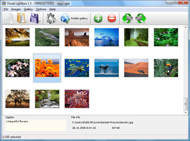
It's no secret that adding photos to your blog posts is one of the most effective ways to enhance your blog and attract attention to your writing. Flickr has millions of photos available in its database. A simple FREE tool called Flickr Gallery allows you to create a custom image gallery with a cool slide show of the most recent and most interesting photos from Flickr on your website or blog in a few easy steps. Just visit Flickr website and find photostream, photoset or a single photo you like. Enter the address of flickr page to add all photos from this page in your gallery, select the style of thumbnails and the overlay window and add the HTML embed code on your website or blog.
A few clicks and you'll see a stylish photo gallery with beautifull lightbox and zoom effects on your own website or blog!


Flickr Gallery for Windows   Flickr Gallery for MAC

Want more?

Example

Lightbox gallery sample

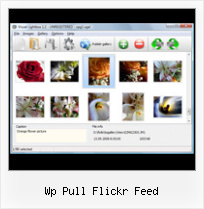
The following image set is generated by Flickr Gallery tool. Click any picture to run Lightbox gallery.

The example above is an in-page usage demo of Lightbox script with Flickr images. The lightbox gallery created with Flickr Gallery application is placed inside the page layout. You can also check the full-page demo gallery. This example takes whole browser area to show the website gallery.Flickr Ftp Images

How to Use

Step 1. Adding flickr images to your own gallery.


Locate the photo, photoset or photostream you want to use in your Flickr slideshow. Click on it to see the photo on its own page.

Copy URL of the flickr page.

Select Add images from Flickr... from the 'Add' button on the Toolbar.

Add images from Flickr

In the appeared window paste URL of the flickr page. Specify also the number of photos you want to add from the flickr page. Flickr Gallery will now include these photos in your project.

Add images from Flickr

If you have included the photos that you do not wish to be in your web gallery, you can easily remove them. Select all images that you wish to remove from photo gallery, and select Delete images. from the Images menu. You can pick and choose pictures by holding the CTRL while clicking the pictures you like.

Step 2. Adding caption.

The name of the photo on flickr page will automatically appear in the caption. When you select a photo you'll see the various info about it, such as: Path, Size, date of last change and Caption. You can add any comment or text about the photo (up to 512 symbols).

Step 3. Gallery properties.

Change the name of your flickr album, the size and quality of your pictures with Flickr Gallery. From the Gallery menu, select Properties or use "Edit Gallery Properties" button on the toolbar.

On the first tab of the Gallery Properties window you can change the name of your photo album and enable/disable the following properties: Slide Show, Auto play Slide Show, Zoom effect, Overlay Shadow. You can also set the Overlay shadow color and select the Engine you want to use (jQuery or Prototype + script.aculo.us).

On the second tab of the Gallery Properties window you can select the thumbnail you want to use, set the Thumbnails Resolution, Thumbnails Quality, Thumbnails Titles. Select Thumbnails Format (save in PNG or JPG format). Specify the Number of columns in you photo album and the Page color.

On the third tab of the Gallery Properties window you can select the template, Image resolution and Image quality of your pictures and change the Watermark.

You can set up the various sizes for exported images.

Control the quality of output PNG or JPEG format image by defining output "Image quality" and "Thumbnail quality" parameters (0%…100%).

Step 4. Save your photo gallery as project file.

When you exit Flickr Gallery application, you'll be asked if you want to save your project. The project consists of the pictures you choose to put on your web photo gallery and all your settings. It's a good idea to save the project, because that will allow you to change the project in case you decide to do something different with future galleries. So click Yes, then enter a name for your project. To select the location of your project, just click the Browse folders button and choose a different location. Then click Save.

Embed Flickr Badge Wp Pull Flickr Feed

Download Flickr Gallery


Download Flickr Gallery Download Free Edition
for Windows
Download Flickr Gallery Download Free Edition
for MAC

Flickr Gallery is free for non-commercial use.

A small fee is required for business use. Flickr Gallery Business Edition additionally provides an option to remove the Flickr Gallery. Com credit string as well as a feature to put your own logo to images. After you finish the payment via the secure order form, you will receive a license key instantly by e-mail that turns the Flickr Gallery Free Edition into a Business one. You can select the most appropriate payment method: check, PayPal, credit card, bank transfer etc. Also you can get Business Edition for free if you help with translating Flickr Gallery into your native language, please contact us at for more info.

Create Flickr Slideshow Code Background

Buy Flickr GalleryBuy Business Edition
for Windows

$49
Single Website
$69
Unlimited Websites
Buy Flickr GalleryBuy Business Edition
for MAC

$49
Single Website
$69
Unlimited Websites

Support

For troubleshooting, feature requests and general help contact Customer Support at . Make sure to include details on your Flickr Gallery version, operating system, a link (or relevant code) and a browser.Flickr Rss Jquery

Feedback

    * This looks like EXACTLY what I need for my site. It would make my job much faster! Love your program. Thank you!!

    * I downloaded your trial version to see if I could get it to work with my website, and I am almost there (I have been looking for something like this for ages)..

    * I have purchased the business and LOVE IT..Your product appears easy to use and close to what I need to help several of my clients..Insert Flickr Into Css Website

    * I'm absolutely loving Flickr Gallery Business and Video LightBox. Amazing, quick and painless, to create a custom, browser independent gallery. And it works first time - every time! Best value for money I've seen in quite a while...

FAQ

Q:Is it possible to load a gallery from within image? So the gallery loads externally?

A:You should start the gallery onClick:

1) Add the following function into the <head> tag:

<script type="text/javascript">
function showLightBox()
{ Lightbox.start(document.getElementById('firstImage'));}
</script>

2) Specify the onClick event for the image (or link):
<img src="thumbnail_gr.jpg" onClick="javascript:showLightBox()" title="Click to see the demo" style="cursor: pointer;">
3) Set the ID for any image in your gallery (id="firstImage"), for example add it to the first image:
<a rel="lightbox_vlb" href="data/images/dscn6831.jpg" title="dscn6831" id="firstImage">
4) Use 'display: none;' property for your gallery in engine\css\vlightbox.css. Just change the following code:

#vlightbox a{
display:-moz-inline-stack;
display:inline-block;
zoom:1;
*display:inline;
position:relative;
vertical-align:top;
margin:3px;
width:160px;
font-family:Trebuchet,Tahoma,Arial,sans-serif;
font-size:11px;
font-weight:normal;
text-align:center;
opacity:0.87;
}

to:

#vlightbox a{
display:-moz-inline-stack;
display:none;
zoom:1;
*display:inline;
position:relative;
vertical-align:top;
margin:3px;
width:160px;
font-family:Trebuchet,Tahoma,Arial,sans-serif;
font-size:11px;
font-weight:normal;
text-align:center;
opacity:0.87;
}

RELATED

8 Flickr related WordPress Plugins | WPThemesPlugin.com Flickr Photo Album. The WordPress Flickr Photo Album plugin will pull in your Flickr photosets and display them as albums on your WordPress site. your Flickr account with Simpleviewer in a page or post. WP-Flickr. Make ALL your posts colourful and full of flickr goodness,

flickr pulling the same image every time " WP Robot Support Forum I have an issue with the Flickr module on a campaign it pulls the same exact image every time even though I just assumed the {flickr} tag would pull a random image, not the same one over and over

Richard Shepherd | FlickrBox Get your Flickr API Key and Secret. Before you can setup your blog to pull in your Flickr photos, you need to get your own Flickr API Key and Secret. Flickr window and head on over to WordPress. Unzip FlickrBox.zip into your /wp-content

Flickr Feed Gallery Flickr Feed Gallery. Using Flickr Feed Gallery plugin, blog writers can easily embed Flickr Feed Gallery supports public photo stream, group pool stream,

BLOGSENSE-WP POST TEMPLATING DOCUMENTATION & GUIDE WHAT ARE BlogSense uses the xml api of Flickr and Picasa to pull images from This token selects an RSS item from an RSS feed at random and returns the content in a format defined by the

APAD: Flickr Photo Album " Weblog Tools Collection The WordPress Flickr Photo Album plugin will pull in your Flickr photosets and display Display your Flickr photo sets as albums on your site. Search engine friendly URLs

How To: Pull Your Blog Posts Into Facebook | The Tourism Tech Flickr. Foursquare. Google Buzz. How To. Twitter. Tourism. Web Tech. Apr 30 10. How To: Pull Your to the RSS feed for updates on this topic. Powered by WP Greet Box WordPress Plugin

WordPress photo gallery Plugin - Flickr | Wordpress4Dummies This Flickr plugin for WordPress will allow you to pull in your Flickr photosets and display them as albums on your WordPress site. There is a pretty simple

WP Flickr Background Plugin For Wordpress Hi, This plugin allows to display a photo from Flickr as the theme background without modification requirement in any file of the blog. You just need to create one or more galleries within the help of this plugin, each containing a collection of

WP Robot discount coupon code 41% + cashback 18% WP Robot is the most powerful autoblogging plugin for Wordpress, buy it now at WPwebshop.com with a WORKING discount coupon code and special cashback!

Internet Marketing Secrets Revealed: LIST OF BEST As such, the results you get from WP-o-Matic are only as good as the content you feed into it. replicate the results you'll get from WP Robot, you can visit Amazon, eBay, Yahoo! Answers, YouTube, Flickr, and Twitter yourself

WP Robot 1.2 – Better Than Ever A new version of the excellent WordPress automation plugin, WP Robot, has recently been released by Lunatic Studios. WP Robot allows you to build a completely

fhwrdh.net - powered by FeedBurner p>

Options for Easily Adding Flickr Photos to Your Website This page shows a number of the leading options for quickly and easily adding your Flickr photos to your website or blog (WordPress, Joomla, TextPattern). They all offer some options and customizations

Embed a Flickr feed on your website with jQuery | WebDesign Looking for a quick way to pull your Flickr photos onto your website? Using a lil bit of jQuery and the code below you can pull the latest photos right onto your webpage. Check out the demo and grab the code here

Top 10 Best WordPress Photo Gallery Plugins For Your WP Blog List of best wordpress photo gallery plugins and wordpress picture plugins including Lazyest Gallery, YAPB, Shutter Reloaded, Picasa, and more. Another basic image uploading and management tool, the fGallery WordPress Plugin offers RSS feed creation for albums and support for lightbox

10 Amazing Wordpress Plugins for Flickr And just to make things that little bit easier here are 10 WP Plugins to integrate Flickr directly into your blog. Description: This Flickr plugin for WordPress will allow you to pull in your Flickr photosets and display them as albums on your WordPress site

Yahoo Pulls The Plug on Yahoo Photos In Favor of Flickr Multiple sources are reporting that Yahoo has decided to pull the plug on Yahoo Photos in favor of Flickr, a photo sharing service they acquired in March If you are new here, you might want to subscribe to the RSS feed for updates on this topic. Powered by WP Greet Box WordPress Plugin

It's Called Web Design " Using Lightbox with the Flickr Photo Using Lightbox with the Flickr Photo Album Plugin by jack23 WordPress, the Flickr Photo Album utilizes Flickr API to pull your Flickr photos to your

WordPress " Support " WP-Flickr plugin: legal matter I use WP-Flickr plugin. I love it. It randomly pulls photos from flickr.com -- based on your input, and display them into your post. I credit the photo source by writing in the my post "courtesy of Flickr". As no any API Key from Flickr is needed

WP Robot Review, WP Robot Plugin Review | WP Robot Coupon Code Today, We are write the WP Robot Review, a full review of the WP Robot Plugin, Before download the WP Robot, first read the Review of WP Robot plugin

Pulling twitter feeds into Wordpress - 3things – Life, the advertising open source o2 flickr wp-o-matic adverts Humour football pull my twitter feed so I thought I'd post the answer here in case anyone else wondered. There is no plugin as such – I just use the Twitter feed and

Flickr Feed Gallery: A Quick Hack for DS106 | bavatuesdays Anyway, each of these tags still has a feed, and looking at that provided a way for me to demonstrate more specifically how plugins work in WordPress. We installed the Flickr Feed Gallery, which is a simple plugin that pulls in specific photos based on Flickr feeds

The New Flickr Photo Album Plugin for WordPress : tan tan The Flickr Photo Album plugin for WordPress is a plugin I developed at work. a Flickr account, then you can use this plugin to very easily pull in

WP Multimedia Plugin Download Flickr Photo Album – Pulls in your Flickr photo sets and displays them as albums in FlickrRSS – Displays most recent images from any RSS feed from Flickr such as a user, group, or tags page

Iweb Flickr Widget : Flickr Gallery Iweb Flickr Widget. A few clicks to create stylish photo gallery webpage!. How To Get A Flickr Badge

WP Robot Autoblogging Plugin | WordPress Video I WP Robot Lets You Create A Blog -- Without Writing Anything! WP Robot is a powerful and easy to use autoblogging | WP Robot Autoblogging Plugin

