
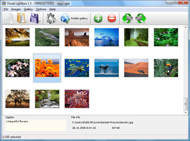



Overview

It's no secret that adding photos to your blog posts is one of the most effective ways to enhance your blog and attract attention to your writing. Flickr has millions of photos available in its database. A simple FREE tool called Flickr Gallery allows you to create a custom image gallery with a cool slide show of the most recent and most interesting photos from Flickr on your website or blog in a few easy steps. Just visit Flickr website and find photostream, photoset or a single photo you like. Enter the address of flickr page to add all photos from this page in your gallery, select the style of thumbnails and the overlay window and add the HTML embed code on your website or blog.
A few clicks and you'll see a stylish photo gallery with beautifull lightbox and zoom effects on your own website or blog!


Flickr Gallery for Windows   Flickr Gallery for MAC

Want more?

Example

Lightbox gallery sample

The following image set is generated by Flickr Gallery tool. Click any picture to run Lightbox gallery.

The photo gallery above is an in-page usage demo of Lightbox with images from Flickr. The lightbox gallery created with Flickr Gallery tool is placed inside the website page. You can also check the full-page demo slideshow. This example takes whole browser area to show the website gallery.Incorporate Flickr Into Personal Website

How to Use

Step 1. Adding flickr images to your own gallery.


Locate the photo, photoset or photostream you want to use in your Flickr slideshow. Click on it to see the photo on its own page.

Copy URL of the flickr page.

Select Add images from Flickr... from the 'Add' button on the Toolbar.

Add images from Flickr

In the appeared window paste URL of the flickr page. Specify also the number of photos you want to add from the flickr page. Flickr Gallery will now include these photos in your project.

Add images from Flickr

If you have included the photos that you do not wish to be in your web gallery, you can easily remove them. Select all images that you wish to remove from photo gallery, and select Delete images. from the Images menu. You can pick and choose pictures by holding the CTRL while clicking the pictures you like.

Step 2. Adding caption.

The name of the photo on flickr page will automatically appear in the caption. When you select a photo you'll see the various info about it, such as: Path, Size, date of last change and Caption. You can add any comment or text about the photo (up to 512 symbols).

Step 3. Gallery properties.

Change the name of your flickr album, the size and quality of your pictures with Flickr Gallery. From the Gallery menu, select Properties or use "Edit Gallery Properties" button on the toolbar.

On the first tab of the Gallery Properties window you can change the name of your photo album and enable/disable the following properties: Slide Show, Auto play Slide Show, Zoom effect, Overlay Shadow. You can also set the Overlay shadow color and select the Engine you want to use (jQuery or Prototype + script.aculo.us).

On the second tab of the Gallery Properties window you can select the thumbnail you want to use, set the Thumbnails Resolution, Thumbnails Quality, Thumbnails Titles. Select Thumbnails Format (save in PNG or JPG format). Specify the Number of columns in you photo album and the Page color.

On the third tab of the Gallery Properties window you can select the template, Image resolution and Image quality of your pictures and change the Watermark.

You can set up the various sizes for exported images.

Control the quality of output PNG or JPEG format image by defining output "Image quality" and "Thumbnail quality" parameters (0%…100%).

Step 4. Save your photo gallery as project file.

When you exit Flickr Gallery application, you'll be asked if you want to save your project. The project consists of the pictures you choose to put on your web photo gallery and all your settings. It's a good idea to save the project, because that will allow you to change the project in case you decide to do something different with future galleries. So click Yes, then enter a name for your project. To select the location of your project, just click the Browse folders button and choose a different location. Then click Save.

Adding Lightbox To Flickrrss Jquery Flickr Carousel

Download Flickr Gallery


Download Flickr Gallery Download Free Edition
for Windows
Download Flickr Gallery Download Free Edition
for MAC

Flickr Gallery is free for non - commercial use.

A small fee is required for business use. Flickr Gallery Business Edition additionally provides an option to remove the Flickr Gallery. Com credit string as well as a feature to put your own logo to images. After you conclude the payment via the secure form, you will receive a license key instantly by email that turns the Flickr Gallery Free Edition into a Business one. You can select the most appropriate payment method: credit card, bank transfer, PayPal, check etc. Also you can get Business Edition for free if you help with translating Flickr Gallery into your native language, please contact us at for more info.

Posting Flickr Galleries On Tumblr

Buy Flickr GalleryBuy Business Edition
for Windows

$49
Single Website
$69
Unlimited Websites
Buy Flickr GalleryBuy Business Edition
for MAC

$49
Single Website
$69
Unlimited Websites

Support

For feature requests, troubleshooting, general help contact Customer Support at . Make sure to include details on your Flickr Gallery version, a link (or relevant code), operating system and a browser.Slideshow Flickr

Feedback

    * I LOVE your free Lightbox2 software tool and will purchase the business version shortly. I have seen the Lightbox JS effect used with video tutorials and I was hoping you have a version for video that I can purchase.
Video LightBox: http://videolightbox.com

    * I am thrilled with what this tool can do for me thanks for all the hard work that must have gone into it.

    * I just tried the application, It is wonderful idea. Like you said in the website "few clicks without writing a single line of code" because most of the people is not web designers".Save Pics From Flickr

    * Let me start just congratulating you, good job, really. I am trying out the free version before I buy it. It works great.

FAQ

Q:How do I embed the lightbox image gallery into an existing page?

A:To install Flickr Gallery gallery on your page you should:

1. Create your gallery in Flickr Gallery and publish it on a local drive in any test folder.
2. Open index.html file from the saved folder in any text editor.
3. Copy code for the HEAD section and paste it inside the HEAD section of you own webpage, for example:

<head>
...
<!-- Start Flickr Gallery.com HEAD section -->
<link rel="stylesheet" href="engine/css/vlightbox.css" type="text/css" />
<style>#vlightbox a#vlb{display:none}</style>
<link rel="stylesheet" href="engine/css/Flickr Gallery.css" type="text/css" media="screen" />
<script src="engine/js/jquery.js" type="text/javascript"></script>
<script src="engine/js/jquery.tools.min.js" type="text/javascript"></script>
<script src="engine/js/visuallightbox.js" type="text/javascript"></script>
<!-- End Flickr Gallery.com HEAD section -->

...
</head>


4. Copy code for the BODY section and paste it inside the Body section of you own webpage in the place where you want to have a gallery, for example:

<body>
...
<!-- Start Flickr Gallery.com BODY section -->
<div id="vlightbox">
<a rel="lightbox_vlb" href="data/images/dscn6831.jpg" title="DSCN6831"><img src="data/thumbnails/dscn6831.png"><span></span></a>
<a rel="lightbox_vlb" href="data/images/dscn6823.jpg" title="DSCN6823"><img src="data/thumbnails/dscn6823.png"><span></span></a>
<a rel="lightbox_vlb" href="data/images/dscn6819.jpg" title="DSCN6819"><img src="data/thumbnails/dscn6819.png"><span></span></a>
<a id="vlb" href="http://Flickr Gallery.com">Photo Gallery For Web by Flickr Gallery.com v2.1</a>
</div>
<!-- End Flickr Gallery.com BODY section -->

...
</body>


5. Copy 'data' folder with images and thumbnails and 'engine' folder with .css and .js files into the same folder with your own webpage.
You can find the example on our website:
http://www.Flickr Gallery.com/#example


RELATED

jCarousel - Riding carousels with jQuery The instance of the carousel will be stored with the data() method of jQuery under the key jcarousel for a simple access. var carousel = jQuery('#mycarousel').data('jcarousel'); You can also access methods of the instance directly,

Create a Flickr Carousel - EE Insider - Learn Create a Flickr Carousel. What do you get when you combine a Flickr EE plugin and a few jQuery plugins? A simple way to create a Flickr carousel on your ExpressionEngine website. Darren Hoyt wrote up the quick tutorial (would've made a great EE Insider Tip!) on his blog

Jquery Flickr Carousel : Flickr Gallery Jquery Flickr Carousel. Web photo album? With Flickr Gallery, you need just 4 simple steps to get your web photo album ready!. Image Gallery Flickr

Jquery Carousel | jQuery Carousel Jquery Carousel. How to make photo gallery for web site in minutes with jQuery Carousel Gallery. Jquery Form Submit Carousel

Carousel demo - Interface plugin for jQuery | Flickr - Photo

Create Custom Carousel with Agile Carousel jQuery Plugin Create Custom Carousel with Agile Carousel jQuery Plugin - Open Source Resources for Web Developers

Agile Carousel - Javascript Slideshow - Image Carousel Agile Development can help you complete website development projects on time, within budget and more inline with customer expectations. Include Agile Carousel as part of your web development process for advanced image displays

De Web Times - Sharing Useful Resources. " Blog Archive " 11 Riding carousels with jQuery. jCarousel is a jQuery plugin for controlling a list of items in horizontal or Agile Carousel: JQuery Carousel Plugin. Full-Featured Example: Full-featured example including all available buttons such as previous, next, play,

Media | jQuery Plugins When I noticed the growing popularity of JS-Slide and JS-Fade effects I have decide to develop a plugin for jQuery. Tiny Carousel is a lightweight Jquery based carousel for sliding html based content

HOW TO: Create a jQuery Carousel with WordPress Posts | dre.im HOW TO: Create a jQuery Carousel with WordPress Posts. by dremeda • on July 19, 2009 • in Slider for jQuery. There are various content slider and carousel scripts available. I

Creating a Flickr Carousel in Expression Engine | Darren Hoyt Creating a Flickr Carousel in Expression Engine. Flickr is still one of my favorite online services in terms of features and interface. so the carousel format came to mind. Since the site isn't live yet, here's a sample: View the Demo. It's built on a mix of CSS, jQuery and a special

Automatic Infinite Carousel | jQuery for Designers You should follow me on Twitter here I tweet about jQuery amongst the usual tweet-splurges! jQuery Infinite Carousel With jQuery for Designer's redesign I

js_carousels js_carousels ekstasis picks - hand picked sites with standards-based, accessible code and separation of content, behavior and presentation in web design. Jquery Accessible Carousel. Sorgalla.com - Jcarousel. jCarousel is a Jquery plugin for controlling a list of items in horizontal or

jQuery Infinite Carousel Plugin | W3Avenue Unlike most carousel plugins which stop when they get to the last image, jQuery Infinite Carousel Plugin allows the show to go on infinitely without any user intervention. In a nutshell, list items and the images contained within (and optionally

7 Powerful image carousels for web designers It includes Agile Carousel, YUI Carousel, JCarousel, iCarousel (jQuery + MooTools) and a tutorial about how to implement a simple Flickr-like carousel using Prototype-UI. 1. Agile Carousel. Agile Carousel is a jQuery plugin that lets you create a super fexible carousel with advanced setting options

jCarousel - Riding carousels with jQuery The instance of the carousel will be stored with the data() method of jQuery under the key jcarousel for a simple access. var carousel = jQuery('#mycarousel').data('jcarousel'); You can also access methods of

jquery lightbox Software - Free Download jquery lightbox jquery lightbox Software - Free Download jquery lightbox - Top 4 Download - Free Download Software jQuery Carousel for Images is a truly unique jquery carousel gallery display, guaranteed to make your site

flickr jquery 64 bit download - freeware, shareware - X 64 flickr jquery 64 bit download - freeware, shareware - X 64-bit Download - x64-bit download - freeware, shareware and software downloads

jQuery Tools' Scrollable as a circular carousel " not so I recently discovered a new jQuery effect library named jQuery Tools. It's like jQuery UI but more focused on the core items that can improve the usefulness of a website. Tabs, tooltips, scrollables, overlays, and a few more. I began using it

jqRevolve :: Smooth-action Carousel Scrolling Carousel Scrolling for jQuery. Pressure sensitive content scroller for JavaScript

jQuery Carousel Complete collection of easy-to-use ajax scripts and javascript demos in action. jQuery Carousel. The items, which can be static HTML content or loaded with (or without) AJAX, can be scrolled back and forth (with or without animation). Several examples illustrate the possibilities of jCarousel

Demos : Just Another Carousel in jQuery : Projects : Intrepid Just Another Carousel Contents. Main. Demos. Documentation. Related Projects. jQuery Rich Text for a real-world demo of the carousel. Any Width, Mouse-Enabled. If

Carousel of JS / jQuery, PHP with JSON File that gracefully You are hereBlogs / alif's blog / Carousel of JS / jQuery, PHP with JSON File that gracefully degrades In this jQuery Carousel I use PHP to create the layout and using an external JSON File

jQuery cycle plugin as carousel You can use the jQuery cycle plugin as carousel. No need of special plugin for carousel. Just use the fx: 'scrollHorz' and that's all! This option is kinda hidden on the malsup site. Don't know why they never emphasize on this option!

John Patrick Given is a Programmer jQuery Backround Resize - jQuery plug-in to resize a background image keeping it's aspect jQuery Flickr Gallery - By simply providing a set ID you get a beautiful photo gallery powered by jQuery

