


Overview

It's no secret that adding photos to your blog posts is one of the most effective ways to enhance your blog and attract attention to your writing. Flickr has millions of photos available in its database. A simple FREE tool called Flickr Gallery allows you to create a custom image gallery with a cool slide show of the most recent and most interesting photos from Flickr on your website or blog in a few easy steps. Just visit Flickr website and find photostream, photoset or a single photo you like. Enter the address of flickr page to add all photos from this page in your gallery, select the style of thumbnails and the overlay window and add the HTML embed code on your website or blog.
A few clicks and you'll see a stylish photo gallery with beautifull lightbox and zoom effects on your own website or blog!


Flickr Gallery for Windows   Flickr Gallery for MAC

Want more?

Example

Lightbox gallery sample

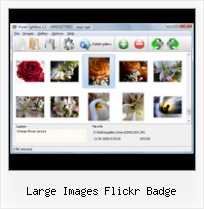
The following image set is generated by Flickr Gallery tool. Click any picture to run Lightbox gallery.

The photo gallery above is an in-page usage demo of Lightbox with images from Flickr. The slideshow created with Flickr Gallery software is placed inside the page layout. You can also check the full-page demo lightbox gallery. This example takes whole browser area to show the Lightbox gallery that uses images from Flickr.Flickr Drupal Howto

How to Use

Step 1. Adding flickr images to your own gallery.


Locate the photo, photoset or photostream you want to use in your Flickr slideshow. Click on it to see the photo on its own page.

Copy URL of the flickr page.

Select Add images from Flickr... from the 'Add' button on the Toolbar.

Add images from Flickr

In the appeared window paste URL of the flickr page. Specify also the number of photos you want to add from the flickr page. Flickr Gallery will now include these photos in your project.

Add images from Flickr

If you have included the photos that you do not wish to be in your web gallery, you can easily remove them. Select all images that you wish to remove from photo gallery, and select Delete images. from the Images menu. You can pick and choose pictures by holding the CTRL while clicking the pictures you like.

Step 2. Adding caption.

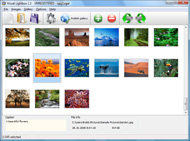
The name of the photo on flickr page will automatically appear in the caption. When you select a photo you'll see the various info about it, such as: Path, Size, date of last change and Caption. You can add any comment or text about the photo (up to 512 symbols).

Step 3. Gallery properties.

Change the name of your flickr album, the size and quality of your pictures with Flickr Gallery. From the Gallery menu, select Properties or use "Edit Gallery Properties" button on the toolbar.

On the first tab of the Gallery Properties window you can change the name of your photo album and enable/disable the following properties: Slide Show, Auto play Slide Show, Zoom effect, Overlay Shadow. You can also set the Overlay shadow color and select the Engine you want to use (jQuery or Prototype + script.aculo.us).

On the second tab of the Gallery Properties window you can select the thumbnail you want to use, set the Thumbnails Resolution, Thumbnails Quality, Thumbnails Titles. Select Thumbnails Format (save in PNG or JPG format). Specify the Number of columns in you photo album and the Page color.

On the third tab of the Gallery Properties window you can select the template, Image resolution and Image quality of your pictures and change the Watermark.

You can set up the various sizes for exported images.

Control the quality of output PNG or JPEG format image by defining output "Image quality" and "Thumbnail quality" parameters (0%100%).

Step 4. Save your photo gallery as project file.

When you exit Flickr Gallery application, you'll be asked if you want to save your project. The project consists of the pictures you choose to put on your web photo gallery and all your settings. It's a good idea to save the project, because that will allow you to change the project in case you decide to do something different with future galleries. So click Yes, then enter a name for your project. To select the location of your project, just click the Browse folders button and choose a different location. Then click Save.

Gallery Drupal Flickr Lightroom Large Images Flickr Badge

Download Flickr Gallery


Download Flickr Gallery Download Free Edition
for Windows
Download Flickr Gallery Download Free Edition
for MAC

Flickr Gallery is free for non - commercial use.

A small fee is required for business use. Flickr Gallery Business Edition additionally provides an option to remove the Flickr Gallery. Com credit string as well as a feature to put your own logo to images. After you conclude the payment via the secure order form, you will receive a license key instantly by email that turns the Flickr Gallery Free Edition into a Business one. You can select the most suitable payment procedure: check, bank transfer, credit card, PayPal etc. Also you can get Business Edition for free if you help with translating Flickr Gallery into your native language, please contact us at for more info.

Html Flickr Album

Buy Flickr GalleryBuy Business Edition
for Windows

$49
Single Website
$69
Unlimited Websites
Buy Flickr GalleryBuy Business Edition
for MAC

$49
Single Website
$69
Unlimited Websites

Support

For general help, feature requests, troubleshooting contact Customer Support at . Make sure to include details on your browser, operating system, Flickr Gallery version and a link (or relevant code).Download Free Flickr Gallery For Joolma

Feedback

    * I have installed Flickr Gallery to trial. All good, loving it!! I want to get an business version of your great programm. I love it - soo easy to use!!

    * First of all, I love you Flickr Gallery. I think it's beautiful! I purchased the lightbox “business edition” yesterday, and I’m very happy how easy it is to use. Found this to be one of the fastest ways to get a gallery on the web. Thanks.

    * I would like to say that Flickr Gallery is a stunning lil program! Its almost too good to be true i'd say! I've been looking for tutorials to create a lightbox gallery, but just couldnt come right. Im so glad i found Flickr Gallery!Demo Captbunzo S Flickr Album Plugin

    * Great product by the way and saved me loads of time. I really like your Flickr Gallery program! Very nice.

FAQ

Q:How do I control the SlideShow speed?

A:Open engine\js\visuallightbox.js and find the following code:

slideTime:3, // time to display images during slideshow

Set the time you need.

RELATED

흑백예술단체 bwartcompany에 오신것을 환영합니다 Flickriver - view images as a 'river of photos' and more Use Flickriver Badge Creator to create a badge linking to your photos, your group or any other Flickriver view. You can place your badge on your Flickr profile, Blog or Website. Add to your iGoogle or Netvibes page

Mahalo Badges In September of 2010 Mahalo released "Mahalo Badges" into the Mahalo community, which were met with great joy by our wonderful Mahaloians. Mahalo Badges are special "tokens" you can earn by performing certain actions around Mahalo.com and Mahalo

SLEDcc 2008 - flickrprob Flickr Badge Problem. I'm trying to add an HTML flickr badge to the front page that should display three fairly large images in a horizontal row. But when I paste in the embed code, I get a giant swath of white space between the badge and the text on the page

Flickriver - A new way to view Flickr photos and more Flickriver - view images as a 'river of photos' and more Use Flickriver Badge Creator to create a badge linking to your photos, your group or any other Flickriver view. You can place your badge on your Flickr profile, Blog or Website. Add to your iGoogle or Netvibes page. Flickriver widget for iGoogle

virtualmacbeth - Badge You can choose a small image, a large image with your wiki name and description, or a Copy an HTML snippet below to your website and your badge will be up and running

Fraser Britton - Vancouver based Wed Design and Photography This is a Flickr badge showing public photos from transcendmag. badge here. For my photographic portfolio, please see the gallery. Click for Large Image

David Arpi Photography Large images - size really matters when you truly want to appreciate the beauty of photography A Greasemonkey script that adds Flickriver links to various Flickr photo pages - user photos, favorites, pools

TrauFoto - Hochzeitsfotografie Flickriver - view images as a 'river of photos' and more Use Flickriver Badge Creator to create a badge linking to your photos, your group or any other Flickriver view. You can place your badge on your Flickr profile, Blog or Website. Add to your iGoogle or Netvibes page

Displaying your flickr photos in an unobtrusive manner And this is the HTML for the generated large photo: X [Title] See full image on flickr It's not my language! The amount of thumbnails is wrong!

kiddesign.tk Flickriver - view images as a 'river of photos' and more Use Flickriver Badge Creator to create a badge linking to your photos, your group or any other Flickriver view. You can place your badge on your Flickr profile, Blog or Website. Add to your iGoogle or Netvibes page

prusianbleu.tk Flickriver - view images as a 'river of photos' and more Use Flickriver Badge Creator to create a badge linking to your photos, your group or any other Flickriver view. You can place your badge on your Flickr profile, Blog or Website. Add to your iGoogle or Netvibes page

On Black: mimosa man by Gail at Large + Image Legacy [Large] View mimosa man by Gail at Large + Image Legacy [Large] (a photo hosted by Flickr.com) on a plain black background

rbfotografia.tk Flickriver - view images as a 'river of photos' and more Use Flickriver Badge Creator to create a badge linking to your photos, your group or any other Flickriver view. You can place your badge on your Flickr profile, Blog or Website. Add to your iGoogle or Netvibes page

TonyShiPhotography.com - Urban HDR Gallery You can place your badge on your Flickr profile, Blog or Website. to various Flickr photo pages - user photos, favorites, pools etc, allowing to quickly open the corresponding Flickriver view. Also, allows quickly viewing any Flickr photo on black background in large size

How To: Flickr Slideshow Badge — PaulStamatiou.com Instead of using images on your server, you can give the slideshow your flickr RSS feed. The idea behind this flickr slideshow badge is that it a) won't slow down page However, if you want crisp looking images and a larger slideshow badge, stick with the "medium" attribute which is good for up to

binkupg.tk Flickriver - view images as a 'river of photos' and more Use Flickriver Badge Creator to create a badge linking to your photos, your group or any other Flickriver view. You can place your badge on your Flickr profile, Blog or Website. Add to your iGoogle or Netvibes page

Building a Flickr Flash Display, Part 1 We want to mimic the Flickr Badge, so we have to adapt the UserRecentPhotos player to give 4 rows with 3 thumbnails in each. Then of course, the stage is too large, so we have to modify it to fit with the new image matrix

JakesOnline!-Flickr Sites Flickr Montager: create montages with Flickr images | Another Mosaic Flickr | restaurant that offers patrons access to Flickr through their cell phones, individuals send tags to the system and Flickr images play on the 3 large screens

A Large Set of Images Created with Kuler Creator available on A Large Set of Images Created with Kuler Creator available on Flickr. Starlit Web has created and posted a large set of images created with my KulerCreator app at Flickr

BadgeCreator : Create custom ID Badges Online Once the badge is ready, print it out and laminate it. Now you have a Upload images from URL or hard drive. Import/Export photos to/from your Flickr or Photobucket account. No restrictions on the number of badges user can create. Customize badge: choose color, add custom text, add barcode etc

eFlickrStream() - a standards compliant flickr badge Demo and source code for eFlickrstream(); a JavaScript to add a standards compliant flickr badge to a website An easily configurable, dynamic, standards compliant and unobtrusive js method for displaying images from flickr on a website

Using the Flickr API: We Don't Need No Stinkin' Badges A while back I wrote about pulling Flickr images using jQuery, but in that example we were using feeds provided by Flickr's services. Examples of Flickr Badge Parameters. Ordering your images: display=latest, display=random

Embed Flickr Badge : Flickr Gallery Embed Flickr Badge. You just upload files generated by the online photo album software to your server and an online photo album will run immediately!. Embed Flickr Gallery Website

thisverymoment.tk Flickriver - view images as a 'river of photos' and more Use Flickriver Badge Creator to create a badge linking to your photos, your group or any other Flickriver view. You can place your badge on your Flickr profile, Blog or Website. Add to your iGoogle or Netvibes page

www.varunsuresh.com Flickriver - view images as a 'river of photos' and more Use Flickriver Badge Creator to create a badge linking to your photos, your group or any other Flickriver view. You can place your badge on your Flickr profile, Blog or Website. Add to your iGoogle or Netvibes page

Flash Flickr Badge Widget for WordPress | American in Spain ATTENTION: I now recommend that you use the Javascript Flickr Badge widget instead. I love the Flickr Flash Badges, but the content of the iframe that you have

Flickr: Help: Photos Flickr is almost certainly the best online photo management and sharing application in the world. Show off your favorite photos and videos to the world, securely and privately show content to your friends and family, or blog the photos and videos

