



Overview

It's no secret that adding photos to your blog posts is one of the most effective ways to enhance your blog and attract attention to your writing. Flickr has millions of photos available in its database. A simple FREE tool called Flickr Gallery allows you to create a custom image gallery with a cool slide show of the most recent and most interesting photos from Flickr on your website or blog in a few easy steps. Just visit Flickr website and find photostream, photoset or a single photo you like. Enter the address of flickr page to add all photos from this page in your gallery, select the style of thumbnails and the overlay window and add the HTML embed code on your website or blog.
A few clicks and you'll see a stylish photo gallery with beautifull lightbox and zoom effects on your own website or blog!


Flickr Gallery for Windows   Flickr Gallery for MAC

Want more?

Example

Lightbox gallery sample

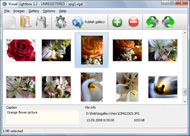
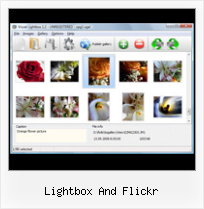
The following image set is generated by Flickr Gallery tool. Click any picture to run Lightbox gallery.

The sample above is an in-page usage demo of Lightbox tool with Flickr images. The lightbox gallery created with Flickr Gallery wizard is placed inside the website page. You can also check the full-page demo web gallery. This example takes whole browser area to show the gallery.Flickr Lightbox Website Tool

How to Use

Step 1. Adding flickr images to your own gallery.


Locate the photo, photoset or photostream you want to use in your Flickr slideshow. Click on it to see the photo on its own page.

Copy URL of the flickr page.

Select Add images from Flickr... from the 'Add' button on the Toolbar.

Add images from Flickr

In the appeared window paste URL of the flickr page. Specify also the number of photos you want to add from the flickr page. Flickr Gallery will now include these photos in your project.

Add images from Flickr

If you have included the photos that you do not wish to be in your web gallery, you can easily remove them. Select all images that you wish to remove from photo gallery, and select Delete images. from the Images menu. You can pick and choose pictures by holding the CTRL while clicking the pictures you like.

Step 2. Adding caption.

The name of the photo on flickr page will automatically appear in the caption. When you select a photo you'll see the various info about it, such as: Path, Size, date of last change and Caption. You can add any comment or text about the photo (up to 512 symbols).

Step 3. Gallery properties.

Change the name of your flickr album, the size and quality of your pictures with Flickr Gallery. From the Gallery menu, select Properties or use "Edit Gallery Properties" button on the toolbar.

On the first tab of the Gallery Properties window you can change the name of your photo album and enable/disable the following properties: Slide Show, Auto play Slide Show, Zoom effect, Overlay Shadow. You can also set the Overlay shadow color and select the Engine you want to use (jQuery or Prototype + script.aculo.us).

On the second tab of the Gallery Properties window you can select the thumbnail you want to use, set the Thumbnails Resolution, Thumbnails Quality, Thumbnails Titles. Select Thumbnails Format (save in PNG or JPG format). Specify the Number of columns in you photo album and the Page color.

On the third tab of the Gallery Properties window you can select the template, Image resolution and Image quality of your pictures and change the Watermark.

You can set up the various sizes for exported images.

Control the quality of output PNG or JPEG format image by defining output "Image quality" and "Thumbnail quality" parameters (0%100%).

Step 4. Save your photo gallery as project file.

When you exit Flickr Gallery application, you'll be asked if you want to save your project. The project consists of the pictures you choose to put on your web photo gallery and all your settings. It's a good idea to save the project, because that will allow you to change the project in case you decide to do something different with future galleries. So click Yes, then enter a name for your project. To select the location of your project, just click the Browse folders button and choose a different location. Then click Save.

Flickr Like Gallery Script Lightbox And Flickr

Download Flickr Gallery


Download Flickr Gallery Download Free Edition
for Windows
Download Flickr Gallery Download Free Edition
for MAC

Flickr Gallery is free for non-commercial use.

A small fee is required for business use. Flickr Gallery Business Edition additionally provides an option to remove the Flickr Gallery. Com credit bar as well as a feature to put your own logo to images. After you complete the payment via the secure form, you will receive a license key instantly by e-mail that turns the Flickr Gallery Free Edition into a Business one. You can select the most appropriate payment mode: check, bank transfer, credit card, PayPal etc. Also you can get Business Edition for free if you help with translating Flickr Gallery into your native language, please contact us at for more info.

Flickr Web Gallery

Buy Flickr GalleryBuy Business Edition
for Windows

$49
Single Website
$69
Unlimited Websites
Buy Flickr GalleryBuy Business Edition
for MAC

$49
Single Website
$69
Unlimited Websites

Support

For troubleshooting, feature requests and general help contact Customer Support at . Make sure to include details on your Flickr Gallery version, a link (or relevant code), browser and operating system.Jquery And Flickr Stream Slideshow

Feedback

    * Let me start just congratulating you, good job, really. I am trying out the free version before I buy it. It works great.

    * This looks like EXACTLY what I need for my site. It would make my job much faster! Love your program. Thank you!!

    * I LOVE your free Lightbox2 software tool and will purchase the business version shortly. I have seen the Lightbox JS effect used with video tutorials and I was hoping you have a version for video that I can purchase.
Video LightBox: http://videolightbox.comFlickr Jquery Slideshow Gallery Embed

    * I have purchased the business and LOVE IT..Your product appears easy to use and close to what I need to help several of my clients..

FAQ

Q:I would like to reposition the Previous and Next buttons to a position below the images and have them be visible all the time.Where do I have to go to make these changes in the code?

A:Find the css file in the folder generated by gallery:
engine\css\
or in the following folder:
c:\Program Files\Visual LightBox Business\templates\Default\engine\css\

To set their position you should change 15% to something different:
#prevLink:hover, #prevLink:visited:hover { background: url(../images/prevlabel.gif) left 15% no-repeat; }
#nextLink:hover, #nextLink:visited:hover { background: url(../images/nextlabel.gif) right 15% no-repeat; }

For example:
#prevLink:hover, #prevLink:visited:hover { background:url(../images/prevlabel.gif) left 75% no-repeat; }
#nextLink:hover, #nextLink:visited:hover { background: url(../images/nextlabel.gif) right 75% no-repeat;}

RELATED

WordPress " Support " [Plugin: Flickr Gallery] Lightbox not and there is no Lightbox happening - I click an image and it goes to Flickr. Additionally, there is a 'Next Page' button at the bottom (positioned a bit absurdly) but it doesn't go to the next page of images. Do I need to install Lightbox separately

Wordpress Flickr Manager now with Lightbox Support | tgardner.net It's a bit of a rushed release because I'm pretty busy at the moment, so I didn't have time to test it as much as I would have liked. I introduced a couple new

Album viewer for Flickr & Picasa | tools.forret.com Album viewer based on LightBox/Lytebox for photos in RSS feeds Create Lightbox slideshow page for pictures from Flickr, Picasa or any other image RSS feed

PmWiki | Cookbook / FlickrAlbum Using this recipe will allow you to have albums of Flickr photos in your wiki that update automatically when new photos are added to Flickr. image and link tags for each photo $output .= "< a href='"; if ($opt['lightbox'] == 1)

SimplePie Documentation: Flickr Lightbox Flickr is a popular photo sharing site that supports the best and the brightest ideas that the modern web has Lightbox was so popular, in fact, that it has inspired innumerable spinoffs and variations

Flickr - LightBox Search for: Follow LightBox. follow. subscribe to rss. Sections. Closeup " The best pictures of the week from the news and our and poignant task: Identify the more than 1,100 children in those photos, and find out what happened to them. Topic: Flickr. Out

Fancybox Flickr - LightBox Alternative Fancybox Flickr. Light Box Alternative is a versatile, ready-made solution that allows professional and amateur web developers to Make superior html photo gallery for their web sites and web applications.. ajax photo cropping

jQuery Lightbox Plugin (balupton edition) If the archive was extracted and you have a whole bunch of files and directories (folders), then you must create a new directory called jquery-lightbox and move all the files and directories into that to continue

Flickr Lightbox : Flickr Gallery Flickr Lightbox. Flickr Gallery - photo gallery script. Cross-browser. Cool styles. Easy setup.. How To Link Flickr Slideshow Flickr Lightbox Slideshow - ProgrammableWeb Mashup Detail Flickr Lightbox Slideshow: Slideshow of most interesting and recent photos from flickr using the Lightbox Ajax tools

It's Called Web Design " Using Lightbox with the Flickr Photo Creating links and images in HTML " Using Lightbox with the Flickr Photo Album Plugin by jack23. A plugin for WordPress, the Flickr Photo Album utilizes Flickr API to pull your Flickr photos to your WordPress blog. You can choose from Lightbox, Fancyzoom, Fancybox, and Facebox. Click here for the demo:

Flickr Gallery Lightbox | Flickr Slideshow Flickr Gallery Lightbox. No more need to wait for page reloading after every click with ajax photogallery! A few clicks and you'll see a stylish photo gallery with beautifull lightbox and zoom effects on your own website or blog!

Flickr Lightbox Slideshow - ProgrammableWeb Mashup Detail Flickr Lightbox Slideshow: Slideshow of most interesting and recent photos from flickr using the Lightbox Ajax tools

DMXzone Lightbox for Dreamweaver, Visual LightBox Mac, Video Ever wanted to open your great looking. Visual Lightbox JS Web Gallery Maker for Mac. Video LightBox for MAC Add video to website. Add Flickr Slideshow to your website on Mac

Flickr: "lightbox" Flickr is almost certainly the best online photo management and sharing application in the world. Show off your favorite photos and videos to the world, securely and privately show content to your friends and family, or blog the photos and videos

flickr add - Software Downloads - GoLoads A simple FREE Mac tool called Flickr Gallery allows you to embed a custom image gallery, or a cool slideshow with beautiful lightbox and zoom effects of the most interesting photos from Flickr.com on your website or blog in a few easy steps

How to add a Flickr-based photo gallery to your website After some playing around, I've settled with the phpFlickr and Lightbox combination to nicely display photo galleries on a website. PhpFlickr is a class written by Dan Coulter to act as a wrapper to Flickr's API, and lightbox is a very simple and elegant way to display photos on a page

Lightbox2 Flickr Visual LightBox Lightbox2 Flickr Visual LightBox. Make professional online photo album software in minutes with VisualLightBox! i can click on each of them and html tooltip get the bigger picture with the lightbox correct caption, that is something like flickr "Photo by Smeallum", where Smeallum is getattribute a

Premshree's (品速力) Personal Weblog - Flickr Lightbox The feature is useful, most of the work had been done, and I was bored. So here you go, a Greasemonkey script that'll add the lightbox feature to Flickr. It works on any Flickr photos list-type pages (recent photos page, your friends page, favorites, any tag page, etc

WordPress Flickr Plugin – Slickr Flickr Easy Flickr Slickr Flickr installation and usage notes plus links to FAQ, known issues and tips and best practices for creating Flickr slideshows and galleries

Yuan.CC Flickr Experiments Download: flickr.comments.quickview.user.js. Lightbox for Hyperlinks. The all in one version of Lightbox for Hyperlinks for the following three sites: Bloglines, del.icio.us, and HEMiDEMi. The profile widget is a cool way for us to see one's flickr stats and most recent/interesting photos at a glance

Slickr Flickr, Flickr Gallery and TubePress Investigation into Lightbox issues when running Slickr Flickr, Flickr Gallery and TubePress When running these three plugins together Slickr Flickr and TubePress operate normally but the lightbox of Flickr Gallery fails to operate

Flickr/YUI/Lightbox (Lily) Demonstrates how web APIs and 3rd party framework JS can be wrapped as Lily objects- in this case, the flickr.interestingness.getList service, the Yahoo YUI Calendar widget and Lokesh Dhakar's Lightbox script. Also shows how a Lily patch can

The World's Best Photos by light-box - Flickr Hive Mind If you are a Flickr user and Log into Flickr you will be able to see your private photos, as well as larger thumbnails. Hivemind: http://flickrhivemind.net/User/light-box Hits: 119 Pages: 3 Flickr Hive Mind is a data mining tool for the Flickr photography database

Art Sexy Lightbox is Joomla! lightbox/popup for photos Art Sexy Lightbox is Joomla! popup for photos, galleries, external pages, Picasa, Flickr, Photobucket photos and inline content

