



Overview

It's no secret that adding photos to your blog posts is one of the most effective ways to enhance your blog and attract attention to your writing. Flickr has millions of photos available in its database. A simple FREE tool called Flickr Gallery allows you to create a custom image gallery with a cool slide show of the most recent and most interesting photos from Flickr on your website or blog in a few easy steps. Just visit Flickr website and find photostream, photoset or a single photo you like. Enter the address of flickr page to add all photos from this page in your gallery, select the style of thumbnails and the overlay window and add the HTML embed code on your website or blog.
A few clicks and you'll see a stylish photo gallery with beautifull lightbox and zoom effects on your own website or blog!


Flickr Gallery for Windows   Flickr Gallery for MAC

Want more?

Example

Lightbox gallery sample

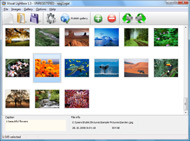
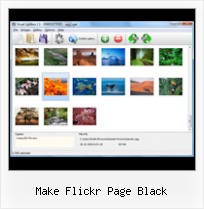
The following image set is generated by Flickr Gallery tool. Click any picture to run Lightbox gallery.

The photo gallery above is an in-page usage demo of Lightbox script with Flickr images. The photo gallery created with Flickr Gallery application is placed inside the html page. You can also check the full-page demo web gallery. This example takes whole browser area to show the gallery.Flickr Button For Blogs

How to Use

Step 1. Adding flickr images to your own gallery.


Locate the photo, photoset or photostream you want to use in your Flickr slideshow. Click on it to see the photo on its own page.

Copy URL of the flickr page.

Select Add images from Flickr... from the 'Add' button on the Toolbar.

Add images from Flickr

In the appeared window paste URL of the flickr page. Specify also the number of photos you want to add from the flickr page. Flickr Gallery will now include these photos in your project.

Add images from Flickr

If you have included the photos that you do not wish to be in your web gallery, you can easily remove them. Select all images that you wish to remove from photo gallery, and select Delete images. from the Images menu. You can pick and choose pictures by holding the CTRL while clicking the pictures you like.

Step 2. Adding caption.

The name of the photo on flickr page will automatically appear in the caption. When you select a photo you'll see the various info about it, such as: Path, Size, date of last change and Caption. You can add any comment or text about the photo (up to 512 symbols).

Step 3. Gallery properties.

Change the name of your flickr album, the size and quality of your pictures with Flickr Gallery. From the Gallery menu, select Properties or use "Edit Gallery Properties" button on the toolbar.

On the first tab of the Gallery Properties window you can change the name of your photo album and enable/disable the following properties: Slide Show, Auto play Slide Show, Zoom effect, Overlay Shadow. You can also set the Overlay shadow color and select the Engine you want to use (jQuery or Prototype + script.aculo.us).

On the second tab of the Gallery Properties window you can select the thumbnail you want to use, set the Thumbnails Resolution, Thumbnails Quality, Thumbnails Titles. Select Thumbnails Format (save in PNG or JPG format). Specify the Number of columns in you photo album and the Page color.

On the third tab of the Gallery Properties window you can select the template, Image resolution and Image quality of your pictures and change the Watermark.

You can set up the various sizes for exported images.

Control the quality of output PNG or JPEG format image by defining output "Image quality" and "Thumbnail quality" parameters (0%…100%).

Step 4. Save your photo gallery as project file.

When you exit Flickr Gallery application, you'll be asked if you want to save your project. The project consists of the pictures you choose to put on your web photo gallery and all your settings. It's a good idea to save the project, because that will allow you to change the project in case you decide to do something different with future galleries. So click Yes, then enter a name for your project. To select the location of your project, just click the Browse folders button and choose a different location. Then click Save.

Flickr Badge Html Make Flickr Page Black

Download Flickr Gallery


Download Flickr Gallery Download Free Edition
for Windows
Download Flickr Gallery Download Free Edition
for MAC

Flickr Gallery is free for non - commercial use.

A small fee is required for business use. Flickr Gallery Business Edition additionally provides an option to remove the Flickr Gallery. Com credit string as well as a feature to put your own logo to images. After you conclude the payment via the secure form, you will receive a license key instantly by e-mail that turns the Flickr Gallery Free Edition into a Business one. You can select the most suitable payment method: check, bank transfer, credit card, PayPal etc. Also you can get Business Edition for free if you help with translating Flickr Gallery into your native language, please contact us at for more info.

How Is Flickr Programmed

Buy Flickr GalleryBuy Business Edition
for Windows

$49
Single Website
$69
Unlimited Websites
Buy Flickr GalleryBuy Business Edition
for MAC

$49
Single Website
$69
Unlimited Websites

Support

For feature requests, troubleshooting, general help contact Customer Support at . Make sure to include details on your operating system, browser, a link (or relevant code) and Flickr Gallery version.Writing A Flickr Plugin

Feedback

    * I have just bought this product and think it is great. As it is extremely easy to use it is something I could get my clients to purchase to upload their own portfolio and latest projects etc.

    * I am thrilled with what this tool can do for me thanks for all the hard work that must have gone into it.

    * I would like to say that Flickr Gallery is a stunning lil program! Its almost too good to be true i'd say! I've been looking for tutorials to create a lightbox gallery, but just couldnt come right. Im so glad i found Flickr Gallery!Flickr Feeds On Blogger

    * I tried Flickr Gallery and for me its a very cool and usefull application. Its so easy to manage my galleries and it looks very nice.

FAQ

Q:Instead of making one page with 40 photos, is there no property to make 2 or more pages?

A:You can do it in the following way:

1. Create your gallery in Flickr Gallery and publish it on a local drive in any test folder.
2. Make two copies of the generated index.html file (for example index1.html and index2.html).
3. Open index.html, index1.html and index2.html files in any text editor.
4. Find code for the gallery inside the BODY tag and cut some part of the images, so you'll have different images on each page.

<!-- Start Flickr Gallery.com BODY section -->
<div class="gallery">
<!-- leave the following code on index.html page -->
<a href="./data/images/1.jpg" rel="lightbox[sample]" title="Best Toy Ever"><img src="./data/thumbnails/1.png" /></a>
<a href="./data/images/8.jpg" rel="lightbox[sample]" title="PrueaMacro"><img src="./data/thumbnails/8.png" /></a>

<!-- leave the following code on index1.html page -->
<a href="./data/images/3.jpg" rel="lightbox[sample]" title="Macro Leaf."><img src="./data/thumbnails/3.png" /></a>
<a href="./data/images/11.jpg" rel="lightbox[sample]" title="Bell Pepper"><img src="./data/thumbnails/11.png" /></a>

<!-- leave the following code on index2.html page -->
<a href="./data/images/5_0.jpg" rel="lightbox[sample]" title="5"><img src="./data/thumbnails/5_0.png" /></a>
<a href="./data/images/6_0.jpg" rel="lightbox[sample]" title="6"><img src="./data/thumbnails/6_0.png" /></a>

<!--[if lte IE 6]><script src="engine/js/pngfix_vlb.js" type="text/javascript"></script><![endif]-->
<a id="vlightbox" href="http://Flickr Gallery.com/">Online Photo Album Sharing by Flickr Gallery.com</a>
</div>
<!-- End Flickr Gallery.com BODY section -->

5. Create links to switch between your pages, for example:
<a href="index.html">1</a>  <a href="index1.html">2</a>  <a href="index2.html">3</a> 


Q:I want to change color of the overlay shadow? How can I do this?

A:Open engine\css\Flickr Gallery.css and find the following code:

#overlay{
position: absolute;
top: 0;
left: 0;
z-index: 90;
width: 100%;
height: 500px;
background-color: #FFF;
filter:alpha(opacity=60);
-moz-opacity: 0.6;
opacity: 0.6;
}

set the background-color parameter :

#overlay{
position: absolute;
top: 0;
left: 0;
z-index: 90;
width: 100%;
height: 500px;
background-color: #FF00FF;
filter:alpha(opacity=60);
-moz-opacity: 0.6;
opacity: 0.6;
}


RELATED

Make Use Of Podcast #37: Top Ten Flickr Greasemonkey Scripts A recent article by Jim Henderson about getting your pictures noticed in Flickr got me thinking about making Flickr easier to use, getting more out of it. So,

Flickr Shades for Greasemonkey Changes colour of all flickr pages pages to white text on a black background. You can also now easily customise the colours in the script to whatever your preference is, using the new colour configurator

Make: Online | Black Box lightshow DIY projects, how-tos, and inspiration from the workshops and minds of geeks, makers, and hackers @ the Make: Magazine blog

Flickr.com - A site that allows you to upload photos securely Find detailed information about Flickr.com - like contact info, an SEO analysis and more - on AboutUs.org

Flickr Revamps Photo Page - PCWorld Flickr has revamped the layout of its photo display page. Flickr has given a makeover to the layout of its site's photo display page, making the default picture size larger, revamping the navigation scheme and consolidating capabilities and information under fewer menus and sections

Tools for Flickr GeoTagging Flickr. GPSyncr. h4ppierphotos. idGettr. jUploadr. KFlickr. Keyword Assistant Search Plugins:Flickr. Spahk. Spell with Flickr. Sprinklr. Steganography

Watch Only YouTube videos and Flickr Photos and nothing else!! Ever wanted to watch YouTube videos without any comments and other several widgets, ads etc. on the YouTube pages, i.e. did you ever felt like watching YouTube

Louise - Paisleys Flickr Quick View Links Louise - Paisley Flickr App's. PLEASE NOTE: If you wish to favourite/ bookmark or post links to any of my app's, please use this page rather than the actual app page to ensure links are valid and point to but any code you make or edit MUST include the link back to my page so other people can

black make up | Flickr - Photo Sharing! black make up

educationalsoftware - Flickr This tool has been upgraded to having a page to itself as there are so many tools that are designed to support Flickr they need the space! You can download Flickr Uploader from the site to make uploading a large number of photos at once much easier

Great Flickr add-ons | E-Mail & Internet | Macworld If you think you've seen all Flickr can do, you may be in for a surprise. An abundance of Flickr add-ons and related Web sites make the photo-sharing experience faster, nimbler, and more fun

How To View On Black Flickr : Flickr Gallery How To View On Black Flickr. A few clicks to create stylish photo gallery webpage!. Whats My Flickr Id Flickr On Black for Greasemonkey Adds "View on black" links in the right-hand panel on a Flickr photo page

A collection of Flickr Bookmarklets / Tools at sean mcgrath's Flickr will provide you with the HTML, but I find this bookmarklet makes it a bit easier to get to. A popular thing on Flickr is for photographers to include a link to a "View on Black" page

Turn Your Flickr Crush Into Real Romance - Wired How-To Wiki When trying to make a connection, the profile page is your best friend. Not only does this often-overlooked Flickr feature give you valuable insight into your crush's personal info (age, location, marital status), but your own profile also gives

Extract colors from photos and make color schemes | ColorSuckr Search Flickr. Tips: Drag and drop the color results: You can move the color results around the page, click on the color strip, hold and drag, let go to drop. You can also show and hide the color text by clicking the small grey Flickr pages: If you enter a Flickr photo page (e.g. http://www

Code: Flickr Developer Blog In an effort to make this flow as painless as possible we've moved to a "contextual" login, which is to say, logging in doesn't require you to leave the page you are looking at. We By doing this we make a lot of old photos display at 640 on the new Photo, All Sizes and Photostream pages

the make up - a photo on Flickriver A Greasemonkey script that adds Flickriver links to various Flickr photo pages - user photos, favorites, pools etc, allowing to quickly open the corresponding Flickriver view. Also, allows quickly viewing any Flickr photo on black background in large size

Red/Black Swirl " Odyssey BMX Odyssey BMX – Dedicated to Quality and Innovation Share This Page. 31 Comments. Meclo " Reply June 21, 2010 at 2:26 pm. NICE!!!! i want these on my S&M SOOOOOOO bad. kratz " Reply June 21, 2010 at 3:56 pm. make some in black and blue that would be sick!! taine " Reply June 22, 2010 at 12:49 am. how much

QOOP Company that makes printed editions of online, digital content. All proceeds from sales go to the animals at the OKC Animal Shelter to make their time there more comfortable

Flickr on Black " Flickr Blog Flickr on Black. Take a look at 3 Flickr viewers, each of which Of course, each app is showing photos that are hosted on Flickr, with attribution and links back to the photo pages on Flickr. Fluidr presents photos quickly and seamlessly. It even includes some EXIF data, the description and

Fluidr / vandergus's photos and videos tagged with View vandergus's Flickr photos and videos tagged with " Now when you're on a page on Flickr, simply click on the bookmarklet in your bookmarks toolbar and a box will pop up with the HTML code that you can copy and paste. This is a good way of adding a view on black link to your photo's caption. close

Flickr's New Photo Page: 5 Great Things You'd Notice & Love A few weeks back, Flickr rolled out its new features specifically for the photo page. After exploring these updates for a solid two weeks, I have to say that I'm in love with them. These new updates are long overdue and make Flickr an even more

Home " Black Lips Official band site. The Black Lips are a self-described "flower punk" band from Atlanta, Georgia. News, tour dates and photographs

Make your own custom code for a Wordpress-style Flickr badge Using toggle javascripts to build an FAQ page. A better way to make a custom Wordpress-style Flickr badge. JW FLV player that switches playlists on on a page. Create buttons for your site using nothing but Glossy.js. Make your own custom

