



Overview

It's no secret that adding photos to your blog posts is one of the most effective ways to enhance your blog and attract attention to your writing. Flickr has millions of photos available in its database. A simple FREE tool called Flickr Gallery allows you to create a custom image gallery with a cool slide show of the most recent and most interesting photos from Flickr on your website or blog in a few easy steps. Just visit Flickr website and find photostream, photoset or a single photo you like. Enter the address of flickr page to add all photos from this page in your gallery, select the style of thumbnails and the overlay window and add the HTML embed code on your website or blog.
A few clicks and you'll see a stylish photo gallery with beautifull lightbox and zoom effects on your own website or blog!


Flickr Gallery for Windows   Flickr Gallery for MAC

Want more?

Example

Lightbox gallery sample

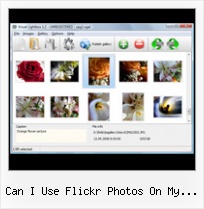
The following image set is generated by Flickr Gallery tool. Click any picture to run Lightbox gallery.

The sample above is an in-page usage demo of Lightbox tool with Flickr images. The photo gallery created with Flickr Gallery tool is placed inside the page layout. You can also check the full-page demo web gallery. This example takes whole browser area to show the Lightbox gallery that uses images from Flickr.Html For Flickr Gallery

How to Use

Step 1. Adding flickr images to your own gallery.


Locate the photo, photoset or photostream you want to use in your Flickr slideshow. Click on it to see the photo on its own page.

Copy URL of the flickr page.

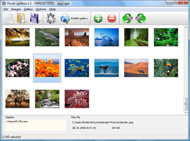
Select Add images from Flickr... from the 'Add' button on the Toolbar.

Add images from Flickr

In the appeared window paste URL of the flickr page. Specify also the number of photos you want to add from the flickr page. Flickr Gallery will now include these photos in your project.

Add images from Flickr

If you have included the photos that you do not wish to be in your web gallery, you can easily remove them. Select all images that you wish to remove from photo gallery, and select Delete images. from the Images menu. You can pick and choose pictures by holding the CTRL while clicking the pictures you like.

Step 2. Adding caption.

The name of the photo on flickr page will automatically appear in the caption. When you select a photo you'll see the various info about it, such as: Path, Size, date of last change and Caption. You can add any comment or text about the photo (up to 512 symbols).

Step 3. Gallery properties.

Change the name of your flickr album, the size and quality of your pictures with Flickr Gallery. From the Gallery menu, select Properties or use "Edit Gallery Properties" button on the toolbar.

On the first tab of the Gallery Properties window you can change the name of your photo album and enable/disable the following properties: Slide Show, Auto play Slide Show, Zoom effect, Overlay Shadow. You can also set the Overlay shadow color and select the Engine you want to use (jQuery or Prototype + script.aculo.us).

On the second tab of the Gallery Properties window you can select the thumbnail you want to use, set the Thumbnails Resolution, Thumbnails Quality, Thumbnails Titles. Select Thumbnails Format (save in PNG or JPG format). Specify the Number of columns in you photo album and the Page color.

On the third tab of the Gallery Properties window you can select the template, Image resolution and Image quality of your pictures and change the Watermark.

You can set up the various sizes for exported images.

Control the quality of output PNG or JPEG format image by defining output "Image quality" and "Thumbnail quality" parameters (0%…100%).

Step 4. Save your photo gallery as project file.

When you exit Flickr Gallery application, you'll be asked if you want to save your project. The project consists of the pictures you choose to put on your web photo gallery and all your settings. It's a good idea to save the project, because that will allow you to change the project in case you decide to do something different with future galleries. So click Yes, then enter a name for your project. To select the location of your project, just click the Browse folders button and choose a different location. Then click Save.

Web Open Source Like Flickr Youtube Can I Use Flickr Photos On My Website

Download Flickr Gallery


Download Flickr Gallery Download Free Edition
for Windows
Download Flickr Gallery Download Free Edition
for MAC

Flickr Gallery is free for non-commercial use.

A small fee is required for business use. Flickr Gallery Business Edition additionally provides an option to remove the Flickr Gallery. Com credit bar as well as a feature to put your own logo to images. After you complete the payment via the secure form, you will receive a license key instantly by email that turns the Flickr Gallery Free Edition into a Business one. You can select the most appropriate payment mode: bank transfer, credit card, check, PayPal etc. Also you can get Business Edition for free if you help with translating Flickr Gallery into your native language, please contact us at for more info.

Embed Flickr Typo3

Buy Flickr GalleryBuy Business Edition
for Windows

$49
Single Website
$69
Unlimited Websites
Buy Flickr GalleryBuy Business Edition
for MAC

$49
Single Website
$69
Unlimited Websites

Support

For troubleshooting, feature requests and general help contact Customer Support at . Make sure to include details on your Flickr Gallery version, operating system, browser and a link (or relevant code).Flickr Embedded Image Gallery

Feedback

    * Another programmes have incredible functionality but no fantastic interface like your product!

    * Great product by the way and saved me loads of time. I really like your Flickr Gallery program! Very nice.

    * I have installed Flickr Gallery to trial. All good, loving it!! I want to get an business version of your great programm. I love it - soo easy to use!!Flickr Gallery For Website

    * Just a quick thank you for the software though, It's not often you get a free software version of this quality and style! Well done and please continue this amazing gallery. Hope to see more advances.

FAQ

Q:Is it possible to load a gallery from within image? So the gallery loads externally?

A:You should start the gallery onClick:

1) Add the following function into the <head> tag:

<script type="text/javascript">
function showLightBox()
{ Lightbox.start(document.getElementById('firstImage'));}
</script>

2) Specify the onClick event for the image (or link):
<img src="thumbnail_gr.jpg" onClick="javascript:showLightBox()" title="Click to see the demo" style="cursor: pointer;">
3) Set the ID for any image in your gallery (id="firstImage"), for example add it to the first image:
<a rel="lightbox_vlb" href="data/images/dscn6831.jpg" title="dscn6831" id="firstImage">
4) Use 'display: none;' property for your gallery in engine\css\vlightbox.css. Just change the following code:

#vlightbox a{
display:-moz-inline-stack;
display:inline-block;
zoom:1;
*display:inline;
position:relative;
vertical-align:top;
margin:3px;
width:160px;
font-family:Trebuchet,Tahoma,Arial,sans-serif;
font-size:11px;
font-weight:normal;
text-align:center;
opacity:0.87;
}

to:

#vlightbox a{
display:-moz-inline-stack;
display:none;
zoom:1;
*display:inline;
position:relative;
vertical-align:top;
margin:3px;
width:160px;
font-family:Trebuchet,Tahoma,Arial,sans-serif;
font-size:11px;
font-weight:normal;
text-align:center;
opacity:0.87;
}

RELATED

Digital Photo Contest // Flickr Entry Protect our land and water for nature and people by making a taxdeductible donation to The Nature Conservancy today. Log On – To submit your photos via Flickr™, use your Yahoo!® ID to login to www.flickr.com. If you do not have an account, you can sign-up for free

How To Find And Use Amazing Photos From Flickr | Super Blogging Flickr is a site where anyone can sign up and upload their photos, so there are millions of great images that you can use. I as a visitor can only confirm that pics definitely grab my attention and I'm more likely to examine the website further

Fun With Flickr Photos - The Fun Times Guide to Cameras View Flickr Photos on TiVo — I don't have TiVo, don't even really want TiVo, but I think it's a cool advancement for those who do. It can run on your computer's hard drive or on your website. Photo Upload — Allows you to upload photos directly to a specific photoset, use IPTC and

Flickr Slideshow - create flickr photo slideshows for your Yahoo's photosharing service Flickr is almost certainly the best online photo management and sharing on the web, Flickr Slideshow allows you to easily create a custom flickr slideshow on your website or blog. You can use the below form to create one Flickr slide show online, alternate, you can

Flickr: Using Pictures on Your Web Site | AssortedStuff Flickr: Using Pictures on Your Web Site. September 16, 2008. Many people know flickr as a wonderful site for storing and sharing pictures and as a photo community. It is that, of course, but you can also use flickr as a storage place for your

How to Market on Flickr | Small Business Search Marketing It's tremendously easy to use, and when used with friends / associates it can be great fun. ( And if this sounds like a bit of a commercial, here's my disclaimer: I love Flickr. How do I market my business on Flickr? First, let me emphasize that it's against the Terms of Use to "exploit

Options for Easily Adding Flickr Photos to Your Website This page shows a number of the leading options for quickly and easily adding your Flickr photos to your website or blog (WordPress, Joomla, TextPattern). They all offer some options and customizations

Wild Apricot Blog : Five Ways Nonprofits Can Use Flickr to A couple of weeks ago, I attended a Flickr session at the Non-Profit Technology Conference . A common question asked was "How can we use Flickr to reach new audiences?" A lot of nonprofits have started using Flickr to increase their visibility

Flickr Tag and browse photos, and upload pictures and short videos with Flickr, a digital photography and media file sharing website

Flickr - Wikipedia, the free encyclopedia In May 2009, White House official photographer Pete Souza began using Flickr as a conduit for releasing White House photos. Flickr asks photo submitters to organize images using tags (a form of metadata), which enable searchers to find images related to

JPROF - Photos you can use Flickr + Creative Commons = Photos you can use. One of the first topics that JPROF.com tackled (which is coming up on its second birthday in less than a week) was that of how a news web site that didn't have access to syndicated photos could stay visually current

Accessing Images On Flickr From An ASP.NET Website Using The Flickr is a popular photo-sharing website. Like many "Web 2.0" and "social" websites, Flickr includes a programmatic interface through which other programs and websites can view and manage I recently started work on a website that offers its users a customized homepage where they can upload

Get the Most Out of Flickr - Wired How-To Wiki You can easily send photos straight from your camera-phone. Just fill in your e-mail address using the e-mail form on Flickr's people know this, but you can also use Google's free Picasa application to send photos to Flickr via GMail

Should I Put My Photos On My Website or On Flickr? This post is part of the Friday Q&A section. If you want to ask a question, just write a comment below. Mary H. asks: I blog about animal training, and end up with quite a few good photos I'd like to share with my readers. I put a few photos in

Using Flickr Slideshows in Plone — LearnPlone Flickr is a great tool for organizing and managing your photos. Learn how to insert a Flickr slideshow into your Plone site

A Complete Guide to Finding and Using Incredible Flickr It's also one of the most commented-on aspects of the blog — the images are something I think leaves an impression on a lot of people. Here, I want to focus on Creative Commons licensed photos. Photo by

How to post event photos on the Flickr photo sharing website Gurteen Knowledge on Facebook. I would like to explain how you may load photos up to the Flickr photo website and tag them so everyone can have access to a single slide I have done this on my website for CROInfo 2006 both here and below

Flickr Photo Albums and Tools in the Yahoo! Directory Discover Flickr, an online photo management tool where users can share photos, store, search, and sort photos, along with user created tools based on Flickr's open architecture

Flickriver: Photos from P7 Gallery Flickriver - view images as a 'river of photos' and more Use Flickriver Badge Creator to create a badge linking to your photos, your group or any other Flickriver view. You can place your badge on your Flickr profile, Blog or Website. Add to your iGoogle or Netvibes page

How to Use Flickr: Basics and Beyond Flickr is one of the most popular photo-sharing sites on the Internet. Owned by Yahoo!, Flickr offers its users a website where they can create free accounts that let them store, share, and explore digital photos. Flickr is also an online social

JISC Digital Media - Still Images: Using Flickr to Organise a You can also use the Flickr Uploadr to automatically resize your photos down from their to one of four sizes: 800, 1280, 1600, or 2048 pixels on the longest

How to Create Streaming Photos for My Website | eHow.com How to Create Streaming Photos for My Website. There are quite a few ways to generate streaming photos for your website. You can link directly to flickr. Flickr is an image-hosting website. You can also use a flash program. Flash

Chasr: display your Flickr photos on your own website Chasr: display your Flickr photos on your own website The demo helps you feel what it would be like to use Chasr to display your photos on your own website (with the default theme). Give it a try! You can also explore my photos on my website

Blogging Section of SLA-IT: Five uses of Flickr (or any photo We think of sharing ordinary photos on a photo sharing web site, but what else can you do with them? Post screen shots of presentations. I can hear you say "why????" For a conference where participants heavily use tagging and

misterteacher.com: Flickr for Teachers: Blogging Photos from Flickr for Teachers: Blogging Photos from flickr. Once a classroom account has been set up with flickr, a Flickr allows you to set up your account so that you can select and post a photo to any number of blogs

Flickr Hacks Once you authorize Picnik to access your flickr photos, you can quickly and easily crop, resize, adjust While Picnik plays especially well with flickr, you can use it to adjust photos on your desktop or website or from a photo search

Flickr Photos On My Website : Flickr Gallery Flickr Photos On My Website. Flickr Gallery is the first software that creates AJAX-powered online image galleries without the need for server-side setup!. Flickr Carousel Jquery

