



Overview

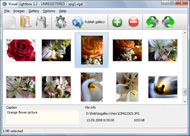
It's no secret that adding photos to your blog posts is one of the most effective ways to enhance your blog and attract attention to your writing. Flickr has millions of photos available in its database. A simple FREE tool called Flickr Gallery allows you to create a custom image gallery with a cool slide show of the most recent and most interesting photos from Flickr on your website or blog in a few easy steps. Just visit Flickr website and find photostream, photoset or a single photo you like. Enter the address of flickr page to add all photos from this page in your gallery, select the style of thumbnails and the overlay window and add the HTML embed code on your website or blog.
A few clicks and you'll see a stylish photo gallery with beautifull lightbox and zoom effects on your own website or blog!


Flickr Gallery for Windows   Flickr Gallery for MAC

Want more?

Example

Lightbox gallery sample

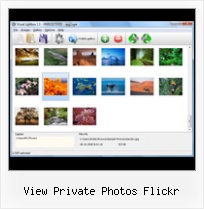
The following image set is generated by Flickr Gallery tool. Click any picture to run Lightbox gallery.

The example above is an in-page usage demo of Lightbox gallery that uses images from Flickr. The lightbox gallery created with Flickr Gallery software is placed inside the html page. You can also check the full-page demo web gallery. This example takes whole browser area to show the gallery.Flickr Slideshow Blogger Loop

How to Use

Step 1. Adding flickr images to your own gallery.


Locate the photo, photoset or photostream you want to use in your Flickr slideshow. Click on it to see the photo on its own page.

Copy URL of the flickr page.

Select Add images from Flickr... from the 'Add' button on the Toolbar.

Add images from Flickr

In the appeared window paste URL of the flickr page. Specify also the number of photos you want to add from the flickr page. Flickr Gallery will now include these photos in your project.

Add images from Flickr

If you have included the photos that you do not wish to be in your web gallery, you can easily remove them. Select all images that you wish to remove from photo gallery, and select Delete images. from the Images menu. You can pick and choose pictures by holding the CTRL while clicking the pictures you like.

Step 2. Adding caption.

The name of the photo on flickr page will automatically appear in the caption. When you select a photo you'll see the various info about it, such as: Path, Size, date of last change and Caption. You can add any comment or text about the photo (up to 512 symbols).

Step 3. Gallery properties.

Change the name of your flickr album, the size and quality of your pictures with Flickr Gallery. From the Gallery menu, select Properties or use "Edit Gallery Properties" button on the toolbar.

On the first tab of the Gallery Properties window you can change the name of your photo album and enable/disable the following properties: Slide Show, Auto play Slide Show, Zoom effect, Overlay Shadow. You can also set the Overlay shadow color and select the Engine you want to use (jQuery or Prototype + script.aculo.us).

On the second tab of the Gallery Properties window you can select the thumbnail you want to use, set the Thumbnails Resolution, Thumbnails Quality, Thumbnails Titles. Select Thumbnails Format (save in PNG or JPG format). Specify the Number of columns in you photo album and the Page color.

On the third tab of the Gallery Properties window you can select the template, Image resolution and Image quality of your pictures and change the Watermark.

You can set up the various sizes for exported images.

Control the quality of output PNG or JPEG format image by defining output "Image quality" and "Thumbnail quality" parameters (0%…100%).

Step 4. Save your photo gallery as project file.

When you exit Flickr Gallery application, you'll be asked if you want to save your project. The project consists of the pictures you choose to put on your web photo gallery and all your settings. It's a good idea to save the project, because that will allow you to change the project in case you decide to do something different with future galleries. So click Yes, then enter a name for your project. To select the location of your project, just click the Browse folders button and choose a different location. Then click Save.

Flickr Lightbox For Tumblr View Private Photos Flickr

Download Flickr Gallery


Download Flickr Gallery Download Free Edition
for Windows
Download Flickr Gallery Download Free Edition
for MAC

Flickr Gallery is free for non - commercial use.

A small fee is required for business use. Flickr Gallery Business Edition additionally provides an option to remove the Flickr Gallery. Com credit string as well as a feature to put your own logo to images. After you finish the payment via the secure form, you will receive a license key instantly by e-mail that turns the Flickr Gallery Free Edition into a Business one. You can select the most appropriate payment mode: bank transfer, credit card, check, PayPal etc. Also you can get Business Edition for free if you help with translating Flickr Gallery into your native language, please contact us at for more info.

Embedden Van Flickr Tumbnails

Buy Flickr GalleryBuy Business Edition
for Windows

$49
Single Website
$69
Unlimited Websites
Buy Flickr GalleryBuy Business Edition
for MAC

$49
Single Website
$69
Unlimited Websites

Support

For feature requests, troubleshooting, general help contact Customer Support at . Make sure to include details on your operating system, browser, Flickr Gallery version and a link (or relevant code).Embed Flickr Pool

Feedback

    * Let me start just congratulating you, good job, really. I am trying out the free version before I buy it. It works great.

    * I tried Flickr Gallery and for me its a very cool and usefull application. Its so easy to manage my galleries and it looks very nice.

    * First of all, I love you Flickr Gallery. I think it's beautiful! I purchased the lightbox “business edition” yesterday, and I’m very happy how easy it is to use. Found this to be one of the fastest ways to get a gallery on the web. Thanks.Flickr Highslide Typepad

    * Just a quick thank you for the software though, It's not often you get a free software version of this quality and style! Well done and please continue this amazing gallery. Hope to see more advances.

FAQ

Q:How can I set the number of thumbnails columns?

A:Open the generated 'engine\css\vlightbox.css' in any text editor and specify the width for your gallery,
for example:

#vlightbox { zoom:1; width: 650px;}

Change this value to have a different number of columns.


RELATED

Getting Started with Flickr This slideshow walks you through setting up, customizing, and using a Flickr account. View "Private" photos of people who have marked you as family or friend

Getting Started with Flick r View "Public" Photos. What can you do in Flick. r. with. an account? keywords) Join groups / post photos to groups. View "Private" photos of people who

Flickr: Manage and Share Your Photos Online Flickr is one of best photo management and sharing services. It offers a place to upload, organize and share photos with others. It is a cross-platform application for both PCs and Macs

Accessing Images On Flickr From An ASP.NET Website Using The Flickr is a popular photo-sharing website. Like many "Web 2.0" and "social" websites, Flickr includes a programmatic interface through which other programs and websites can view and manage photos, comments, groups, tags, and other Flickr assets

Eamonn's Home: Flickring Families There are also other ways to view your photos -- one way (using Flickr's Organizer) is to view them by date taken, since your I mark photos as private if I'm only uploading them so that I can use them on my blog site or for some other utilitarian purpose. Flickr is a social service. Your public

Download Flickr Photos Protected by Transparent spaceball.gif A DI reader wants to download a private picture from Flickr Photos that's blocked from downloading. When a Flickr member has set download permissions to disallow his/her photos from being downloaded, a transparent image is overlaid on the actual photo so the right-click method fails. You

Flickr: Strong On Content & Community, But Commerce Needs Work Editor's note: Sramana Mitra is currently running a series on her blog reviewing the photo sharing industry. In this Read/WriteWeb post, she looks at Flickr's offering using her Web 3.0 framework. Before I get to my analysis, here is a quick

Le Taha'a Private Island & Spa, Bora-Bora, Tahiti Photos See popular photos of Le Taha'a Private Island & Spa, Bora-Bora, Tahiti on Yahoo! Travel Please wait while we get your photos from Flickr Thank you for adding your photos to Yahoo! Travel. Photos that meet our guidelines will appear on Yahoo! Travel within 2-3 days. Click

Flickr Founder Says Sharing Private Photos to Get Easier Well, since then, Tim Mayer of Yahoo! pointed the co-founder of Flickr, Stewart Butterfield towards this entry. Stewart commented stating that they are aware of the issues and will be working on an "email a friend" feature to make it easier for family and friends to view private photos

How To View Private Flickr Photos : Flickr Gallery How To View Private Flickr Photos. With Flickr Gallery comprehensible interface, you need just 4 simple steps to get your photo album website ready!. Autoreplay Flickr Slideshow

CyberNotes: Picsviewr Provides Cool Templates for Your Flickr On multiple occasions we have mentioned the fact that we use Flickr for our online photo storage and sharing solution. A pity that we cannot view my photos using picsviewer since they are private

Breaking: Yahoo To Shut Down Yahoo Photos In Favor Of Flickr View Comments. Michael Arrington. May 3, 2007. I am at the annual Outcast CEO Dinner event – Brad Garlinghouse (Yahoo SVP Communications & Communities) and Stewart Butterfield (Cofounder Flickr) are sitting at my table and told me that they will announce the closure of Yahoo Photos tomorrow

Getting Started with flickr View "Public" Photos. What can you do in Flickr with an account? Upload your own photos View "Private" photos of people who have marked you as family or friend

Flickr: XO Private's Photostream Flickr is almost certainly the best online photo management and sharing application in the world. Show off your favorite photos and videos to the world, securely and privately show content to your friends and family, or blog the photos and videos

How to Share Your Photos Online Public photos can be seen by anyone, and private photos can be seen only by your family In order for someone to see your private photos, they must first open their own Flickr account

Flickr - Wikipedia, the free encyclopedia In November 2006 Flickr created a "guest pass" system that allows private photos to be shared with non Flickr members. For instance, a person could email this pass to parents who may not have an account to allow them to see the photos otherwise restricted from public view

Flickriver: Photoset '#72157625134606485' by Train Chartering A Greasemonkey script that adds Flickriver links to various Flickr photo pages - user photos, favorites, pools etc, allowing to quickly open the corresponding Flickriver view. Also, allows quickly viewing any Flickr photo on black background in large size

The World's Best Photos - Flickr Hive Mind - If you are a Flickr user and Log into Flickr you will be able to see your private photos, as well as larger thumbnails. Hivemind: http://flickrhivemind.net/Interestingness/canon Hits: 500 Pages: 10 Link Explore Flickr Hive Mind is a data mining tool for the Flickr photography database

Fluidr / gael_H's photos and videos View gael_H's Flickr photos and videos on Fluidr. Fluidr makes it easy to view photos and videos on Flickr using continuous pagination which essentially means that you can view hundreds of photos and videos without ever having to click on a 'next

Flickr You do not need to be registered to search or view public photos on Flickr, however you must be a registered member of Flickr or Yahoo! to post. The Flickr Privacy Policy continues to be in effect for existing users of the Flickr service who have not yet merged their Flickr and Yahoo! accounts

Review: Flickr apps for iPhone Review | Mobile | iOS Central A trio of Flickr apps for the iPhone offer ways to view and contribute to the popular photo-sharing Web site

chumby " flickr photo viewer View photos from Flickr.com. This customizable widget lets you choose public photos by user name or email address, search and view photos by tag words, or view public/private photos by you or your friends. Sit back and watch the show or navigate back and forth using the touchscreen

On Black: See your photos in a new light View your Flickr photos on a gorgeous plain all-black or all-white background (sort of like a framed mat). A black background helps viewers find detail in black and white photos and other photos with dark areas and makes colors really pop. An

Flickr Private Photos Exposed Private Photos on Flickr Exposed through Google Image Search. Using Google Images is helping find private photos on Flickr. Today, I searched for "Strange Pictures" on Google Images. This brought up a photo thumbnail that I clicked on titled "Strange Little Girl"

Geek to Live: Flickr Advanced User Guide foo13bar+family@photos.flickr.com - Visible to family. foo13bar+ff@photos.flickr.com - Visible to friends and family. foo13bar+private@photos.flickr.com - Only visible to you. Be sure to add these addresses to your contacts list and email client address book for easy access

Flickr: Information from Answers.com Flickr This is the leading photograph sharing site. Flickr users can download photographs and then show them to other users Flickr provides both private and public image storage. A user uploading an image can set privacy controls that determine who can view the image. A photo can be flagged

