
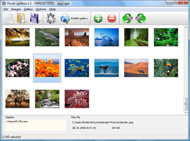
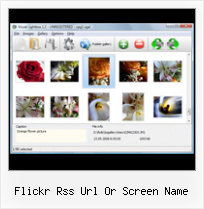



Overview

It's no secret that adding photos to your blog posts is one of the most effective ways to enhance your blog and attract attention to your writing. Flickr has millions of photos available in its database. A simple FREE tool called Flickr Gallery allows you to create a custom image gallery with a cool slide show of the most recent and most interesting photos from Flickr on your website or blog in a few easy steps. Just visit Flickr website and find photostream, photoset or a single photo you like. Enter the address of flickr page to add all photos from this page in your gallery, select the style of thumbnails and the overlay window and add the HTML embed code on your website or blog.
A few clicks and you'll see a stylish photo gallery with beautifull lightbox and zoom effects on your own website or blog!


Flickr Gallery for Windows   Flickr Gallery for MAC

Want more?

Example

Lightbox gallery sample

The following image set is generated by Flickr Gallery tool. Click any picture to run Lightbox gallery.

The photo gallery above is an in-page usage demo of Lightbox with images from Flickr. The lightbox gallery created with Flickr Gallery tool is placed inside the website page. You can also check the full-page demo slideshow. This example takes whole browser area to show the website gallery.Delete Photos In A Set Flickr

How to Use

Step 1. Adding flickr images to your own gallery.


Locate the photo, photoset or photostream you want to use in your Flickr slideshow. Click on it to see the photo on its own page.

Copy URL of the flickr page.

Select Add images from Flickr... from the 'Add' button on the Toolbar.

Add images from Flickr

In the appeared window paste URL of the flickr page. Specify also the number of photos you want to add from the flickr page. Flickr Gallery will now include these photos in your project.

Add images from Flickr

If you have included the photos that you do not wish to be in your web gallery, you can easily remove them. Select all images that you wish to remove from photo gallery, and select Delete images. from the Images menu. You can pick and choose pictures by holding the CTRL while clicking the pictures you like.

Step 2. Adding caption.

The name of the photo on flickr page will automatically appear in the caption. When you select a photo you'll see the various info about it, such as: Path, Size, date of last change and Caption. You can add any comment or text about the photo (up to 512 symbols).

Step 3. Gallery properties.

Change the name of your flickr album, the size and quality of your pictures with Flickr Gallery. From the Gallery menu, select Properties or use "Edit Gallery Properties" button on the toolbar.

On the first tab of the Gallery Properties window you can change the name of your photo album and enable/disable the following properties: Slide Show, Auto play Slide Show, Zoom effect, Overlay Shadow. You can also set the Overlay shadow color and select the Engine you want to use (jQuery or Prototype + script.aculo.us).

On the second tab of the Gallery Properties window you can select the thumbnail you want to use, set the Thumbnails Resolution, Thumbnails Quality, Thumbnails Titles. Select Thumbnails Format (save in PNG or JPG format). Specify the Number of columns in you photo album and the Page color.

On the third tab of the Gallery Properties window you can select the template, Image resolution and Image quality of your pictures and change the Watermark.

You can set up the various sizes for exported images.

Control the quality of output PNG or JPEG format image by defining output "Image quality" and "Thumbnail quality" parameters (0%…100%).

Step 4. Save your photo gallery as project file.

When you exit Flickr Gallery application, you'll be asked if you want to save your project. The project consists of the pictures you choose to put on your web photo gallery and all your settings. It's a good idea to save the project, because that will allow you to change the project in case you decide to do something different with future galleries. So click Yes, then enter a name for your project. To select the location of your project, just click the Browse folders button and choose a different location. Then click Save.

Simple Flickr Photos Widget Wordpress Flickr Rss Url Or Screen Name

Download Flickr Gallery


Download Flickr Gallery Download Free Edition
for Windows
Download Flickr Gallery Download Free Edition
for MAC

Flickr Gallery is free for non - commercial use.

A small fee is required for business use. Flickr Gallery Business Edition additionally provides an option to remove the Flickr Gallery. Com credit string as well as a feature to put your own logo to images. After you conclude the payment via the secure order form, you will receive a license key instantly by e-mail that turns the Flickr Gallery Free Edition into a Business one. You can select the most appropriate payment procedure: bank transfer, check, credit card, PayPal etc. Also you can get Business Edition for free if you help with translating Flickr Gallery into your native language, please contact us at for more info.

Joomla 1 5 Flickr Plugin Slideshow

Buy Flickr GalleryBuy Business Edition
for Windows

$49
Single Website
$69
Unlimited Websites
Buy Flickr GalleryBuy Business Edition
for MAC

$49
Single Website
$69
Unlimited Websites

Support

For troubleshooting, feature requests and general help contact Customer Support at . Make sure to include details on your browser, a link (or relevant code), operating system and Flickr Gallery version.Flickr Slidewshow Galleries

Feedback

    * I have purchased the business and LOVE IT..Your product appears easy to use and close to what I need to help several of my clients..

    * Another programmes have incredible functionality but no fantastic interface like your product!

    * Great product by the way and saved me loads of time. I really like your Flickr Gallery program! Very nice.Download Movies Off Flickr

    * Just bought the business version of Flickr Gallery and I just had to write and say how impressed I am with it. Really easy to use, intuitive interface and generates a truly professional presentation. Seldom have I been so pleased with a software purchase. Thank you.

FAQ

Q:Can this be adapted so only one image is shown and then the gallery opens to flick through the rest of the images..

A:You can use the following parameter to hide thumbnails you don't want to display on the page:

style="display: none;"

for example:

<!-- Start Flickr Gallery.com BODY section -->
<div id="vlightbox">
<a rel="lightbox_vlb" href="data/images/dscn6831.jpg" title="dscn6831" ><img src="data/thumbnails/dscn6831.png" ><span></span></a>
<a rel="lightbox_vlb" href="data/images/dscn6823.jpg" title="dscn6823"><img src="data/thumbnails/dscn6823.png" style="display: none"><span></span></a>
<a rel="lightbox_vlb" href="data/images/dscn6819.jpg" title="dscn6819"><img src="data/thumbnails/dscn6819.png" style="display:none"><span></span></a>
<a id="vlb" href="http://Flickr Gallery.com">Photo Gallery For Web by Flickr Gallery.com v2.0</a>
</div>
<!-- End Flickr Gallery.com BODY section -->


RELATED

URL Hack: View and save original photos on Flickr - Tech-Recipes Have you ever been frustrated of wanting to save a really nice photo on Flickr, but when you try to save it, what you got was “spacer.gif”

MacMost Now 84: Flickr Photo Screen Saver Gary Rosenzweig looks at how to pull in an updated list of photos from Flickr or an RSS feed and use them as you Mac screensaver. with a Flickr feed that uses high resolution images and then you can use these as your screen saver and get

bbum's weblog-o-mat " Blog Archive " Quartz Composer based It should be able to parse any Flickr RSS or Atom feed, but maybe not even that. embed Quartz Composer document into a Cocoa view hierarchy) into a screen saver and pass custom values into the embedded QC patch

Gickr: Create Animations from your Flickr Photos " Freakitude Gickr.com is handy web service that lets you instantly create Animated GIF animations from your flickr pictures. You just have to enter your Flickr screen name or a flickr tag. The website will grab and show thumbnails of the pictures

Online Photo Sharing with Flickr 4. Select a Flickr screen name by. entering it in the Yahoo! ID and with your Flickr user name). You can. copy and paste this URL into an email. message to

The Strength of Weak Ties: Flickr Storm This means that if the URL is recorded (see my search on sunsets), kids can reclaim their page of Not only are large images provided, but the Flickr users screen name, the Creative Commons pool, and a URL to the image on Flickr

Flickr & WEBIMAGER: Easy screenshot-to-Flickr uploading Here's a cool tool with possibly the most awkward name ever: Flickr & WEBIMAGER. Yes, that's its name. It's a Windows app whose sole purpose is to Simply use the built-in tools to capture the whole screen or a particular area, then click on the Upload

valibuk.net " Access Flickr with Ruby and Flickraw Preferably, use the flickraw code, where it is necessary to specify your user screen name (not in the flickr URL to your profile - you may find it in the flickr's greeting or in your settings): id = flickr.people.findByUsername(:username => "YOUR USER SCREEN NAME").id

Flickr - Wikipedia, the free encyclopedia Flickr asks photo submitters to organize images using tags (a form of related to particular topics, such as place names or subject matter

Building a Volta Control : A Flickr Widget This article illustrates how to create a Volta control around Flickr, the popular image hosting service. In order to retrieve the NSID for a user, Flickr offers a method named flickr.people.findByUsername which takes the Flickr screen name of the user and returns an XML like the following:

Flickr Studio pour iPad sur l'iTunes App Store Découvrez Flickr Studio par Keeple, lisez des avis sur l'application et téléchargez-la dans l'App Store d'iTunes. Bugfix: Video playback was broken due to a bug in their URL construction (Only occurred for videos from people with a space in their screen name)

PhotoViewer You can get it from your RSS feed URL (http://api.flickr.com/services Fires when a Flickr RSS feed or Flickr API call is finished loading

Yahoo and Flickr Merge Passwords RSS. In the "thank God for small favors" department, I learned today from the FlickrBlog that if you have a Yahoo user name and password, it's going to get you in to Flickr without you having to go through all able to keep their existing screen names on Flickr whether they choose to merge accounts

Promote Your Business - Post Portfolio Screen Shots on Flickr Use free photo sharing sites like Flickr to promote your portfolio screen shots. If you post your screen shots there, and make them public, this puts them out to a lot of people and could get you some extra business. Create a Flickr account that uses your business name or URL

Online Photo Sharing with Flickr 4. Select a Flickr screen name by entering it in. the Yahoo! ID text with a separate RSS reader or with a website that. can display RSS feeds. To copy the RSS feed address, right-click on the. RSS icon or on the Feed link next to it and select. Copy Link or Copy Link Location (this will vary

Flickr Marketing – 6 Awesome Tactics to Promote Your Website Tap into the Amazing Potential that Flickr Offers to Successfully Market Your Business. The screen name you choose for your account will become your URL on Flickr, so you should use a competitive keyword

Updated Google Screensaver supports Picasa Web Albums and RSS My screen saver just got so much better that now I think I'll have to sit and use it to watch cool photos rather than as a nice view for passerby visitors while I'm away from my computer. open an RSS feed from this site or the Flickr one listed above, you simply copy and paste that URL into the

4 Unique Tools to Monitor Flickr via RSS If you often browse Flickr to find inspiration, you may be wondering if there are any good tools to monitor the resource for regular interesting updates. One

Building Flickr 4. Clean URLs Use them as branding - top of screen, everyone can see the URL and the name of your company Core principle - no need to expose the mobile devices 9. Open Data Import and export of data from systems. Export - RSS feeds. give feeling

Using RMagick with Flickr Using RMagick with Flickr, Ruby, ruby, flickr, rmagick weare.buildingsky.net If you do not already have a flickr account or yahoo screen name, you will need to create one now

Graphic Identity: Things to Consider Before You Join a Flickr You are always welcome to join this group and feel free to add your profile or blog URLs in the comment box! Here are things to consider before you join a Flickr Pool: 1. Create a nice screen name url because you can direct people to your Flickr pages with it!

Quick Flickr Widget Hello and thanks for using Quick Flickr Widget. Here's some information which might be interesting, and please please please read before you ask, The Quick Flickr Widget for WordPress is capable of displaying up to ten photos using your Flickr screen name or any public Flickr RSS feed

Creating a Web Slice for your flickr badge § The Adventures Seth's post says, "Note: For security reasons, the Web Slice preview does not allow script or Microsoft ActiveX controls. The "feed" url tells the web slice where to check for the change in content (if you aren't using a script this could be an RSS feed)

Flickr Ftp : Flickr Gallery Flickr Rss Url Or Screen Name. Alternatives To Flickr. Flickr Ftp You can add any comment or text about the photo (up to 512 symbols). Step 3. Gallery properties. Change the name of your flickr album, the size and quality of your pictures with Flickr Gallery. From the Gallery menu, select

Tiger RSS Screen Saver | Flickr - Photo Sharing! Tiger RSS Screen Saver www.flickr.com/people/pelle/]pelleb[/url], on Flickr

Free PHP5 Script to grab YOUR flickr Photos " kosso's braingarden This script takes your screen name and then lists all your photos, how to specify the filename and Appendix M for a list of supported URL protocols." 7 kosso January 31, 2007 at 7:07 pm. Or I could

WordPress " Quick Flickr Widget " WordPress Plugins Quick Flickr Widget. Display Flickr photos (by Flickr RSS or Flickr screen name) in your sidebar. Fully customizable HTML. Easy to setup and configure (feed with Flickr RSS or Screen name) Up to 20 Flickr photos in your sidebar or any other widgetized area. Fully customizable widget (editable

