



Overview

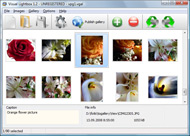
It's no secret that adding photos to your blog posts is one of the most effective ways to enhance your blog and attract attention to your writing. Flickr has millions of photos available in its database. A simple FREE tool called Flickr Gallery allows you to create a custom image gallery with a cool slide show of the most recent and most interesting photos from Flickr on your website or blog in a few easy steps. Just visit Flickr website and find photostream, photoset or a single photo you like. Enter the address of flickr page to add all photos from this page in your gallery, select the style of thumbnails and the overlay window and add the HTML embed code on your website or blog.
A few clicks and you'll see a stylish photo gallery with beautifull lightbox and zoom effects on your own website or blog!


Flickr Gallery for Windows   Flickr Gallery for MAC

Want more?

Example

Lightbox gallery sample

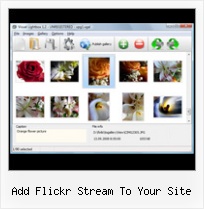
The following image set is generated by Flickr Gallery tool. Click any picture to run Lightbox gallery.

The photo gallery above is an in-page usage demo of Lightbox script with Flickr images. The website gallery created with Flickr Gallery wizard is placed inside the website page. You can also check the full-page demo web gallery. This example takes whole browser area to show the website gallery.Flickr Photos On Your Website

How to Use

Step 1. Adding flickr images to your own gallery.


Locate the photo, photoset or photostream you want to use in your Flickr slideshow. Click on it to see the photo on its own page.

Copy URL of the flickr page.

Select Add images from Flickr... from the 'Add' button on the Toolbar.

Add images from Flickr

In the appeared window paste URL of the flickr page. Specify also the number of photos you want to add from the flickr page. Flickr Gallery will now include these photos in your project.

Add images from Flickr

If you have included the photos that you do not wish to be in your web gallery, you can easily remove them. Select all images that you wish to remove from photo gallery, and select Delete images. from the Images menu. You can pick and choose pictures by holding the CTRL while clicking the pictures you like.

Step 2. Adding caption.

The name of the photo on flickr page will automatically appear in the caption. When you select a photo you'll see the various info about it, such as: Path, Size, date of last change and Caption. You can add any comment or text about the photo (up to 512 symbols).

Step 3. Gallery properties.

Change the name of your flickr album, the size and quality of your pictures with Flickr Gallery. From the Gallery menu, select Properties or use "Edit Gallery Properties" button on the toolbar.

On the first tab of the Gallery Properties window you can change the name of your photo album and enable/disable the following properties: Slide Show, Auto play Slide Show, Zoom effect, Overlay Shadow. You can also set the Overlay shadow color and select the Engine you want to use (jQuery or Prototype + script.aculo.us).

On the second tab of the Gallery Properties window you can select the thumbnail you want to use, set the Thumbnails Resolution, Thumbnails Quality, Thumbnails Titles. Select Thumbnails Format (save in PNG or JPG format). Specify the Number of columns in you photo album and the Page color.

On the third tab of the Gallery Properties window you can select the template, Image resolution and Image quality of your pictures and change the Watermark.

You can set up the various sizes for exported images.

Control the quality of output PNG or JPEG format image by defining output "Image quality" and "Thumbnail quality" parameters (0%…100%).

Step 4. Save your photo gallery as project file.

When you exit Flickr Gallery application, you'll be asked if you want to save your project. The project consists of the pictures you choose to put on your web photo gallery and all your settings. It's a good idea to save the project, because that will allow you to change the project in case you decide to do something different with future galleries. So click Yes, then enter a name for your project. To select the location of your project, just click the Browse folders button and choose a different location. Then click Save.

How To Install Flickr2facebook On Chrome Add Flickr Stream To Your Site

Download Flickr Gallery


Download Flickr Gallery Download Free Edition
for Windows
Download Flickr Gallery Download Free Edition
for MAC

Flickr Gallery is free for non-commercial use.

A small fee is required for business use. Flickr Gallery Business Edition additionally provides an option to remove the Flickr Gallery. Com credit string as well as a feature to put your own logo to images. After you conclude the payment via the secure order form, you will receive a license key instantly by email that turns the Flickr Gallery Free Edition into a Business one. You can select the most suitable payment procedure: credit card, PayPal, bank transfer, check etc. Also you can get Business Edition for free if you help with translating Flickr Gallery into your native language, please contact us at for more info.

Set Up Flickr For Tumblr

Buy Flickr GalleryBuy Business Edition
for Windows

$49
Single Website
$69
Unlimited Websites
Buy Flickr GalleryBuy Business Edition
for MAC

$49
Single Website
$69
Unlimited Websites

Support

For general help, feature requests, troubleshooting contact Customer Support at . Make sure to include details on your browser, operating system, Flickr Gallery version and a link (or relevant code).Flickr Jquery Embed Photoset

Feedback

    * I LOVE your free Lightbox2 software tool and will purchase the business version shortly. I have seen the Lightbox JS effect used with video tutorials and I was hoping you have a version for video that I can purchase.
Video LightBox: http://videolightbox.com

    * Just bought the business version of Flickr Gallery and I just had to write and say how impressed I am with it. Really easy to use, intuitive interface and generates a truly professional presentation. Seldom have I been so pleased with a software purchase. Thank you.

    * First of all, I love you Flickr Gallery. I think it's beautiful! I purchased the lightbox “business edition” yesterday, and I’m very happy how easy it is to use. Found this to be one of the fastest ways to get a gallery on the web. Thanks.Telecharger Flickr Gallerie

    * I'm absolutely loving Flickr Gallery Business and Video LightBox. Amazing, quick and painless, to create a custom, browser independent gallery. And it works first time - every time! Best value for money I've seen in quite a while...

FAQ

Q:Is it possible to load a gallery from within image? So the gallery loads externally?

A:You should start the gallery onClick:

1) Add the following function into the <head> tag:

<script type="text/javascript">
function showLightBox()
{ Lightbox.start(document.getElementById('firstImage'));}
</script>

2) Specify the onClick event for the image (or link):
<img src="thumbnail_gr.jpg" onClick="javascript:showLightBox()" title="Click to see the demo" style="cursor: pointer;">
3) Set the ID for any image in your gallery (id="firstImage"), for example add it to the first image:
<a rel="lightbox_vlb" href="data/images/dscn6831.jpg" title="dscn6831" id="firstImage">
4) Use 'display: none;' property for your gallery in engine\css\vlightbox.css. Just change the following code:

#vlightbox a{
display:-moz-inline-stack;
display:inline-block;
zoom:1;
*display:inline;
position:relative;
vertical-align:top;
margin:3px;
width:160px;
font-family:Trebuchet,Tahoma,Arial,sans-serif;
font-size:11px;
font-weight:normal;
text-align:center;
opacity:0.87;
}

to:

#vlightbox a{
display:-moz-inline-stack;
display:none;
zoom:1;
*display:inline;
position:relative;
vertical-align:top;
margin:3px;
width:160px;
font-family:Trebuchet,Tahoma,Arial,sans-serif;
font-size:11px;
font-weight:normal;
text-align:center;
opacity:0.87;
}

RELATED

Tech Tip 139 - Getting The Most Out of Flickr However, most of these photo-sharing tools require people to go to the Flickr site. If you prefer a set of static photos on your site, then it's easy to add a Flickr photo stream to your Web site or blog

How to Add a Flickr Badge to Your Website How to Add a Flickr Badge to Your Website. eXo Platform 3 provides many features for building rich websites To add a stream of fresh, colorful content to our website, we wrote a simple gadget that displays a Flickr badge

Displaying your flickr photos in an unobtrusive manner Displaying your flickr photos without leaving or slowing down your web site. Here you can download a script to add a flickr badge like the following to any HTML document or blog with some HTML and a JavaScript include. The following badge is added to the document using this code:

Fluidr / Hot Flash Photography's photos and videos View Hot Flash Photography's Flickr photos and videos on Fluidr. Fluidr makes it easy to view photos and videos on Flickr using continuous pagination which essentially means that you can view hundreds of photos and videos without ever having to

Adding streaming video content to your site - Mehfuz's WebLog In this post, I will show how to create a simple video site using the video library support that is bundled with 3.6 release. It is often required that you want to add a streaming video content to your site, either it could be a product demonstration or a getting started tutorial

Fab Flickr add-ons I just registered on Picnik (thanks to Barbara Iverson for telling me about it recently) and edited a live photo on my Flickr photo stream in a couple of minutes. Add Flickr images to your site. Wouldn't it be nice to include a slide show or preview

Friday Flickr Fun: add a Flickr tag cloud to your site It has been said that the "tag cloud is the mullet of the internet," and who doesn't want to be the height of current fashion? Friday Flickr Fun: add a Flickr tag cloud to your site

How to: Add a Styled Flickr Photo Stream to Your Blog Adding uniquely-styled Flickr photo streams to your blog is easy, and it's just another thing you can leverage to make your blog stand out among the crowd. Today, my goal is simply to walk you through the process of creating How to: Add a Styled Flickr Photo Stream to Your Blog

How to add a styled flickr photo stream to your blog | etc: a A stream of webdev and design consciousness: webdev, css, web design,digital photography, Firefox, Photoshop etc. How to add a styled flickr photo stream to your blog - with how-to for Wordpress and MT, along with instructions for styling the photos to match

How to Add Flickr to Joomla | eHow.com How to Add Flickr to Joomla. The core of any website is its content. Whether you are running your company's website or designing a personal blog, incorporating photos into your site is necessary. Most content management software

WordPress Tutorial – How to Add Flickr Photo Widget to WordPress Tutorial – How to Add Flickr Photo Widget to WordPress Theme Sidebar how to add Flickr Photo Widget to your WordPress blog's sidebar so that you can display thumbnails of your Flickr photos. The Flickr Widget comes with WordPress 2.5+ on the WordPress.com hosting site. Your

Activity Stream (Scripts) 6.x-1.0 - Free Activity Stream Activity Stream builds a lifestream for you by aggregating your social activities all in one place. Activity Stream (Scripts) Voting and Download Button For Your Site: To link back to this page, please copy code below and insert in your page. All visits come thru this code will add a 10

Flickr: Photos & video from everyone in Flickr Flickr is almost certainly the best online photo management and sharing application in the world. Show off your favorite photos and videos to the world, securely and privately show content to your friends and family, or blog the photos and videos

Css Flickr Gallery : Flickr Gallery Css Flickr Gallery. High Quality and Professional ajax picture gallery with Minimum Effort! Use a an image gallery on your site or blog. It takes about a minute or two to set up. Now you can display your flickr photos in style. How To Add a Flickr Gallery to Your WordPress Theme Without a Web Gallery >

Web Design Schools Guide Link to your own site within the photo: Be sure to add a link within your photo's description to get traffic back to your website. Use Flickr as hosting: Store your photos on Flickr, and link directly to them to take a load off of your server

How To Add Pictures To Comments On DIYPhotography.net Allot of readers are asking me "how can we add pictures to go along with our comments? on DIYPhotography.net (of course you can always use the Flickr stream)

Flickr Adds NoFollow to Photo Description Links | Search Flickr today took away a major source of link juice for the social media marketers and search engine optimization link you can still rank highly for your brand name or specific terms and brand control your Flickr stream with relevant images and links to your site

FLICKR TOOLBOX: 100+ Tools For Flickr Addicts Flickr is back in the news this week with reports that it will add video. But we're still loving the photo-sharing element: here's 100+ ways to get even FlickUrPic – Module to let you add your Flickr photos, including private ones, to your Joomla powered site

Adding A Flickr Photo Stream To My Blog I didn't use Flickr then, nor did I ever get photos in place by Add a Styled Flickr Photo Stream to Your Blog. I came across his guide when I was looking for some new

Useful Tools for Flickr Desktop Applications Flickr Finder - Mac OS X application for browsing your photos. 1001 for Mac OS X is a desktop client to be used in conjunction It allows to edit photo titles and descriptions, and add tags to them, create a new photoset with your photos, or add them to an existing photoset,

Activity Stream API | drupal.org You can add fields to the Activity Stream admin settings page, allowing the site administrator to add API keys or global settings If the site you are integrating provides an RSS feed for the user's activity, you might find it easiest to use the activitystreamfeed module to do all your streamapi

Field Notes Theme | How to Embed your Flickr Photo Stream How to Embed your Flickr Photo Stream For people who aren't used to working with HTML or customizing their Tumblr themes, don't worry, I have tried to make embedding your Flickr photo stream into this

How to show your Tweets, Stumbles, Diggs, Flickr Stream, etc We have posted about How to add Real Time Twitter stream to your Website and Blog, using which you can show Twitter for any particular topic on your website and

Add Flickr Stream On Website | Flickr Slideshow Add Flickr Stream On Website. Build professional web photo gallery templates in minutes with jQuery Thickbox Alternative! add photo flickr html

Flickr to add video streaming - AfterDawn Flickr, the well known photo sharing site, has announced that it will begin offering video Streaming in an effort to rival the dominant market leader, YouTube. Flickr,

Flickr Stream " ReMooz Showcase " digitarald:Harald Kirschner digitarald:Harald K - Consultant & Contractor - Flickr Stream Ă‚" ReMooz Showcase - ReMooz is an open-source widget for great looking and unobtrusive inline-pop-ups, poweredby MooTools. It enables how your vistors browse through content, such as

Top 100 Tools For Flickr Addicts - Top 100 Directory Flickr is back in the news this week with reports that it will add video. But we're still loving the photo-sharing element: here's 100+ ways to get even more Add Flickr pictures to your CMS Made Simple site

