
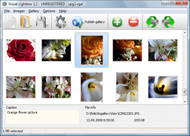

Overview

It's no secret that adding photos to your blog posts is one of the most effective ways to enhance your blog and attract attention to your writing. Flickr has millions of photos available in its database. A simple FREE tool called Flickr Gallery allows you to create a custom image gallery with a cool slide show of the most recent and most interesting photos from Flickr on your website or blog in a few easy steps. Just visit Flickr website and find photostream, photoset or a single photo you like. Enter the address of flickr page to add all photos from this page in your gallery, select the style of thumbnails and the overlay window and add the HTML embed code on your website or blog.
A few clicks and you'll see a stylish photo gallery with beautifull lightbox and zoom effects on your own website or blog!


Flickr Gallery for Windows   Flickr Gallery for MAC

Want more?

Example

Lightbox gallery sample

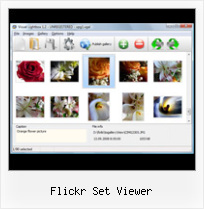
The following image set is generated by Flickr Gallery tool. Click any picture to run Lightbox gallery.

The sample above is an in-page usage demo of Lightbox tool with Flickr images. The slideshow created with Flickr Gallery application is placed inside the page layout. You can also check the full-page demo gallery. This example takes whole browser area to show the website gallery.Modify Flickr Set Gallery Slideshow

How to Use

Step 1. Adding flickr images to your own gallery.


Locate the photo, photoset or photostream you want to use in your Flickr slideshow. Click on it to see the photo on its own page.

Copy URL of the flickr page.

Select Add images from Flickr... from the 'Add' button on the Toolbar.

Add images from Flickr

In the appeared window paste URL of the flickr page. Specify also the number of photos you want to add from the flickr page. Flickr Gallery will now include these photos in your project.

Add images from Flickr

If you have included the photos that you do not wish to be in your web gallery, you can easily remove them. Select all images that you wish to remove from photo gallery, and select Delete images. from the Images menu. You can pick and choose pictures by holding the CTRL while clicking the pictures you like.

Step 2. Adding caption.

The name of the photo on flickr page will automatically appear in the caption. When you select a photo you'll see the various info about it, such as: Path, Size, date of last change and Caption. You can add any comment or text about the photo (up to 512 symbols).

Step 3. Gallery properties.

Change the name of your flickr album, the size and quality of your pictures with Flickr Gallery. From the Gallery menu, select Properties or use "Edit Gallery Properties" button on the toolbar.

On the first tab of the Gallery Properties window you can change the name of your photo album and enable/disable the following properties: Slide Show, Auto play Slide Show, Zoom effect, Overlay Shadow. You can also set the Overlay shadow color and select the Engine you want to use (jQuery or Prototype + script.aculo.us).

On the second tab of the Gallery Properties window you can select the thumbnail you want to use, set the Thumbnails Resolution, Thumbnails Quality, Thumbnails Titles. Select Thumbnails Format (save in PNG or JPG format). Specify the Number of columns in you photo album and the Page color.

On the third tab of the Gallery Properties window you can select the template, Image resolution and Image quality of your pictures and change the Watermark.

You can set up the various sizes for exported images.

Control the quality of output PNG or JPEG format image by defining output "Image quality" and "Thumbnail quality" parameters (0%…100%).

Step 4. Save your photo gallery as project file.

When you exit Flickr Gallery application, you'll be asked if you want to save your project. The project consists of the pictures you choose to put on your web photo gallery and all your settings. It's a good idea to save the project, because that will allow you to change the project in case you decide to do something different with future galleries. So click Yes, then enter a name for your project. To select the location of your project, just click the Browse folders button and choose a different location. Then click Save.

Flickr Yoomla Flickr Set Viewer

Download Flickr Gallery


Download Flickr Gallery Download Free Edition
for Windows
Download Flickr Gallery Download Free Edition
for MAC

Flickr Gallery is free for non - commercial use.

A small fee is required for business use. Flickr Gallery Business Edition additionally provides an option to remove the Flickr Gallery. Com credit string as well as a feature to put your own logo to images. After you conclude the payment via the secure form, you will receive a license key instantly by email that turns the Flickr Gallery Free Edition into a Business one. You can select the most suitable payment procedure: bank transfer, check, PayPal, credit card etc. Also you can get Business Edition for free if you help with translating Flickr Gallery into your native language, please contact us at for more info.

Filmstrip Phpflickr

Buy Flickr GalleryBuy Business Edition
for Windows

$49
Single Website
$69
Unlimited Websites
Buy Flickr GalleryBuy Business Edition
for MAC

$49
Single Website
$69
Unlimited Websites

Support

For feature requests, troubleshooting, general help contact Customer Support at . Make sure to include details on your Flickr Gallery version, a link (or relevant code), operating system and a browser.Save Flickr Images Mac

Feedback

    * First of all, your product is fantasitc. I looked at the others and your code generator app was insanely easy to use.

    * I find Flickr Gallery (and lightbox2) a great tool and was about to proceed in its purchase.

    * I'd like to express my gratitude to your efforts on creating such a nice piece of program and best of all it's free! Keep out the good work and I hope to see new features in the near coming future to rate you 5 star!Download Selection Tags Flickr Html Code

    * I ran into your website wile looking for a JavaScript to manage a personal Photo Gallery. I downloaded the trial version and immediately fell in love with your Flickr Gallery, it is one of the best products I’ve ever found; it is very user friendly and easy to use and creates great Photo Galleries.

FAQ

Q:Instead of making one page with 40 photos, is there no property to make 2 or more pages?

A:You can do it in the following way:

1. Create your gallery in Flickr Gallery and publish it on a local drive in any test folder.
2. Make two copies of the generated index.html file (for example index1.html and index2.html).
3. Open index.html, index1.html and index2.html files in any text editor.
4. Find code for the gallery inside the BODY tag and cut some part of the images, so you'll have different images on each page.

<!-- Start Flickr Gallery.com BODY section -->
<div class="gallery">
<!-- leave the following code on index.html page -->
<a href="./data/images/1.jpg" rel="lightbox[sample]" title="Best Toy Ever"><img src="./data/thumbnails/1.png" /></a>
<a href="./data/images/8.jpg" rel="lightbox[sample]" title="PrueaMacro"><img src="./data/thumbnails/8.png" /></a>

<!-- leave the following code on index1.html page -->
<a href="./data/images/3.jpg" rel="lightbox[sample]" title="Macro Leaf."><img src="./data/thumbnails/3.png" /></a>
<a href="./data/images/11.jpg" rel="lightbox[sample]" title="Bell Pepper"><img src="./data/thumbnails/11.png" /></a>

<!-- leave the following code on index2.html page -->
<a href="./data/images/5_0.jpg" rel="lightbox[sample]" title="5"><img src="./data/thumbnails/5_0.png" /></a>
<a href="./data/images/6_0.jpg" rel="lightbox[sample]" title="6"><img src="./data/thumbnails/6_0.png" /></a>

<!--[if lte IE 6]><script src="engine/js/pngfix_vlb.js" type="text/javascript"></script><![endif]-->
<a id="vlightbox" href="http://Flickr Gallery.com/">Online Photo Album Sharing by Flickr Gallery.com</a>
</div>
<!-- End Flickr Gallery.com BODY section -->

5. Create links to switch between your pages, for example:
<a href="index.html">1</a>  <a href="index1.html">2</a>  <a href="index2.html">3</a> 


Q:I want to change color of the overlay shadow? How can I do this?

A:Open engine\css\Flickr Gallery.css and find the following code:

#overlay{
position: absolute;
top: 0;
left: 0;
z-index: 90;
width: 100%;
height: 500px;
background-color: #FFF;
filter:alpha(opacity=60);
-moz-opacity: 0.6;
opacity: 0.6;
}

set the background-color parameter :

#overlay{
position: absolute;
top: 0;
left: 0;
z-index: 90;
width: 100%;
height: 500px;
background-color: #FF00FF;
filter:alpha(opacity=60);
-moz-opacity: 0.6;
opacity: 0.6;
}


RELATED

Browser add-on makes Flickr's galleries faster - Digital Browser add-on Flickr Gallery Plus adds extended functionality to Flickr's set view, allowing users to click through to see full versions of each shot without having to reload the page

Darckr - User Customizable Flickr Viewer and Tool Viewer of Flickr photos and videos, Flickr companion tool for commenting pictures welcome explore contacts recent search mine username photo sets set groups group changes download credits help optin remember hide this menu

Flickrbits FSViewr (short for Flickr set viewer), is a light-weight, easy to configure Flash environment for displaying images from a Flickr photo set on a separate website. Uses could include a personal portfolio or special presentation site with the ability to administer content on Flickr

from my pocket: Flickr is an ideal Windows Mobile Companion Flickr's mobile site uses the same account settings as those of your main flickr account, so you'll set these options on your computer through your main flickr account. See this link for detailed instruction on how to set up Resco Photo Viewer to upload photos to flickr

The FlexWinds blog Finally decided to do something with Flickr because it's so damn easy The app I built is a simple viewer for your flickr sets. The app uses the standard Cairngorm approach to structuring the code. The DisplayShelf component for the sets is from Quitely Scheming

TiltViewer Flickr Gallery Spectacular image galleries made simple. SimpleViewer is the home of the SimpleViewer family of image galleries - professional quality, fully customizable Flash image galleries. Download your free Flash image gallery here

Build a Photo Viewer Using Flex and the Flickr API | Activetuts+ In this tutorial you will learn how to use the as3flickrlib library to create a Flash Flickr photo viewer. Step 1: The

Album viewer for Flickr & Picasa | tools.forret.com Album viewer based on LightBox/Lytebox for photos in RSS feeds Create Lightbox slideshow page for pictures from Flickr, Picasa or any other image RSS feed

KiKiWi Flickr Album Viewer Please input your flickr user name: Introduction. What is KiKiWi Flickr album viewer? KiKiWi is designed as the alternative interface for viewing Flickr photos, which eliminate some Flickr's fanscy features, focus on the way to view the photo sets (albums) and photos as simple as possible

chumby " flickr photo viewer The chumby is a compact wi-fi device that displays useful and entertaining information from the web. It can also be used as an Internet radio player, digital picture frame and alarm clock

Flickr It can be set to display all Flickr photos, only photos with certain tags or only certain photosets. There is also a map viewer for geo-tagged items. There is an embedded

FlickrEdit Help You can select all or any of the Flickr Sets in this tab. The selected sets are backed up to the directory named after the set. If multiple pages of sets are available, you can scroll through the pages by clicking on next or You can select a Flickr Set in this tab and display its photos. If

Download & Set Flickr Homepage Images as Wallpaper with Download & Set Flickr Homepage Images as Wallpaper with FlickR Wallpaper. Flickr image sharing website collection of huge images

Create a Flickr Viewer using Flex - The Tech Labs In this tutorial, you will learn how to integrate photos from Flickr in your Flex application, using as3flickrlib. Now set up the ID parameter of the TextInput, Button and TileList components in the Flex Properties panel

Viewer Favorites - a set on Flickr Flickr is almost certainly the best online photo management and sharing application in the world. Show off your favorite photos and videos to the world, securely and privately show content to your friends and family, or blog the photos and videos

FlickrSet Extension - ThePlaz.com I wanted to be able to embed Flickr sets and tags directly on my website. This way it is only called if a user opens a wiki page with a flickr set/tag

multitouchflickrviewer - Google Code You don't have to be a programmer to point it at your own photo set or change the size of the photos. Multi Touch Flickr Viewer is built on the Adobe Air platform. Screen Shots ©2009 Google - Code Home - Terms of Service - Privacy Policy - Site Directory - Project Hosting Help. Hosted by

Flickr slideshow plug-in - Joomla! Extensions Directory The Flickr Slideshow plugin is a plugin to display photos and videos from your Flickr account on your Joomla website using a simple expression:[flickr photo= xxx] (where xxx is the photo id)The plugin supports various ways of displaying media

Flickr Set Viewer : Flickr Gallery Flickr Set Viewer. Create superior online photo galleries for your Website with Flickr Slideshow!. How To See Flickr Private Photos

Blow Up - A Bond Art + Science Fair Project View your flickr account through this lightweight, streamlined display. Deeplink to the exact sets or photos you want. Downloadable to run on your own site or blog. Customizable interface and color palette

Create a Fisheye Flickr Image Viewer with Adobe Flex This free tutorial shows you how to create a Flickr fisheye image viewer with Adobe Flex. Demo and source code included

PhotoViewer Array. The x and y coordinates used to place the viewer when fixedcenter is set to false. (square|thumb) For loading either Flickr's square thumbs or their normal thumbs

Flickr Viewer Flickr Viewer Check in your package set up. If this is the case then to remove the double header you should uninstall the flickr mods in reverse order in which you have installed them. If not let me know since you'll need to remove the menu items manually. What set up are you using

rreset — most certainly the best way to view flickr sets rreset is a minimalist flickr set viewer. rreset is a minimalist flickr set viewer. View an example set or authenticate with your flickr account to share your own sets

Jing Learning Center - The Flickr Button Here's some sample Flickr embed code: The part highlighted in red is It allows the viewer to click the image and be directed to your Flickr Set

GeekTonic: The Ultimate Flickr Tools Hacks and Scripts Database Flickr Viewer. Flickr Watch. View a flickr photo set in SimpleViewer, a popular flash photo of Flickr images next to links to Flickr photos or set pages

Fluidr / neetones's "Do These Paintings Make Me Look Morbid?" set View neetones'sDo These Paintings Make Me Look Morbid? set on Fluidr. Fluidr makes it easy to view photos and videos on Flickr using continuous pagination which essentially means that you can view hundreds of photos and videos without ever having

FlickrViewer Download FlickrViewer allows you to view a Flickr photo set in SimpleViewer. You will need your Flickr API key (sign in to Flickr and get one free)

Extension:FlickrSet - MediaWiki Load Image Viewer from cache. Show the viewer photo-set-id1; [edit] source code does not exist in cache directory then it is created using Flickr APIs. This

