



Overview

It's no secret that adding photos to your blog posts is one of the most effective ways to enhance your blog and attract attention to your writing. Flickr has millions of photos available in its database. A simple FREE tool called Flickr Gallery allows you to create a custom image gallery with a cool slide show of the most recent and most interesting photos from Flickr on your website or blog in a few easy steps. Just visit Flickr website and find photostream, photoset or a single photo you like. Enter the address of flickr page to add all photos from this page in your gallery, select the style of thumbnails and the overlay window and add the HTML embed code on your website or blog.
A few clicks and you'll see a stylish photo gallery with beautifull lightbox and zoom effects on your own website or blog!


Flickr Gallery for Windows   Flickr Gallery for MAC

Want more?

Example

Lightbox gallery sample

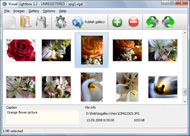
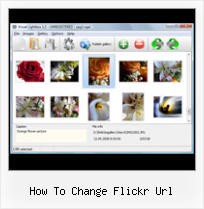
The following image set is generated by Flickr Gallery tool. Click any picture to run Lightbox gallery.

The sample above is an in-page usage demo of Lightbox tool with Flickr images. The lightbox gallery created with Flickr Gallery wizard is placed inside the website page. You can also check the full-page demo web gallery. This example takes whole browser area to show the gallery.Show Flickr Search Results In Flash

How to Use

Step 1. Adding flickr images to your own gallery.


Locate the photo, photoset or photostream you want to use in your Flickr slideshow. Click on it to see the photo on its own page.

Copy URL of the flickr page.

Select Add images from Flickr... from the 'Add' button on the Toolbar.

Add images from Flickr

In the appeared window paste URL of the flickr page. Specify also the number of photos you want to add from the flickr page. Flickr Gallery will now include these photos in your project.

Add images from Flickr

If you have included the photos that you do not wish to be in your web gallery, you can easily remove them. Select all images that you wish to remove from photo gallery, and select Delete images. from the Images menu. You can pick and choose pictures by holding the CTRL while clicking the pictures you like.

Step 2. Adding caption.

The name of the photo on flickr page will automatically appear in the caption. When you select a photo you'll see the various info about it, such as: Path, Size, date of last change and Caption. You can add any comment or text about the photo (up to 512 symbols).

Step 3. Gallery properties.

Change the name of your flickr album, the size and quality of your pictures with Flickr Gallery. From the Gallery menu, select Properties or use "Edit Gallery Properties" button on the toolbar.

On the first tab of the Gallery Properties window you can change the name of your photo album and enable/disable the following properties: Slide Show, Auto play Slide Show, Zoom effect, Overlay Shadow. You can also set the Overlay shadow color and select the Engine you want to use (jQuery or Prototype + script.aculo.us).

On the second tab of the Gallery Properties window you can select the thumbnail you want to use, set the Thumbnails Resolution, Thumbnails Quality, Thumbnails Titles. Select Thumbnails Format (save in PNG or JPG format). Specify the Number of columns in you photo album and the Page color.

On the third tab of the Gallery Properties window you can select the template, Image resolution and Image quality of your pictures and change the Watermark.

You can set up the various sizes for exported images.

Control the quality of output PNG or JPEG format image by defining output "Image quality" and "Thumbnail quality" parameters (0%…100%).

Step 4. Save your photo gallery as project file.

When you exit Flickr Gallery application, you'll be asked if you want to save your project. The project consists of the pictures you choose to put on your web photo gallery and all your settings. It's a good idea to save the project, because that will allow you to change the project in case you decide to do something different with future galleries. So click Yes, then enter a name for your project. To select the location of your project, just click the Browse folders button and choose a different location. Then click Save.

Disable Iphoto Flickr Plugin How To Change Flickr Url

Download Flickr Gallery


Download Flickr Gallery Download Free Edition
for Windows
Download Flickr Gallery Download Free Edition
for MAC

Flickr Gallery is free for non - commercial use.

A small fee is required for business use. Flickr Gallery Business Edition additionally provides an option to remove the Flickr Gallery. Com credit bar as well as a feature to put your own logo to images. After you conclude the payment via the secure order form, you will receive a license key instantly by e-mail that turns the Flickr Gallery Free Edition into a Business one. You can select the most suitable payment procedure: PayPal, bank transfer, credit card, check etc. Also you can get Business Edition for free if you help with translating Flickr Gallery into your native language, please contact us at for more info.

Flickr Like Gallery For Joomla

Buy Flickr GalleryBuy Business Edition
for Windows

$49
Single Website
$69
Unlimited Websites
Buy Flickr GalleryBuy Business Edition
for MAC

$49
Single Website
$69
Unlimited Websites

Support

For troubleshooting, feature requests and general help contact Customer Support at . Make sure to include details on your operating system, browser, Flickr Gallery version and a link (or relevant code).Prototype Flickr Feed

Feedback

    * Just a quick thank you for the software though, It's not often you get a free software version of this quality and style! Well done and please continue this amazing gallery. Hope to see more advances.

    * Just bought the business version of Flickr Gallery and I just had to write and say how impressed I am with it. Really easy to use, intuitive interface and generates a truly professional presentation. Seldom have I been so pleased with a software purchase. Thank you.

    * I LOVE your free Lightbox2 software tool and will purchase the business version shortly. I have seen the Lightbox JS effect used with video tutorials and I was hoping you have a version for video that I can purchase.
Video LightBox: http://videolightbox.comMass Download Flickr Images Mac

    * First of all, your product is fantasitc. I looked at the others and your code generator app was insanely easy to use.

FAQ

Q:In previewing some of my own slides on the browser, I find the background (thumb nails visible) too busy and distracting. Is there a way to darken the background?

A:You may set the following parameter in engine\js\visuallightbox.js file in a such way:

overlayOpacity: 1, // controls transparency of shadow overlay


RELATED

Commons:Flickr files - Wikimedia Commons Flickr allows its users to select the license of their choice and to change it at any Images verified as freely available should be considered free, even if the license on Flickr changes

Create a Yahoo Photo album Yahoo photo album for free: Create your own online album using Yahoo's Flickr service and share it with friends and family. How to create a photo album on Yahoo Flickr? To create a photo album on the Yahoo Flickr service you first need to upload files and these are several ways to do this

Custom Yahoo Pipes/ Flickr Slideshows For Your Blog | Tubetorial Add a Text Input module to allow easy changes to which Flickr tags to search for. generated RSS feed URL for the Pipe. Each time you change the tag + number parameters,

How to link your Flickr and Twitter accounts | Business It's an easy read and you're bound to pick up some nice tips there. So, how do I link my Flickr and Twitter accounts? Here's how you do it. Step 1. Authorize posting to your Twitter account Important: This step does not allow Flickr to go in and change your

Change Flickr Url : Flickr Gallery Change Flickr Url. Flickr Gallery is the best photo gallery software on the Web! How to Read the Complex URLs of Flickr Images To reconstruct other Flickr URLs pointing to different sizes of the same image, all we need to do is change the suffix as

Flash Flickr Badge Widget for WordPress | American in Spain ATTENTION: I now recommend that you use the Javascript Flickr Badge widget instead. I love the Flickr Flash Badges, but the content of the iframe that you have I was investigating the parameters that Flickr's flash file takes, and figured out how to change the numbers of rows and columns,

How to Read the Complex URLs of Flickr Images From the above URL, the mail Flickr photo page will be located at the following location: To reconstruct other Flickr URLs pointing to different sizes of the same image, all we need to do is change the suffix as descibed here: s for small square 75x75 http://static.flickr.com

Talk:Flickerific - Wiki How to change the ugly Flickr URL to be "flickr.com/photos/yoursexynamehere" Scroll down to Your own Flickr web page and click on the Set up your URL link. Choose an alias, and type it in the form field at the end of the URL listed on the page

Flickr: Help: Photos Flickr is almost certainly the best online photo management and sharing application in the world. Show off your favorite photos and videos to the world, securely and privately show content to your friends and family, or blog the photos and videos

How to: Add a Styled Flickr Photo Stream to Your Blog Adding uniquely-styled Flickr photo streams to your blog is easy, and it's just another thing you can leverage to make your blog stand out among the crowd. Today, my goal is simply to walk you through the process of creating

Build a Photo Gallery Using CakePHP and Flickr " SitePoint Is the Flickr interface doing justice to your stunning snaps? It's time to consider customization! Jonathan shows us the ropes in his hands-on tutorial, as he uses CakePHP and the Flickr API to build an attractive, fully customized gallery that

Make your own Flickr search engine with Flash and in this tutorial I'm gonna show you how to interact with the flickr data base, making your own photo search engine, looking for tags on the photos. In this url http://www.flickr.com/services/api/misc.urls.html, you gonna found how format the data flickr provide to call a picture

How to Use the Flickr API Flickr is a very well developed web application that allows you to store and share your photos. The site has an easy to use API that will allow you to use access almost all of the data on Flickr. In this tutorial, you'll learn how the basics of

How to add a Flickr-based photo gallery to your website A lot of people have been asking me how to display the description of the Flickr photo instead of using the title within the lightbox display. Here is the change of code you will need in order to do this (very similar to the code in the tutorial, with 2 changes)

Adding a Flickr Photo Gallery to Your Website Confirm that the URL is exactly what you want. If you need to make a change, click the When you are satisfied with how your URL looks, click the. Ok, Lock it in and Continu. e

How to Get a Personalized Flickr Account - wikiHow How to Get a Personalized Flickr Account. Almost everyone wants to stake out their little piece of the Internet world. Those who love taking pictures usually enjoy sharing them with family, friends, or the world. You can open a Flickr

full size images in Flickr RSS feeds " Manifest Density full size images in Flickr RSS feeds. Something that JP and I just figured out at work: how to change a Flickr RSS feed so that it returns images larger than the default, using Yahoo Pipes. Be sure to change that to point to "description" instead, otherwise

How to Promote Your Business on Flickr : Marketing Flickr offers one of the largest image archives and communities online and one that is often not targeted because most small businesses are

change URL 2008 Leave a Comment Written by Shane. Do you know that you can change the URL of your post? Wordopress assigns a "Default" URL to your post when you add the title of your post. This URL contains these portions: Flickr Google How to Image Images import latest version manage OPML OPML URL page

Getting started on Flickr Find out more about how Flickr works, how to set up an account and how to add photos to our Flickr groups

Media: Flickr | drupal.org To use it, enable the Embedded Video Field module, and add a Third Party Video field to a editors will be able to paste a URL or the embed code for a Flickr

Help:Use pictures from Flickr - Ignatian Wiki the Flickr user later decides to delete the photo, change the license, or change it from URL for the Flickr page for the photo. The easiest way to do this is to have two windows open and copy the URL from the browser address window and paste into this box. When downloading the photo from Flickr,

Open blocked Flickr photos by changing URL open, view blocked flickr photos, images, sets, albums. Unblock by changing flickr website url. Is Flickr blocked at your school, office or work place? There is alternative for every blocked service like Gmail blocked at work, here is dead simple way to access blocked Flickr photos by changing the URL

Opening your First Flickr Group! | Meylah The social marketplace for all things creative: handmade products, digital goods, DIY tutorials and more! things for you. Have fun learning how to open your first Flickr group in this Byte-Syze Learning tutorial

WordPress " Support " change images like the logotype change images like the logotype, banners or URL to my images in flickr (1 post) change them but I dont know how, I log on to the administrator site in worldpress tool, there I can change news, comments, etc, but I cant not find how to change images like the logotype, banners or URL to my

Listing your photo albums with the Flickr API and jQuery But turning an API call which lists the albums ( photosets' in Flickr parlance) into some useful HTML takes a little bit of effort. The first task is to construct the query URL. The URL to query all my photosets looks like this: http://api.flickr

Change url on MySpace How to change your url on MySpace? When you open your MySpace account, you are able to pick a custom url suffix that directs to your profile

