



Overview

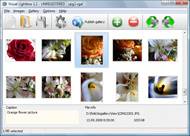
It's no secret that adding photos to your blog posts is one of the most effective ways to enhance your blog and attract attention to your writing. Flickr has millions of photos available in its database. A simple FREE tool called Flickr Gallery allows you to create a custom image gallery with a cool slide show of the most recent and most interesting photos from Flickr on your website or blog in a few easy steps. Just visit Flickr website and find photostream, photoset or a single photo you like. Enter the address of flickr page to add all photos from this page in your gallery, select the style of thumbnails and the overlay window and add the HTML embed code on your website or blog.
A few clicks and you'll see a stylish photo gallery with beautifull lightbox and zoom effects on your own website or blog!


Flickr Gallery for Windows   Flickr Gallery for MAC

Want more?

Example

Lightbox gallery sample

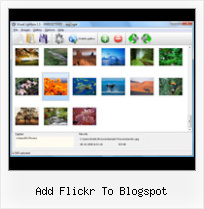
The following image set is generated by Flickr Gallery tool. Click any picture to run Lightbox gallery.

The sample above is an in-page usage demo of Lightbox gallery that uses images from Flickr. The slideshow created with Flickr Gallery wizard is placed inside the page layout. You can also check the full-page demo slideshow. This example takes whole browser area to show the Lightbox gallery that uses images from Flickr.Blog Photos From Flickr To Tumblr

How to Use

Step 1. Adding flickr images to your own gallery.


Locate the photo, photoset or photostream you want to use in your Flickr slideshow. Click on it to see the photo on its own page.

Copy URL of the flickr page.

Select Add images from Flickr... from the 'Add' button on the Toolbar.

Add images from Flickr

In the appeared window paste URL of the flickr page. Specify also the number of photos you want to add from the flickr page. Flickr Gallery will now include these photos in your project.

Add images from Flickr

If you have included the photos that you do not wish to be in your web gallery, you can easily remove them. Select all images that you wish to remove from photo gallery, and select Delete images. from the Images menu. You can pick and choose pictures by holding the CTRL while clicking the pictures you like.

Step 2. Adding caption.

The name of the photo on flickr page will automatically appear in the caption. When you select a photo you'll see the various info about it, such as: Path, Size, date of last change and Caption. You can add any comment or text about the photo (up to 512 symbols).

Step 3. Gallery properties.

Change the name of your flickr album, the size and quality of your pictures with Flickr Gallery. From the Gallery menu, select Properties or use "Edit Gallery Properties" button on the toolbar.

On the first tab of the Gallery Properties window you can change the name of your photo album and enable/disable the following properties: Slide Show, Auto play Slide Show, Zoom effect, Overlay Shadow. You can also set the Overlay shadow color and select the Engine you want to use (jQuery or Prototype + script.aculo.us).

On the second tab of the Gallery Properties window you can select the thumbnail you want to use, set the Thumbnails Resolution, Thumbnails Quality, Thumbnails Titles. Select Thumbnails Format (save in PNG or JPG format). Specify the Number of columns in you photo album and the Page color.

On the third tab of the Gallery Properties window you can select the template, Image resolution and Image quality of your pictures and change the Watermark.

You can set up the various sizes for exported images.

Control the quality of output PNG or JPEG format image by defining output "Image quality" and "Thumbnail quality" parameters (0%…100%).

Step 4. Save your photo gallery as project file.

When you exit Flickr Gallery application, you'll be asked if you want to save your project. The project consists of the pictures you choose to put on your web photo gallery and all your settings. It's a good idea to save the project, because that will allow you to change the project in case you decide to do something different with future galleries. So click Yes, then enter a name for your project. To select the location of your project, just click the Browse folders button and choose a different location. Then click Save.

Flickr Photostream Iweb Add Flickr To Blogspot

Download Flickr Gallery


Download Flickr Gallery Download Free Edition
for Windows
Download Flickr Gallery Download Free Edition
for MAC

Flickr Gallery is free for non-commercial use.

A small fee is required for business use. Flickr Gallery Business Edition additionally provides an option to remove the Flickr Gallery. Com credit bar as well as a feature to put your own logo to images. After you complete the payment via the secure order form, you will receive a license key instantly by email that turns the Flickr Gallery Free Edition into a Business one. You can select the most suitable payment method: PayPal, check, credit card, bank transfer etc. Also you can get Business Edition for free if you help with translating Flickr Gallery into your native language, please contact us at for more info.

Photos On Flickr Wordpress Plugin

Buy Flickr GalleryBuy Business Edition
for Windows

$49
Single Website
$69
Unlimited Websites
Buy Flickr GalleryBuy Business Edition
for MAC

$49
Single Website
$69
Unlimited Websites

Support

For general help, feature requests, troubleshooting contact Customer Support at . Make sure to include details on your operating system, browser, a link (or relevant code) and Flickr Gallery version.Spaceball Flickr Save

Feedback

    * I find Flickr Gallery (and lightbox2) a great tool and was about to proceed in its purchase.

    * First of all, your product is fantasitc. I looked at the others and your code generator app was insanely easy to use.

    * I LOVE your free Lightbox2 software tool and will purchase the business version shortly. I have seen the Lightbox JS effect used with video tutorials and I was hoping you have a version for video that I can purchase.
Video LightBox: http://videolightbox.comWordpress Flicr Show Recent Thumbnails

    * I would like to say that Flickr Gallery is a stunning lil program! Its almost too good to be true i'd say! I've been looking for tutorials to create a lightbox gallery, but just couldnt come right. Im so glad i found Flickr Gallery!

FAQ

Q:I would like to reposition the Previous and Next buttons to a position below the images and have them be visible all the time.Where do I have to go to make these changes in the code?

A:Find the css file in the folder generated by gallery:
engine\css\
or in the following folder:
c:\Program Files\Visual LightBox Business\templates\Default\engine\css\

To set their position you should change 15% to something different:
#prevLink:hover, #prevLink:visited:hover { background: url(../images/prevlabel.gif) left 15% no-repeat; }
#nextLink:hover, #nextLink:visited:hover { background: url(../images/nextlabel.gif) right 15% no-repeat; }

For example:
#prevLink:hover, #prevLink:visited:hover { background:url(../images/prevlabel.gif) left 75% no-repeat; }
#nextLink:hover, #nextLink:visited:hover { background: url(../images/nextlabel.gif) right 75% no-repeat;}

RELATED

Add Flickr To Blogspot : Flickr Gallery Add Flickr To Blogspot. Create an online photo album in minutes with Flickr Gallery!. Yoxview Flickr Examles To add this widget to your Blogger blog, you will need to have your Flickr user or group ID which may look something like this:

Flickriver: Photos from http://visiondel89.blogspot.com/ Use Flickriver Badge Creator to create a badge linking to your photos, your group or any other Flickriver view. You can place your badge on your Flickr profile, Blog or Website. Add to your iGoogle or Netvibes page While viewing any Flickr photos page, click on the bookmarklet to

JeLa19 layouts | Friendster-Layouts.com Thousands of Free Friendster Layouts for Your Friendster Profile http://o19jela.blogspot.com/2009/02/frequesntly-ask-questions.html. Feel free to add me as your friend: http://friendster.com/jela19layouts

YouTube blocked in China; Flickr, Blogspot restored Print | Add a comment. China watchers, get your scorecards out: Google's YouTube is blocked, Wikipedia is still blocked, but for the moment, Google blog site Blogspot.com is available and some pictures from Yahoo's Flickr photos The posts ultimately led to an unsuccessful hunt for the author and a

Flickr Importr Flickr Importr. Flickr Importr is a tool for Windows that allows you to upload images to Flickr and automatically add them to groups and sets. Additionally it can import tags from a variety of third party image applications. Quick overview of features:

Phil's Tips: How to get access to a person's Flickr photos The easiest way to get access to a person's shared Flickr photos is to ask the user to add you as a contact. That user needs to search for your email address or Flickr screen name in the search field and click the blue

Blogs That Flickr | Weblog Blogging webring for Flickr members. You can create a profile to further promote your blog - add photos, video and widgets to your page, plus add your blog post links on the blog!

ADD | Flickr - Photo Sharing! Details at: slfreestyle.blogspot.com/2010/03/add-blue-blood-sentou-yo

YouTube - How to Add Flickr Images to Your Blog how to legally add free pictures to your blog from flickr.com

China Blocks YouTube, Restores Flickr and Blogspot - PCWorld China's Web viewers can no longer access YouTube, but Blogspot.com and Flickr photos are now available. The posts ultimately led to an unsuccessful hunt for the author and a temporary closing of the blog. Google did not respond to a request for comment on YouTube's block and Blogspot's availability

Fluidr / LuisCarlos ... tansoloson.blogspot.com's photos and View LuisCarlos tansoloson.blogspot.com's Flickr photos and videos on Fluidr. Fluidr makes it easy to view photos and videos on Flickr using continuous pagination which essentially means that you can view hundreds of photos and videos without

FLICKR TOOLBOX: 100+ Tools For Flickr Addicts Flickr is back in the news this week with reports that it will add video. But we're still loving the photo-sharing element: here's 100+ ways to get even

Geotagging at Flickr Now you can geotag your photos on Flickr! The Flickr geotagging feature allows you to tag your photos to your locations. I've to use Google Earth to get the correct coordination before add Flickr photos to the exact location. http://www.phantomclf.blogspot.com CLF

Flickr Slideshow Generator Widget Plugin,embed in Wordpress Flash slide show maker gadget plugin is the best Yahoo Flickr slideshow widget to make free iamge galleries and embed into Facebook, Wordpress, Blogger blogspot

Blog Know How - Top Blogging How to Add Borders to a Blogger Footer Blogspot. 2011-01-24 06:07:00. In this Blogger tutorial I expand on my previous article about how to add a 3-4 In today's Blogger tutorial I am going to show you how to add a Flickr Slideshow (Flickr Photostream) to a Blogger blog (Blogspot blog)

Scripts Tagged flickr - Userscripts.org 438. Apr 22, 2011. Flickr Show All Large Photos. Add an option on flickr menu "Show All" to This script allows you to easily add extra tags to your pool's photos

Add a Signature to Every Blog Post on your Blogger/Blogspot If you have a blog, you may be wondering how to add your signature after every post on your Blogger or Blogspot blog. This simple tutorial will show you how to do it in just a few easy steps!

Add Flickr photostream/slideshow widget | Blogger Sentral Add Flickr photostream/slideshow widget. by Greenlava on Saturday, April 10, 2010 | 6 comments. This tutorial will show you how to make a Flickr slideshow/photostream. It will use Blogger slideshow gadget as a base. The slideshow will display 20 of your most recent Flickr photos

Blogger Buster: A Simple Flickr Photostream Widget for Blogger It's an ideal solution of you prefer a simpler method to display your Flickr photos which does not slow down page-loading time. To add this widget to your Blogger blog, you will need to have your Flickr user or group ID which may look something like this:

Jaiku | #Flickr Create your own microblog and connect with your friends. Post from the Web, by SMS, or from desktop clients. Add comments, use icons, link Webfeeds. Take it with you on your phone

Flickr To Add Online Photo Editing Tools Via Picnik Clicking it takes the user to a new Flickr photo edit page, with the Picnik tools integrated via an iframe. web 2.0 summit, Flickr was reported that it will let users to add edited photos from

Flickr Gallery Blogspot | Flickr Slideshow Flickr Gallery Blogspot. Web photo album? With jQuery Thickbox Alternative, you need just 4 simple steps to get your web photo Enter the address of flickr page to add all photos from this page in your slideshow, select the style of thumbnails and the overlay window and add the HTML embed code on

Flickr Photostream is Blank - Blogger Help As not much is going on here to help, I have done some search and found another way to ad my Flickr Photostream to my blog. http://bal00sblog.blogspot.com/2008/08/adding-flickr-gadget-to-blogger.html

YouTube, Flickr in Blogger Beta. ~ The Blog Doctor The Blog Doctor, blogger Hacks, Blog design, Blog Template, SEO, Adsense, Blogging Tips and Tricks, Making money through blogs, PPC A list of your blogs will come up of which choose the one you want to add it to. Next add the Title and the text to accompany the video and click Post to blog. Another

After blogspot China blocked twitter and Flickr Almost 10 days back China Blocked Blogger blogspot and we discussed what are the various ways we can use to unblock Blogspot in China. China is going to celebrate Tiananmen massacre on June 4th and before that China is cutting

50 Essential Twitter Tools For Bloggers | Featured Content Today Twitter becomes one of the most important methods to keep in touch with your families and friends. Also a lot of bloggers and Internet Mobypicture lets you share postings to your Twitter, Flickr, Wordpress, Blogspot, Tumblr, Hyves and Jaiku accounts from your mobile phone, email or from the web,

