




Overview

It's no secret that adding photos to your blog posts is one of the most effective ways to enhance your blog and attract attention to your writing. Flickr has millions of photos available in its database. A simple FREE tool called Flickr Gallery allows you to create a custom image gallery with a cool slide show of the most recent and most interesting photos from Flickr on your website or blog in a few easy steps. Just visit Flickr website and find photostream, photoset or a single photo you like. Enter the address of flickr page to add all photos from this page in your gallery, select the style of thumbnails and the overlay window and add the HTML embed code on your website or blog.
A few clicks and you'll see a stylish photo gallery with beautifull lightbox and zoom effects on your own website or blog!


Flickr Gallery for Windows   Flickr Gallery for MAC

Want more?

Example

Lightbox gallery sample

The following image set is generated by Flickr Gallery tool. Click any picture to run Lightbox gallery.

The photo gallery above is an in-page usage demo of Lightbox with images from Flickr. The website gallery created with Flickr Gallery software is placed inside the website page. You can also check the full-page demo gallery. This example takes whole browser area to show the slideshow.Flickr Embed Random Photos From Set

How to Use

Step 1. Adding flickr images to your own gallery.


Locate the photo, photoset or photostream you want to use in your Flickr slideshow. Click on it to see the photo on its own page.

Copy URL of the flickr page.

Select Add images from Flickr... from the 'Add' button on the Toolbar.

Add images from Flickr

In the appeared window paste URL of the flickr page. Specify also the number of photos you want to add from the flickr page. Flickr Gallery will now include these photos in your project.

Add images from Flickr

If you have included the photos that you do not wish to be in your web gallery, you can easily remove them. Select all images that you wish to remove from photo gallery, and select Delete images. from the Images menu. You can pick and choose pictures by holding the CTRL while clicking the pictures you like.

Step 2. Adding caption.

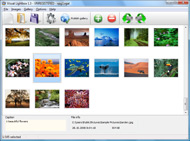
The name of the photo on flickr page will automatically appear in the caption. When you select a photo you'll see the various info about it, such as: Path, Size, date of last change and Caption. You can add any comment or text about the photo (up to 512 symbols).

Step 3. Gallery properties.

Change the name of your flickr album, the size and quality of your pictures with Flickr Gallery. From the Gallery menu, select Properties or use "Edit Gallery Properties" button on the toolbar.

On the first tab of the Gallery Properties window you can change the name of your photo album and enable/disable the following properties: Slide Show, Auto play Slide Show, Zoom effect, Overlay Shadow. You can also set the Overlay shadow color and select the Engine you want to use (jQuery or Prototype + script.aculo.us).

On the second tab of the Gallery Properties window you can select the thumbnail you want to use, set the Thumbnails Resolution, Thumbnails Quality, Thumbnails Titles. Select Thumbnails Format (save in PNG or JPG format). Specify the Number of columns in you photo album and the Page color.

On the third tab of the Gallery Properties window you can select the template, Image resolution and Image quality of your pictures and change the Watermark.

You can set up the various sizes for exported images.

Control the quality of output PNG or JPEG format image by defining output "Image quality" and "Thumbnail quality" parameters (0%…100%).

Step 4. Save your photo gallery as project file.

When you exit Flickr Gallery application, you'll be asked if you want to save your project. The project consists of the pictures you choose to put on your web photo gallery and all your settings. It's a good idea to save the project, because that will allow you to change the project in case you decide to do something different with future galleries. So click Yes, then enter a name for your project. To select the location of your project, just click the Browse folders button and choose a different location. Then click Save.

Flickr Gallery Syntax Add Flickr To Tumblr

Download Flickr Gallery


Download Flickr Gallery Download Free Edition
for Windows
Download Flickr Gallery Download Free Edition
for MAC

Flickr Gallery is free for non-commercial use.

A small fee is required for business use. Flickr Gallery Business Edition additionally provides an option to remove the Flickr Gallery. Com credit bar as well as a feature to put your own logo to images. After you complete the payment via the secure form, you will receive a license key instantly by e-mail that turns the Flickr Gallery Free Edition into a Business one. You can select the most appropriate payment mode: check, bank transfer, credit card, PayPal etc. Also you can get Business Edition for free if you help with translating Flickr Gallery into your native language, please contact us at for more info.

Font Html On Flickr

Buy Flickr GalleryBuy Business Edition
for Windows

$49
Single Website
$69
Unlimited Websites
Buy Flickr GalleryBuy Business Edition
for MAC

$49
Single Website
$69
Unlimited Websites

Support

For general help, troubleshooting and feature requests contact Customer Support at . Make sure to include details on your Flickr Gallery version, a link (or relevant code), browser and operating system.Photo Gallery Flickr Sets

Feedback

    * I'm absolutely loving Flickr Gallery Business and Video LightBox. Amazing, quick and painless, to create a custom, browser independent gallery. And it works first time - every time! Best value for money I've seen in quite a while...

    * Just a quick thank you for the software though, It's not often you get a free software version of this quality and style! Well done and please continue this amazing gallery. Hope to see more advances.

    * I ran into your website wile looking for a JavaScript to manage a personal Photo Gallery. I downloaded the trial version and immediately fell in love with your Flickr Gallery, it is one of the best products I’ve ever found; it is very user friendly and easy to use and creates great Photo Galleries.Doesn T Flickr Allow Embedding Within

    * Let me start just congratulating you, good job, really. I am trying out the free version before I buy it. It works great.

FAQ

Q:Instead of making one page with 40 photos, is there no property to make 2 or more pages?

A:You can do it in the following way:

1. Create your gallery in Flickr Gallery and publish it on a local drive in any test folder.
2. Make two copies of the generated index.html file (for example index1.html and index2.html).
3. Open index.html, index1.html and index2.html files in any text editor.
4. Find code for the gallery inside the BODY tag and cut some part of the images, so you'll have different images on each page.

<!-- Start Flickr Gallery.com BODY section -->
<div class="gallery">
<!-- leave the following code on index.html page -->
<a href="./data/images/1.jpg" rel="lightbox[sample]" title="Best Toy Ever"><img src="./data/thumbnails/1.png" /></a>
<a href="./data/images/8.jpg" rel="lightbox[sample]" title="PrueaMacro"><img src="./data/thumbnails/8.png" /></a>

<!-- leave the following code on index1.html page -->
<a href="./data/images/3.jpg" rel="lightbox[sample]" title="Macro Leaf."><img src="./data/thumbnails/3.png" /></a>
<a href="./data/images/11.jpg" rel="lightbox[sample]" title="Bell Pepper"><img src="./data/thumbnails/11.png" /></a>

<!-- leave the following code on index2.html page -->
<a href="./data/images/5_0.jpg" rel="lightbox[sample]" title="5"><img src="./data/thumbnails/5_0.png" /></a>
<a href="./data/images/6_0.jpg" rel="lightbox[sample]" title="6"><img src="./data/thumbnails/6_0.png" /></a>

<!--[if lte IE 6]><script src="engine/js/pngfix_vlb.js" type="text/javascript"></script><![endif]-->
<a id="vlightbox" href="http://Flickr Gallery.com/">Online Photo Album Sharing by Flickr Gallery.com</a>
</div>
<!-- End Flickr Gallery.com BODY section -->

5. Create links to switch between your pages, for example:
<a href="index.html">1</a>  <a href="index1.html">2</a>  <a href="index2.html">3</a> 


Q:I want to change color of the overlay shadow? How can I do this?

A:Open engine\css\Flickr Gallery.css and find the following code:

#overlay{
position: absolute;
top: 0;
left: 0;
z-index: 90;
width: 100%;
height: 500px;
background-color: #FFF;
filter:alpha(opacity=60);
-moz-opacity: 0.6;
opacity: 0.6;
}

set the background-color parameter :

#overlay{
position: absolute;
top: 0;
left: 0;
z-index: 90;
width: 100%;
height: 500px;
background-color: #FF00FF;
filter:alpha(opacity=60);
-moz-opacity: 0.6;
opacity: 0.6;
}


RELATED

Flipboard turns your Facebook, Twitter feeds into "social Sure, there are already dozens of magazine and newspaper apps available for the iPad, but how about one crammed only with stories, photos, and updates from your various Facebook and Twitter pals? networks for now, although support for sites such as Flickr and Tumblr are on tap for future versions

Use Twitbit to Automatically Post Flickr Photos to Tumblr at Use Twitbit to Automatically Post Flickr Photos to Tumblr But soon I was itching to post my pictures directly to Flickr from Twitbit, and one of the great things about building software that you use yourself is that you get to add the features you want

Does Picasa, or someone, have a Tumblr "button" for Picasa?? Does Picasa, or someone, have a Tumblr "button" so you can add images from Picasa to Tumblr, as we can for our Facebook entries? Or could it be created? Go to your Tumblr blog and from your dashboard select Customize -> Services and add your Flickr album's RSS feed address

Posting Flickr Photos on WordPress (and other Blogs!) via Update: Scroll down to the comments section for additional help on known Flickr/Wordpress solutions! Now all you have to do to add Flickr photos on your blog is: 1) Goto YOUR PHOTOSTREAM, 2) Click on any picture that you want on your Blog, and finally 3) Click on the

Perfect Your Picasa to Flickr Workflow Desktop photo manager Picasa is a Google product, and photo-sharing web site Flickr's owned by Yahoo, and the two companies don't make it obvious how to get the apps to talk to one another. When I returned home from a vacation on the beaches of

Add Flickr To Tumblr | Flickr Slideshow Add Flickr To Tumblr. Improve your online photo gallery with jQuery Thickbox Alternative! Enter the address of flickr page to add all photos from this page in your slideshow, select the style of thumbnails and the overlay window and add the HTML embed code on your website or blog

Add Flickr To Tumblr : Flickr Gallery Add Flickr To Tumblr. Flickr Gallery is the first software that creates AJAX-powered online image galleries without the need for server-side setup.. Obtener Flickr User Id

" How to import flickr photos into tumblr " jongarcia.info/blog By default, flickr just embeds into the feeds the small size images making this resolution too small to show anywhere. I managed to modify this and using yahoo pipes I now get a feed with medium size images which is much more suitable for most tumblr themes

deviantART: manj3d's Journal: features | flickr | tumblr | update Art - community of artists and those devoted to art. Digital art, skin art, themes, wallpaper art, traditional art, photography, poetry / prose. Art prints

How to use flickr photos on tumblr? - Yahoo! Answers Just Open http://www.tumblr.com/goodies and add the "Share on Tumblr" bookmarklet to your bookmarks toolbar. Select any flickr photo page, just click on the "share on tumblr" link on the your bookmarks toolbar. you see a photo you like on flickr, just click the bookmarklet and a window will pop up

iview – iphone application for tumblr " ku Now supports FFFFOUND!, Flickr, and two more services. If you have a tumblr account, you can share on tumblr the images found with no-overhead by just touching the button once. You can pintch-in the images to Now iview supports Flickr. You can add any Flickr user to iview as an image source to

Posting Other Users' Flickr Photos to Tumblr Posting other users' Flickr photos onto your Tumblr blog is possible and legal. Here are a few ways to do it as well as the legal requirements of doing so.HTML LinksTumblr users can add

My Flickr App Blog My Flickr App Blog - Blog for the My Flickr web application (on Facebook, for now). Posting new features, neat new Flickr items, and popular Flickr photos

Add a Tumblr Soccer World Cup Icon Flag If you want to show what national soccer/football team you are supporting, Tumblr is giving you the option to add a small flag right next to your Avatar. Here is how you add the Tumblr soccer icon to your picture

YouTube - Tumblr/Flickr Meet up Flickr/Tumblr Meet Up March 2010 in West Palm Beach, Florida. anna szczekutowicz : http://www.flickr.com/photos/annaszczek/ alexis mire : http://www.flickr.c

debi layouts | Friendster-Layouts.com Thousands of Free Friendster Layouts for Your Friendster Profile photo credits to : http://www.flickr.com/photos/jamesyg/3854863839/sizes/l/ add me up! fs: cocainesans@hotmai

How to Add a Flickr Photo to a Blog | eHow.com How to Add a Flickr Photo to a Blog. Flickr is a photograph management service that allows members to upload and store photographs to the Internet, making it easier to organize, store and manage their photographs. Photographs

How do I post pictures from flickr to tumblr? - Yahoo! Answers I used to know how, but since flickr changed now I Also, how do I post pictures to tumblr from weheartit ? I`m using Internet Explorer if that helps. Thanks ! 10 months ago. Report Abuse. by - Member since: September 12, 2008. Total points: 1,059 (Level 3) Add Contact. Block. Best Answer - Chosen by Asker

FLICKR TOOLBOX: 100+ Tools For Flickr Addicts Flickr is back in the news this week with reports that it will add video. But we're still loving the photo-sharing element: here's 100+ ways to get even

Insert Flickr Slideshow Tumblr : Free SlideShow Software Free Slideshow Creator! Insert Flickr Slideshow Tumblr. Flash SlideShow Maker is a ready-made, professional solution that allows webmasters to create superior, cross-browser, fast-loading website photo galleries.. Windows Slideshow Software

Tumblr: Add a Text Post | Flickr - Photo Sharing!

Flickr Adds Picnik, An Integrated Online Photo Editor Flickr has teamed up with Picnik to offer a new online photo editing feature that can be used with photos hosted on Flickr. You can also do things like add effects, text, shapes and fames. Some options require upgrading to Picnik's premium service

