


Overview

It's no secret that adding photos to your blog posts is one of the most effective ways to enhance your blog and attract attention to your writing. Flickr has millions of photos available in its database. A simple FREE tool called Flickr Gallery allows you to create a custom image gallery with a cool slide show of the most recent and most interesting photos from Flickr on your website or blog in a few easy steps. Just visit Flickr website and find photostream, photoset or a single photo you like. Enter the address of flickr page to add all photos from this page in your gallery, select the style of thumbnails and the overlay window and add the HTML embed code on your website or blog.
A few clicks and you'll see a stylish photo gallery with beautifull lightbox and zoom effects on your own website or blog!


Flickr Gallery for Windows   Flickr Gallery for MAC

Want more?

Example

Lightbox gallery sample

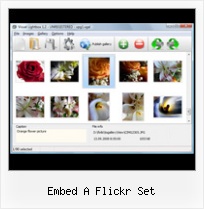
The following image set is generated by Flickr Gallery tool. Click any picture to run Lightbox gallery.

The sample above is an in-page usage demo of Lightbox gallery that uses images from Flickr. The slideshow created with Flickr Gallery wizard is placed inside the page layout. You can also check the full-page demo slideshow. This example takes whole browser area to show the Lightbox gallery that uses images from Flickr.Flickr Gallery Wp Plugin Language File

How to Use

Step 1. Adding flickr images to your own gallery.


Locate the photo, photoset or photostream you want to use in your Flickr slideshow. Click on it to see the photo on its own page.

Copy URL of the flickr page.

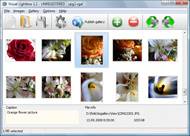
Select Add images from Flickr... from the 'Add' button on the Toolbar.

Add images from Flickr

In the appeared window paste URL of the flickr page. Specify also the number of photos you want to add from the flickr page. Flickr Gallery will now include these photos in your project.

Add images from Flickr

If you have included the photos that you do not wish to be in your web gallery, you can easily remove them. Select all images that you wish to remove from photo gallery, and select Delete images. from the Images menu. You can pick and choose pictures by holding the CTRL while clicking the pictures you like.

Step 2. Adding caption.

The name of the photo on flickr page will automatically appear in the caption. When you select a photo you'll see the various info about it, such as: Path, Size, date of last change and Caption. You can add any comment or text about the photo (up to 512 symbols).

Step 3. Gallery properties.

Change the name of your flickr album, the size and quality of your pictures with Flickr Gallery. From the Gallery menu, select Properties or use "Edit Gallery Properties" button on the toolbar.

On the first tab of the Gallery Properties window you can change the name of your photo album and enable/disable the following properties: Slide Show, Auto play Slide Show, Zoom effect, Overlay Shadow. You can also set the Overlay shadow color and select the Engine you want to use (jQuery or Prototype + script.aculo.us).

On the second tab of the Gallery Properties window you can select the thumbnail you want to use, set the Thumbnails Resolution, Thumbnails Quality, Thumbnails Titles. Select Thumbnails Format (save in PNG or JPG format). Specify the Number of columns in you photo album and the Page color.

On the third tab of the Gallery Properties window you can select the template, Image resolution and Image quality of your pictures and change the Watermark.

You can set up the various sizes for exported images.

Control the quality of output PNG or JPEG format image by defining output "Image quality" and "Thumbnail quality" parameters (0%…100%).

Step 4. Save your photo gallery as project file.

When you exit Flickr Gallery application, you'll be asked if you want to save your project. The project consists of the pictures you choose to put on your web photo gallery and all your settings. It's a good idea to save the project, because that will allow you to change the project in case you decide to do something different with future galleries. So click Yes, then enter a name for your project. To select the location of your project, just click the Browse folders button and choose a different location. Then click Save.

How To Loop Slideshow In Flickr Embed A Flickr Set

Download Flickr Gallery


Download Flickr Gallery Download Free Edition
for Windows
Download Flickr Gallery Download Free Edition
for MAC

Flickr Gallery is free for non-commercial use.

A small fee is required for business use. Flickr Gallery Business Edition additionally provides an option to remove the Flickr Gallery. Com credit bar as well as a feature to put your own logo to images. After you conclude the payment via the secure order form, you will receive a license key instantly by email that turns the Flickr Gallery Free Edition into a Business one. You can select the most appropriate payment method: bank transfer, PayPal, check, credit card etc. Also you can get Business Edition for free if you help with translating Flickr Gallery into your native language, please contact us at for more info.

Php Flickr Gallery Private Collection

Buy Flickr GalleryBuy Business Edition
for Windows

$49
Single Website
$69
Unlimited Websites
Buy Flickr GalleryBuy Business Edition
for MAC

$49
Single Website
$69
Unlimited Websites

Support

For general help, feature requests, troubleshooting contact Customer Support at . Make sure to include details on your operating system, browser, a link (or relevant code) and Flickr Gallery version.How To Embed Flickr Into Website

Feedback

    * I have just bought this product and think it is great. As it is extremely easy to use it is something I could get my clients to purchase to upload their own portfolio and latest projects etc.

    * I have purchased the business and LOVE IT..Your product appears easy to use and close to what I need to help several of my clients..

    * Great product by the way and saved me loads of time. I really like your Flickr Gallery program! Very nice.Picture Html Flickr Lightbox

    * I would like to say that Flickr Gallery is a stunning lil program! Its almost too good to be true i'd say! I've been looking for tutorials to create a lightbox gallery, but just couldnt come right. Im so glad i found Flickr Gallery!

FAQ

Q:I purchased your business license today but I don't see any way to update so the watermark is either missing or replace with mine.What do I do?

A:Free edition of Flickr Gallery doesn't allow you to remove our watermark.

Register your Flickr Gallery application at first. Use reg. key from the license message you received after the purchase. After the registration you can remove watermarks.

Open Gallery->Properties->Templates: Watermark. Click to disable this option or use your own watermark.


RELATED

Embed Code Flickr | Flickr Slideshow Embed Code Flickr. jQuery Thickbox Alternative is an excellent program that is friendly to amateur web developers, but at the same time is powerful enough to meet the needs of more advanced users. slideshow con fotos de flickr

Flickr Photo Sets Video – 5min.com Flickr Photo Sets - As your image collection grows on Flickr, the importance of keeping things organized will be apparent. Best to get started with the practice of organizing your photos before your gallery becomes a potpourri of photos or a

Flickr Photo Set to KML by Adam Franco Large photo sets make take a long time to generate, sometimes causing Google Maps to time out. If you want to share a large photo set, please use the following steps: photo was uploaded to Flickr. Set Order - Paths will be drawn based on the order they appear in the set. What icon/style to use

Howto Embed Flickr Photos and Slideshows in Web Notes with examples on how to link to and to embed your Flickr photos or slideshows into your own web pages, with examples. by RoderickT in How-To Guides/Manuals and flickr photography html web serif howto tutorial I find it best to show a pre built Flickr Set

Flickr Archives - etc: a stream of geek consciousness Read "More Ways to Embed a Flickr Slideshow on your Site" Embed Flickr Slideshows within Your Site. Just fill in the url of the flickr user, set or

How to Use Flickr How to Use Flickr (and embed a slideshow into a Blog or Web Page) The next step is to click on the big blue "Create Your First Set" button, and then set our chosen name of "Sandcastles One", and then click on the save

Adding a Flickr Photo Gallery to Your Website Yahoo account, you may set up your Flickr account using your existing Yahoo sign in. Embed your Photo Gallery in a web page. To add the new gallery to your

How To: Embed Map with Geotagged Photos for Your Blog So you have a bunch of photos geotagged with GPS-capable cameraphones like the Nokia N95 or the Nokia N82 and want to show it off on your blog. Here's the

Jing Learning Center - The Flickr Button Select whether you want your Flickr button to return a link to your video or embed code. You can set up a Flickr button to return embed code instead of a like to your image

Uploading and Downloading The quality is excellent, you can set the level of. privacy for each video, and you can embed the videos in other places like Amanda Signal (or Hey Milly on Flickr) has done in her class and she has set up a Flickr

Flickriver: Photoset 'Flickr' by °Jen° Flickriver - view images as a 'river of photos' and more Use Flickriver Badge Creator to create a badge linking to your photos, your group or any other Flickriver view. You can place your badge on your Flickr profile, Blog or Website. Add to your iGoogle or Netvibes page

How to Embed Photos and Slideshows from Picasa, Flickr and To overcome these limitations, try uploading your photos to a popular photo sharing service, and then use simple HTML code to embed them — either individually, as an album, or in a slideshow — on your site. Picasa, Flickr and Photobucket are popular photo sharing services

Flickr - Wikipedia, the free encyclopedia Flickr is an image hosting and video hosting website, web services suite, and online community created by Ludicorp and later acquired by Yahoo! Flickr also provides a "contact list" which can be used to control image access for a specific set of users in a way similar to that of

Flickr: Help: Sharing Instead of a "Share this" button you will see icons for email, the two sharing services you most recently used, and a drop down menu where you can grab the URL, embed code, access your other sharing services, or set new services up. Now share more pages

Create your own slideFlickr! SlideFlickr is an online Flickr slideshow generator that will help you create and embed Flickr slideshows in less than 10 seconds! 1. Insert a Flickr username or URL. Here are some examples Username: stelabouras. Flickr user: http://www.flickr.com/photos/stelabouras/ Flickr set:

Flickr Slidr Embeds Cool Slideshows in Your Blogs I'm all about blogging as my day job, but since I started my OnSugar blog, I've been blogging on my off-hours as well. If you have your own, you may know there are tons of ways to pimp out your blog, one of which is to embed a Flickr slideshow

Flickr Set Embed : Flickr Gallery Flickr Set Embed. Flickr Gallery generates all necessary icons, images, html, javascripts, css styles automatically!. Json Flickr Upload Just visit Flickr website and find photostream, photoset or a single photo you like

Embed Flickr Slideshows On Any Website FlickrSlidr is a free web app that lets you embed your Flickr slideshows on any website or blog. All you have to do is specify the URL of your photoset and set a few slideshow options; that's it. You will then be provided with an HTML code that you can use to embed the slideshows on your web page

Flickr Slideshow Embed : Free SlideShow Software Free Slideshow Creator! Flickr Slideshow Embed. Online photo albums created with Flickr Slideshow are fully compatible with all modern Windows and MAC browsers!. Picture Gallery For Website

Mini-feature: Auto-embed Flickr sets and tags - The Official still got a bunch of bigger things in the pipe you'll hear about soon, but wanted to let you know that now you can easily embed Flickr sets and tags. ( Gallery courtesy razorbern aka Bernie DeChant, a personal flickr favorite, and one of the most talented photographers I have ever met

Flickr Slideshow - create flickr photo slideshows for your Flickr Slideshow is a really easy way to embed a nice slide show of your photos off site. You can use the below form to create one Flickr slide show online, alternate, you can download one freeware called "Flickr Slideshow" to create on your pc anytime that you want

Embed a Bowl in Your Counter Top Flickr user Queen Esoterica converted an IKEA butcher-block kitchen cart to include an embedded bowl. The result is perfect for pushing your cooking scraps into or mixing up a few ingredients. The Flickr set details the process, which includes

Cooliris Developer Forum - Flickr Sets(albums) display Help Embed Wall > Flickr & Picasa Feed Questions > Flickr Sets(albums) display Help (on flickr - a set), then we take and replace the line that we will remember after the = sign the following

How to Embed a Flickr Slideshow in your Facebook Static FBML Embedding a Flickr Slideshow in your Facebook Static FBML Application Tab Page is easy. A tutorial on how to add your Flickr slideshow. This tutorial shows you how to add a Flickr slideshow, created from one of your "Sets" in your Flickr account, to a Static FBML Application Tab

Flickr tools for WordPress bloggers | WereWP Flickr photo album does it well by adding a simple button on the editor giving you direct access to your flickr sets. Inserting a picture on one of your posts is then really easy! SimpleFlickr from Josh Gerdes allows you to embed a flickr integrated simpleviewer into your WordPress site

Tools for embedding Flickr Slideshows I came across few nice tools to embed Flickr Photos in your blogs or myspace pages, I will make a list of them here and update the post with new tools whenever All you need to do is enter the flickr URL address, photo set or group you would like to embed along with some options like width and height

