

Overview

It's no secret that adding photos to your blog posts is one of the most effective ways to enhance your blog and attract attention to your writing. Flickr has millions of photos available in its database. A simple FREE tool called Flickr Gallery allows you to create a custom image gallery with a cool slide show of the most recent and most interesting photos from Flickr on your website or blog in a few easy steps. Just visit Flickr website and find photostream, photoset or a single photo you like. Enter the address of flickr page to add all photos from this page in your gallery, select the style of thumbnails and the overlay window and add the HTML embed code on your website or blog.
A few clicks and you'll see a stylish photo gallery with beautifull lightbox and zoom effects on your own website or blog!


Flickr Gallery for Windows   Flickr Gallery for MAC

Want more?

Example

Lightbox gallery sample

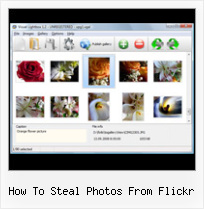
The following image set is generated by Flickr Gallery tool. Click any picture to run Lightbox gallery.

The photo gallery above is an in-page usage demo of Lightbox gallery that uses images from Flickr. The website gallery created with Flickr Gallery application is placed inside the page layout. You can also check the full-page demo slideshow. This example takes whole browser area to show the Lightbox gallery that uses images from Flickr.Flickr Slideshow For Drupal

How to Use

Step 1. Adding flickr images to your own gallery.


Locate the photo, photoset or photostream you want to use in your Flickr slideshow. Click on it to see the photo on its own page.

Copy URL of the flickr page.

Select Add images from Flickr... from the 'Add' button on the Toolbar.

Add images from Flickr

In the appeared window paste URL of the flickr page. Specify also the number of photos you want to add from the flickr page. Flickr Gallery will now include these photos in your project.

Add images from Flickr

If you have included the photos that you do not wish to be in your web gallery, you can easily remove them. Select all images that you wish to remove from photo gallery, and select Delete images. from the Images menu. You can pick and choose pictures by holding the CTRL while clicking the pictures you like.

Step 2. Adding caption.

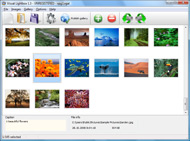
The name of the photo on flickr page will automatically appear in the caption. When you select a photo you'll see the various info about it, such as: Path, Size, date of last change and Caption. You can add any comment or text about the photo (up to 512 symbols).

Step 3. Gallery properties.

Change the name of your flickr album, the size and quality of your pictures with Flickr Gallery. From the Gallery menu, select Properties or use "Edit Gallery Properties" button on the toolbar.

On the first tab of the Gallery Properties window you can change the name of your photo album and enable/disable the following properties: Slide Show, Auto play Slide Show, Zoom effect, Overlay Shadow. You can also set the Overlay shadow color and select the Engine you want to use (jQuery or Prototype + script.aculo.us).

On the second tab of the Gallery Properties window you can select the thumbnail you want to use, set the Thumbnails Resolution, Thumbnails Quality, Thumbnails Titles. Select Thumbnails Format (save in PNG or JPG format). Specify the Number of columns in you photo album and the Page color.

On the third tab of the Gallery Properties window you can select the template, Image resolution and Image quality of your pictures and change the Watermark.

You can set up the various sizes for exported images.

Control the quality of output PNG or JPEG format image by defining output "Image quality" and "Thumbnail quality" parameters (0%…100%).

Step 4. Save your photo gallery as project file.

When you exit Flickr Gallery application, you'll be asked if you want to save your project. The project consists of the pictures you choose to put on your web photo gallery and all your settings. It's a good idea to save the project, because that will allow you to change the project in case you decide to do something different with future galleries. So click Yes, then enter a name for your project. To select the location of your project, just click the Browse folders button and choose a different location. Then click Save.

Flickr Gallery Widget For Website How To Steal Photos From Flickr

Download Flickr Gallery


Download Flickr Gallery Download Free Edition
for Windows
Download Flickr Gallery Download Free Edition
for MAC

Flickr Gallery is free for non - commercial use.

A small fee is required for business use. Flickr Gallery Business Edition additionally provides an option to remove the Flickr Gallery. Com credit bar as well as a feature to put your own logo to images. After you finish the payment via the secure form, you will receive a license key instantly by e-mail that turns the Flickr Gallery Free Edition into a Business one. You can select the most appropriate payment procedure: credit card, bank transfer, check, PayPal etc. Also you can get Business Edition for free if you help with translating Flickr Gallery into your native language, please contact us at for more info.

Html Snippets Flickr Album

Buy Flickr GalleryBuy Business Edition
for Windows

$49
Single Website
$69
Unlimited Websites
Buy Flickr GalleryBuy Business Edition
for MAC

$49
Single Website
$69
Unlimited Websites

Support

For general help, troubleshooting and feature requests contact Customer Support at . Make sure to include details on your operating system, browser, a link (or relevant code) and Flickr Gallery version.Flickrrss Style Example

Feedback

    * I have installed Flickr Gallery to trial. All good, loving it!! I want to get an business version of your great programm. I love it - soo easy to use!!

    * I would like to say that Flickr Gallery is a stunning lil program! Its almost too good to be true i'd say! I've been looking for tutorials to create a lightbox gallery, but just couldnt come right. Im so glad i found Flickr Gallery!

    * First of all, your product is fantasitc. I looked at the others and your code generator app was insanely easy to use.Flickr Integrate Images Into Website

    * I just tried the application, It is wonderful idea. Like you said in the website "few clicks without writing a single line of code" because most of the people is not web designers".

FAQ

Q:Instead of making one page with 40 photos, is there no property to make 2 or more pages?

A:You can do it in the following way:

1. Create your gallery in Flickr Gallery and publish it on a local drive in any test folder.
2. Make two copies of the generated index.html file (for example index1.html and index2.html).
3. Open index.html, index1.html and index2.html files in any text editor.
4. Find code for the gallery inside the BODY tag and cut some part of the images, so you'll have different images on each page.

<!-- Start Flickr Gallery.com BODY section -->
<div class="gallery">
<!-- leave the following code on index.html page -->
<a href="./data/images/1.jpg" rel="lightbox[sample]" title="Best Toy Ever"><img src="./data/thumbnails/1.png" /></a>
<a href="./data/images/8.jpg" rel="lightbox[sample]" title="PrueaMacro"><img src="./data/thumbnails/8.png" /></a>

<!-- leave the following code on index1.html page -->
<a href="./data/images/3.jpg" rel="lightbox[sample]" title="Macro Leaf."><img src="./data/thumbnails/3.png" /></a>
<a href="./data/images/11.jpg" rel="lightbox[sample]" title="Bell Pepper"><img src="./data/thumbnails/11.png" /></a>

<!-- leave the following code on index2.html page -->
<a href="./data/images/5_0.jpg" rel="lightbox[sample]" title="5"><img src="./data/thumbnails/5_0.png" /></a>
<a href="./data/images/6_0.jpg" rel="lightbox[sample]" title="6"><img src="./data/thumbnails/6_0.png" /></a>

<!--[if lte IE 6]><script src="engine/js/pngfix_vlb.js" type="text/javascript"></script><![endif]-->
<a id="vlightbox" href="http://Flickr Gallery.com/">Online Photo Album Sharing by Flickr Gallery.com</a>
</div>
<!-- End Flickr Gallery.com BODY section -->

5. Create links to switch between your pages, for example:
<a href="index.html">1</a>  <a href="index1.html">2</a>  <a href="index2.html">3</a> 


Q:I want to change color of the overlay shadow? How can I do this?

A:Open engine\css\Flickr Gallery.css and find the following code:

#overlay{
position: absolute;
top: 0;
left: 0;
z-index: 90;
width: 100%;
height: 500px;
background-color: #FFF;
filter:alpha(opacity=60);
-moz-opacity: 0.6;
opacity: 0.6;
}

set the background-color parameter :

#overlay{
position: absolute;
top: 0;
left: 0;
z-index: 90;
width: 100%;
height: 500px;
background-color: #FF00FF;
filter:alpha(opacity=60);
-moz-opacity: 0.6;
opacity: 0.6;
}


RELATED

How To Steal Any Photo Online | The Nonsense Society You heard me. This article will teach you how to instantly become an internet curator of art. But is it right?

Flickr expert tips: How to make the site work for you The Flickr site is easy to navigate, but you may not realize how various add-on programs and lesser-known Flickr site features can improve Flickr's functionality

How To Embed Flickr Photo : Flickr Gallery How To Embed Flickr Photo. Make superior ajax picture gallery for your web site with Flickr Gallery!. Bulk Delete Photos Flickr

How to identify public domain photos on Flickr :: Free Tech Free Tech Support on How to identify public domain photos on Flickr from Dave Taylor

How to Use Flickr - Associated Content from Yahoo! Using Flickr is easy, but many people don't know what it is and think it's hard. Flickr is an online community where users upload photos and join groups, this post will teach you about some of the different features of Flickr and how to use them. 1-- Upload photos

feeling stitchy: Crafty Blog School: Blogging Photos from Flickr Welcome to Week 4 of Crafty Blog School - today I'll show you how to blog photos from Flickr. The photo is on your blog, but you haven't "stolen" the image because it clearly links back to the user's Flickr stream

How to STEAL images A spoonful of credit crunch Originally uploaded by The Silver Penguin And do it right! The last post was a warning on how NOT to steal images. It was really a setup for this post which deals with finding the right image on the internet and

MacroPhotos.NET - Tools for online photo sharing Tools for online photo sharing include Flickr photo browser, profile widget, auto photo watermarker Cavemen used tools to carve images into rocks, cybermen use tools to carve images onto monitor screens. Thanks to Flickr's API, web developers can write applications to

Linux & Lip Gloss: How To Steal Photos on Flickr How To Steal Photos on Flickr. I found the photo I needed (for offline use) but I'm not hosting any copyrighted photos stolen from flickr, period. By the way mate, you really should consider switching to a Linux machine. Your

StockPhotoTalk | Special Interest Blog: Weblogs and Journalism Gawker Media: Consumerist's Editor Ben Popken Admits Publicly to Steal Photos From Flickr's Photographers (Feb. 16, 2007) How To Steal Content And How To Make Money With The Stolen Content: Stock Index Online UK/US Is At The Forefront Of Creative Writing

Flickr Review - Breakdown of Flickr Photo Features, Pros and Cons Flickr is one of the most popular image storing and sharing sites on the Web. Here is a review of the Flickr photo site features, including pros and cons, photo security, sharing capabilities, ease of use, storage space and more

Yahoo Shutters Photos In Favor Of Flickr | Webmonkey | Wired.com Current Yahoo Photos users will have the opportunity to move their pictures over to Flickr, though no details about how that If you're a Yahoo Photos user, I would recommend checking out Flickr, it's a little different, but once you wrap your head around it, I think

ACME Photography | Blog Archive " Flickr – Free stock I was working on a photography project and finishing up some work for the day. In the corner of my screen I was occasionally scanning message alerts ( so why steal from Flickr Photographers?) Dealing with blogger.com and how to Write a formal complaint to get blogspot content removed. This blog post

How to Prevent Your Digital Photos from Being Stolen on the How to Prevent Your Digital Photos from Being Stolen on the Internet. Professional and amateur photographers alike struggle with posting their photos on the Internet due to the extremely delicate balance that exists between trying

How To Join Our Flickr Group and Upload Photos - Style Sheet Welcome to Style Sheet â€" a home decor blog committed to offering you inspirational ideas, the latest trends, stunning makeovers, helpful tips and advice from our talented pros

Flickr " Wonder How To Flickr | Watch how to videos & articles tagged "flickr" on Wonder How To, like Upload iPhoto pictures directly to Flickr and Facebook, Use Flickr to share photos on the Internet, and Import Flickr photos to Facebook

How to get your photos out of Flickr, Picasa Web Albums Everyone should keep backups of their photos offline, of course, but what if your PC suffers a catastrophic crash or your backup gets stolen? Here's how you can pull your photos back down from a couple of popular photo sharing sites. How to get your photos out of Flickr, Picasa Web Albums

How to get your photos Explored on Flickr | MostlyLisa.com How to get your photos Explored on Flickr. Apr 18 2009. This Rainbow Lorikeet let Front Since I'm a Flickr newbie, I don't know how to get your photos seen by other people. For example, if I had a photo that I thought was really good (like any of yours from

Flickr Censorship? Stolen Photos Followup | Travel Yesterday, I wrote about Rebekka Guðleifsdóttira and her claim that a poster company had stolen her photos. The case has taken an interesting and, in my view,

Photo loss blogger to Flickr: You're f*cking kidding • The He reported a user account to Flickr that contained stolen photos and which had linked to his Flickr account; whereupon Flickr Flickr had 21.3 million unique users in December 2010, down 16 per cent from a year earlier

Audrey Hepburn (How to Steal a Million) | Flickr - Photo Sharing! 129 audrey hepburn at the Studio de Boulogne, during the making of How to Steal a Million in Paris

SquaredPeg " Blog Archive " Flickr, your electronic photo (Updated 7/31/2009) It's no secret that I love Flickr. It's a perfect blend of community and functionality in the web 2.0 world, and it's an extremely Let's take a walk at what Flickr has to offer you, and how it can help you organize your campus photos and provide some additional value to your

[How-To] Add Flickr Photos to your Word Documents with Ease This post introduces an interesting tool called Flickr4Word using which you can easily insert and embed images from Flickr into Microsoft Word documents. [How-To] Add Flickr Photos to your Word Documents with Ease What do you do when you have to embed an image from Flickr into your Word Documents?

Download Photo Images From Flickr Protected By Spaceball.gif How to download photo or images from Flickr.com that is protected by spaceball.gif? When saving an image to your computer you get an image with the file name called spaceball.gif then you should follow the rest of the steps to

Can an API Steal Data? ProgrammableWeb.com keeps you up to date with web mashups and APIs: what's new, interesting, useful and important. Hundreds of To address some of Flickr members' concerns he has now blocked any indexing on pages that show their photos and then asks: As sites like Flickr and Last.fm move from

Flickr Hacks Flickrbooth is a must have app for any Mac using Flickr fan. It allows you to easily upload your Photo Booth photos to your Flickr account with the click of a button. And if your beloved Mac gets stolen, Flickrbooth could be an invaluable tool in getting it back. Just ask this guy

How to: Add a Styled Flickr Photo Stream to Your Blog Adding uniquely-styled Flickr photo streams to your blog is easy, and it's just another thing you can leverage to make your blog stand out among the crowd. Today, my goal is simply to walk you through the process of creating

How to Get Paid for your Flickr Photos Photography: Peter Faretra It's happening. In fact, it's been happening for a while. But it's happening quietly, and outside a few forums on Flickr, If you want to know how much to charge, go onto istock.com and see how much they charge for their photos and go from there

