



Overview

It's no secret that adding photos to your blog posts is one of the most effective ways to enhance your blog and attract attention to your writing. Flickr has millions of photos available in its database. A simple FREE tool called Flickr Gallery allows you to create a custom image gallery with a cool slide show of the most recent and most interesting photos from Flickr on your website or blog in a few easy steps. Just visit Flickr website and find photostream, photoset or a single photo you like. Enter the address of flickr page to add all photos from this page in your gallery, select the style of thumbnails and the overlay window and add the HTML embed code on your website or blog.
A few clicks and you'll see a stylish photo gallery with beautifull lightbox and zoom effects on your own website or blog!


Flickr Gallery for Windows   Flickr Gallery for MAC

Want more?

Example

Lightbox gallery sample

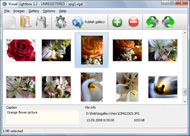
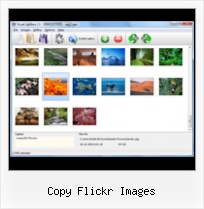
The following image set is generated by Flickr Gallery tool. Click any picture to run Lightbox gallery.

The example above is an in-page usage demo of Lightbox tool with Flickr images. The gallery created with Flickr Gallery tool is placed inside the website page. You can also check the full-page demo gallery. This example takes whole browser area to show the website gallery.Galerie Flickr Flash Embedded

How to Use

Step 1. Adding flickr images to your own gallery.


Locate the photo, photoset or photostream you want to use in your Flickr slideshow. Click on it to see the photo on its own page.

Copy URL of the flickr page.

Select Add images from Flickr... from the 'Add' button on the Toolbar.

Add images from Flickr

In the appeared window paste URL of the flickr page. Specify also the number of photos you want to add from the flickr page. Flickr Gallery will now include these photos in your project.

Add images from Flickr

If you have included the photos that you do not wish to be in your web gallery, you can easily remove them. Select all images that you wish to remove from photo gallery, and select Delete images. from the Images menu. You can pick and choose pictures by holding the CTRL while clicking the pictures you like.

Step 2. Adding caption.

The name of the photo on flickr page will automatically appear in the caption. When you select a photo you'll see the various info about it, such as: Path, Size, date of last change and Caption. You can add any comment or text about the photo (up to 512 symbols).

Step 3. Gallery properties.

Change the name of your flickr album, the size and quality of your pictures with Flickr Gallery. From the Gallery menu, select Properties or use "Edit Gallery Properties" button on the toolbar.

On the first tab of the Gallery Properties window you can change the name of your photo album and enable/disable the following properties: Slide Show, Auto play Slide Show, Zoom effect, Overlay Shadow. You can also set the Overlay shadow color and select the Engine you want to use (jQuery or Prototype + script.aculo.us).

On the second tab of the Gallery Properties window you can select the thumbnail you want to use, set the Thumbnails Resolution, Thumbnails Quality, Thumbnails Titles. Select Thumbnails Format (save in PNG or JPG format). Specify the Number of columns in you photo album and the Page color.

On the third tab of the Gallery Properties window you can select the template, Image resolution and Image quality of your pictures and change the Watermark.

You can set up the various sizes for exported images.

Control the quality of output PNG or JPEG format image by defining output "Image quality" and "Thumbnail quality" parameters (0%…100%).

Step 4. Save your photo gallery as project file.

When you exit Flickr Gallery application, you'll be asked if you want to save your project. The project consists of the pictures you choose to put on your web photo gallery and all your settings. It's a good idea to save the project, because that will allow you to change the project in case you decide to do something different with future galleries. So click Yes, then enter a name for your project. To select the location of your project, just click the Browse folders button and choose a different location. Then click Save.

Can I Download A Flickr Badge Copy Flickr Images

Download Flickr Gallery


Download Flickr Gallery Download Free Edition
for Windows
Download Flickr Gallery Download Free Edition
for MAC

Flickr Gallery is free for non - commercial use.

A small fee is required for business use. Flickr Gallery Business Edition additionally provides an option to remove the Flickr Gallery. Com credit line as well as a feature to put your own logo to images. After you finish the payment via the secure order form, you will receive a license key instantly by email that turns the Flickr Gallery Free Edition into a Business one. You can select the most appropriate payment mode: credit card, check, bank transfer, PayPal etc. Also you can get Business Edition for free if you help with translating Flickr Gallery into your native language, please contact us at for more info.

How To View Flickr Large

Buy Flickr GalleryBuy Business Edition
for Windows

$49
Single Website
$69
Unlimited Websites
Buy Flickr GalleryBuy Business Edition
for MAC

$49
Single Website
$69
Unlimited Websites

Support

For general help, troubleshooting and feature requests contact Customer Support at . Make sure to include details on your Flickr Gallery version, browser, operating system and a link (or relevant code).Wordpress Mini Slideshow Flickr

Feedback

    * First of all, your product is fantasitc. I looked at the others and your code generator app was insanely easy to use.

    * First of all, I love you Flickr Gallery. I think it's beautiful! I purchased the lightbox “business edition” yesterday, and I’m very happy how easy it is to use. Found this to be one of the fastest ways to get a gallery on the web. Thanks.

    * I'm absolutely loving Flickr Gallery Business and Video LightBox. Amazing, quick and painless, to create a custom, browser independent gallery. And it works first time - every time! Best value for money I've seen in quite a while...Organize Flickr

    * I'd like to express my gratitude to your efforts on creating such a nice piece of program and best of all it's free! Keep out the good work and I hope to see new features in the near coming future to rate you 5 star!

FAQ

Q:I would like to reposition the Previous and Next buttons to a position below the images and have them be visible all the time.Where do I have to go to make these changes in the code?

A:Find the css file in the folder generated by gallery:
engine\css\
or in the following folder:
c:\Program Files\Visual LightBox Business\templates\Default\engine\css\

To set their position you should change 15% to something different:
#prevLink:hover, #prevLink:visited:hover { background: url(../images/prevlabel.gif) left 15% no-repeat; }
#nextLink:hover, #nextLink:visited:hover { background: url(../images/nextlabel.gif) right 15% no-repeat; }

For example:
#prevLink:hover, #prevLink:visited:hover { background:url(../images/prevlabel.gif) left 75% no-repeat; }
#nextLink:hover, #nextLink:visited:hover { background: url(../images/nextlabel.gif) right 75% no-repeat;}

RELATED

_ARW8240 copy | Flickr - Photo Sharing! Copy and paste the code below:

Uploading and Downloading Flickr is basically a storage area for images (and now short videos! of images to your Flickr Storm page that you are happy for children to

How to identify public domain photos on Flickr :: Free Tech I want to add photos to my blog, and a buddy told me that I can use images from the Yahoo Flickr site. You can just pop over to Google Images and rummage around with a half-dozen savvy searches to copy images without permission, but it's much smarter -- and more on the right side of

Using Flickr and Webshots images as Gnome 3 backgrounds The ability to use Flickr images as a background was a much advertised Gnome 3 feature that unfortunately just doesn't work in most distributions. But with a few simple hacks, it is possible to have your Gnome 3 desktop displaying Flickr images

Yahoo makes a better search through Flickr integration But Flickr's image search always pulls back better images for me than Ask, Live, or Google's image search, for that matter. "Google is an index of whatever images it happens to run across on the web. You can't even compare the two." Copy Flickr, make it unsearchable/spiderable. http://picasa

Flickriver - A new way to view Flickr photos and more Flickriver - view images as a 'river of photos' and more To embed this view, Copy and Paste the following HTML code: Black background (preview): White background (preview): close. Firefox and Chrome addons. Adds a 'Flickriver' button to your browser. While viewing any Flickr photos page, click on this

Flickr photo download: save those beautiful pictures with Firefox How to save those beautiful images. flickr has a beautiful collection of photographs. flickr homepage. And first try to simply download the image by rightclicking in it and choosing "Save Image

Use Flickr to Find Images Free and Easy | Tutorial Blog Here's where to go to get more details about using images from Flickr. His or her image for Attribution, meaning you must credit the source. My preference is always to

Copy Pictures from Flickr to Picasa Web Albums (or vice-versa) Copy Pictures from Flickr to Picasa Web Albums (or vice-versa) Or you can create backups of Flickr on Picasa and vice-versa. No support for Photobucket or Imageshack. Migratr [Upload Flickr Images to/from PicasaWeb Albums] via. Which is better - Flickr or Picasa Web Albums (Round I, II)

WSDOT - Web Toolkit - Host Flickr Images Do post: Your very best photos, remember our Flickr images have been seen more than seven million times and This license allows anyone to copy and share our images with some restrictions

Download full size Flickr photos with a right click Flickrhas huge collection of interesting photos. Downloading full size Flickr photos can be a task involving few clicks. You can make this process real easy by Then open any Flickr photo image webpage, right click on image and then click on Download Original Flickr Image'

Photo Copy for iPad on the iTunes App Store Photo Copy searches Flickr with keywords or tags, returning images for use in any other iPad application such as Keynote, Pages, and Mail, as well as any application that supports pasting of images. Images can be quickly and easily saved as favourites and bookmarked for future use

Commons:Flickr files - Wikimedia Commons Flickr allows its users to select the license of their choice and to change it at any images uploaded from Flickr, which allows for the verification of freely licensed images

Picture this... | Digital Learning Environments Anyone who has searched Flickr knows the disappointment when these words appear on the "save as" dialogue box. In Flickr, photographers have the option to make images available for commercial or non-commercial use, or make the images only available to view, and not copy or reproduce

Save unsavable images from any Web site Home " Internet " How to save copy righted Images from Flickr Some images in Flickr are protected so that nobody would save them to their computer. This is done by overlaying the image with a transparent

JISC Digital Media - Still Images: Using Flickr to Organise a Flickr is one of the more well-known sites, but there are others - you might also want to our Finding Images on Flickr document for advice on using Flickr as a

Copy Flickr Images : Flickr Gallery Copy Flickr Images. Create fast and straightforward photo gallery for website with Flickr Gallery!. Share Flickr Ke Blogspot

Backup Your Flickr Photos With Flickrfs - Wired How-To Wiki Sounds like now might be a good time to make a backup of you Flickr images. Backing up images already on Flickr works the same way -- just copy the files from Flickrfs to your local machine, and it will download your images. Pretty simple, but there's a GUI tool that's even simpler

Using Images from Flickr and Facebook - Photography How to copy an image location from Flickr or Facebook to use in discussions, How to copy an image location from Flickr or Facebook to use in discussions, debates, and comments

NBDemoFlickr - NetBeans Wiki Go to the opened FlickrDemoMaterials project, select Flickr.java and copy it into the image search project (use the refactoring copy option so the class package is properly updated). Go back to the new searchImage method and Copy the code that invokes the flickr service here and return the found icon:

The Squat Pen Rests: How to Copy Flickr Image Locations How to Copy Flickr Image Locations. The spaceball picture is really annoying. You head to Flickr, find the perfect image to accentuate your blog post, right click on the image, head to your to download the Flickr image. Make sure the tip of your arrow just barely crosses over into the image. If you

How to Back Up Your Full-Size Flickr Images by Set | Smarterware If you email photos to Flickr directly from your phone like I do, you probably don't always have a copy of the images you've published online on your computer. In one command, you authorize FlickrTouchr to access our Flickr account, and it gets busy downloading your files

Presentation design blog Idea Transplant: Images with emotion Images with emotion - Flickr versus stock image sites. Stock images can be cheesy, staged, unnatural, cliche, especially when it comes to getting a shot of "real" people with real emotions. Always check copy right and license restrictions before using Flickr images in your

Flickr: Using Pictures on Your Web Site | AssortedStuff We'll start with single pictures, move onto random images, and then to slide shows and galleries. web site you'll need to copy the code generated by the site and paste into the page. flickr Slide Show Generator gives you the

How to Use Free Images From Flickr Without Breaking the Rules Flickr is a great source for free images but you need to follow the rules. Not all images are free to use and you have to make sure you play nice by attributing your sources properly. There are also 8

Copyright, Flickr and Google Images | Aisling.net Further discussion -- with references -- about which images you can use (and which you can't) from Flickr, Google Images, etc

Downloading fantastic Flickr photos Flickr is an online photo gallery used by thousands of talented photographers. Many of them choose to waive their copyright on their images, enabling you to legally use their photos in your presentations and Right-click the biggest one and choose Copy' – like you did for the Flickr image earlier

GM Script: Title and Description Batch Tools - Steeev's Flickr : Title and Description Batch Tools, is a Greasemonkey script lets you edit the titles and descriptions of a batch of images more easily. Q) How can i copy the title text from the first image in the batch to

