



Overview

It's no secret that adding photos to your blog posts is one of the most effective ways to enhance your blog and attract attention to your writing. Flickr has millions of photos available in its database. A simple FREE tool called Flickr Gallery allows you to create a custom image gallery with a cool slide show of the most recent and most interesting photos from Flickr on your website or blog in a few easy steps. Just visit Flickr website and find photostream, photoset or a single photo you like. Enter the address of flickr page to add all photos from this page in your gallery, select the style of thumbnails and the overlay window and add the HTML embed code on your website or blog.
A few clicks and you'll see a stylish photo gallery with beautifull lightbox and zoom effects on your own website or blog!


Flickr Gallery for Windows   Flickr Gallery for MAC

Want more?

Example

Lightbox gallery sample

The following image set is generated by Flickr Gallery tool. Click any picture to run Lightbox gallery.

The example above is an in-page usage demo of Lightbox script with Flickr images. The photo gallery created with Flickr Gallery tool is placed inside the html page. You can also check the full-page demo web gallery. This example takes whole browser area to show the web gallery.Find Flickr User

How to Use

Step 1. Adding flickr images to your own gallery.


Locate the photo, photoset or photostream you want to use in your Flickr slideshow. Click on it to see the photo on its own page.

Copy URL of the flickr page.

Select Add images from Flickr... from the 'Add' button on the Toolbar.

Add images from Flickr

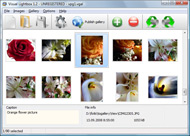
In the appeared window paste URL of the flickr page. Specify also the number of photos you want to add from the flickr page. Flickr Gallery will now include these photos in your project.

Add images from Flickr

If you have included the photos that you do not wish to be in your web gallery, you can easily remove them. Select all images that you wish to remove from photo gallery, and select Delete images. from the Images menu. You can pick and choose pictures by holding the CTRL while clicking the pictures you like.

Step 2. Adding caption.

The name of the photo on flickr page will automatically appear in the caption. When you select a photo you'll see the various info about it, such as: Path, Size, date of last change and Caption. You can add any comment or text about the photo (up to 512 symbols).

Step 3. Gallery properties.

Change the name of your flickr album, the size and quality of your pictures with Flickr Gallery. From the Gallery menu, select Properties or use "Edit Gallery Properties" button on the toolbar.

On the first tab of the Gallery Properties window you can change the name of your photo album and enable/disable the following properties: Slide Show, Auto play Slide Show, Zoom effect, Overlay Shadow. You can also set the Overlay shadow color and select the Engine you want to use (jQuery or Prototype + script.aculo.us).

On the second tab of the Gallery Properties window you can select the thumbnail you want to use, set the Thumbnails Resolution, Thumbnails Quality, Thumbnails Titles. Select Thumbnails Format (save in PNG or JPG format). Specify the Number of columns in you photo album and the Page color.

On the third tab of the Gallery Properties window you can select the template, Image resolution and Image quality of your pictures and change the Watermark.

You can set up the various sizes for exported images.

Control the quality of output PNG or JPEG format image by defining output "Image quality" and "Thumbnail quality" parameters (0%…100%).

Step 4. Save your photo gallery as project file.

When you exit Flickr Gallery application, you'll be asked if you want to save your project. The project consists of the pictures you choose to put on your web photo gallery and all your settings. It's a good idea to save the project, because that will allow you to change the project in case you decide to do something different with future galleries. So click Yes, then enter a name for your project. To select the location of your project, just click the Browse folders button and choose a different location. Then click Save.

Flickr Slideshow Ajax Jquery Flickr And Blog

Download Flickr Gallery


Download Flickr Gallery Download Free Edition
for Windows
Download Flickr Gallery Download Free Edition
for MAC

Flickr Gallery is free for non - commercial use.

A small fee is required for business use. Flickr Gallery Business Edition additionally provides an option to remove the Flickr Gallery. Com credit bar as well as a feature to put your own logo to images. After you conclude the payment via the secure order form, you will receive a license key instantly by e-mail that turns the Flickr Gallery Free Edition into a Business one. You can select the most suitable payment procedure: credit card, PayPal, bank transfer, check etc. Also you can get Business Edition for free if you help with translating Flickr Gallery into your native language, please contact us at for more info.

Change Flickr Web Address

Buy Flickr GalleryBuy Business Edition
for Windows

$49
Single Website
$69
Unlimited Websites
Buy Flickr GalleryBuy Business Edition
for MAC

$49
Single Website
$69
Unlimited Websites

Support

For feature requests, troubleshooting, general help contact Customer Support at . Make sure to include details on your operating system, browser, a link (or relevant code) and Flickr Gallery version.Rotating Flickr Drupal

Feedback

    * I ran into your website wile looking for a JavaScript to manage a personal Photo Gallery. I downloaded the trial version and immediately fell in love with your Flickr Gallery, it is one of the best products I’ve ever found; it is very user friendly and easy to use and creates great Photo Galleries.

    * I am thrilled with what this tool can do for me thanks for all the hard work that must have gone into it.

    * Just bought the business version of Flickr Gallery and I just had to write and say how impressed I am with it. Really easy to use, intuitive interface and generates a truly professional presentation. Seldom have I been so pleased with a software purchase. Thank you.Flash Set Flickr

    * I'm absolutely loving Flickr Gallery Business and Video LightBox. Amazing, quick and painless, to create a custom, browser independent gallery. And it works first time - every time! Best value for money I've seen in quite a while...

FAQ

Q:Is it possible to load a gallery from within image? So the gallery loads externally?

A:You should start the gallery onClick:

1) Add the following function into the <head> tag:

<script type="text/javascript">
function showLightBox()
{ Lightbox.start(document.getElementById('firstImage'));}
</script>

2) Specify the onClick event for the image (or link):
<img src="thumbnail_gr.jpg" onClick="javascript:showLightBox()" title="Click to see the demo" style="cursor: pointer;">
3) Set the ID for any image in your gallery (id="firstImage"), for example add it to the first image:
<a rel="lightbox_vlb" href="data/images/dscn6831.jpg" title="dscn6831" id="firstImage">
4) Use 'display: none;' property for your gallery in engine\css\vlightbox.css. Just change the following code:

#vlightbox a{
display:-moz-inline-stack;
display:inline-block;
zoom:1;
*display:inline;
position:relative;
vertical-align:top;
margin:3px;
width:160px;
font-family:Trebuchet,Tahoma,Arial,sans-serif;
font-size:11px;
font-weight:normal;
text-align:center;
opacity:0.87;
}

to:

#vlightbox a{
display:-moz-inline-stack;
display:none;
zoom:1;
*display:inline;
position:relative;
vertical-align:top;
margin:3px;
width:160px;
font-family:Trebuchet,Tahoma,Arial,sans-serif;
font-size:11px;
font-weight:normal;
text-align:center;
opacity:0.87;
}

RELATED

Flickr - Photo Sharing - Internet - Technology - news Eolake Stobblehouse blog. — By July, the iPhone 4 will be the most popular camera to post pictures with on Flickr, above Nikon D90 and other serious cameras. Well, at least it couldn't happen to a better phone camera, there's nothing "dilettante"

feeling stitchy You should check out her Duvet Project Flickr set where she's documenting the progress of set pop up in the Flickr Embroidery pool, stitched very charmingly by

flickr December was a busy month in our Flickr group. We welcomed about 20 new members and 100 million speakers, and there's no reason to limit our blog to only

Deep Focus " Flickr It was an experiment to develop and employ mobile technologies for teaching and learning through the University of Texas School of Architecture group pool and Flickr Pro account

FLICKR - Bits Blog - NYTimes.com MG Siegler of the blog TechCrunch has written regularly about the end of point-and-shoot cameras, and citing the latest data from Flickr, believes their days are numbered. " Six months ago, sites like Flickr, Slide, Photobucket and RockYou, which let users post their photos to any blog or social

Posting Flickr Photos on WordPress (and other Blogs!) via Now that you have set up Flickr photos auto-posting to your blog, setting up photo email to your blog is a snap. ( Keep in mind that by emailing pictures, it will go to both your blog AND your Flickr account.) 1) Return back to your YOU menu and, again, 2) Click Your Account

Flickr Photo Blog - BrushedPixels How is this different from Flickr? BrushedPixels makes your photos social with comments anyone can participate in, personalizes their presentation in your own blog with your own custom domain, and optimizes it all for SEO. Your BrushedPixels blog has comments built in, that anyone can

10 Amazing Wordpress Plugins for Flickr And just to make things that little bit easier here are 10 WP Plugins to integrate Flickr directly into your blog. And if you want, you could also hook it up with Lightbox or any other number of display libraries

Flickr Widget Blog : Flickr Gallery Flickr Widget Blog. Web photo album? With Flickr Gallery, you need just 4 simple steps to get your web photo album ready!. Ajax Flickers Joombla Just visit Flickr website and find photostream, photoset or a single photo you like

Flickr gives Geotagging a New Place | Eye-Fi Earlier today, Flickr announced a makeover. We're reviewing the changes made to the layout and the new place geotagging (location) information is given

Flickroom - A rich experience for browsing Flickr You can find the post here: http://blog.flickr.net/en/2010/02/17/flickroom-chat-browse-upload-share Flickroom is an application that brings Flickr to your desktop, allowing you to browse and search photographs of yours, your contacts, and the

Flickriver - A new way to view Flickr photos and more Flickriver - view images as a 'river of photos' and more You can place your badge on your Flickr profile, Blog or Website. Add to your iGoogle or Netvibes page

Flickr Blog Companion blog to Flickr features downtime status, daily photos, and news and updates about new photo and video sharing features

Blogs That Flickr | Weblog Blogging webring for Flickr members. You can create a profile to further promote your blog - add photos, video and widgets to your page, plus add your blog post links on the blog!

Code: Flickr Developer Blog Then use the Y.flickrAPI.callMethod function, passing the Flickr API method name and Unfortunately Yahoo!'s new user signup process closed our popup and opened a new one of their own

How Every Flickr Photo Ended Up on Sale This Weekend " JMG They issue API keys and supposedly monitor who they give these keys to whether companies like Myxer, independent software developers like Dave Winer or blog plugin developers like Eightface. Flickr even goes so far as to provide Flickr RSS is often used to provide image thumbnails on blogs and

Blogs That Flickr - Blog Tested flickr Listing Flickr members who blog. For those who love the community of fellow Flickr users. And that wish to let it be known. International Members & Non-Eng

5 billionth photo uploaded to Flickr - CNN Facebook claims to be the largest photo-sharing site on the internet, and more than 15 billion photos had been uploaded to the site as of April 2009, according to Facebook's blog. As the blog Social Photo Talk notes, Facebook has many uses and purposes, while Flickr is focused solely on uploading and

Flickrista.com - The Best Fashion Photography on Flickr Thousands of inspiring photos from the best fashion photographers and models. Fashion inspiration, digital photography, beautiful portraits, styling, nudes, studio and editorial photos featured daily

Flickr " My Yahoo! Blog My Yahoo! Blog. News and Tips About Your Personal Start Page. No posts found. Pages My Yahoo! Blog is proudly powered by WordPress. Entries (RSS) and Comments (RSS)

Flickr | Profoto Blog We got a notification from Flickr today that Jason Perry had tagged us (ProfotoUSA) in a photo! Awesome. Hellooooo Profoto Ringflash! Thanks, Jason! It got us to thinking – isn't this a cool feature? We dig light and this blog is dedicated to those who share our passion

Flickr - Wikipedia, the free encyclopedia Flickr is an image hosting and video hosting website, web services suite, and online community created by Ludicorp and later acquired by Yahoo! The other photos that were uploaded are still stored on the site and links to these images in blog posts remain active

My Flickr App Blog My Flickr App Blog - Blog for the My Flickr web application (on Facebook, for now). Posting new features, neat new Flickr items, and popular Flickr photos

Flickr Scotland The Flickr Scotland Blog. A Photo Blog where photographers from all around the Scotland, and visitors to the The Blog has been featured in the Sunday Herald Magazine and has been highlighted on the Flickr Blog

Flickr Flickr is almost certainly the best online photo management and sharing application in the world. Show off your favorite photos and videos to the world, securely and privately show content to your friends and family, or blog the photos and videos

Jeffrey Friedl

Photoblogging with Flickr and Blogger - Photoblog with Flickr The Which? guide to creating, customising and posting images to a photoblog, including how to send photos by email or from your mobile phone to Flickr, and then blog them using Blogger

