


Overview

It's no secret that adding photos to your blog posts is one of the most effective ways to enhance your blog and attract attention to your writing. Flickr has millions of photos available in its database. A simple FREE tool called Flickr Gallery allows you to create a custom image gallery with a cool slide show of the most recent and most interesting photos from Flickr on your website or blog in a few easy steps. Just visit Flickr website and find photostream, photoset or a single photo you like. Enter the address of flickr page to add all photos from this page in your gallery, select the style of thumbnails and the overlay window and add the HTML embed code on your website or blog.
A few clicks and you'll see a stylish photo gallery with beautifull lightbox and zoom effects on your own website or blog!


Flickr Gallery for Windows   Flickr Gallery for MAC

Want more?

Example

Lightbox gallery sample

The following image set is generated by Flickr Gallery tool. Click any picture to run Lightbox gallery.

The sample above is an in-page usage demo of Lightbox tool with Flickr images. The photo gallery created with Flickr Gallery tool is placed inside the page layout. You can also check the full-page demo web gallery. This example takes whole browser area to show the Lightbox gallery that uses images from Flickr.Flickr View Dark

How to Use

Step 1. Adding flickr images to your own gallery.


Locate the photo, photoset or photostream you want to use in your Flickr slideshow. Click on it to see the photo on its own page.

Copy URL of the flickr page.

Select Add images from Flickr... from the 'Add' button on the Toolbar.

Add images from Flickr

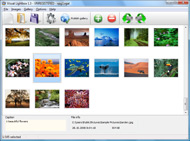
In the appeared window paste URL of the flickr page. Specify also the number of photos you want to add from the flickr page. Flickr Gallery will now include these photos in your project.

Add images from Flickr

If you have included the photos that you do not wish to be in your web gallery, you can easily remove them. Select all images that you wish to remove from photo gallery, and select Delete images. from the Images menu. You can pick and choose pictures by holding the CTRL while clicking the pictures you like.

Step 2. Adding caption.

The name of the photo on flickr page will automatically appear in the caption. When you select a photo you'll see the various info about it, such as: Path, Size, date of last change and Caption. You can add any comment or text about the photo (up to 512 symbols).

Step 3. Gallery properties.

Change the name of your flickr album, the size and quality of your pictures with Flickr Gallery. From the Gallery menu, select Properties or use "Edit Gallery Properties" button on the toolbar.

On the first tab of the Gallery Properties window you can change the name of your photo album and enable/disable the following properties: Slide Show, Auto play Slide Show, Zoom effect, Overlay Shadow. You can also set the Overlay shadow color and select the Engine you want to use (jQuery or Prototype + script.aculo.us).

On the second tab of the Gallery Properties window you can select the thumbnail you want to use, set the Thumbnails Resolution, Thumbnails Quality, Thumbnails Titles. Select Thumbnails Format (save in PNG or JPG format). Specify the Number of columns in you photo album and the Page color.

On the third tab of the Gallery Properties window you can select the template, Image resolution and Image quality of your pictures and change the Watermark.

You can set up the various sizes for exported images.

Control the quality of output PNG or JPEG format image by defining output "Image quality" and "Thumbnail quality" parameters (0%…100%).

Step 4. Save your photo gallery as project file.

When you exit Flickr Gallery application, you'll be asked if you want to save your project. The project consists of the pictures you choose to put on your web photo gallery and all your settings. It's a good idea to save the project, because that will allow you to change the project in case you decide to do something different with future galleries. So click Yes, then enter a name for your project. To select the location of your project, just click the Browse folders button and choose a different location. Then click Save.

Mac Widget Flickr Feed Delete Flickr Album

Download Flickr Gallery


Download Flickr Gallery Download Free Edition
for Windows
Download Flickr Gallery Download Free Edition
for MAC

Flickr Gallery is free for non-commercial use.

A small fee is required for business use. Flickr Gallery Business Edition additionally provides an option to remove the Flickr Gallery. Com credit string as well as a feature to put your own logo to images. After you complete the payment via the secure order form, you will receive a license key instantly by e-mail that turns the Flickr Gallery Free Edition into a Business one. You can select the most appropriate payment method: bank transfer, credit card, check, PayPal etc. Also you can get Business Edition for free if you help with translating Flickr Gallery into your native language, please contact us at for more info.

How To Set Your Username Flickrrss

Buy Flickr GalleryBuy Business Edition
for Windows

$49
Single Website
$69
Unlimited Websites
Buy Flickr GalleryBuy Business Edition
for MAC

$49
Single Website
$69
Unlimited Websites

Support

For feature requests, troubleshooting, general help contact Customer Support at . Make sure to include details on your operating system, browser, a link (or relevant code) and Flickr Gallery version.Javascript Get Random Flickr Image Src

Feedback

    * I find Flickr Gallery (and lightbox2) a great tool and was about to proceed in its purchase.

    * I downloaded your trial version to see if I could get it to work with my website, and I am almost there (I have been looking for something like this for ages)..

    * I ran into your website wile looking for a JavaScript to manage a personal Photo Gallery. I downloaded the trial version and immediately fell in love with your Flickr Gallery, it is one of the best products I’ve ever found; it is very user friendly and easy to use and creates great Photo Galleries.How To Check Explore Flickr Galleries

    * I'm absolutely loving Flickr Gallery Business and Video LightBox. Amazing, quick and painless, to create a custom, browser independent gallery. And it works first time - every time! Best value for money I've seen in quite a while...

FAQ

Q:How do I embed the lightbox image gallery into an existing page?

A:To install Flickr Gallery gallery on your page you should:

1. Create your gallery in Flickr Gallery and publish it on a local drive in any test folder.
2. Open index.html file from the saved folder in any text editor.
3. Copy code for the HEAD section and paste it inside the HEAD section of you own webpage, for example:

<head>
...
<!-- Start Flickr Gallery.com HEAD section -->
<link rel="stylesheet" href="engine/css/vlightbox.css" type="text/css" />
<style>#vlightbox a#vlb{display:none}</style>
<link rel="stylesheet" href="engine/css/Flickr Gallery.css" type="text/css" media="screen" />
<script src="engine/js/jquery.js" type="text/javascript"></script>
<script src="engine/js/jquery.tools.min.js" type="text/javascript"></script>
<script src="engine/js/visuallightbox.js" type="text/javascript"></script>
<!-- End Flickr Gallery.com HEAD section -->

...
</head>


4. Copy code for the BODY section and paste it inside the Body section of you own webpage in the place where you want to have a gallery, for example:

<body>
...
<!-- Start Flickr Gallery.com BODY section -->
<div id="vlightbox">
<a rel="lightbox_vlb" href="data/images/dscn6831.jpg" title="DSCN6831"><img src="data/thumbnails/dscn6831.png"><span></span></a>
<a rel="lightbox_vlb" href="data/images/dscn6823.jpg" title="DSCN6823"><img src="data/thumbnails/dscn6823.png"><span></span></a>
<a rel="lightbox_vlb" href="data/images/dscn6819.jpg" title="DSCN6819"><img src="data/thumbnails/dscn6819.png"><span></span></a>
<a id="vlb" href="http://Flickr Gallery.com">Photo Gallery For Web by Flickr Gallery.com v2.1</a>
</div>
<!-- End Flickr Gallery.com BODY section -->

...
</body>


5. Copy 'data' folder with images and thumbnails and 'engine' folder with .css and .js files into the same folder with your own webpage.
You can find the example on our website:
http://www.Flickr Gallery.com/#example


RELATED

Flickr Flickr is almost certainly the best online photo management and sharing application in the world. Show off your favorite photos and videos to the world, securely and privately show content to your friends and family, or blog the photos and videos

How to Monitor Your Flickr Album - loose wire blog The best way to keep tabs on who is linking to your Flickr photo album is through Technorati, the blog-tracking service. But it's not as straightforward as it could be, so here's a guide, based almost entirely on that provided

Fetchr4SSP - Building complete Flickr album solutions for the Fetchr - Building complete Flickr album solutions for the web!

Using iPhoto '09 to backup your Flickr photos | Deliberate I wondered what would happen if I removed a photo from the set on Flickr (but not on iPhoto), hoping that it wouldn't delete the photo from iPhoto (as that is what happens if you change your mind and delete the photo on Flickr the set on Flickr, all ties to the flickr album' on iPhoto are broken,

Why Aperture's Syncing to Flickr, Facebook and MobileMe is As Aperture writers and instructors we pay pretty close attention to the issues that cause pain points (business-speak for the things that drive people nuts) is when every single gallery, set or album added to the social sites shows up in the Inspector. I've been using Flickr since 2004

How to Delete an Album in iPhoto but Not in Facebook The purpose of this article is to provide steps to delete pictures from iPhoto without changing the synced album in Facebook

ePhotoBazaar online digital store~ get photo prints~ buy Ephotobazaar.com is the complete photography solution portal, offering, Digital Cameras, Kodak Photo Prints, Photo Books, T-shirt Printing, Mug Printing, Mobile Phones Wedding Albums and many more

SplashPhoto for iPhone User Guide Tools are included for uploading and download to/from Web Albums on Flickr and Picasa services. And you can delete a group of images by clicking the Delete button

Technomadics " Photography - Part 2 This lists all of the published albums, including Flickr, Facebook, etc. Find the entries with a publishedURL at flickr.com, and delete them. In Froq, I had to take note of their primary key values, and manually execute an SQL query (DELETE FROM SqPublishedAlbum WHERE primaryKey = 12345)

Flickr vs Picasa Web Albums: Where are tags, Photo notes We had a chance to try Picasa Web Albums and our first impression is that it is very inspired by Flickr but not anywhere near. Well unless you delete photos. Written on 23/6/06 11:17 PM. Let us remember that Flickr has been available

How to Save or Download Protected Images in Flickr / Orkut How to Save or Download Protected Images in Flickr / Orkut Album ? How to Save or Download Protected Images in Flickr / Orkut Album ? Posted by Shekhar Saxena on April 1, 2009 in Orkut Hacks · 0 Comment. A friend ( reader) was asking me "How to Save or Download Protected Images in flickr ?

About Yahoo! Photos Albums | eHow.co.uk About Yahoo! Photos Albums. Yahoo! Photos was a popular photo sharing service for Yahoo users. Although it provided many tools and features, particularly with the sharing and categorizing of photo albums, Yahoo shut down the site

Delete Photo album | Support | GROU.PS Founders Network Hmmm tried this but my Flickr album is not listed (normal albums are) how do I delete my personal flickr album, aside from, disabling the Flickr album function? asukru.goksu 14 months ago how does importing a Flickr album affect one's disc space usage?

How to you delete an album on my pictures from myspace How to you delete an album on my pictures from myspace?

Bugs & Fixes: Apple's Advice on ILife '09 Bugs - PCWorld To fix this, you need to delete the photo from your Flickr web album in iPhoto. In the unlikely case that your Flickr album contains only one photo, you'll need to delete the entire album, edit the photo, and create a new album. iPhoto '09 and third party plug-ins

Create a Yahoo Photo album Yahoo photo album for free: Create your own online album using Yahoo's Flickr service and share it with friends and family

Make Your Own Album Cover | Know Your Meme Popularly known as Make Your Own Album Cover (or shortly "album cover"), this DIY game first began as a Flickr group project circa early 2008 and Predating the flickr group and facebook. Delete. Lanthus. Dec 11, 2009 at 07:19AM UTC. Mine

HowTo Backup Your Flickr Photo Albums ? Today let us see how to back up your flickr photo album to your computer. We have two free tools to back up your flickr photo album. 1. Downloadr You can also upload new photos, edit photos and delete it. Now you can back up your flickr album in a easier way, try out and if you find any issues,

Apple's iPhoto Makes It Way Too Easy To Delete Your Entire The problem is that iPhoto treats this syncing very literally: if you delete a photo from one of these albums on iPhoto, it doesn't just remove it from the Set on Flickr — it actually deletes the photo from your Flickr account entirely. iPhoto

Martin's posterous - Things I found Typography in Album Covers. Edit. Delete. Tags. Autopost. Nice collection Space Flight Center. Edit. Delete. Tags. Autopost. NASA's flickr stream. Tweet. 0 responses

r148 - photo-album - Google Code Delete /trunk/tantan-flickr/flickr/photoalbum-albums-index-groups. Delete /trunk/tantan-flickr/flickr/photoalbum-albums-index-highlight.html. diff. Delete

Bugs & Fixes: Apple's advice on iLife '09 bugs | Software To fix this, you need to delete the photo from your Flickr web album in iPhoto. In the unlikely case that your Flickr album contains only one photo, you'll need to delete the entire album, edit the photo, and create a new album. iPhoto 09 and third party plug-ins

spfweb: my life and other animals Drag photos in and out of the Flickr albums and iPhoto syncs automatically with flickr.com. Great. Apart from when you now want to disassociate the Flickr albums in iPhoto from flickr.com. Sure, you can delete the Flickr albums, but that also deletes the sets on flickr.com as well

Keeping Flickr away from iPhoto How to edit iPhoto's back-end files to forcibly remove Flickr albums from iPhoto, without the corresponding photosets being deleted on Flickr. This lists all of the published albums, including Flickr, Facebook, etc. Find the entries with a publishedURL at flickr.com, and delete them

iPhoto '09 and Flickr: The Learning Curve " Utilizing Blogs 6- If I want to delete the Flickr album in iPhoto '09, then I will first go to the photos in that set online and remove them from the set. Now, when I delete the set or the Flickr album in iPhoto, the online photo will remain as

How to upload photos from iPhoto directly to Flickr This tutorial will guide you through installing FFXporter, a small iPhoto plugin that allows you to upload photos from iPhoto directly to Flickr. spuriously created Flickr Album in iPhoto means the photos are removed from Flickr. After iPhoto tells you it won't actually delete any photos! ( it

Kishor Krishnamoorthi's Website " Blog Archive " Flickr vs Flickr vs. Picasa Web Albums. Filed Under (Review, Software) versus. I couldn't find a good comparison of the upgraded versions of One of the most important and basic features of any image hosting or web album service is the storage limitations

How To Delete Photos From Flickr : Flickr Gallery How To Delete Photos From Flickr. Just drag and drop your photos or folders with photos and press How to Monitor Your Flickr Album - loose wire blog The best way to keep tabs on who is linking to your Flickr photo album is through Technorati, the blog-tracking service

