


Overview

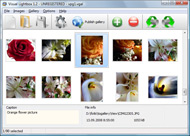
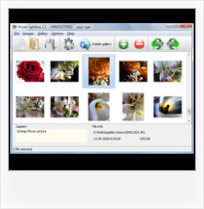
It's no secret that adding photos to your blog posts is one of the most effective ways to enhance your blog and attract attention to your writing. Flickr has millions of photos available in its database. A simple FREE tool called Flickr Gallery allows you to create a custom image gallery with a cool slide show of the most recent and most interesting photos from Flickr on your website or blog in a few easy steps. Just visit Flickr website and find photostream, photoset or a single photo you like. Enter the address of flickr page to add all photos from this page in your gallery, select the style of thumbnails and the overlay window and add the HTML embed code on your website or blog.
A few clicks and you'll see a stylish photo gallery with beautifull lightbox and zoom effects on your own website or blog!


Flickr Gallery for Windows   Flickr Gallery for MAC

Want more?

Example

Lightbox gallery sample

The following image set is generated by Flickr Gallery tool. Click any picture to run Lightbox gallery.

The example above is an in-page usage demo of Lightbox script with Flickr images. The lightbox gallery created with Flickr Gallery wizard is placed inside the page layout. You can also check the full-page demo gallery. This example takes whole browser area to show the website gallery.Lightbox Flickr Wordpress Fit To Screen

How to Use

Step 1. Adding flickr images to your own gallery.


Locate the photo, photoset or photostream you want to use in your Flickr slideshow. Click on it to see the photo on its own page.

Copy URL of the flickr page.

Select Add images from Flickr... from the 'Add' button on the Toolbar.

Add images from Flickr

In the appeared window paste URL of the flickr page. Specify also the number of photos you want to add from the flickr page. Flickr Gallery will now include these photos in your project.

Add images from Flickr

If you have included the photos that you do not wish to be in your web gallery, you can easily remove them. Select all images that you wish to remove from photo gallery, and select Delete images. from the Images menu. You can pick and choose pictures by holding the CTRL while clicking the pictures you like.

Step 2. Adding caption.

The name of the photo on flickr page will automatically appear in the caption. When you select a photo you'll see the various info about it, such as: Path, Size, date of last change and Caption. You can add any comment or text about the photo (up to 512 symbols).

Step 3. Gallery properties.

Change the name of your flickr album, the size and quality of your pictures with Flickr Gallery. From the Gallery menu, select Properties or use "Edit Gallery Properties" button on the toolbar.

On the first tab of the Gallery Properties window you can change the name of your photo album and enable/disable the following properties: Slide Show, Auto play Slide Show, Zoom effect, Overlay Shadow. You can also set the Overlay shadow color and select the Engine you want to use (jQuery or Prototype + script.aculo.us).

On the second tab of the Gallery Properties window you can select the thumbnail you want to use, set the Thumbnails Resolution, Thumbnails Quality, Thumbnails Titles. Select Thumbnails Format (save in PNG or JPG format). Specify the Number of columns in you photo album and the Page color.

On the third tab of the Gallery Properties window you can select the template, Image resolution and Image quality of your pictures and change the Watermark.

You can set up the various sizes for exported images.

Control the quality of output PNG or JPEG format image by defining output "Image quality" and "Thumbnail quality" parameters (0%…100%).

Step 4. Save your photo gallery as project file.

When you exit Flickr Gallery application, you'll be asked if you want to save your project. The project consists of the pictures you choose to put on your web photo gallery and all your settings. It's a good idea to save the project, because that will allow you to change the project in case you decide to do something different with future galleries. So click Yes, then enter a name for your project. To select the location of your project, just click the Browse folders button and choose a different location. Then click Save.

Wordpress Flickr Slidesow Plug In Embed Flickr Gallery On My Website

Download Flickr Gallery


Download Flickr Gallery Download Free Edition
for Windows
Download Flickr Gallery Download Free Edition
for MAC

Flickr Gallery is free for non-commercial use.

A small fee is required for business use. Flickr Gallery Business Edition additionally provides an option to remove the Flickr Gallery. Com credit bar as well as a feature to put your own logo to images. After you finish the payment via the secure form, you will receive a license key instantly by e-mail that turns the Flickr Gallery Free Edition into a Business one. You can select the most suitable payment procedure: bank transfer, check, PayPal, credit card etc. Also you can get Business Edition for free if you help with translating Flickr Gallery into your native language, please contact us at for more info.

Itunes Flickr Slideshow

Buy Flickr GalleryBuy Business Edition
for Windows

$49
Single Website
$69
Unlimited Websites
Buy Flickr GalleryBuy Business Edition
for MAC

$49
Single Website
$69
Unlimited Websites

Support

For feature requests, troubleshooting, general help contact Customer Support at . Make sure to include details on your browser, operating system, a link (or relevant code) and Flickr Gallery version.Www Flickr Com Album

Feedback

    * First of all, I love you Flickr Gallery. I think it's beautiful! I purchased the lightbox “business edition” yesterday, and I’m very happy how easy it is to use. Found this to be one of the fastest ways to get a gallery on the web. Thanks.

    * I'm absolutely loving Flickr Gallery Business and Video LightBox. Amazing, quick and painless, to create a custom, browser independent gallery. And it works first time - every time! Best value for money I've seen in quite a while...

    * I find Flickr Gallery (and lightbox2) a great tool and was about to proceed in its purchase.Flickr Ftp Server

    * Another programmes have incredible functionality but no fantastic interface like your product!

FAQ

Q:In previewing some of my own slides on the browser, I find the background (thumb nails visible) too busy and distracting. Is there a way to darken the background?

A:You may set the following parameter in engine\js\visuallightbox.js file in a such way:

overlayOpacity: 1, // controls transparency of shadow overlay


RELATED

Best free flickr embed downloads. one freeware to create Flickr embed software: freeware to create flickr photo slideshow, Add Flickr Slideshow on your website! A simple FREE tool called Flickr Gallery allows you to create a custom image gallery with a cool slide show of the most interesting photos from Flickr on your website or blog in a few easy

Photo Galleries, Portfolios and Presentations Try our no-fuss Flickr Gallery widget to quickly add a dynamic photo gallery. and clever tricks that you can use to embed images into your website. Let's examine the Flickr Gallery and other widgets before going on to explore

flickr blog Software - Free Download flickr blog - Top 4 Download flickr gallery lightbox jquery flickr slideshow flickr wordpress flickr how to flickr plugin flickr blog flickr embed flickr add flickr jquery flickr embed slideshow flickr photo gallery how to download flickr flickr on website. Flickr Gallery for Mac OS 4.8. Price: FREE

Adding Flickr To My Website | Flickr Slideshow Adding Flickr To My Website. jQuery Thickbox Alternative - photo gallery script. Enter the address of flickr page to add all photos from this page in your slideshow, select the style of thumbnails and the overlay window and add the HTML embed code on your website or blog

Flickr Gallery freeware download - Embed Flickr slideshow on Flickr Gallery freeware download - Embed Flickr slideshow on your website in minutes with Flickr Gallery! - Best Freeware Download - Freeware downloads - best freeware - Best Freeware Download

Flickr: Help: Blogging Flickr is almost certainly the best online photo management and sharing application in the world. Show off your favorite photos and videos to the world, securely and privately show content to your friends and family, or blog the photos and videos

Embed Flickr slideshow on your website in minutes with Flickr A simple FREE tool called Flickr Gallery allows you to embed a custom image gallery, or a cool slideshow with beautiful lightbox and zoom effects of the most interesting photos from Flickr.com on your website or blog in a few easy steps

Embed Flickr slideshows in website ,Blogger, Wordpress Uploading and managing multiple images and photo galleries are difficult tasks for every webmaster .For static websites, there are softwares like Ashampoo photo

Simple flash gallery to embed in my site? - Photo.net Digital Simple flash gallery to embed in my site? Chris Kresser , May 07, 2008; 09:31 p.m. I'm looking for a very salt: create a Flickr account and use the little dynamic gallery (if you don't know what I mean I'll post a screenshot) in your website instead

Generate Code To Embed, Add Flickr Photo Album Slideshow On There are times when you want to embed a photo slideshow on flickr onto your blog or website, there are many online services which allows you to it, one of them

Options for Easily Adding Flickr Photos to Your Website This page shows a number of the leading options for quickly and easily adding your Flickr photos to your website or blog (WordPress, Joomla, TextPattern). They all offer some options and customizations

Flickr Slideshow Embed : Free SlideShow Software Free Slideshow Creator! Flickr Slideshow Embed. Online photo albums created with Flickr Slideshow are fully compatible with all modern Windows and MAC browsers!. Picture Gallery For Website

How do I find a flash gallery for my website that pulls from I need something like PictoBrowser but more customizable and without the "pictobrowser" link embedded in there. It is perfect in that it loads from Flickr sets, so I can have one particular set feed my website gallery and just worry about uploading my photos to Flickr and sorting there

Embed a 3D Photo Gallery in Your Website With Cooliris Photo galleries are pretty popular these days. If you have an account with any photo storage and sharing service like Flickr or Picasa, then you probably Embed a 3D Photo Gallery in Your Website With Cooliris. posted on June 23, 2010 by Ryan Dube. Photo galleries are pretty popular these days

Flickr Gallery for Mac OS, Art Photo Gallery, Box Flash Add Flickr Slideshow to your website on Mac. Art Photo Gallery. Box Flash Gallery. Dazzle your viewers with 3D photo navigation Embed Flickr slideshow on your website in minutes with Flickr Gallery on Mac OS!

Adding a Flickr Photo Gallery to Your Website Embed your Photo Gallery in a web page. To add the new gallery to your website, you'll need to sign in to Expression Engine in a. separate browser window and Edit the appropriate page entry to display the gallery. From your Flickr home page, click the. Your PhotoStream

Flash Gallery Embed Php 5 - Flash Photo Gallery Flash Gallery Embed Php 5. Flash Photo Gallery uses the Tweener engine, which makes it support several tween types for the flash photo gallery transitions, such as Cubic, Bounce or Elastic.. Flash Presentations Fla Templates Forum Free

Flickr Gallery Downloads by Flickr-Gallery.com at Software Add Flickr Slideshow on your website! It's no secret that adding photos to your blog posts is one of the most effective ways to enhance your blog and attract attention to your writing

Flickr Slideshow - create flickr photo slideshows for your Yahoo's photosharing service Flickr is almost certainly the best online photo management and sharing on the web, Flickr Slideshow allows you to easily create a custom flickr slideshow on your website or blog. Flickr Slideshow is a really easy way to embed a nice slide show of your photos off site

How to Embed Flickr Slideshow on Website How to Embed Flickr Slideshow on Website Here I introduce a web flash slideshow maker to you, which combines your digital photos into web flash slideshow and 3D gallery in minutes

Flickr Gallery for Windows 7, 98, 2000, XP, Vista published Download Embed Flickr slideshow on your website in minutes with Flickr Gallery! - Flickr Gallery 4.8 Enter the address of flickr page to add all photos from this page in your gallery, select the style of thumbnails and the overlay window and add the HTML embed code on your website or blog

Flickr Slideshow Generator Widget Plugin,embed in Wordpress Flash slide show maker gadget plugin is the best Yahoo Flickr slideshow widget to make free iamge galleries and embed into Facebook, Wordpress, Blogger blogspot

Flickr Gallery 3.2.3 Freeware Download - Add Flickr Slideshow Download Freeware Flickr Gallery. A simple FREE tool called Flickr Gallery allows you to embed a custom image gallery, or a cool slideshow with beautiful lightbox and zoom effects of the most interesting photos from Flickr.com on your website or

Flickr Gallery On My Website : Flickr Gallery Flickr Gallery On My Website. Web photo album? With Flickr Gallery, you need just 4 simple steps to get your web photo album ready!. Iphoto 09 Sync Movies To Flickr

What Is The Use Of Flickr Website? What is the use of flickr website ? Best Topic Hot Answer: Use Flickr Website,Hot Pictures Videos Images Reviews Discussion Website For Anonymous Online Questions Answers flickr that i can embed in my website that is mobile friendly? How can i embed a flickr set as an automatically updating gallery

