



Overview

It's no secret that adding photos to your blog posts is one of the most effective ways to enhance your blog and attract attention to your writing. Flickr has millions of photos available in its database. A simple FREE tool called Flickr Gallery allows you to create a custom image gallery with a cool slide show of the most recent and most interesting photos from Flickr on your website or blog in a few easy steps. Just visit Flickr website and find photostream, photoset or a single photo you like. Enter the address of flickr page to add all photos from this page in your gallery, select the style of thumbnails and the overlay window and add the HTML embed code on your website or blog.
A few clicks and you'll see a stylish photo gallery with beautifull lightbox and zoom effects on your own website or blog!


Flickr Gallery for Windows   Flickr Gallery for MAC

Want more?

Example

Lightbox gallery sample

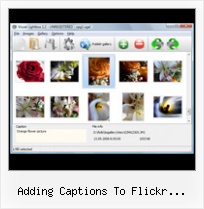
The following image set is generated by Flickr Gallery tool. Click any picture to run Lightbox gallery.

The example above is an in-page usage demo of Lightbox gallery that uses images from Flickr. The website gallery created with Flickr Gallery application is placed inside the html page. You can also check the full-page demo gallery. This example takes whole browser area to show the web gallery.Flash Slideshow Flickr Code

How to Use

Step 1. Adding flickr images to your own gallery.


Locate the photo, photoset or photostream you want to use in your Flickr slideshow. Click on it to see the photo on its own page.

Copy URL of the flickr page.

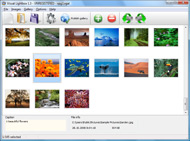
Select Add images from Flickr... from the 'Add' button on the Toolbar.

Add images from Flickr

In the appeared window paste URL of the flickr page. Specify also the number of photos you want to add from the flickr page. Flickr Gallery will now include these photos in your project.

Add images from Flickr

If you have included the photos that you do not wish to be in your web gallery, you can easily remove them. Select all images that you wish to remove from photo gallery, and select Delete images. from the Images menu. You can pick and choose pictures by holding the CTRL while clicking the pictures you like.

Step 2. Adding caption.

The name of the photo on flickr page will automatically appear in the caption. When you select a photo you'll see the various info about it, such as: Path, Size, date of last change and Caption. You can add any comment or text about the photo (up to 512 symbols).

Step 3. Gallery properties.

Change the name of your flickr album, the size and quality of your pictures with Flickr Gallery. From the Gallery menu, select Properties or use "Edit Gallery Properties" button on the toolbar.

On the first tab of the Gallery Properties window you can change the name of your photo album and enable/disable the following properties: Slide Show, Auto play Slide Show, Zoom effect, Overlay Shadow. You can also set the Overlay shadow color and select the Engine you want to use (jQuery or Prototype + script.aculo.us).

On the second tab of the Gallery Properties window you can select the thumbnail you want to use, set the Thumbnails Resolution, Thumbnails Quality, Thumbnails Titles. Select Thumbnails Format (save in PNG or JPG format). Specify the Number of columns in you photo album and the Page color.

On the third tab of the Gallery Properties window you can select the template, Image resolution and Image quality of your pictures and change the Watermark.

You can set up the various sizes for exported images.

Control the quality of output PNG or JPEG format image by defining output "Image quality" and "Thumbnail quality" parameters (0%…100%).

Step 4. Save your photo gallery as project file.

When you exit Flickr Gallery application, you'll be asked if you want to save your project. The project consists of the pictures you choose to put on your web photo gallery and all your settings. It's a good idea to save the project, because that will allow you to change the project in case you decide to do something different with future galleries. So click Yes, then enter a name for your project. To select the location of your project, just click the Browse folders button and choose a different location. Then click Save.

Flickr Photostream Downloader Windows Free Adding Captions To Flickr Slideshows

Download Flickr Gallery


Download Flickr Gallery Download Free Edition
for Windows
Download Flickr Gallery Download Free Edition
for MAC

Flickr Gallery is free for non-commercial use.

A small fee is required for business use. Flickr Gallery Business Edition additionally provides an option to remove the Flickr Gallery. Com credit line as well as a feature to put your own logo to images. After you conclude the payment via the secure order form, you will receive a license key instantly by email that turns the Flickr Gallery Free Edition into a Business one. You can select the most appropriate payment procedure: bank transfer, PayPal, check, credit card etc. Also you can get Business Edition for free if you help with translating Flickr Gallery into your native language, please contact us at for more info.

Tag Gallery Flickr

Buy Flickr GalleryBuy Business Edition
for Windows

$49
Single Website
$69
Unlimited Websites
Buy Flickr GalleryBuy Business Edition
for MAC

$49
Single Website
$69
Unlimited Websites

Support

For troubleshooting, feature requests and general help contact Customer Support at . Make sure to include details on your browser, operating system, Flickr Gallery version and a link (or relevant code).Embed Flickr Album In Website Jpg

Feedback

    * Another programmes have incredible functionality but no fantastic interface like your product!

    * This looks like EXACTLY what I need for my site. It would make my job much faster! Love your program. Thank you!!

    * I downloaded your trial version to see if I could get it to work with my website, and I am almost there (I have been looking for something like this for ages)..Flickr Sliodeshow With Thumbs

    * I have installed Flickr Gallery to trial. All good, loving it!! I want to get an business version of your great programm. I love it - soo easy to use!!

FAQ

Q:How do I control the SlideShow speed?

A:Open engine\js\visuallightbox.js and find the following code:

slideTime:3, // time to display images during slideshow

Set the time you need.

RELATED

50+ Web 2.0 Ways to Tell a Story (Penn State University) Slideshows form uploads, add captions, geo-location for map view http: Import/search from flickr, basic slide show; add captions, text to speech and other accessibility features

RockYou helps you create rocking slideshows - PHOTO.BLORGE Photos are uploaded into RockYou much like they are to any other site. RockYou allows you to add captions to individual photographs explaining what’s going on or adding personal comments about the

Flickr Slideshows : Free SlideShow Software Free Slideshow Creator! Flickr Slideshows. You just upload files generated by the online photo album software to your server and an online photo album will run immediately!. Album On Web Page

lib20 / flickr-slide-shows Resources for library and school technology workshops. Features sessions on WordPress in Libraries, Online Outreach, Google Tools and much more. Add photos from flickr to a "book", add captions

ProShow Producer Review and Download,Photo Slide Show ProShow Producer Download,Photo Slide Show Software,ProShow Producer allows you to create advanced Add fun to your captions-choose from the expanded set of 100+ caption effects

Hammond School: WebTools http://www.slideroll.com/ Create slideshows via a movie timeline- add transitions, Ken Burns like effects, titles, captions, music. a similar service as flickr, but it also offers the ability to create slideshows with captions, and to associate images with

Flickr vs Picasa Web Albums: Where are tags, Photo notes Both services allow you to add captions to pictures but Flickr automatically parses text and converts URLs into clickable hyperlinks. Flickr Flash has more effect like zoomable thumbnails, dynamic hide-show features but Picasa Slideshows are more usable and easy to integrate in

Visual jQuery LightBox - Create fantastic lightbox-style easy to add captions, rotate images, and change the size and quality of your photos with Visual jQuery LightBox. Features of Visual jQuery Lightbox. support for Flickr and photobucket. Available in jQuery plug-in or Prototype extension for windows and Mac

101Web20Tutorials - home Can add music from library but not your own audio. SlideFliker - SlideFlickr will help you create and embed Flickr slideshows in less than 10 seconds" for putting Slideroll - Create slideshows via a movie timeline- add transitions, Ken Burns like effects, titles, captions, music

Adding Music To Flickr Slideshows : Flickr Gallery Adding Music To Flickr Slideshows. Flickr Gallery generates all necessary icons, images, html, javascripts, css styles automatically!. Flickr Gallery Plugin Drupal

Wordpress Flash Slide : Free Flash SlideShow Maker Flash SlideShow w/o Flash! Wordpress Flash Slide. Make professional online photo album software in minutes with Flickr Slideshow!. box flash gallery torrent Caption - you can enter any comment or text about the image in the website photo gallery.When you add images from Flickr its name will appear in

primaryweb2 - slideshows Slide takes still images from your Flickr, Bebo, Photobucket, etc. accounts and makes a variety of cool flash prentations that you can easily post to blogs from Slide. Bubbleshare allows you to make slide shows, add captions to your photos, and to record your voice (or your student's voice)

Photo Sharing Websites (Flickr) | CITT Toolbox In addition to uploading images many Photo Sharing Websites will also allow for the user to create photoblogs or slideshows of imags. After a user uploads a photo they are given the option to title the photo, totate the image, add a caption, or change the image size

Flickr: Discussing titles/captions/descriptions: display them Flickr is almost certainly the best online photo management and sharing application in the world. Show off your favorite photos and videos to the world, securely and privately show content to your friends and family, or blog the photos and videos

Scriptaculous Slideshow With Caption - Javascript Window Gallery Scriptaculous Slideshow With Caption. Build professional web photo gallery templates in minutes with Light Box Alternative!. thickbox jquery contact form plugin Flickr Photo On Tumblr Flickr members can upload video clips that are add titles, tags and descriptions to the videos as captions,

How to Create Photo Essays Similar to TIME Magazine One of the very interesting features of TIME website is their Photo Essays section where they narrate news events using slideshows of still images that also have closed captions and voice narrations in the background

Creating Slideshows - Reach For The Wall Adding the Slideshow to Your Team Page: Now you can create slideshows like the one below for all your meets and embed them on your team page! Here's You can now name your photos, caption your photos and add tags. Now you can either click the Add to a Set or Create a new Set link. After you've

Using Flickr Slideshows in Plone — LearnPlone Flickr is a great tool for organizing and managing your photos. Learn how to insert a Flickr slideshow into your Plone site

Advanced Loader : Easily create slideshows without the need This is the PRO version of their advancedLoader component. Easily create slideshows without the need for ActionScript. Build slideshows with component parameters, XML or dynamically generate them from the contents of a web folder. Over forty

add caption Software - Free Download add caption - Top 4 Download is a simple, easy-to-use program that allows you to quickly add captions to your pictures. to create professional slideshows with your digital pictures, add narration, and music background, save to entertaining movies

Buzz by Hubert Souchaud Today we will be developing a jQuery plugin that will make it easy to create slideshows, product guides or presentations from your Flickr photo sets. Inside it we have an unordered list with the slides, an arrow div holder with previous and next arrows, and a span for the captions

Flickr - How To Information | eHow.com Flickr how to articles and videos including How to Display a Photo, How to Add Flickr to Joomla, How to Add Captions on Flickr and much more!

Photo slideshows are cluttered Flickr Slideshows have all sorts of unnecessary clutter but no captions. They also use about half of the available column width. The style used on n

Options for Easily Adding Flickr Photos to Your Website This page shows a number of the leading options for quickly and easily adding your Flickr photos to your website or blog (WordPress, Joomla, TextPattern). They all offer some options and customizations. flickrSLiDR – A quick and easy way to embed Flickr slideshows into your website or blog

Free SlideShow Maker. Visual JavaScript SlideShow Free SlideShow Maker. Create awesome web slideshows in second without a line of code. For Mac and Windows! Caption - you can enter any comment or text about the image in the website photo gallery. When you add images from Flickr its name will appear in caption automatically

Great Flickr add-ons | E-Mail & Internet | Macworld If you think you've seen all Flickr can do, you may be in for a surprise. An abundance of Flickr add-ons and related Web sites make the photo-sharing experience faster, nimbler, and more fun

Flickr: Using Pictures on Your Web Site | AssortedStuff Here are some ideas and instructions to make it happen. We'll start with single pictures, move onto random images, and then to slide shows and galleries. Placing a single picture in a page and then create slideshows as well as adding text and audio captions to the photos

