


Overview

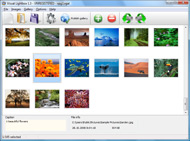
It's no secret that adding photos to your blog posts is one of the most effective ways to enhance your blog and attract attention to your writing. Flickr has millions of photos available in its database. A simple FREE tool called Flickr Gallery allows you to create a custom image gallery with a cool slide show of the most recent and most interesting photos from Flickr on your website or blog in a few easy steps. Just visit Flickr website and find photostream, photoset or a single photo you like. Enter the address of flickr page to add all photos from this page in your gallery, select the style of thumbnails and the overlay window and add the HTML embed code on your website or blog.
A few clicks and you'll see a stylish photo gallery with beautifull lightbox and zoom effects on your own website or blog!


Flickr Gallery for Windows   Flickr Gallery for MAC

Want more?

Example

Lightbox gallery sample

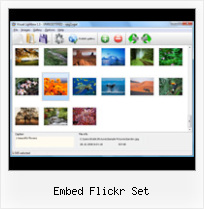
The following image set is generated by Flickr Gallery tool. Click any picture to run Lightbox gallery.

The photo gallery above is an in-page usage demo of Lightbox with images from Flickr. The photo gallery created with Flickr Gallery software is placed inside the html page. You can also check the full-page demo slideshow. This example takes whole browser area to show the web gallery.Set Flickr Slideshow To Auto Replay

How to Use

Step 1. Adding flickr images to your own gallery.


Locate the photo, photoset or photostream you want to use in your Flickr slideshow. Click on it to see the photo on its own page.

Copy URL of the flickr page.

Select Add images from Flickr... from the 'Add' button on the Toolbar.

Add images from Flickr

In the appeared window paste URL of the flickr page. Specify also the number of photos you want to add from the flickr page. Flickr Gallery will now include these photos in your project.

Add images from Flickr

If you have included the photos that you do not wish to be in your web gallery, you can easily remove them. Select all images that you wish to remove from photo gallery, and select Delete images. from the Images menu. You can pick and choose pictures by holding the CTRL while clicking the pictures you like.

Step 2. Adding caption.

The name of the photo on flickr page will automatically appear in the caption. When you select a photo you'll see the various info about it, such as: Path, Size, date of last change and Caption. You can add any comment or text about the photo (up to 512 symbols).

Step 3. Gallery properties.

Change the name of your flickr album, the size and quality of your pictures with Flickr Gallery. From the Gallery menu, select Properties or use "Edit Gallery Properties" button on the toolbar.

On the first tab of the Gallery Properties window you can change the name of your photo album and enable/disable the following properties: Slide Show, Auto play Slide Show, Zoom effect, Overlay Shadow. You can also set the Overlay shadow color and select the Engine you want to use (jQuery or Prototype + script.aculo.us).

On the second tab of the Gallery Properties window you can select the thumbnail you want to use, set the Thumbnails Resolution, Thumbnails Quality, Thumbnails Titles. Select Thumbnails Format (save in PNG or JPG format). Specify the Number of columns in you photo album and the Page color.

On the third tab of the Gallery Properties window you can select the template, Image resolution and Image quality of your pictures and change the Watermark.

You can set up the various sizes for exported images.

Control the quality of output PNG or JPEG format image by defining output "Image quality" and "Thumbnail quality" parameters (0%…100%).

Step 4. Save your photo gallery as project file.

When you exit Flickr Gallery application, you'll be asked if you want to save your project. The project consists of the pictures you choose to put on your web photo gallery and all your settings. It's a good idea to save the project, because that will allow you to change the project in case you decide to do something different with future galleries. So click Yes, then enter a name for your project. To select the location of your project, just click the Browse folders button and choose a different location. Then click Save.

Flickr Photo Leecher Embed Flickr Set

Download Flickr Gallery


Download Flickr Gallery Download Free Edition
for Windows
Download Flickr Gallery Download Free Edition
for MAC

Flickr Gallery is free for non - commercial use.

A small fee is required for business use. Flickr Gallery Business Edition additionally provides an option to remove the Flickr Gallery. Com credit line as well as a feature to put your own logo to images. After you finish the payment via the secure order form, you will receive a license key instantly by email that turns the Flickr Gallery Free Edition into a Business one. You can select the most appropriate payment mode: credit card, check, bank transfer, PayPal etc. Also you can get Business Edition for free if you help with translating Flickr Gallery into your native language, please contact us at for more info.

Flickr Album Display

Buy Flickr GalleryBuy Business Edition
for Windows

$49
Single Website
$69
Unlimited Websites
Buy Flickr GalleryBuy Business Edition
for MAC

$49
Single Website
$69
Unlimited Websites

Support

For feature requests, troubleshooting, general help contact Customer Support at . Make sure to include details on your browser, operating system, a link (or relevant code) and Flickr Gallery version.Splice Flickr Blogspot

Feedback

    * I just tried the application, It is wonderful idea. Like you said in the website "few clicks without writing a single line of code" because most of the people is not web designers".

    * I am thrilled with what this tool can do for me thanks for all the hard work that must have gone into it.

    * I'd like to express my gratitude to your efforts on creating such a nice piece of program and best of all it's free! Keep out the good work and I hope to see new features in the near coming future to rate you 5 star!Free Flickr Photostream Viewer

    * First of all, I love you Flickr Gallery. I think it's beautiful! I purchased the lightbox “business edition” yesterday, and I’m very happy how easy it is to use. Found this to be one of the fastest ways to get a gallery on the web. Thanks.

FAQ

Q:I would like to center all the thumbnails and I cannot figure out how.Can you please help?

A:Try to use <div> tag or <table> tag to center your thumbnails. Flickr Gallery generates a special code.
Just paste it in <div> tag.
You can also place in <dierates a special code.
Just paste it in <div> tag.
You can also place in <div> tag your iframe.
And then use the alignment that you ned.


RELATED

How to Embed a Flickr Slideshow in your Facebook Static FBML Embedding a Flickr Slideshow in your Facebook Static FBML Application Tab Page is easy. A tutorial on how to add your Flickr slideshow. Create a Flickr Set. If the Set that you want to be the slideshow is already created, skip to Step 4. If you need to first create the Set that will be

Media: Flickr | drupal.org (4) If you want to use a set from Flickr, then use the "Embedded Video" CCK field. Example Flickr URL: http://www.flickr.com/photos/thusthought/sets/72157625220814125/show/ Drupal 7. The Drupal 7 version of the module requires the Media module. It currently only supports Flickr photos

Learning How to Embed Flickr Slideshows onto Your Website or Blog Learn the easy Flickr slideshow codes for how to embed flicker slideshows and customizing the slideshow on your site or blog

Flickr Photo Sets Video – 5min.com Flickr Photo Sets - As your image collection grows on Flickr, the importance of keeping things organized will be apparent. Best to get started with the practice of organizing your photos before your gallery becomes a potpourri of photos or a

Flickr - Wikipedia, the free encyclopedia Flickr's "sets", then, represent a form of categorical metadata rather than a physical hierarchy. The resulting map can be embedded in a website.[25] Sets may be grouped into "collections", and collections further grouped into

Create your own slideFlickr! SlideFlickr is an online Flickr slideshow generator that will help you create and embed Flickr slideshows in less than 10 seconds!

Asphalt Archeology - a set on Flickr Flickr is almost certainly the best online photo management and sharing application in the world. Show off your favorite photos and videos to the world, securely and privately show content to your friends and family, or blog the photos and videos

Flickr: Using Pictures on Your Web Site | AssortedStuff Enter your flickr name, choose a set, set the size, and it gives you the code to embed the show in your page. Splashr offers another very simply way to generate a slide show but with many more options to alter the appearance, including templates for borders and backgrounds

Flickr Slideshow Settings | Flickr Slideshow Flickr Slideshow Settings. Create excellent online photo websites with jQuery Thickbox Alternative! flickr slideshow url not working While embed code you can take a straight photostream and use a variety of web-based slideshow services, I've used a specific set of tools: Yahoo Pipes – to control the

Uploading and Downloading The quality is excellent, you can set the level of. privacy for each video, and you can embed the videos in other places like. wikis or blogs. Downloading Photos from Flickr. When you click on All Sizes at the top of a photo, you will then see all

Lake Trafford: An Embedded Flickr SlideShow | NFN 4 Good And because it is so popular the developers of Flickr also provide cutting edge sharing tools for you and your web site. the embedding of a Flickr slide show into your post. The example here is a set of pictures I photographed of

Photo Galleries, Portfolios and Presentations In this example, it's set to display 10 "Small Square" images in 5 columns. A good way in which you can embed a slideshow of a specific Set of Flickr photographs in your Yola website is to create and

Making Descriptions show by default in an embedded Flickr How to make descriptions show automatically in a Flickr Slideshow that's embedded on a Web page. I just set up a Flickr slideshow and the client asked if the descriptions (captions) could show by default

Generate Code To Embed, Add Flickr Photo Album Slideshow On There are times when you want to embed a photo slideshow on flickr onto your blog or website, there are many online services which allows you to it, one of them 1. Login to your flickr account and open the photo album or photo set which you want to embed

flickr embed vista freeware, shareware, software download flickr embed vista freeware, shareware, software download - Best Free Vista Downloads - Free Vista software download - freeware, shareware and trialware downloads

How to Embed Flickr Slideshows | eHow.com How to Embed Flickr Slideshows. If you've always wanted to use all the photos from your Flickr account in a slideshow for your website, blog or Myspace page, there are 2 easy ways to do it. Flickr's official embed tool, SLiDR,

Flickr Set Embed : Flickr Gallery Flickr Set Embed. Flickr Gallery generates all necessary icons, images, html, javascripts, css styles automatically!. Json Flickr Upload

Simple Flickr Slideshow Script " DanielAndrade.net Sometime ago, I wanted to do something to show the pictures in a flickr set in a easy way for my websites. new window in flickr website. So I decided to build this script. After reading the paulstamatiou.com s HowTo: Embedded Flickr Slideshows, I decided

Adding a Flickr Photo Gallery to Your Website Yahoo account, you may set up your Flickr account using your existing Embed your Photo Gallery in a web page. To add the new gallery to your website, you'll need to sign in to Expression Engine in a. separate browser window and Edit the appropriate page entry to display the gallery. From your Flickr

Mini-feature: Auto-embed Flickr sets and tags - The Official still got a bunch of bigger things in the pipe you'll hear about soon, but wanted to let you know that now you can easily embed Flickr sets and tags. Just paste the URL, e.g. from the address bar: I currently use the flickr API to grab the set and provide HTML for Posterous

Embed Flickr slideshows into a blog post " wongaBlog Just thought some bloggers might be interested in how to embed an official Flickr slideshow into a post. The unique flickr ID is in the form of 12345678@N00, which you can find out from idgettr (or, if you haven't set up a nickname on flickr yet, it

Flickr Archives - etc: a stream of geek consciousness Read "More Ways to Embed a Flickr Slideshow on your Site" Embed Flickr Slideshows within Your Site. Just fill in the url of the flickr user, set or

Embed Flickr slideshows in your Blog | Social Media Design I have just discovered that you can embed Flickr slideshows in your website or blog. Go to the photo set or group you'd like to embed, click slideshow, on the

Flickr Slideshow Embed : Free SlideShow Software Free Slideshow Creator! Flickr Slideshow Embed. Online photo albums created with Flickr Slideshow are fully compatible with all modern Windows and MAC browsers!. Picture Gallery For Website

Embed Flickr slideshows with flickrSLiDR If you've been looking for a ridiculously easy way to embed your Flickr pics on your website or blog, look no further than flickrSLiDR. Alll you need to do is enter the URL of the Flickr photo set, user name, or group that you'd like to showcase, set some basic slideshow parameters, and whammo!

Tools for embedding Flickr Slideshows I came across few nice tools to embed Flickr Photos in your blogs or myspace pages, I will make a list of them here and update the post with new tools whenever All you need to do is enter the flickr URL address, photo set or group you would like to embed along with some options like width and height

