
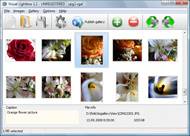
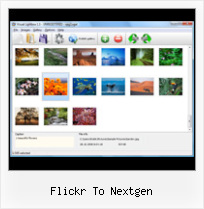


Overview

It's no secret that adding photos to your blog posts is one of the most effective ways to enhance your blog and attract attention to your writing. Flickr has millions of photos available in its database. A simple FREE tool called Flickr Gallery allows you to create a custom image gallery with a cool slide show of the most recent and most interesting photos from Flickr on your website or blog in a few easy steps. Just visit Flickr website and find photostream, photoset or a single photo you like. Enter the address of flickr page to add all photos from this page in your gallery, select the style of thumbnails and the overlay window and add the HTML embed code on your website or blog.
A few clicks and you'll see a stylish photo gallery with beautifull lightbox and zoom effects on your own website or blog!


Flickr Gallery for Windows   Flickr Gallery for MAC

Want more?

Example

Lightbox gallery sample

The following image set is generated by Flickr Gallery tool. Click any picture to run Lightbox gallery.

The sample above is an in-page usage demo of Lightbox gallery that uses images from Flickr. The website gallery created with Flickr Gallery tool is placed inside the website page. You can also check the full-page demo lightbox gallery. This example takes whole browser area to show the gallery.Flickr Gallery Slide Show

How to Use

Step 1. Adding flickr images to your own gallery.


Locate the photo, photoset or photostream you want to use in your Flickr slideshow. Click on it to see the photo on its own page.

Copy URL of the flickr page.

Select Add images from Flickr... from the 'Add' button on the Toolbar.

Add images from Flickr

In the appeared window paste URL of the flickr page. Specify also the number of photos you want to add from the flickr page. Flickr Gallery will now include these photos in your project.

Add images from Flickr

If you have included the photos that you do not wish to be in your web gallery, you can easily remove them. Select all images that you wish to remove from photo gallery, and select Delete images. from the Images menu. You can pick and choose pictures by holding the CTRL while clicking the pictures you like.

Step 2. Adding caption.

The name of the photo on flickr page will automatically appear in the caption. When you select a photo you'll see the various info about it, such as: Path, Size, date of last change and Caption. You can add any comment or text about the photo (up to 512 symbols).

Step 3. Gallery properties.

Change the name of your flickr album, the size and quality of your pictures with Flickr Gallery. From the Gallery menu, select Properties or use "Edit Gallery Properties" button on the toolbar.

On the first tab of the Gallery Properties window you can change the name of your photo album and enable/disable the following properties: Slide Show, Auto play Slide Show, Zoom effect, Overlay Shadow. You can also set the Overlay shadow color and select the Engine you want to use (jQuery or Prototype + script.aculo.us).

On the second tab of the Gallery Properties window you can select the thumbnail you want to use, set the Thumbnails Resolution, Thumbnails Quality, Thumbnails Titles. Select Thumbnails Format (save in PNG or JPG format). Specify the Number of columns in you photo album and the Page color.

On the third tab of the Gallery Properties window you can select the template, Image resolution and Image quality of your pictures and change the Watermark.

You can set up the various sizes for exported images.

Control the quality of output PNG or JPEG format image by defining output "Image quality" and "Thumbnail quality" parameters (0%…100%).

Step 4. Save your photo gallery as project file.

When you exit Flickr Gallery application, you'll be asked if you want to save your project. The project consists of the pictures you choose to put on your web photo gallery and all your settings. It's a good idea to save the project, because that will allow you to change the project in case you decide to do something different with future galleries. So click Yes, then enter a name for your project. To select the location of your project, just click the Browse folders button and choose a different location. Then click Save.

Insert Flickr Gallery Into Html Flickr To Nextgen

Download Flickr Gallery


Download Flickr Gallery Download Free Edition
for Windows
Download Flickr Gallery Download Free Edition
for MAC

Flickr Gallery is free for non - commercial use.

A small fee is required for business use. Flickr Gallery Business Edition additionally provides an option to remove the Flickr Gallery. Com credit line as well as a feature to put your own logo to images. After you conclude the payment via the secure form, you will receive a license key instantly by e-mail that turns the Flickr Gallery Free Edition into a Business one. You can select the most appropriate payment procedure: PayPal, check, bank transfer, credit card etc. Also you can get Business Edition for free if you help with translating Flickr Gallery into your native language, please contact us at for more info.

Flickr Photo Blog

Buy Flickr GalleryBuy Business Edition
for Windows

$49
Single Website
$69
Unlimited Websites
Buy Flickr GalleryBuy Business Edition
for MAC

$49
Single Website
$69
Unlimited Websites

Support

For general help, troubleshooting and feature requests contact Customer Support at . Make sure to include details on your browser, operating system, a link (or relevant code) and Flickr Gallery version.Jquery Flickr Slideshow Loop

Feedback

    * I just tried the application, It is wonderful idea. Like you said in the website "few clicks without writing a single line of code" because most of the people is not web designers".

    * I'm absolutely loving Flickr Gallery Business and Video LightBox. Amazing, quick and painless, to create a custom, browser independent gallery. And it works first time - every time! Best value for money I've seen in quite a while...

    * I tried Flickr Gallery and for me its a very cool and usefull application. Its so easy to manage my galleries and it looks very nice.Embedding A Flickr Photostream In Iweb

    * This looks like EXACTLY what I need for my site. It would make my job much faster! Love your program. Thank you!!

FAQ

Q:Instead of making one page with 40 photos, is there no property to make 2 or more pages?

A:You can do it in the following way:

1. Create your gallery in Flickr Gallery and publish it on a local drive in any test folder.
2. Make two copies of the generated index.html file (for example index1.html and index2.html).
3. Open index.html, index1.html and index2.html files in any text editor.
4. Find code for the gallery inside the BODY tag and cut some part of the images, so you'll have different images on each page.

<!-- Start Flickr Gallery.com BODY section -->
<div class="gallery">
<!-- leave the following code on index.html page -->
<a href="./data/images/1.jpg" rel="lightbox[sample]" title="Best Toy Ever"><img src="./data/thumbnails/1.png" /></a>
<a href="./data/images/8.jpg" rel="lightbox[sample]" title="PrueaMacro"><img src="./data/thumbnails/8.png" /></a>

<!-- leave the following code on index1.html page -->
<a href="./data/images/3.jpg" rel="lightbox[sample]" title="Macro Leaf."><img src="./data/thumbnails/3.png" /></a>
<a href="./data/images/11.jpg" rel="lightbox[sample]" title="Bell Pepper"><img src="./data/thumbnails/11.png" /></a>

<!-- leave the following code on index2.html page -->
<a href="./data/images/5_0.jpg" rel="lightbox[sample]" title="5"><img src="./data/thumbnails/5_0.png" /></a>
<a href="./data/images/6_0.jpg" rel="lightbox[sample]" title="6"><img src="./data/thumbnails/6_0.png" /></a>

<!--[if lte IE 6]><script src="engine/js/pngfix_vlb.js" type="text/javascript"></script><![endif]-->
<a id="vlightbox" href="http://Flickr Gallery.com/">Online Photo Album Sharing by Flickr Gallery.com</a>
</div>
<!-- End Flickr Gallery.com BODY section -->

5. Create links to switch between your pages, for example:
<a href="index.html">1</a>  <a href="index1.html">2</a>  <a href="index2.html">3</a> 


Q:I want to change color of the overlay shadow? How can I do this?

A:Open engine\css\Flickr Gallery.css and find the following code:

#overlay{
position: absolute;
top: 0;
left: 0;
z-index: 90;
width: 100%;
height: 500px;
background-color: #FFF;
filter:alpha(opacity=60);
-moz-opacity: 0.6;
opacity: 0.6;
}

set the background-color parameter :

#overlay{
position: absolute;
top: 0;
left: 0;
z-index: 90;
width: 100%;
height: 500px;
background-color: #FF00FF;
filter:alpha(opacity=60);
-moz-opacity: 0.6;
opacity: 0.6;
}


RELATED

Tags - Flickr: On next-gen Internet, Web 2.0, emerging Web On next-gen Internet, Web 2.0, emerging Web technologies, online business, Blogs, Citizen Journalism, Media, AOL, Digg, Google, IPTV, IP Communication, Net Entrepreneurship, Microsoft, MySpace, Podcasting, Scams, Software, Video Streaming, VoIP

Flickr: Edmonton Next Gen Flickr is almost certainly the best online photo management and sharing application in the world. Show off your favorite photos and videos to the world, securely and privately show content to your friends and family, or blog the photos and videos

Gateway NextGen | taking the next generation to the next level Featured Posts. NextGen Bibles We Like. Jesus Saves, I Spend. Youth Worker's Monday Prayer. Leadership, How to Raise Your Parents. 0 Comments 03 June 2011. We thought the media that the guys over at HSM used in their "How to Raise Your

AOL.com - News, Sports, Weather, Entertainment, Local & Lifestyle AOL offers today's news, sports, stock quotes, weather, movie reviews, TV trends and more. Get free email, AIM access, online radio, videos and horoscopes -- all on AOL.com!

Flickriver: Photos from calvin_gsc A Greasemonkey script that adds Flickriver links to various Flickr photo pages - user photos, favorites, pools etc, allowing to quickly open the While viewing any Flickr photos page, click on the bookmarklet to open the same view on Flickriver

New Game Plan: Edmonton's Next Gen - Edmontonstories.ca Want to make a difference in your Edmonton community? Check out Edmonton's Next Gen- an organization whose mission is to attract and give voice to Edmonton's next generation of 18 to 40 year old adults

7 Wordpress Photo Image Plugins NextGEN Gallery – A plugin for WordPress is a new Gallery plugin called NextGEN Gallery. Flickr Photo Album – This Flickr plugin for WordPress will allow you to pull in your Flickr photosets and display them as albums

Image Handling Plugins for WordPress - CUNY Academic Commons NextGen Gallery provides an easy way to present images in a gallery Not a image service like Flickr and Cincopa, NextGen integrates image storing within WordPress

WordPress plug-in: NextGen Gallery I'm a big fan of flickr for managing photos online but sometimes we need a different presentation and the NextGen Gallery seems to be the tool-of-choice. I just learned of it and will be playing with it here. Related posts:SimpleGallery

pure.skydive Everything about skydiving. Skydiving news, gear, events, records, video and other fun and interesting news Red Bull Video reveals next-gen space suit and pressure helmet designed specifically for Felix Baumgartner and the Red Bull Stratos mission to the edge of space The Red Bull Stratos science

flickr – the edmontonian: awesome since 2009 Local news and events in edmonton. Home of the edmontonian presents, on ShawTV. on by the Next Gen committee and Edmonton Federation of Community Leagues) back in June. Our scrappy little team from Strathcona Centre placed a respectable fifth, notable due to our handful of active members

Hyperlink Each Image Nextgen Slideshow : Free SlideShow Software Free Slideshow Creator! Hyperlink Each Image Nextgen Slideshow. Don't allow your website visitors to get lost! Try Flickr Slide Show!. Album Web Page Templates

Tidbits and Musings | ... Gwen's thoughts on anything This is a test using images resized to "large". [Show as slideshow] 12. After the images text — Let's see how test of adding text and images with the NextGen Gallery Plug-in. Here

Contact – Edmonton's Next Gen Skip to content. home. about. edmonton. nextgen. volunteer. committee. partners. connect. opinions 4 9:30 am. Flickr Facebook Twitter RSS Feed © 2011 Edmonton NextGen

RMS - Next Gen Informed by the rapidly evolving needs of customers and inspired by the transformative power of these new technologies, RMS has made the commitment to risk the status quo and lead a next generation revolution in risk modeling and risk management practice

What WordPress plugin do you use for photos? I use Flickr Gallery if you're using Flickr to host photos. I use Flickr Gallery if you're using Flickr to host photos. http://co.deme.me/projects/flickr-gallery/ NextGen Photogallery for Flickr is really nice as well with LOTS of cool options as

Next Gen A short description of your company We provides a one-stop solution in project management with extended processes to its customers, precision machining and surface coating

Trevor NextGen | The Trevor Project Trevor NextGen is a group of young adults, primarily in their 20s and 30s, comprised of local volunteers who are committed to expanding Trevor NextGen is responsible for coordinating and implementing program, outreach and fundraising related activities in an effort to raise

WordPress " Support I'd like to install the "NextGen-Gallery", but still have a few with a separate thumbnail for each album, and the name of the project next to each th

Flickr Photo Album | Website Design Amazing but true. You can display your flickr photo collections as a gallery with albums right inside your WordPress blog. Additionally it will add photo

Carousel Template Help " PageLines Forum I'd like to use NextGen Gallery on a carousel page with a Flickr Set; I'd like to maintain the flexibility of The NextGen Plug-in should be used if you want more manual control over the images, but if you want to use Flickr you will need

NextGen Player - Canada's Premier Gaming Blog: NGP at the Next Gen Player, News for Canadian Gamers NGP at the 2009 ELAN Awards: Flickr Photos. This year's ELAN Awards have come and passed and I was fortunate enough to be there to celebrate the great achievements in video gaming in 2008

Flickr gallery | Komotion If you use Flickr to store your images online, you can use this widget to display a gallery of your Flickr images anywhere on the page. Example

Slideshow " NextGen Gallery | bavatuesdays And while this obviously doesn't replace the social beauty that is Flickr, it does provide an easy and immediate way to upload, manage, and In fact, seems to me the PicLens slideshow feature works better than the one built into NextGen Gallery, I can't seem to get the

Nextgen Flickr : Flickr Gallery A few clicks to create stylish photo gallery webpage!. Html Code Loop Flickr Slideshow Flickr: NextGen Player Team's Photostream Flickr is almost certainly the best online photo management and sharing application in the world

