



Overview

It's no secret that adding photos to your blog posts is one of the most effective ways to enhance your blog and attract attention to your writing. Flickr has millions of photos available in its database. A simple FREE tool called Flickr Gallery allows you to create a custom image gallery with a cool slide show of the most recent and most interesting photos from Flickr on your website or blog in a few easy steps. Just visit Flickr website and find photostream, photoset or a single photo you like. Enter the address of flickr page to add all photos from this page in your gallery, select the style of thumbnails and the overlay window and add the HTML embed code on your website or blog.
A few clicks and you'll see a stylish photo gallery with beautifull lightbox and zoom effects on your own website or blog!


Flickr Gallery for Windows   Flickr Gallery for MAC

Want more?

Example

Lightbox gallery sample

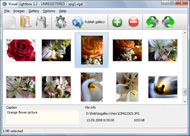
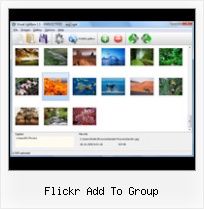
The following image set is generated by Flickr Gallery tool. Click any picture to run Lightbox gallery.

The sample above is an in-page usage demo of Lightbox tool with Flickr images. The slideshow created with Flickr Gallery application is placed inside the page layout. You can also check the full-page demo website gallery. This example takes whole browser area to show the web gallery.Jquery Flickr Photo Slider

How to Use

Step 1. Adding flickr images to your own gallery.


Locate the photo, photoset or photostream you want to use in your Flickr slideshow. Click on it to see the photo on its own page.

Copy URL of the flickr page.

Select Add images from Flickr... from the 'Add' button on the Toolbar.

Add images from Flickr

In the appeared window paste URL of the flickr page. Specify also the number of photos you want to add from the flickr page. Flickr Gallery will now include these photos in your project.

Add images from Flickr

If you have included the photos that you do not wish to be in your web gallery, you can easily remove them. Select all images that you wish to remove from photo gallery, and select Delete images. from the Images menu. You can pick and choose pictures by holding the CTRL while clicking the pictures you like.

Step 2. Adding caption.

The name of the photo on flickr page will automatically appear in the caption. When you select a photo you'll see the various info about it, such as: Path, Size, date of last change and Caption. You can add any comment or text about the photo (up to 512 symbols).

Step 3. Gallery properties.

Change the name of your flickr album, the size and quality of your pictures with Flickr Gallery. From the Gallery menu, select Properties or use "Edit Gallery Properties" button on the toolbar.

On the first tab of the Gallery Properties window you can change the name of your photo album and enable/disable the following properties: Slide Show, Auto play Slide Show, Zoom effect, Overlay Shadow. You can also set the Overlay shadow color and select the Engine you want to use (jQuery or Prototype + script.aculo.us).

On the second tab of the Gallery Properties window you can select the thumbnail you want to use, set the Thumbnails Resolution, Thumbnails Quality, Thumbnails Titles. Select Thumbnails Format (save in PNG or JPG format). Specify the Number of columns in you photo album and the Page color.

On the third tab of the Gallery Properties window you can select the template, Image resolution and Image quality of your pictures and change the Watermark.

You can set up the various sizes for exported images.

Control the quality of output PNG or JPEG format image by defining output "Image quality" and "Thumbnail quality" parameters (0%…100%).

Step 4. Save your photo gallery as project file.

When you exit Flickr Gallery application, you'll be asked if you want to save your project. The project consists of the pictures you choose to put on your web photo gallery and all your settings. It's a good idea to save the project, because that will allow you to change the project in case you decide to do something different with future galleries. So click Yes, then enter a name for your project. To select the location of your project, just click the Browse folders button and choose a different location. Then click Save.

Customizable Flickr Gallery Flickr Add To Group

Download Flickr Gallery


Download Flickr Gallery Download Free Edition
for Windows
Download Flickr Gallery Download Free Edition
for MAC

Flickr Gallery is free for non-commercial use.

A small fee is required for business use. Flickr Gallery Business Edition additionally provides an option to remove the Flickr Gallery. Com credit bar as well as a feature to put your own logo to images. After you complete the payment via the secure form, you will receive a license key instantly by e-mail that turns the Flickr Gallery Free Edition into a Business one. You can select the most appropriate payment mode: check, bank transfer, credit card, PayPal etc. Also you can get Business Edition for free if you help with translating Flickr Gallery into your native language, please contact us at for more info.

Setting Up Artsexylightbox For Flickr

Buy Flickr GalleryBuy Business Edition
for Windows

$49
Single Website
$69
Unlimited Websites
Buy Flickr GalleryBuy Business Edition
for MAC

$49
Single Website
$69
Unlimited Websites

Support

For feature requests, troubleshooting, general help contact Customer Support at . Make sure to include details on your operating system, a link (or relevant code), browser and Flickr Gallery version.Image Embedded Flickr

Feedback

    * I LOVE your free Lightbox2 software tool and will purchase the business version shortly. I have seen the Lightbox JS effect used with video tutorials and I was hoping you have a version for video that I can purchase.
Video LightBox: http://videolightbox.com

    * I am thrilled with what this tool can do for me thanks for all the hard work that must have gone into it.

    * First of all, I love you Flickr Gallery. I think it's beautiful! I purchased the lightbox “business edition” yesterday, and I’m very happy how easy it is to use. Found this to be one of the fastest ways to get a gallery on the web. Thanks.Organize Tag Flickr Mac

    * I downloaded your trial version to see if I could get it to work with my website, and I am almost there (I have been looking for something like this for ages)..

FAQ

Q:Instead of making one page with 40 photos, is there no property to make 2 or more pages?

A:You can do it in the following way:

1. Create your gallery in Flickr Gallery and publish it on a local drive in any test folder.
2. Make two copies of the generated index.html file (for example index1.html and index2.html).
3. Open index.html, index1.html and index2.html files in any text editor.
4. Find code for the gallery inside the BODY tag and cut some part of the images, so you'll have different images on each page.

<!-- Start Flickr Gallery.com BODY section -->
<div class="gallery">
<!-- leave the following code on index.html page -->
<a href="./data/images/1.jpg" rel="lightbox[sample]" title="Best Toy Ever"><img src="./data/thumbnails/1.png" /></a>
<a href="./data/images/8.jpg" rel="lightbox[sample]" title="PrueaMacro"><img src="./data/thumbnails/8.png" /></a>

<!-- leave the following code on index1.html page -->
<a href="./data/images/3.jpg" rel="lightbox[sample]" title="Macro Leaf."><img src="./data/thumbnails/3.png" /></a>
<a href="./data/images/11.jpg" rel="lightbox[sample]" title="Bell Pepper"><img src="./data/thumbnails/11.png" /></a>

<!-- leave the following code on index2.html page -->
<a href="./data/images/5_0.jpg" rel="lightbox[sample]" title="5"><img src="./data/thumbnails/5_0.png" /></a>
<a href="./data/images/6_0.jpg" rel="lightbox[sample]" title="6"><img src="./data/thumbnails/6_0.png" /></a>

<!--[if lte IE 6]><script src="engine/js/pngfix_vlb.js" type="text/javascript"></script><![endif]-->
<a id="vlightbox" href="http://Flickr Gallery.com/">Online Photo Album Sharing by Flickr Gallery.com</a>
</div>
<!-- End Flickr Gallery.com BODY section -->

5. Create links to switch between your pages, for example:
<a href="index.html">1</a>  <a href="index1.html">2</a>  <a href="index2.html">3</a> 


Q:I want to change color of the overlay shadow? How can I do this?

A:Open engine\css\Flickr Gallery.css and find the following code:

#overlay{
position: absolute;
top: 0;
left: 0;
z-index: 90;
width: 100%;
height: 500px;
background-color: #FFF;
filter:alpha(opacity=60);
-moz-opacity: 0.6;
opacity: 0.6;
}

set the background-color parameter :

#overlay{
position: absolute;
top: 0;
left: 0;
z-index: 90;
width: 100%;
height: 500px;
background-color: #FF00FF;
filter:alpha(opacity=60);
-moz-opacity: 0.6;
opacity: 0.6;
}


RELATED

Flickr Group List Search Demo - Video Flickr Group List Search is a Greasemonkey script that enhances the "add to group" selector on Flickr. This is a short demonstration of it's features. Watch Video about Flickr,Greasemonkey,Script by Metacafe.com

Heritage Key and Flickr | Heritage Key Heritage Key has three groups on Flickr where photographers contribute images to the Heritage Key website.Flickr is the world's largest repository for photographs - millions of people from every corner of the world are taking photographs of

Share Your Nature Photos All you need to do is add your photos to the Nature Conservancy group and tag them DailyNature-TNC11. Flickr is an online photo sharing web site that is made up of many groups, including a Nature Conservancy group

A small treat for you groupies! " Flickr Blog We've introduced a couple of new features to make group participation a little easier. When you click "Add photos" you'll see a new tool. From here, you can add up to 6 photos at a time from your photostream, a set, via a tag search, etc., (though, if the group is throttling submissions of the

Uploading and Downloading There are groups within Flickr that you can join and then add your photos see a place underneath the name of the group that. you can click on to join it - Join This Group

Flickr Group List Search Video – 5min.com Flickr Group List Search - Flickr Group List Search is a Greasemonkey script that enhances the "add to group" selector on Flickr. This is a short demonstration of it's features. Very simple and very useful. Available at http://userscripts

Groups: Flickr - Upcoming About Flickr. For fans of Flickr, this group is for Flickr meetings Please note: Suggesting Flickr unrelated events (spam) might result in a group ban without prior notice

What hotels need to know about Flickr fan groups by The latter is especially important if you're located in a little-known destination and want to raise awareness. Link: Create a group on Flickr. What is a group? A Flickr group allows members to submit and share photos they have taken about a common subject

How flickr works - Victoria and Albert Museum Anyone can look at photographs on flickr, but in order to upload your own photos to any part of If you want to add a lot of your photos to our group at once, select 'Organize' from the top of the flickr page, go to the 'Groups' tab, select all of your V&A photos from the filmstrip at

Join the Physics Classroom Flickr Group It is a read-write web where anyone and everyone can easily add content to the volumes that are already there. Whether through a FaceBook page, a blogging site, a YouTube channel, or a photo-sharing site like Flickr, adding text, images and video to the Web is no longer a big deal

NEA - Join Our Annual Meeting Flickr Group As we did last year, we're again extending our photo coverage of the Annual Meeting to include everyone's photos - yours, too! Once you've snapped a few pictures of the Annual meeting, add those pictures to your personal Flickr page

Flickr Group List Search Demo by Rasman -- Revver Online A video by Rasman - Flickr Group List Search is a Greasemonkey script that enhances the \"add to group\" selector on Flickr. This is a short demonstration of it's features. Very simple and very useful. Available at http://userscripts.org

2 Great Ways To Automate Set Management In Flickr Flickr has a great ability to create Sets of images, and then group the sets as Collections. I've talked about Flickr sets before, in terms of how to best That is, if you add more images to the member groups, then the Collections are updated accordingly

Flickr Add To Group : Flickr Gallery Flickr Add To Group. Create excellent online photo websites with Flickr Gallery!. Slideshow And Lightbox Flickr Flickr Group List Search is a Greasemonkey script that enhances the "add to group" selector on Flickr

Online Photo Sharing with Flickr Add Note: Adds a hot spot to a photo. When the viewer hovers over the hot spot. with their Group members can view the photo. even if it is private. • Add to Set: Adds the photo to a

The Saline Flickr Fan Meetup Group (Saline, MI) - Meetup Meetup with other local Flickr.com Fans! Gather and talk about your favorite photosharing community! There are already two Saline photo groups on Flickr - let's add to their resources!

Better Flickr :: Add-ons for Firefox Add useful extra features to Flickr, like rich text edit controls, short URLs to photos, Better Flickr compiles some of the best Greasemonkey user scripts for Flickr into a single package, including: Add Buddy Icon Reply Options: Add a reply link to each comment which will generate the buddy icon

Flickr tool: add a photo set to a group You will be asked to allow read & write access for the tool. Mass-Add-To-Group allows you to add the photos in a Flickr photo set to a Flickr group all-at-once

The University of Maine - UMaine's Flickr Group Upload your UMaine photo to Flickr and navigate to that photo. Depending on which version of Flickr you're using, add your photo to the group by doing the following: Click on the Send to Group button above the photo and choose "Photos from the University of Maine" from the drop-down list OR

NMAH | Flickr By submitting your photo and caption to our Flickr group, your story could become part of By submitting your photo and caption to our Flickr group, your story could become part of the map featured on the Museum's On the Water

Flickr: YahooGroupsPhotos Flickr is almost certainly the best online photo management and sharing application in the world. Show off your favorite photos and videos to the world, securely and privately show content to your friends and family, or blog the photos and videos

YouTube - Flickr tutorial 1. Joining yahoo2. Joining flickr3. uploading pictures4. Joining paradox group5. adding picture to paradox group

Flickriver - A new way to view Flickr photos and more Use Flickriver Badge Creator to create a badge linking to your photos, your group or any other Flickriver You can place your badge on your Flickr profile, Blog or Website. Add to your iGoogle or Netvibes page

Bookmarklets for the Flickr "Delete me" group These bookmarklets reportedly no longer work in Flickr. Someone has adapted them for the new Flickr API: click here to find the new versionsWondering what's going on with these 'deleteme' tags and harsh comments on Flickr photos? This is the

How To Add Snapshot To Flickr / Adding Snapshot To Group Before thinking of adding any picture to Flickr, you need to make a Flickr account. After you've joined the group, go to the photo you want to add from your photostream and choose from the upper options "Send to Group"

PSDlearning Flickr Group | Learning Resources for Adobe Photoshop I thought a great way to expand this community would be to create a Flickr group where anyone can add their art and photos to. I've set it up so the nine newest

Launched Animhut Flcikr Group | AnimHuT Today`s post is something different from my previous one. Do you know we have Flickr group for this blog,anyhow people who visited my blog,also added their creative designs to my flickr group. - As it reached 125 images in the pool,thought to

Flickr Photo Sharing CIEE has set up a FLICKR group for each seminar so that you can share your photos and videos with others in your group, your colleagues, friends, and family, as well as CIEE. To get started, find and click on the link to the group for your seminar and follow these instructions:

