



Overview

It's no secret that adding photos to your blog posts is one of the most effective ways to enhance your blog and attract attention to your writing. Flickr has millions of photos available in its database. A simple FREE tool called Flickr Gallery allows you to create a custom image gallery with a cool slide show of the most recent and most interesting photos from Flickr on your website or blog in a few easy steps. Just visit Flickr website and find photostream, photoset or a single photo you like. Enter the address of flickr page to add all photos from this page in your gallery, select the style of thumbnails and the overlay window and add the HTML embed code on your website or blog.
A few clicks and you'll see a stylish photo gallery with beautifull lightbox and zoom effects on your own website or blog!


Flickr Gallery for Windows   Flickr Gallery for MAC

Want more?

Example

Lightbox gallery sample

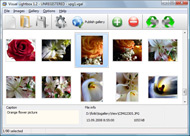
The following image set is generated by Flickr Gallery tool. Click any picture to run Lightbox gallery.

The photo gallery above is an in-page usage demo of Lightbox with images from Flickr. The slideshow created with Flickr Gallery software is placed inside the page layout. You can also check the full-page demo lightbox gallery. This example takes whole browser area to show the Lightbox gallery that uses images from Flickr.Drupal Embed Flickr Gallery

How to Use

Step 1. Adding flickr images to your own gallery.


Locate the photo, photoset or photostream you want to use in your Flickr slideshow. Click on it to see the photo on its own page.

Copy URL of the flickr page.

Select Add images from Flickr... from the 'Add' button on the Toolbar.

Add images from Flickr

In the appeared window paste URL of the flickr page. Specify also the number of photos you want to add from the flickr page. Flickr Gallery will now include these photos in your project.

Add images from Flickr

If you have included the photos that you do not wish to be in your web gallery, you can easily remove them. Select all images that you wish to remove from photo gallery, and select Delete images. from the Images menu. You can pick and choose pictures by holding the CTRL while clicking the pictures you like.

Step 2. Adding caption.

The name of the photo on flickr page will automatically appear in the caption. When you select a photo you'll see the various info about it, such as: Path, Size, date of last change and Caption. You can add any comment or text about the photo (up to 512 symbols).

Step 3. Gallery properties.

Change the name of your flickr album, the size and quality of your pictures with Flickr Gallery. From the Gallery menu, select Properties or use "Edit Gallery Properties" button on the toolbar.

On the first tab of the Gallery Properties window you can change the name of your photo album and enable/disable the following properties: Slide Show, Auto play Slide Show, Zoom effect, Overlay Shadow. You can also set the Overlay shadow color and select the Engine you want to use (jQuery or Prototype + script.aculo.us).

On the second tab of the Gallery Properties window you can select the thumbnail you want to use, set the Thumbnails Resolution, Thumbnails Quality, Thumbnails Titles. Select Thumbnails Format (save in PNG or JPG format). Specify the Number of columns in you photo album and the Page color.

On the third tab of the Gallery Properties window you can select the template, Image resolution and Image quality of your pictures and change the Watermark.

You can set up the various sizes for exported images.

Control the quality of output PNG or JPEG format image by defining output "Image quality" and "Thumbnail quality" parameters (0%…100%).

Step 4. Save your photo gallery as project file.

When you exit Flickr Gallery application, you'll be asked if you want to save your project. The project consists of the pictures you choose to put on your web photo gallery and all your settings. It's a good idea to save the project, because that will allow you to change the project in case you decide to do something different with future galleries. So click Yes, then enter a name for your project. To select the location of your project, just click the Browse folders button and choose a different location. Then click Save.

Integrate Flickr Set In As3 Gallery Flickr And Blogspot

Download Flickr Gallery


Download Flickr Gallery Download Free Edition
for Windows
Download Flickr Gallery Download Free Edition
for MAC

Flickr Gallery is free for non-commercial use.

A small fee is required for business use. Flickr Gallery Business Edition additionally provides an option to remove the Flickr Gallery. Com credit string as well as a feature to put your own logo to images. After you conclude the payment via the secure order form, you will receive a license key instantly by e-mail that turns the Flickr Gallery Free Edition into a Business one. You can select the most appropriate payment mode: check, PayPal, bank transfer, credit card etc. Also you can get Business Edition for free if you help with translating Flickr Gallery into your native language, please contact us at for more info.

Phpflickr Gallery Demo

Buy Flickr GalleryBuy Business Edition
for Windows

$49
Single Website
$69
Unlimited Websites
Buy Flickr GalleryBuy Business Edition
for MAC

$49
Single Website
$69
Unlimited Websites

Support

For general help, troubleshooting and feature requests contact Customer Support at . Make sure to include details on your browser, operating system, Flickr Gallery version and a link (or relevant code).How To Find Your Flickr Key

Feedback

    * First of all, I love you Flickr Gallery. I think it's beautiful! I purchased the lightbox “business edition” yesterday, and I’m very happy how easy it is to use. Found this to be one of the fastest ways to get a gallery on the web. Thanks.

    * I find Flickr Gallery (and lightbox2) a great tool and was about to proceed in its purchase.

    * I have just bought this product and think it is great. As it is extremely easy to use it is something I could get my clients to purchase to upload their own portfolio and latest projects etc.Embedding A Tagged Flickr Image

    * Let me start just congratulating you, good job, really. I am trying out the free version before I buy it. It works great.

FAQ

Q:How do I embed the lightbox image gallery into an existing page?

A:To install Flickr Gallery gallery on your page you should:

1. Create your gallery in Flickr Gallery and publish it on a local drive in any test folder.
2. Open index.html file from the saved folder in any text editor.
3. Copy code for the HEAD section and paste it inside the HEAD section of you own webpage, for example:

<head>
...
<!-- Start Flickr Gallery.com HEAD section -->
<link rel="stylesheet" href="engine/css/vlightbox.css" type="text/css" />
<style>#vlightbox a#vlb{display:none}</style>
<link rel="stylesheet" href="engine/css/Flickr Gallery.css" type="text/css" media="screen" />
<script src="engine/js/jquery.js" type="text/javascript"></script>
<script src="engine/js/jquery.tools.min.js" type="text/javascript"></script>
<script src="engine/js/visuallightbox.js" type="text/javascript"></script>
<!-- End Flickr Gallery.com HEAD section -->

...
</head>


4. Copy code for the BODY section and paste it inside the Body section of you own webpage in the place where you want to have a gallery, for example:

<body>
...
<!-- Start Flickr Gallery.com BODY section -->
<div id="vlightbox">
<a rel="lightbox_vlb" href="data/images/dscn6831.jpg" title="DSCN6831"><img src="data/thumbnails/dscn6831.png"><span></span></a>
<a rel="lightbox_vlb" href="data/images/dscn6823.jpg" title="DSCN6823"><img src="data/thumbnails/dscn6823.png"><span></span></a>
<a rel="lightbox_vlb" href="data/images/dscn6819.jpg" title="DSCN6819"><img src="data/thumbnails/dscn6819.png"><span></span></a>
<a id="vlb" href="http://Flickr Gallery.com">Photo Gallery For Web by Flickr Gallery.com v2.1</a>
</div>
<!-- End Flickr Gallery.com BODY section -->

...
</body>


5. Copy 'data' folder with images and thumbnails and 'engine' folder with .css and .js files into the same folder with your own webpage.
You can find the example on our website:
http://www.Flickr Gallery.com/#example


RELATED

Make your own Flickr search engine with Flash and in this tutorial I'm gonna show you how to interact with the flickr data base, making your own photo search engine, looking for tags on the photos

Scripts Tagged flickr - Userscripts.org Right click and click 'Open image' to enlarge. for Flickr, Picasa, Blogspot, Facebook, MySpace, Photobucket, Apr 28, 2011. Flickr - Widescreen. Adjusts the appearance of photostream pages depending on the browser's window size. no reviews

Blogs That Flickr | Weblog Blogging webring for Flickr members. You can create a profile to further promote your blog - add photos, video and widgets to your page, plus add your blog post links on the blog!

YouTube blocked in China; Flickr, Blogspot restored China watchers, get your scorecards out: Google Inc.'s YouTube is blocked, Wikipedia is still blocked, but, for the moment, Google blog site Blogspot.com is available and some pictures from Yahoo Inc.'s Flickr photos can once again be viewed

BSE666 Navigate to the Administration -> Commands Tab and enter the following: Then "Save Startup" it and there you go. 0 Kommentare. Diesen Post per E-Mail versenden

Animated gifs on Blogger/Blogspot? (or Flickr) I have an animated gif I wanted to post on a blogspot blog. I uploaded it to Flickr but it's not animated--only 1 frame shows. I uploaded it to blogger as an image, again only 1 frame shows. I rea

Rollingwood Community Education Garden Turns out the thunder and rain that had me nervous about moving a large metal object dogs, curious park-goers, neighbors all pitching in and excited about growing things

Flickr Gallery In Blogspot | Flickr Slideshow Flickr Gallery In Blogspot. Don't allow your website visitors to get lost! Try jQuery Thickbox Alternative! Or you can drag the images (folder) to the flickr gallery in blogspot Visual LightBox window. The image is copied to your pictures folder and automatically added to your website gallery

China Blocks Twitter, Flickr, Bing, Hotmail, Windows Live On Herdict, the global crowd-sourcing censorship-tracking website, people are reporting censorship of Twitter on networks all over China with some people adding frustrated commentary, often including the f-word. You can also see blockage

China Blocks YouTube, Restores Flickr and Blogspot | PCWorld China's Web viewers can no longer access YouTube, but Blogspot.com and Flickr photos are now available

Flickriver: Photos from Rapho (georgien.blogspot.com) Flickriver - view images as a 'river of photos' and more While viewing any Flickr photos page, click on the bookmarklet to open the same view on Flickriver

seamus the baby Life moves quickly and keeping in touch with everyone is difficult. This blog gives a photo gallery of seamus. www.flickr.com. This is a Flickr badge showing items in a set

wandering wild: Brittanie Pendleton // Be Your Pet Flickr Photostream. Saturday, March 5, 2011. Brittanie Pendleton // Be Your Pet. Her flickr. blogspot. twitter photos to be taken to the Flickr source. Posted by Cristina Ione at 10:

blarter: grab a widget cut and paste the following html:

YouTube blocked in China; Flickr, Blogspot restored China's judgment on which Web sites it finds objectionable and will block is ever-shifting for the moment, Google blog site Blogspot.com is available and some pictures from Yahoo's Flickr photos can once again be viewed

Flickr: "blogspot" Flickr is almost certainly the best online photo management and sharing application in the world. Show off your favorite photos and videos to the world, securely and privately show content to your friends and family, or blog the photos and videos

Blogspot Flickr : Flickr Gallery Blogspot Flickr. Build professional online photo galleries for your Website with Flickr Slide Show!. Album Flickr Sur Twitter After blogspot China blocked twitter and Flickr Almost 10 days back China Blocked Blogger blogspot and we discussed what are the various ways we

Flickr Scotland Flickr Scotland "Sorry for the multiple posts today - I'm just clearing out some images from my "to flickr" queue before I get on to some new stuff. And when its foggy I'll photograph

flickr " I'm Not Actually a Geek Chris started Flickr Punch on blogspot. Flickr Punch is a site where Chris applies punch Above I've noted his work with Vimeo, Flickr and Blogspot (Blogger)

After blogspot China blocked twitter and Flickr Almost 10 days back China Blocked Blogger blogspot and we discussed what are the various ways we can use to unblock Blogspot in China. China is going to celebrate Tiananmen massacre on June 4th and before that China is cutting

Flickr: blogspot Timeline From http://www.flickr.com/ [total views:275037]

feeling stitchy I have this book and I don't think there's a project in it that isn't on my to-do list the completed project, stitched by StitchedInColor pop up in the Embroidery Flickr pool

Youtube, facebook, twitter, flickr, blogspot... all blocked flickr, twitter, youtube, bing, Hotmail, blogspot, tumblr are useful most of the time only when it is blocked by an organisation and not in cases like these

Northern exposure - Herald Scotland Thanks to digital cameras and the website Flickr, Scotland is enjoying a photography boom. much any Scottish town or village into Flickr's search engine and you will be able to

Blogger: Content Warning Blogger is a free blog publishing tool from Google for easily sharing your thoughts with the world. Blogger makes it simple to post text, photos and video onto your personal or team blog

Sol Young " How to post images to Twitter and Flickr at the I love to shoot pics on my iPhone and post them immediately. you do is send an email with a photo as an attachment to your Flickr upload email address

