



Overview

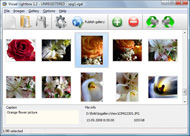
It's no secret that adding photos to your blog posts is one of the most effective ways to enhance your blog and attract attention to your writing. Flickr has millions of photos available in its database. A simple FREE tool called Flickr Gallery allows you to create a custom image gallery with a cool slide show of the most recent and most interesting photos from Flickr on your website or blog in a few easy steps. Just visit Flickr website and find photostream, photoset or a single photo you like. Enter the address of flickr page to add all photos from this page in your gallery, select the style of thumbnails and the overlay window and add the HTML embed code on your website or blog.
A few clicks and you'll see a stylish photo gallery with beautifull lightbox and zoom effects on your own website or blog!


Flickr Gallery for Windows   Flickr Gallery for MAC

Want more?

Example

Lightbox gallery sample

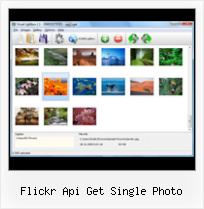
The following image set is generated by Flickr Gallery tool. Click any picture to run Lightbox gallery.

The photo gallery above is an in-page usage demo of Lightbox with images from Flickr. The website gallery created with Flickr Gallery software is placed inside the website page. You can also check the full-page demo gallery. This example takes whole browser area to show the slideshow.Jquery Flickr Overlay

How to Use

Step 1. Adding flickr images to your own gallery.


Locate the photo, photoset or photostream you want to use in your Flickr slideshow. Click on it to see the photo on its own page.

Copy URL of the flickr page.

Select Add images from Flickr... from the 'Add' button on the Toolbar.

Add images from Flickr

In the appeared window paste URL of the flickr page. Specify also the number of photos you want to add from the flickr page. Flickr Gallery will now include these photos in your project.

Add images from Flickr

If you have included the photos that you do not wish to be in your web gallery, you can easily remove them. Select all images that you wish to remove from photo gallery, and select Delete images. from the Images menu. You can pick and choose pictures by holding the CTRL while clicking the pictures you like.

Step 2. Adding caption.

The name of the photo on flickr page will automatically appear in the caption. When you select a photo you'll see the various info about it, such as: Path, Size, date of last change and Caption. You can add any comment or text about the photo (up to 512 symbols).

Step 3. Gallery properties.

Change the name of your flickr album, the size and quality of your pictures with Flickr Gallery. From the Gallery menu, select Properties or use "Edit Gallery Properties" button on the toolbar.

On the first tab of the Gallery Properties window you can change the name of your photo album and enable/disable the following properties: Slide Show, Auto play Slide Show, Zoom effect, Overlay Shadow. You can also set the Overlay shadow color and select the Engine you want to use (jQuery or Prototype + script.aculo.us).

On the second tab of the Gallery Properties window you can select the thumbnail you want to use, set the Thumbnails Resolution, Thumbnails Quality, Thumbnails Titles. Select Thumbnails Format (save in PNG or JPG format). Specify the Number of columns in you photo album and the Page color.

On the third tab of the Gallery Properties window you can select the template, Image resolution and Image quality of your pictures and change the Watermark.

You can set up the various sizes for exported images.

Control the quality of output PNG or JPEG format image by defining output "Image quality" and "Thumbnail quality" parameters (0%…100%).

Step 4. Save your photo gallery as project file.

When you exit Flickr Gallery application, you'll be asked if you want to save your project. The project consists of the pictures you choose to put on your web photo gallery and all your settings. It's a good idea to save the project, because that will allow you to change the project in case you decide to do something different with future galleries. So click Yes, then enter a name for your project. To select the location of your project, just click the Browse folders button and choose a different location. Then click Save.

Flickr Pro Account Free Flickr Api Get Single Photo

Download Flickr Gallery


Download Flickr Gallery Download Free Edition
for Windows
Download Flickr Gallery Download Free Edition
for MAC

Flickr Gallery is free for non - commercial use.

A small fee is required for business use. Flickr Gallery Business Edition additionally provides an option to remove the Flickr Gallery. Com credit string as well as a feature to put your own logo to images. After you complete the payment via the secure order form, you will receive a license key instantly by e-mail that turns the Flickr Gallery Free Edition into a Business one. You can select the most appropriate payment procedure: bank transfer, credit card, check, PayPal etc. Also you can get Business Edition for free if you help with translating Flickr Gallery into your native language, please contact us at for more info.

Flickr Photo Link

Buy Flickr GalleryBuy Business Edition
for Windows

$49
Single Website
$69
Unlimited Websites
Buy Flickr GalleryBuy Business Edition
for MAC

$49
Single Website
$69
Unlimited Websites

Support

For troubleshooting, feature requests and general help contact Customer Support at . Make sure to include details on your Flickr Gallery version, a link (or relevant code), browser and operating system.Drupal Flickr Sets Lightbox

Feedback

    * I downloaded your trial version to see if I could get it to work with my website, and I am almost there (I have been looking for something like this for ages)..

    * I'd like to express my gratitude to your efforts on creating such a nice piece of program and best of all it's free! Keep out the good work and I hope to see new features in the near coming future to rate you 5 star!

    * I find Flickr Gallery (and lightbox2) a great tool and was about to proceed in its purchase.Flickr Slideshow

    * I just tried the application, It is wonderful idea. Like you said in the website "few clicks without writing a single line of code" because most of the people is not web designers".

FAQ

Q:Instead of making one page with 40 photos, is there no property to make 2 or more pages?

A:You can do it in the following way:

1. Create your gallery in Flickr Gallery and publish it on a local drive in any test folder.
2. Make two copies of the generated index.html file (for example index1.html and index2.html).
3. Open index.html, index1.html and index2.html files in any text editor.
4. Find code for the gallery inside the BODY tag and cut some part of the images, so you'll have different images on each page.

<!-- Start Flickr Gallery.com BODY section -->
<div class="gallery">
<!-- leave the following code on index.html page -->
<a href="./data/images/1.jpg" rel="lightbox[sample]" title="Best Toy Ever"><img src="./data/thumbnails/1.png" /></a>
<a href="./data/images/8.jpg" rel="lightbox[sample]" title="PrueaMacro"><img src="./data/thumbnails/8.png" /></a>

<!-- leave the following code on index1.html page -->
<a href="./data/images/3.jpg" rel="lightbox[sample]" title="Macro Leaf."><img src="./data/thumbnails/3.png" /></a>
<a href="./data/images/11.jpg" rel="lightbox[sample]" title="Bell Pepper"><img src="./data/thumbnails/11.png" /></a>

<!-- leave the following code on index2.html page -->
<a href="./data/images/5_0.jpg" rel="lightbox[sample]" title="5"><img src="./data/thumbnails/5_0.png" /></a>
<a href="./data/images/6_0.jpg" rel="lightbox[sample]" title="6"><img src="./data/thumbnails/6_0.png" /></a>

<!--[if lte IE 6]><script src="engine/js/pngfix_vlb.js" type="text/javascript"></script><![endif]-->
<a id="vlightbox" href="http://Flickr Gallery.com/">Online Photo Album Sharing by Flickr Gallery.com</a>
</div>
<!-- End Flickr Gallery.com BODY section -->

5. Create links to switch between your pages, for example:
<a href="index.html">1</a>  <a href="index1.html">2</a>  <a href="index2.html">3</a> 


Q:I want to change color of the overlay shadow? How can I do this?

A:Open engine\css\Flickr Gallery.css and find the following code:

#overlay{
position: absolute;
top: 0;
left: 0;
z-index: 90;
width: 100%;
height: 500px;
background-color: #FFF;
filter:alpha(opacity=60);
-moz-opacity: 0.6;
opacity: 0.6;
}

set the background-color parameter :

#overlay{
position: absolute;
top: 0;
left: 0;
z-index: 90;
width: 100%;
height: 500px;
background-color: #FF00FF;
filter:alpha(opacity=60);
-moz-opacity: 0.6;
opacity: 0.6;
}


RELATED

api - Laughing Meme With Flickr you can get out, via the API, every single piece of information you put into the system. a brain dead easy to use subclass of webapp.RequestHandler that turns Flickr into an single-sign on service for Google AppEngine

Flickr and Perl LG #110 The first step is to get an API key. Flickr is still a relatively new service, and want to know who is writing software to access their service and why, and having use Flickr::API; use Data::Dumper; use warnings; use strict; # Test photo: http://flickr.com/photos/jimregan

Code: Flickr Developer Blog " Standard Photos Response, APIs Most prominently the ever popular swiss-army-API flickr.photos.search() uses it, but also methods like flickr.favorites.getList() or flickr.groups.pools.getPhotos a bunch of photos, and having to roundtrip to call flickr.photos.getInfo() for every single one of them is

Flickr::Photo It uses the Flickr::API::Photos class (and other's it finds necessary) in order to retrieve and send information to/from Flickr regarding a single photo. The class tries to be well behaved and Flickr-server-friendly by using lazy data fetching and caching techniques

Photo gallery with Flickr API Hi! I am Jérôme, a Web Developer, Photo-Blogger, Fixed Gear Bicycle rider who's living in Japan. I am also a tea addict! Photos are hosted on zooomr, I will explain this week in a post how to get them on your homepage using the API, it's pretty much the same as for Flickr Read more

FlickrSkins.com FlickrSkins.com™ will allow the user to determine the style of his online photo album; which categories, sets, tags, and/or photos will be included; and how they will be displayed. © 2011 FlickrSkins.com. This product uses the Flickr API but is not endorsed or certified by Flickr

Factory Joe / wp-diso-flickr-api This plugin would aim to replicate the Flickr API within a single WordPress instance such that tools like this, if they support XRDS-Simple discovery, could provide a rich uploading, manipulation and access experience similar to what you get when you use a native Flickr uploading tool

Flickr via ActionScript 3 Page 1 " Crazy Ahmad's Discount In this installment, we'll get and show the most recent image from Flickr. The first thing to do is get a Flickr API Key. This will allow you to

The Code4Lib Journal – Developing an Academic Image http://api.flickr.com/services/rest/?method=flickr.photos.addTags&api_key=xxx&photo_id additional data using the Flickr API method flickr.photos.getInfo, a results screen like

Upload Images to Flickr With The Fleakr Gem | sneaq Then make sure that you have an API key, shared secret, and auth token for the Flickr API. Single Files. The simplest way to upload is using a single file: photos = Fleakr.upload('/path/to/my/image.jpg') Once uploaded, you now have a reference to the new file through the photos array. By default,

WordPress " Flickr Gallery " WordPress Plugins Inserts a single photo into your content. Embeds Flickr's flash movie player for videos Lightbox script makes it easy to browse photos without leaving the page. Plugin API to let

How to Create a Photo Gallery using the Flickr API | Nettuts+ Flickr is, without doubt, the biggest and best photography website on the internet. There are lots of widgets, badges and plugins which allow you to display Get a Flickr API key. Download the phpFlickr files. Build a gallery page to display our thumbnails (with pagination) Make a photo page to show our

How Every Flickr Photo Ended Up on Sale This Weekend " JMG Don't get me wrong I'm not saying Flickr should shut down their API. I employ services that use Flickr's API all the time with out problem. I authorize Moo to print cards with my photos, I Flickr needs to get way more reponsible about who they give their API to and how they

Flickr Gallery On My Website : Flickr Gallery Flickr Gallery On My Website. Web photo album? With Flickr Gallery, you need just 4 simple steps to get your web photo album ready!. Iphoto 09 Sync Movies To Flickr Just visit Flickr website and find photostream, photoset or a single photo you like

Building a Volta Control : A Flickr Widget We choose REST because it is the simplest among others, and it is performed by simple HTTP GET or POST actions. The Flickr Methods. The Flickr API exposes 115 methods so far. The methods are categorized in Authentication, Photos, User Activity, Photo Pool, Photo Upload and many more

Flickr::Upload - search.cpan.org The key argument is your API key and the secret is the API secret associated with it. To get an API key and secret, Taking a Flickr::Upload instance $ua as an argument, this is basically a direct interface to the Flickr Photo Upload API

Intergrate Flickr Photos on Your Own Site This is the demo page for a phpFlicker & Flickr API intergration. This is a single php page that displays Flickr Photo Sets and indvidual photos on a web site

Flickr Services: Flickr API: flickr.photos.search Flickr is almost certainly the best online photo management and sharing application in the world. Show off your favorite photos and videos to the world, securely and privately show content to your friends and family, or blog the photos and videos

Remixing a Single Web Application Using Its API on the photo search API. With an understanding of how to exercise a single method in hand, API is designed for you as a programmer to send requests to the API and get responses. that are easy for you to decipher with your program. In earlier chapters, especially. Chapter 2, you learned about you can

PhotosInterface (Flickr API-1.2 API) Delete a photo from flickr. java.util.List. getAllContexts(java.lang.String photoId) Returns all visble sets and pools the photo belongs to. PhotoList. getContactsPhotos(int count, boolean justFriends, boolean singlePhoto, boolean includeSelf) Get photos from the user's contacts

Demo enter your Flickr API key (which you can get here) in the corresponding field in the plugin parameter form. Like with single photo, sets can be displayed by entering a simple expression. For

XML.com: XSLT Web Service Clients Bob DuCharme turns XSLT into a rather generic consumer of XML web services like flickr.com. the lists of photo sets and pictures generated by the various calls to the flickr API and combine the results into a single cross-referenced file

flickr photogallery, make flickr a photo gallery, flickr script flickr photogallery, make flickr a photo gallery, flickr script Query.flickrGallery is a jQuery plugin for interacting with the flickr api via javascript

reagent's fleakr at master - GitHub A small, yet powerful, gem to interface with Flickr photostreams To get started, you'll need to grab an API key from Flickr to at least perform any of the non-authenticated, read-only calls

Flickr API Profile Flickr API -- see mashups, code, news, reviews and resources. Plus hundreds of APIs and mashups. Small flash app lets users write short stories, get auto-generated illustrations from Flickr photos, and play around with the results. Nicely done

Athena - A LINQ to flickr API - Download: Athena (1.4) Photo photo= (from p in context.Photots where p.id == 123 select p).Single(); photo.Title = This is new Title. Flickr api support only alteration of Title and Description, more info can be found at flickr.photos.setMeta

