



Overview

It's no secret that adding photos to your blog posts is one of the most effective ways to enhance your blog and attract attention to your writing. Flickr has millions of photos available in its database. A simple FREE tool called Flickr Gallery allows you to create a custom image gallery with a cool slide show of the most recent and most interesting photos from Flickr on your website or blog in a few easy steps. Just visit Flickr website and find photostream, photoset or a single photo you like. Enter the address of flickr page to add all photos from this page in your gallery, select the style of thumbnails and the overlay window and add the HTML embed code on your website or blog.
A few clicks and you'll see a stylish photo gallery with beautifull lightbox and zoom effects on your own website or blog!


Flickr Gallery for Windows   Flickr Gallery for MAC

Want more?

Example

Lightbox gallery sample

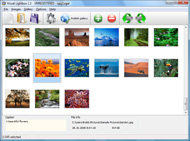
The following image set is generated by Flickr Gallery tool. Click any picture to run Lightbox gallery.

The sample above is an in-page usage demo of Lightbox gallery that uses images from Flickr. The slideshow created with Flickr Gallery software is placed inside the page layout. You can also check the full-page demo website gallery. This example takes whole browser area to show the web gallery.Link Flickr To Slideshowpro

How to Use

Step 1. Adding flickr images to your own gallery.


Locate the photo, photoset or photostream you want to use in your Flickr slideshow. Click on it to see the photo on its own page.

Copy URL of the flickr page.

Select Add images from Flickr... from the 'Add' button on the Toolbar.

Add images from Flickr

In the appeared window paste URL of the flickr page. Specify also the number of photos you want to add from the flickr page. Flickr Gallery will now include these photos in your project.

Add images from Flickr

If you have included the photos that you do not wish to be in your web gallery, you can easily remove them. Select all images that you wish to remove from photo gallery, and select Delete images. from the Images menu. You can pick and choose pictures by holding the CTRL while clicking the pictures you like.

Step 2. Adding caption.

The name of the photo on flickr page will automatically appear in the caption. When you select a photo you'll see the various info about it, such as: Path, Size, date of last change and Caption. You can add any comment or text about the photo (up to 512 symbols).

Step 3. Gallery properties.

Change the name of your flickr album, the size and quality of your pictures with Flickr Gallery. From the Gallery menu, select Properties or use "Edit Gallery Properties" button on the toolbar.

On the first tab of the Gallery Properties window you can change the name of your photo album and enable/disable the following properties: Slide Show, Auto play Slide Show, Zoom effect, Overlay Shadow. You can also set the Overlay shadow color and select the Engine you want to use (jQuery or Prototype + script.aculo.us).

On the second tab of the Gallery Properties window you can select the thumbnail you want to use, set the Thumbnails Resolution, Thumbnails Quality, Thumbnails Titles. Select Thumbnails Format (save in PNG or JPG format). Specify the Number of columns in you photo album and the Page color.

On the third tab of the Gallery Properties window you can select the template, Image resolution and Image quality of your pictures and change the Watermark.

You can set up the various sizes for exported images.

Control the quality of output PNG or JPEG format image by defining output "Image quality" and "Thumbnail quality" parameters (0%…100%).

Step 4. Save your photo gallery as project file.

When you exit Flickr Gallery application, you'll be asked if you want to save your project. The project consists of the pictures you choose to put on your web photo gallery and all your settings. It's a good idea to save the project, because that will allow you to change the project in case you decide to do something different with future galleries. So click Yes, then enter a name for your project. To select the location of your project, just click the Browse folders button and choose a different location. Then click Save.

Link To Flickr Album Flickr Nextgen

Download Flickr Gallery


Download Flickr Gallery Download Free Edition
for Windows
Download Flickr Gallery Download Free Edition
for MAC

Flickr Gallery is free for non - commercial use.

A small fee is required for business use. Flickr Gallery Business Edition additionally provides an option to remove the Flickr Gallery. Com credit line as well as a feature to put your own logo to images. After you finish the payment via the secure order form, you will receive a license key instantly by e-mail that turns the Flickr Gallery Free Edition into a Business one. You can select the most suitable payment method: bank transfer, PayPal, credit card, check etc. Also you can get Business Edition for free if you help with translating Flickr Gallery into your native language, please contact us at for more info.

Flickr Set As Pdf

Buy Flickr GalleryBuy Business Edition
for Windows

$49
Single Website
$69
Unlimited Websites
Buy Flickr GalleryBuy Business Edition
for MAC

$49
Single Website
$69
Unlimited Websites

Support

For general help, feature requests, troubleshooting contact Customer Support at . Make sure to include details on your operating system, browser, a link (or relevant code) and Flickr Gallery version.Flickr Embed Slideshow Jquery

Feedback

    * I'd like to express my gratitude to your efforts on creating such a nice piece of program and best of all it's free! Keep out the good work and I hope to see new features in the near coming future to rate you 5 star!

    * I would like to say that Flickr Gallery is a stunning lil program! Its almost too good to be true i'd say! I've been looking for tutorials to create a lightbox gallery, but just couldnt come right. Im so glad i found Flickr Gallery!

    * I have just bought this product and think it is great. As it is extremely easy to use it is something I could get my clients to purchase to upload their own portfolio and latest projects etc.Flickr Select Picture For Slideshow

    * Great product by the way and saved me loads of time. I really like your Flickr Gallery program! Very nice.

FAQ

Q:I would like to have a few galleries in one website and even on one page.

A:To create several galleries on your page you should change following parameter in A tag for different galleries:

rel="lightbox_vlb"

For example, for the first gallery you should set rel="lightbox_vlb":

<!-- Start Flickr Gallery.com BODY section -->
<div id="vlightbox">
<a rel="lightbox_vlb" href="data/images/dscn6831.jpg" title="dscn6831" >
<img src="data/thumbnails/dscn6831.png" ><span></span></a>
<a rel="lightbox_vlb" href="data/images/dscn6823.jpg" title="dscn6823">
<img src="data/thumbnails/dscn6823.png"><span></span></a>
<a id="vlb" href="http://Flickr Gallery.com">Photo Gallery For Web by Flickr Gallery.com v2.0</a>
</div>
<!-- End Flickr Gallery.com BODY section -->

and for the second gallery rel="lightbox_vlb1":

<!-- Start Flickr Gallery.com BODY section -->
<div id="vlightbox">
<a rel="lightbox_vlb1" href="data/images/img_0501.jpg" title="img_0501">
<img src="data/thumbnails/img_0501.png"><span></span></a>
<a rel="lightbox_vlb1" href="data/images/img_0481.jpg" title="img_0481">
<img src="data/thumbnails/img_0481.png"><span></span></a>
<a id="vlb" href="http://Flickr Gallery.com">Photo Gallery For Web by Flickr Gallery.com v2.0</a>
</div>
<!-- End Flickr Gallery.com BODY section -->


RELATED

Trevor NextGen | The Trevor Project Trevor NextGen is a group of young adults, primarily in their 20s and 30s, comprised of Trevor NextGen is responsible for coordinating and implementing program, outreach and fundraising related activities in an effort to raise

WordPress " Support " [Plugin: NextGEN Gallery] NextGEN Can anyone tell me how to pull a Flickr photoset into NextGEN? I want to use Flickr as my source of images. Can anyone tell me if this has been done,

Light & Shadow " Gallery Next Gen gallery (load images into a folder via the plug-in, then link to it) Steps needed for a Flickr Gallery: On Flickr.com, start an account, load photos and

2 Billion Photos On Flickr You can apparently find various milestones by typing in the URL http://flickr.com/photo.gne?id=XXXXXXX, and replacing the X's with the photo number. http://www.nextgennewmedia.com/?p=376 3 BILLION Photos posted on Flickr – NextGen New Media

NextGen Gallery | bavatuesdays I have been envying Lafayette College's NextGen Gallery goodness in their WPMu Pilot, and after finally setting aside some time I project. Thanks By the way, can you optionally use a Flickr account

Flickr Nextgen : Flickr Gallery Flickr Nextgen. Create an online photo album in minutes with Flickr Gallery!. Citing Flickr Images Flickr: NextGen Player Team's Photostream Flickr is almost certainly the best online photo management and sharing application in the world

Image Handling Plugins for WordPress - CUNY Academic Commons NextGen Gallery provides an easy way to present images in a gallery Not a image service like Flickr and Cincopa, NextGen integrates image storing within WordPress

Flickr: NextGen Player Team's Photostream Flickr is almost certainly the best online photo management and sharing application in the world. Show off your favorite photos and videos to the world, securely and privately show content to your friends and family, or blog the photos and videos

7 Wordpress Photo Image Plugins NextGEN Gallery – A plugin for WordPress is a new Gallery plugin called NextGEN Gallery. Flickr Photo Album – This Flickr plugin for WordPress will allow you to pull in your Flickr photosets and display them as albums

Wordpress Photo Gallery | Blog Design Studio How to add photo gallery in wordpress. NextGen Gallery is a fantastic photo plugin for WordPress. The plugin has slideshow, easily inserts photo albums & lot more How to add a Flickr PhotoStream to your WordPress Blog

Flickr Gallery Demo | Flickr Slideshow Flickr Gallery Demo. Create excellent website photo galleries with minimum effort! displaying flickr galleries on my website Example DEMO using nextgen gallery with flickr FAQ Download Example Example Feedback

next gen xbox and ps3 announced next gen xbox and ps3 announced http://flickr.com/photos/mclldavidson/ Dok. Guest. next gen xbox and ps3 announced " Reply #1 on: May 17, 2005, 05:49 pm " Quote. Add Multi Quote. Remove Multi Quote. Xbox 360. PlayStation 3. Nintendo Revolution (no pics of the controller yet) Logged. Metroid-Star890. Madness?

Integrating ICT into the MFL classroom:: NextGen Teachers On Sunday night, I took part in a NextGen Teachers Skypecast with fellow bloggers and Web 2.0 enthusiasts Doug Belshaw (host), Aaron Smith, Kristian Still, Ollie Bray, Leon Cych and Paul Harrington. Here is a summary of our conversation about

Image Galleries | Komotion Your online media library contains all your uploaded images. You can set titles, captions, descriptions and other properties for NextGEN gallery. This "next generation" gallery type makes it a breeze to work with large image libraries, with options for nested albums, full screen slideshows, display

NextGen Gallery | WordPress Magazine Ett av de mer professionella insticksprogrammen till WordPress är Alex Rabes NextGen Gallery -- ett bildgalleri med en mängd funktioner som bildspel och

Edmonton's Next Gen Edmonton's Next Gen a group of young, passionate, community-minded individuals who are taking the future into 6:00 pm. Edmonton Community Challenge: Kick Off Event. Fri, Jun 3 6:00 pm. Flickr Facebook Twitter RSS Feed © 2011 Edmonton NextGen

flickr – the edmontonian: awesome since 2009 Posts Tagged flickr' Explore Edmonton. Today's event selection is not really one you could accomplish (in its entirety) in one evening, or even one full day. You may remember me talking about the Edmonton Community Challenge (put on by the Next

Tags - Flickr: On next-gen Internet, Web 2.0, emerging Web On next-gen Internet, Web 2.0, emerging Web technologies, online business, Blogs, Citizen Journalism, Media, AOL, Digg, Google, IPTV, IP Communication, Net Entrepreneurship, Microsoft, MySpace, Podcasting, Scams, Software, Video Streaming, VoIP

Hyperlink Each Image Nextgen Slideshow : Free SlideShow Software Free Slideshow Creator! Hyperlink Each Image Nextgen Slideshow. Don't allow your website visitors to get lost! Try Flickr Slide Show!. Album Web Page Templates Flickr and Photobucket support. Use most interesting photos from Flickr and Photobucket on your site or blog in a few easy steps

Photology: next-gen photo organizer Photology is Windows software for organizing and searching through your digital photos. Photology intuitively searches a user's photo collection and filters by

NextGen Player - Canada's Premier Gaming Blog: NGP at the Next Gen Player, News for Canadian Gamers Check the ELAN photos and other NextGen Player-captured imagery by visiting our cozy Flickr gallery, or click on the album image below:

Design | Tech Blog (wh) Posted on March 28, 2010 by Marc. If you're looking for an easy way to integrate picture galleries into wordpress, try these plugins: Flickr Manager Flickr Photo Album NextGEN FlashViewer NextGEN Gallery PictoBrowser Yet Another Flickr Template

WordPress plug-in: NextGen Gallery I'm a big fan of flickr for managing photos online but sometimes we need a different presentation and the NextGen Gallery seems to be the tool-of-choice. I just learned of it and will be playing with it here. Related posts:SimpleGallery

AOL.com - News, Sports, Weather, Entertainment, Local & Lifestyle AOL offers today's news, sports, stock quotes, weather, movie reviews, TV trends and more. Get free email, AIM access, online radio, videos and horoscopes -- all on AOL.com!

NextGen Gallery: The Missing Manual " Jenn Mears Web Design Connections: Facebook, Flickr and your camera phone. NextGen Gallery: The Missing Manual Once you have downloaded, installed and activated the NextGen Gallery Plugin, when you go to your WP dashboard, it appears at the

Next Gen A short description of your company

