



Overview

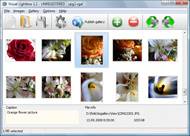
It's no secret that adding photos to your blog posts is one of the most effective ways to enhance your blog and attract attention to your writing. Flickr has millions of photos available in its database. A simple FREE tool called Flickr Gallery allows you to create a custom image gallery with a cool slide show of the most recent and most interesting photos from Flickr on your website or blog in a few easy steps. Just visit Flickr website and find photostream, photoset or a single photo you like. Enter the address of flickr page to add all photos from this page in your gallery, select the style of thumbnails and the overlay window and add the HTML embed code on your website or blog.
A few clicks and you'll see a stylish photo gallery with beautifull lightbox and zoom effects on your own website or blog!


Flickr Gallery for Windows   Flickr Gallery for MAC

Want more?

Example

Lightbox gallery sample

The following image set is generated by Flickr Gallery tool. Click any picture to run Lightbox gallery.

The sample above is an in-page usage demo of Lightbox tool with Flickr images. The slideshow created with Flickr Gallery software is placed inside the website page. You can also check the full-page demo web gallery. This example takes whole browser area to show the slideshow.Polaroid Flickr Overlay

How to Use

Step 1. Adding flickr images to your own gallery.


Locate the photo, photoset or photostream you want to use in your Flickr slideshow. Click on it to see the photo on its own page.

Copy URL of the flickr page.

Select Add images from Flickr... from the 'Add' button on the Toolbar.

Add images from Flickr

In the appeared window paste URL of the flickr page. Specify also the number of photos you want to add from the flickr page. Flickr Gallery will now include these photos in your project.

Add images from Flickr

If you have included the photos that you do not wish to be in your web gallery, you can easily remove them. Select all images that you wish to remove from photo gallery, and select Delete images. from the Images menu. You can pick and choose pictures by holding the CTRL while clicking the pictures you like.

Step 2. Adding caption.

The name of the photo on flickr page will automatically appear in the caption. When you select a photo you'll see the various info about it, such as: Path, Size, date of last change and Caption. You can add any comment or text about the photo (up to 512 symbols).

Step 3. Gallery properties.

Change the name of your flickr album, the size and quality of your pictures with Flickr Gallery. From the Gallery menu, select Properties or use "Edit Gallery Properties" button on the toolbar.

On the first tab of the Gallery Properties window you can change the name of your photo album and enable/disable the following properties: Slide Show, Auto play Slide Show, Zoom effect, Overlay Shadow. You can also set the Overlay shadow color and select the Engine you want to use (jQuery or Prototype + script.aculo.us).

On the second tab of the Gallery Properties window you can select the thumbnail you want to use, set the Thumbnails Resolution, Thumbnails Quality, Thumbnails Titles. Select Thumbnails Format (save in PNG or JPG format). Specify the Number of columns in you photo album and the Page color.

On the third tab of the Gallery Properties window you can select the template, Image resolution and Image quality of your pictures and change the Watermark.

You can set up the various sizes for exported images.

Control the quality of output PNG or JPEG format image by defining output "Image quality" and "Thumbnail quality" parameters (0%…100%).

Step 4. Save your photo gallery as project file.

When you exit Flickr Gallery application, you'll be asked if you want to save your project. The project consists of the pictures you choose to put on your web photo gallery and all your settings. It's a good idea to save the project, because that will allow you to change the project in case you decide to do something different with future galleries. So click Yes, then enter a name for your project. To select the location of your project, just click the Browse folders button and choose a different location. Then click Save.

Overlay Flickr In Flash Website Copy Images From Flickr Slideshow

Download Flickr Gallery


Download Flickr Gallery Download Free Edition
for Windows
Download Flickr Gallery Download Free Edition
for MAC

Flickr Gallery is free for non-commercial use.

A small fee is required for business use. Flickr Gallery Business Edition additionally provides an option to remove the Flickr Gallery. Com credit bar as well as a feature to put your own logo to images. After you complete the payment via the secure form, you will receive a license key instantly by email that turns the Flickr Gallery Free Edition into a Business one. You can select the most suitable payment mode: bank transfer, PayPal, check, credit card etc. Also you can get Business Edition for free if you help with translating Flickr Gallery into your native language, please contact us at for more info.

Typepad Flickr Widget

Buy Flickr GalleryBuy Business Edition
for Windows

$49
Single Website
$69
Unlimited Websites
Buy Flickr GalleryBuy Business Edition
for MAC

$49
Single Website
$69
Unlimited Websites

Support

For general help, feature requests, troubleshooting contact Customer Support at . Make sure to include details on your operating system, browser, a link (or relevant code) and Flickr Gallery version.Get Rid My Flickr Comments

Feedback

    * I LOVE your free Lightbox2 software tool and will purchase the business version shortly. I have seen the Lightbox JS effect used with video tutorials and I was hoping you have a version for video that I can purchase.
Video LightBox: http://videolightbox.com

    * Just bought the business version of Flickr Gallery and I just had to write and say how impressed I am with it. Really easy to use, intuitive interface and generates a truly professional presentation. Seldom have I been so pleased with a software purchase. Thank you.

    * I would like to say that Flickr Gallery is a stunning lil program! Its almost too good to be true i'd say! I've been looking for tutorials to create a lightbox gallery, but just couldnt come right. Im so glad i found Flickr Gallery!Select Some Flickr Photos To Blog

    * I'm absolutely loving Flickr Gallery Business and Video LightBox. Amazing, quick and painless, to create a custom, browser independent gallery. And it works first time - every time! Best value for money I've seen in quite a while...

FAQ

Q:I would like to reposition the Previous and Next buttons to a position below the images and have them be visible all the time.Where do I have to go to make these changes in the code?

A:Find the css file in the folder generated by gallery:
engine\css\
or in the following folder:
c:\Program Files\Visual LightBox Business\templates\Default\engine\css\

To set their position you should change 15% to something different:
#prevLink:hover, #prevLink:visited:hover { background: url(../images/prevlabel.gif) left 15% no-repeat; }
#nextLink:hover, #nextLink:visited:hover { background: url(../images/nextlabel.gif) right 15% no-repeat; }

For example:
#prevLink:hover, #prevLink:visited:hover { background:url(../images/prevlabel.gif) left 75% no-repeat; }
#nextLink:hover, #nextLink:visited:hover { background: url(../images/nextlabel.gif) right 75% no-repeat;}

RELATED

WackyB.co.nz Instant Messenger Help and Support - WackyB Use the 'Refresh Image List' button to get new images when you change the Flickr ID or change options from your own photos to your contacts. WackyB Flickr Desktop SlideShow requires a minimum of Windows XP to run and internet

How To Copy Images From Flickr : Flickr Gallery How To Copy Images From Flickr. Flickr Slide Show creates Vista-style javascript photo gallery with minimum effort!. Flickr Mobile Slideshow

Free SlideShow Maker. Visual JavaScript SlideShow Free SlideShow Maker. Create awesome web slideshows in second without a line of code. For Mac and Windows! From the Images menu, select Add images . Browse to the location of the folder you'd like to add and select the images. You can also use Add images from folder , Add images from Flickr

Photo Galleries, Portfolios and Presentations In addition, we'll pass along a few tips on creating a slick Flickr Slideshow. The Flickr Search Widget. This widget (located in the "Multimedia" folder) pulls squared thumbnail images from your Flickr account or from the Flickr pool. Clicking

Flickr: Deepwater Horizon Response's Photostream Flickr is almost certainly the best online photo management and sharing application in the world. Show off your favorite photos and videos to the world, securely and privately show content to your friends and family, or blog the photos and videos

Slideshow Js Gif Images Samuel Birch : Free SlideShow Software Free Slideshow Creator! Slideshow Js Gif Images Samuel Birch. Create an effective online photo galleries with Flickr Slideshow!. Flickr Slideshow Html Flickr and Photobucket support. Use most interesting photos from Flickr and Photobucket on your site or blog in a few easy steps

Building a Flickr Slideshow with NetBeans IDE 6.5 | PHP Zone In this screencast, Justin Bolter, Technology Evangelist at Sun Microsystems, shows you how to build a PHP Flickr slideshow using NetBeans IDE 6.5 . Bolter I'm going to run my main project and bring up Internet Explorer and then I have 12 images from Flickr related to NetBeans, OK

How To Create Flickr Slideshows You know, the fact is that some folk just don't want to troll through your thousands of images. They like them, but they can't be bothered. What they want is a

Flickr: Using Pictures on Your Web Site | AssortedStuff If you make any errors or don't like what you got, just start from the beginning. Placing a slide show of pictures in a page As always, to place the slide show in your web site you'll need to copy the code generated by the site and paste into the page

Online Photo Sharing with Flickr view photos from other users that match your interests. Flickr has a images found on Flickr in classroom projects as long as they cite the person who took the picture (the conditions of use will vary depending on the type of Creative Common license). age URL you can copy and

Using Flickr Slideshows in Plone — LearnPlone Flickr is a great tool for organizing and managing your photos. Learn how to insert a Flickr slideshow into your Plone site. You can even encourage others who have Flickr accounts to use your Flickr email address to send you their favorite images

Slideflickr Presentation Slide shows from flickr is an easy and fast method of creating custom Flickr slideshows and then embed them anywhere you like Slideflickr gets parameters and feeds the Flash slideshow, which queries Flickr API and fetches the images like Flickr slideshow does

How To: Flickr Slideshow Badge — PaulStamatiou.com A blog covering Tech News, Reviews, Guides and Startups from developer and startup guy Paul Stamatiou. Instead of using images on your server, you can give the slideshow your flickr RSS feed

lib20 / flickr-slide-shows Resources for library and school technology workshops. Features sessions on WordPress in Libraries, Online Outreach, Google Tools and much more

Flickr Page Type Quick Reference or vertically, show a range of sizes and create a Flickr slideshow. Slideshow. Select this checkbox to slideshow through Flickr images. When enabled, choose from the following: Show Controls – select this checkbox to display. slideshow controls on the page. Interval – type in a slide show interval

Flickr Gallery 3.2.3 Freeware Download - Add Flickr Slideshow Download Freeware Flickr Gallery. A simple FREE tool called Flickr Gallery allows you to embed a custom image gallery, or a cool slideshow with beautiful lightbox and zoom effects of the most interesting photos from Flickr.com on your website or

Fluidr / Javier Carrete's photos and videos View Javier Carrete's Flickr photos and videos on Fluidr. Fluidr is a hobby project of Sidath Senanayake (haelio on Flickr) and was initially developed as a way to share photos with friends and family without them having to wait for page loads each time they moved from one large-size image to the next

Flickr photo download: save those beautiful pictures with Firefox How to save those beautiful images. flickr has a beautiful collection of photographs. Althogh the slideshow is nice, when you look at it with a large resolution setting, the

Custom Yahoo Pipes/ Flickr Slideshows For Your Blog | Tubetorial That is, a single slide player will be embedded in a webpage/ blog post and display all images in that footprint. While you can take a straight photostream and use a variety of web-based slideshow services, I've used a specific set of tools: Flickr – from within Yahoo Pipes, to grab images

Slider Flash Xml : Free Flash SlideShow Maker Flash SlideShow w/o Flash! Slider Flash Xml. Online photo albums created with Flickr Slideshow are fully compatible with all modern Windows and MAC browsers!. flash image smooth as3 transition

Flickr Slideshow Embed | Flickr Slideshow Flickr Slideshow Embed. Create superior online photo galleries for your Website with jQuery Thickbox Alternative! bbcode flickr album and Add images from Flickr options. Flickr Slideshow Embed will now include these pictures. Or you can drag the images (folder) to the flickr slideshow embed Visual

Adding a Flickr Slide Show to Your Website If you have a website, Flickr can be a nice tool for you to upload, manage and share your images. of a quick slide show that was created from a few web sites we developed recently: If you tag your images properly, it will allow

Learning How to Embed Flickr Slideshows onto Your Website or Blog Learn the easy Flickr slideshow codes for how to embed flicker slideshows and customizing the slideshow on your site or blog. Flickr allows a person to create a slideshow of almost any images they wish, and share that slideshow with the rest of the world for free

Making a Flickr-powered Slideshow | Tutorialzine In this tutorial we will be developing a jQuery plugin that will make it possible to create slideshows, product guides or presentations from your Flickr photo sets

