



Overview

It's no secret that adding photos to your blog posts is one of the most effective ways to enhance your blog and attract attention to your writing. Flickr has millions of photos available in its database. A simple FREE tool called Flickr Gallery allows you to create a custom image gallery with a cool slide show of the most recent and most interesting photos from Flickr on your website or blog in a few easy steps. Just visit Flickr website and find photostream, photoset or a single photo you like. Enter the address of flickr page to add all photos from this page in your gallery, select the style of thumbnails and the overlay window and add the HTML embed code on your website or blog.
A few clicks and you'll see a stylish photo gallery with beautifull lightbox and zoom effects on your own website or blog!


Flickr Gallery for Windows   Flickr Gallery for MAC

Want more?

Example

Lightbox gallery sample

The following image set is generated by Flickr Gallery tool. Click any picture to run Lightbox gallery.

The sample above is an in-page usage demo of Lightbox with images from Flickr. The photo gallery created with Flickr Gallery application is placed inside the html page. You can also check the full-page demo web gallery. This example takes whole browser area to show the Lightbox gallery that uses images from Flickr.Getphotos Flickr

How to Use

Step 1. Adding flickr images to your own gallery.


Locate the photo, photoset or photostream you want to use in your Flickr slideshow. Click on it to see the photo on its own page.

Copy URL of the flickr page.

Select Add images from Flickr... from the 'Add' button on the Toolbar.

Add images from Flickr

In the appeared window paste URL of the flickr page. Specify also the number of photos you want to add from the flickr page. Flickr Gallery will now include these photos in your project.

Add images from Flickr

If you have included the photos that you do not wish to be in your web gallery, you can easily remove them. Select all images that you wish to remove from photo gallery, and select Delete images. from the Images menu. You can pick and choose pictures by holding the CTRL while clicking the pictures you like.

Step 2. Adding caption.

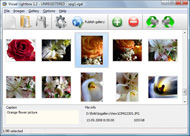
The name of the photo on flickr page will automatically appear in the caption. When you select a photo you'll see the various info about it, such as: Path, Size, date of last change and Caption. You can add any comment or text about the photo (up to 512 symbols).

Step 3. Gallery properties.

Change the name of your flickr album, the size and quality of your pictures with Flickr Gallery. From the Gallery menu, select Properties or use "Edit Gallery Properties" button on the toolbar.

On the first tab of the Gallery Properties window you can change the name of your photo album and enable/disable the following properties: Slide Show, Auto play Slide Show, Zoom effect, Overlay Shadow. You can also set the Overlay shadow color and select the Engine you want to use (jQuery or Prototype + script.aculo.us).

On the second tab of the Gallery Properties window you can select the thumbnail you want to use, set the Thumbnails Resolution, Thumbnails Quality, Thumbnails Titles. Select Thumbnails Format (save in PNG or JPG format). Specify the Number of columns in you photo album and the Page color.

On the third tab of the Gallery Properties window you can select the template, Image resolution and Image quality of your pictures and change the Watermark.

You can set up the various sizes for exported images.

Control the quality of output PNG or JPEG format image by defining output "Image quality" and "Thumbnail quality" parameters (0%…100%).

Step 4. Save your photo gallery as project file.

When you exit Flickr Gallery application, you'll be asked if you want to save your project. The project consists of the pictures you choose to put on your web photo gallery and all your settings. It's a good idea to save the project, because that will allow you to change the project in case you decide to do something different with future galleries. So click Yes, then enter a name for your project. To select the location of your project, just click the Browse folders button and choose a different location. Then click Save.

Set Flickr Slideshow To Auto Replay Flickr Explore How To

Download Flickr Gallery


Download Flickr Gallery Download Free Edition
for Windows
Download Flickr Gallery Download Free Edition
for MAC

Flickr Gallery is free for non - commercial use.

A small fee is required for business use. Flickr Gallery Business Edition additionally provides an option to remove the Flickr Gallery. Com credit string as well as a feature to put your own logo to images. After you complete the payment via the secure order form, you will receive a license key instantly by e-mail that turns the Flickr Gallery Free Edition into a Business one. You can select the most appropriate payment procedure: bank transfer, credit card, check, PayPal etc. Also you can get Business Edition for free if you help with translating Flickr Gallery into your native language, please contact us at for more info.

Clean Flicker Gallery Embed

Buy Flickr GalleryBuy Business Edition
for Windows

$49
Single Website
$69
Unlimited Websites
Buy Flickr GalleryBuy Business Edition
for MAC

$49
Single Website
$69
Unlimited Websites

Support

For feature requests, troubleshooting, general help contact Customer Support at . Make sure to include details on your Flickr Gallery version, a link (or relevant code), operating system and a browser.Simple Flickr Galleries

Feedback

    * I'm absolutely loving Flickr Gallery Business and Video LightBox. Amazing, quick and painless, to create a custom, browser independent gallery. And it works first time - every time! Best value for money I've seen in quite a while...

    * First of all, I love you Flickr Gallery. I think it's beautiful! I purchased the lightbox “business edition” yesterday, and I’m very happy how easy it is to use. Found this to be one of the fastest ways to get a gallery on the web. Thanks.

    * I ran into your website wile looking for a JavaScript to manage a personal Photo Gallery. I downloaded the trial version and immediately fell in love with your Flickr Gallery, it is one of the best products I’ve ever found; it is very user friendly and easy to use and creates great Photo Galleries.Sample Design For Flickr Widget

    * This looks like EXACTLY what I need for my site. It would make my job much faster! Love your program. Thank you!!

FAQ

Q:How do I embed the lightbox image gallery into an existing page?

A:To install Flickr Gallery gallery on your page you should:

1. Create your gallery in Flickr Gallery and publish it on a local drive in any test folder.
2. Open index.html file from the saved folder in any text editor.
3. Copy code for the HEAD section and paste it inside the HEAD section of you own webpage, for example:

<head>
...
<!-- Start Flickr Gallery.com HEAD section -->
<link rel="stylesheet" href="engine/css/vlightbox.css" type="text/css" />
<style>#vlightbox a#vlb{display:none}</style>
<link rel="stylesheet" href="engine/css/Flickr Gallery.css" type="text/css" media="screen" />
<script src="engine/js/jquery.js" type="text/javascript"></script>
<script src="engine/js/jquery.tools.min.js" type="text/javascript"></script>
<script src="engine/js/visuallightbox.js" type="text/javascript"></script>
<!-- End Flickr Gallery.com HEAD section -->

...
</head>


4. Copy code for the BODY section and paste it inside the Body section of you own webpage in the place where you want to have a gallery, for example:

<body>
...
<!-- Start Flickr Gallery.com BODY section -->
<div id="vlightbox">
<a rel="lightbox_vlb" href="data/images/dscn6831.jpg" title="DSCN6831"><img src="data/thumbnails/dscn6831.png"><span></span></a>
<a rel="lightbox_vlb" href="data/images/dscn6823.jpg" title="DSCN6823"><img src="data/thumbnails/dscn6823.png"><span></span></a>
<a rel="lightbox_vlb" href="data/images/dscn6819.jpg" title="DSCN6819"><img src="data/thumbnails/dscn6819.png"><span></span></a>
<a id="vlb" href="http://Flickr Gallery.com">Photo Gallery For Web by Flickr Gallery.com v2.1</a>
</div>
<!-- End Flickr Gallery.com BODY section -->

...
</body>


5. Copy 'data' folder with images and thumbnails and 'engine' folder with .css and .js files into the same folder with your own webpage.
You can find the example on our website:
http://www.Flickr Gallery.com/#example


RELATED

oflickr.info Flickr is almost certainly the best online photo management and sharing application in the world. Show off your favorite photos and videos to the world, securely and privately show content to your friends and family, or blog the photos and videos

Flickr Explore: What is it? Flickr has many unique features and applications that can help you easily locate interesting photographs and images, including the feature Flickr Explore. This feature not only gives you a look at pictures recently posted

GetExplored.com Here is a short video tutorial that will show you how to promote your images on GetExplored. Info, Tips Images, Photos, Video Tutorial. How to Find Your Flickr ID? No comments. The first thing you want to do is to complete your unique Flickr ID on your profile page

familienficke.tk Flickr is almost certainly the best online photo management and sharing application in the world. Show off your favorite photos and videos to the world, securely and privately show content to your friends and family, or blog the photos and videos

jakuba-flickr.tk Flickr is almost certainly the best online photo management and sharing application in the world. Show off your favorite photos and videos to the world, securely and privately show content to your friends and family, or blog the photos and videos

Scout: Find your photos in Flickr's Explore pages The quickest way to see if your digital photos are listed among the 500 photographs chosen each day for the Flickr Explore page or create a great looking digital poster from your photos to show off your achievement. Explore is a swell way for

MyPicsMap - Photos of the World Mypicsmap - explore the world through everyone Flickr photos Flickrstream, to reorder your Flickr photostream by taken date instead of upload date

How to Use Flickr video from Answers.com Videos Digital photography expert Lisa Bettany shows you how to get your photos seen by the world with Flickr and Flickr: Explore!

Flickr Explorer - Interestingness with EXIF Data - by Arun A Flickr API based free web tool that lets you explore any days best photos along with the useful EXIF information that Flickr does not show. A useful tool for understanding and appreciating photographs

Richard's Notes " Blog Archive " Flickr Explore I know there are many more ways to game Explore and the more technically sophisticated flickr users have come up with ways that are both Seeing how overly sweet and cliche (to me) banal photos seemed to ineluctably gather interest, both in Explore and elsewhere in Flickr (besides

Flickr - All About Content – SEO Blog People want to know what Flickr Explore is, why photos got dropped from Explore, and what the secret to Flickr's Interestingness algorithm could be. But a consistent percentage of traffic seems to be asking the very basic questions: How do I know if my photo got into Flickr Explore?

Flickriver - A new way to view Flickr photos and more Flickriver - view images as a 'river of photos' and more While viewing any Flickr photos page, click on the bookmarklet to open the same view on Flickriver

Exploring Flickr - Find your photos in Flickr's explore section Find your photos in flickr's explore. Photos, Videos and more. Printing, Cameras, lenses and Optics

Flickr: Explore Flickr is almost certainly the best online photo management and sharing application in the world. Show off your favorite photos and videos to the world, securely and privately show content to your friends and family, or blog the photos and videos

Flickr Explore How To : Flickr Gallery Flickr Explore How To. Flickr Gallery generates all necessary icons, images, html, javascripts, css styles automatically!. Prototype Flickt Integration

najduk.com Flickr is almost certainly the best online photo management and sharing application in the world. Show off your favorite photos and videos to the world, securely and privately show content to your friends and family, or blog the photos and videos

Exploring Flickr : 'How to' videos : Canoe TV Digital Photography Expert Lisa Bettany shows you how to get your photos seen by the world with Flickr and Flickr: Explore! GC606S06

Discover and search in Explore - Statsr.net Statsr is the tool photographers need to backup and manage their Flickr Statistics during more than 28 days ! See graph and detailled charts about Flickr account Each day Flickr generate a rank called Explore, there are a lot of photos since this date, maybe you are, or your contacts are

How to get into Flickr Explore? (Revised) | How to Live As you know, Flickr uses an algorithm to choose the best 500 photos every day and post them on Flickr Explore page. This mesmerizing collection is done

FlickRooster : The Flickr's Best Photographers FlickRooster produces a list of the Flickr's best photographers. FlickRooster generates a daily rank based on the Flickr's Interestingness algorithm and Pictures inside the Flickr's Explore

Flickr Explore (flickrexplore) on Twitter Nice Pictures from Flickr @flickrexplore your recommendations!

Aryty Flickr is almost certainly the best online photo management and sharing application in the world. Show off your favorite photos and videos to the world, securely and privately show content to your friends and family, or blog the photos and videos

FFFFOUND! | Flickr: Explore! iPhone application for FFFFOUND comes back to App Store! Quoted from: Flickr: Explore! farm5.static.flickr.com/4017/4650185604_249c873c37.jpg. FLAG

Flickr Blog Companion blog to Flickr features downtime status, daily photos, and news and updates about new photo and video sharing features

How to get your photos Explored on Flickr | MostlyLisa.com How to get your photos Explored on Flickr. Apr 18 2009. This Rainbow Lorikeet let Front Land on the front page of Explore, Flickr's home page, and magical things happen, all of

How to Use Flickr Video – 5min.com How to Use Flickr - Digital photography expert Lisa Bettany shows you how to get your photos seen by the world with Flickr and Flickr: Explore!

