



Overview

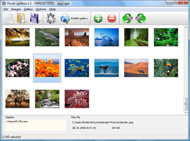
It's no secret that adding photos to your blog posts is one of the most effective ways to enhance your blog and attract attention to your writing. Flickr has millions of photos available in its database. A simple FREE tool called Flickr Gallery allows you to create a custom image gallery with a cool slide show of the most recent and most interesting photos from Flickr on your website or blog in a few easy steps. Just visit Flickr website and find photostream, photoset or a single photo you like. Enter the address of flickr page to add all photos from this page in your gallery, select the style of thumbnails and the overlay window and add the HTML embed code on your website or blog.
A few clicks and you'll see a stylish photo gallery with beautifull lightbox and zoom effects on your own website or blog!


Flickr Gallery for Windows   Flickr Gallery for MAC

Want more?

Example

Lightbox gallery sample

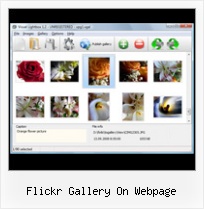
The following image set is generated by Flickr Gallery tool. Click any picture to run Lightbox gallery.

The sample above is an in-page usage demo of Lightbox gallery that uses images from Flickr. The website gallery created with Flickr Gallery tool is placed inside the website page. You can also check the full-page demo lightbox gallery. This example takes whole browser area to show the gallery.Flickr Viewing Private Photos

How to Use

Step 1. Adding flickr images to your own gallery.


Locate the photo, photoset or photostream you want to use in your Flickr slideshow. Click on it to see the photo on its own page.

Copy URL of the flickr page.

Select Add images from Flickr... from the 'Add' button on the Toolbar.

Add images from Flickr

In the appeared window paste URL of the flickr page. Specify also the number of photos you want to add from the flickr page. Flickr Gallery will now include these photos in your project.

Add images from Flickr

If you have included the photos that you do not wish to be in your web gallery, you can easily remove them. Select all images that you wish to remove from photo gallery, and select Delete images. from the Images menu. You can pick and choose pictures by holding the CTRL while clicking the pictures you like.

Step 2. Adding caption.

The name of the photo on flickr page will automatically appear in the caption. When you select a photo you'll see the various info about it, such as: Path, Size, date of last change and Caption. You can add any comment or text about the photo (up to 512 symbols).

Step 3. Gallery properties.

Change the name of your flickr album, the size and quality of your pictures with Flickr Gallery. From the Gallery menu, select Properties or use "Edit Gallery Properties" button on the toolbar.

On the first tab of the Gallery Properties window you can change the name of your photo album and enable/disable the following properties: Slide Show, Auto play Slide Show, Zoom effect, Overlay Shadow. You can also set the Overlay shadow color and select the Engine you want to use (jQuery or Prototype + script.aculo.us).

On the second tab of the Gallery Properties window you can select the thumbnail you want to use, set the Thumbnails Resolution, Thumbnails Quality, Thumbnails Titles. Select Thumbnails Format (save in PNG or JPG format). Specify the Number of columns in you photo album and the Page color.

On the third tab of the Gallery Properties window you can select the template, Image resolution and Image quality of your pictures and change the Watermark.

You can set up the various sizes for exported images.

Control the quality of output PNG or JPEG format image by defining output "Image quality" and "Thumbnail quality" parameters (0%…100%).

Step 4. Save your photo gallery as project file.

When you exit Flickr Gallery application, you'll be asked if you want to save your project. The project consists of the pictures you choose to put on your web photo gallery and all your settings. It's a good idea to save the project, because that will allow you to change the project in case you decide to do something different with future galleries. So click Yes, then enter a name for your project. To select the location of your project, just click the Browse folders button and choose a different location. Then click Save.

How To Get On Flickr Explore Flickr Gallery On Webpage

Download Flickr Gallery


Download Flickr Gallery Download Free Edition
for Windows
Download Flickr Gallery Download Free Edition
for MAC

Flickr Gallery is free for non-commercial use.

A small fee is required for business use. Flickr Gallery Business Edition additionally provides an option to remove the Flickr Gallery. Com credit string as well as a feature to put your own logo to images. After you finish the payment via the secure order form, you will receive a license key instantly by e-mail that turns the Flickr Gallery Free Edition into a Business one. You can select the most suitable payment method: bank transfer, PayPal, check, credit card etc. Also you can get Business Edition for free if you help with translating Flickr Gallery into your native language, please contact us at for more info.

Set Flickr To Tumblr

Buy Flickr GalleryBuy Business Edition
for Windows

$49
Single Website
$69
Unlimited Websites
Buy Flickr GalleryBuy Business Edition
for MAC

$49
Single Website
$69
Unlimited Websites

Support

For troubleshooting, feature requests and general help contact Customer Support at . Make sure to include details on your operating system, browser, Flickr Gallery version and a link (or relevant code).Flickr Include Map In Own Website

Feedback

    * I'd like to express my gratitude to your efforts on creating such a nice piece of program and best of all it's free! Keep out the good work and I hope to see new features in the near coming future to rate you 5 star!

    * Great product by the way and saved me loads of time. I really like your Flickr Gallery program! Very nice.

    * Another programmes have incredible functionality but no fantastic interface like your product!Flickr Slideshow Index Gne Options

    * I have just bought this product and think it is great. As it is extremely easy to use it is something I could get my clients to purchase to upload their own portfolio and latest projects etc.

FAQ

Q:I purchased your business license today but I don't see any way to update so the watermark is either missing or replace with mine.What do I do?

A:Free edition of Flickr Gallery doesn't allow you to remove our watermark.

Register your Flickr Gallery application at first. Use reg. key from the license message you received after the purchase. After the registration you can remove watermarks.

Open Gallery->Properties->Templates: Watermark. Click to disable this option or use your own watermark.


RELATED

Flickr: Tour Flickr is almost certainly the best online photo management and sharing application in the world. Show off your favorite photos and videos to the world, securely and privately show content to your friends and family, or blog the photos and videos

Flickr galleries How to create a screen grab of your SBI! website and add it to a Flickr gallery 9) When I cut and paste that HTML into this web page below, this is what you get: Congratulations, you can now make Flickr slideshows! Step 7: Add your RR URL to your gallery image to help you to make sales

Flickr style photo gallery demo in jQuery Description: This tutorial I'll explain a simple step-by-step way to implement an Flickr style photo gallery demo in Jquery and CSS. The result is

Flickr Slideshow - create flickr photo slideshows for your The usage is very simple, open your Flickr photo web pages on the Internet Explorer, copy the web page address from the Address Bar, then paste on the "URL of User, Set or Group", click "Create Slideshow", and then you can get one HTML code form your photo album slide show

NOAA, Ocean Explorer: Flickr Widget NOAA, Ocean Explorer Flickr Gallery Collection. This is a Flickr badge showing photo's blog, wiki, or Web page. Information in a widget can feature updated information or let the reader do something like use a search box. Stay tuned—more widgets are on the way! Related Links

Flickr Slideshow : Flickr Gallery Don't allow your website visitors to get lost! Try Flickr Slide Show!. Linking To Pictures On Flickr Tumblr Enter the address of flickr page to add all photos from this page in your gallery, select the style of thumbnails and the overlay window and add the HTML embed code on your website or blog

jquery.flickrGallery.js flickrGallery is a jQuery plugin for embedding flickr photos into a webpage. Stops the slide show if it is currently on. Variable that keeps track of the options for all flickr gallery areas on the page

What Is RSS Feed? RSS Feeds Expained Ok, this is what my Flickr gallery RSS feed looks like when installed on a webpage. This is what the feed looks like on a web page, remember it's automatically updated everytime I upload photos to the gallery, so the feed (link) is always fresh and changing

Flickr Flash As2 - Flash Photo Gallery Flickr Flash As2. Create free flash web photo gallery for your Website with Flash Photo Gallery!. Flash Gallery With Navigation Sample

Build a Photo Gallery Using CakePHP and Flickr " SitePoint Is the Flickr interface doing justice to your stunning snaps? It's time to consider customization! Jonathan shows us the ropes in his hands-on tutorial, as he uses CakePHP and the Flickr API to build an attractive, fully customized gallery that

I switched from Flickr to Smugmug | The Web Page of Flickr is great - while they offer a relatively small set of features for the 'pro', they have the best 'aftermarket' support and social integration. Tag photos appropriately and in no time you'll start receiving comments on them - something I had never experienced with Gallery

Darckr - User Customizable Flickr Viewer and Tool With Darckr, your Flickr Stream IS a Photo Gallery. Darckr is a streaming flickr viewer that will turn your Flickr Stream to as many sharable photo galleries as you like. They remain on Flickr and other users see only what they are entitled to

Flickr An Open Source Gallery Application For Flickr Images – Flogr Flogr is an open source PHP application that can display photos hosted on Flickr as a customizable gallery. It can be set to display all Flickr photos, only photos with certain tags or only certain photosets

Adding a Flickr Photo Gallery to Your Website menu). Click on. Choose Your custom Flickr URL , and enter the name of your gallery in the space. provided. Embed your Photo Gallery in a web page. To add the new gallery to your website, you'll

Simple Slideshow for Web Page | LoveToKnow In fact, it's much more difficult to figure out which slide show technique to use than it is to actually install it on the web page. Here are a few available options, starting with the most practical and popular. Simple Slideshow for Web Page Options. Flickr

Flickr Ajax Album Flickr Ajax Album. Ajax Photo Gallery is the first software that creates AJAX-powered online image galleries without the need for server-side setup!. pop up photo gallary ajax Incorporate Flickr Gallery On Web Page digital flush mount album Incorporate Flickr Gallery On Web Page

Flickr gallery code for web page at PTF Flickr gallery code for web page software downloads. Flickr gallery code for web page freeware and shareware

Flickr galleries 2. Drag and drop a Flickr Gallery widget onto your page. 3. In the dialog box that opens up, click on "Settings" (located above the blue Save button) 2. On your Flickr account, open up your photostream page and copy the web page address from the address bar

Flickr Gallery for Mac OS by Flickr-Gallery.com - Review and Flickr has millions of photos available in its database. FREE Mac tool called Flickr Gallery allows you to create a custom image gallery with a cool slide show of the most recent and most interesting photos from Flickr on your website or blog in a few easy steps

FlickrSkins.com - Sample FlickrSkins Album A web page which allows Flickr users to create custom online photo albums, album collections, and individual skins for their Flickr photos, groups, and favorites. You'll notice that when new images are added to the group, they are updated here and on the actual FlickrSkin

Flickr Gallery page capture page design content flash flickr gallery frontpage front page content gemmainsinna.net google Flickr Gallery. About. Portfolio. Home. Flickr Gallery. May. 3. Photosets. Share on bebo. Bookmark on Delicious. Digg this post. Recommend on Facebook. Share on FriendFeed. Buzz it up. Share on Linkedin

Pop Art Poster: Become a pop icon! Create a 9, 4, or 1-panel lo-fi, false-color version of one of your photos. Turn yourself and your friends into pop art instantly! Photo Fortune, Slideshow, Writer, Blog Header, Gallery, On Black, Profile Widget, Scout, Flickr DNA, Name That Contact, Favorite Finder, Pool Cleaner

Embed Flickr Album In Webpage | Flickr Slideshow Embed Flickr Album In Webpage. Don't allow your website visitors to get lost! Try jQuery Thickbox Alternative! embedding flickr content on tumblr Flickr Slideshow allows you to create a custom photo gallery with a cool slide show of the most recent and most interesting photos from Flickr on

Spine Skate Shop & Gallery: New Spine Flickr Webpage Spine Skate Shop & Gallery. Spine, Unit 2 The Hopmarket, Worcester WR1 1DL 01905 23300 info@spineskateboarding.co.uk Open Tues - Sat, 10.30am - 5.00pm. Thursday, August 16, 2007. New Spine Flickr Webpage. All the Curious Creatures exhibition photos have been uploaded to a new Spine Flickr page

flickr photogallery, make flickr a photo gallery, flickr script flickr photogallery, make flickr a photo gallery, flickr script It allows for one to insert albums (photosets) into the page and provide an interface for viewing it to the user, right from their own webpage

