



Overview

It's no secret that adding photos to your blog posts is one of the most effective ways to enhance your blog and attract attention to your writing. Flickr has millions of photos available in its database. A simple FREE tool called Flickr Gallery allows you to create a custom image gallery with a cool slide show of the most recent and most interesting photos from Flickr on your website or blog in a few easy steps. Just visit Flickr website and find photostream, photoset or a single photo you like. Enter the address of flickr page to add all photos from this page in your gallery, select the style of thumbnails and the overlay window and add the HTML embed code on your website or blog.
A few clicks and you'll see a stylish photo gallery with beautifull lightbox and zoom effects on your own website or blog!


Flickr Gallery for Windows   Flickr Gallery for MAC

Want more?

Example

Lightbox gallery sample

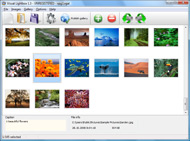
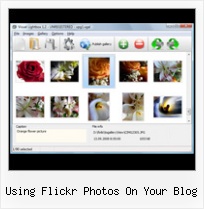
The following image set is generated by Flickr Gallery tool. Click any picture to run Lightbox gallery.

The example above is an in-page usage demo of Lightbox gallery that uses images from Flickr. The website gallery created with Flickr Gallery software is placed inside the html page. You can also check the full-page demo website gallery. This example takes whole browser area to show the website gallery.Blogger Flickr Embed

How to Use

Step 1. Adding flickr images to your own gallery.


Locate the photo, photoset or photostream you want to use in your Flickr slideshow. Click on it to see the photo on its own page.

Copy URL of the flickr page.

Select Add images from Flickr... from the 'Add' button on the Toolbar.

Add images from Flickr

In the appeared window paste URL of the flickr page. Specify also the number of photos you want to add from the flickr page. Flickr Gallery will now include these photos in your project.

Add images from Flickr

If you have included the photos that you do not wish to be in your web gallery, you can easily remove them. Select all images that you wish to remove from photo gallery, and select Delete images. from the Images menu. You can pick and choose pictures by holding the CTRL while clicking the pictures you like.

Step 2. Adding caption.

The name of the photo on flickr page will automatically appear in the caption. When you select a photo you'll see the various info about it, such as: Path, Size, date of last change and Caption. You can add any comment or text about the photo (up to 512 symbols).

Step 3. Gallery properties.

Change the name of your flickr album, the size and quality of your pictures with Flickr Gallery. From the Gallery menu, select Properties or use "Edit Gallery Properties" button on the toolbar.

On the first tab of the Gallery Properties window you can change the name of your photo album and enable/disable the following properties: Slide Show, Auto play Slide Show, Zoom effect, Overlay Shadow. You can also set the Overlay shadow color and select the Engine you want to use (jQuery or Prototype + script.aculo.us).

On the second tab of the Gallery Properties window you can select the thumbnail you want to use, set the Thumbnails Resolution, Thumbnails Quality, Thumbnails Titles. Select Thumbnails Format (save in PNG or JPG format). Specify the Number of columns in you photo album and the Page color.

On the third tab of the Gallery Properties window you can select the template, Image resolution and Image quality of your pictures and change the Watermark.

You can set up the various sizes for exported images.

Control the quality of output PNG or JPEG format image by defining output "Image quality" and "Thumbnail quality" parameters (0%…100%).

Step 4. Save your photo gallery as project file.

When you exit Flickr Gallery application, you'll be asked if you want to save your project. The project consists of the pictures you choose to put on your web photo gallery and all your settings. It's a good idea to save the project, because that will allow you to change the project in case you decide to do something different with future galleries. So click Yes, then enter a name for your project. To select the location of your project, just click the Browse folders button and choose a different location. Then click Save.

Easy Flickr Download Trick Using Flickr Photos On Your Blog

Download Flickr Gallery


Download Flickr Gallery Download Free Edition
for Windows
Download Flickr Gallery Download Free Edition
for MAC

Flickr Gallery is free for non-commercial use.

A small fee is required for business use. Flickr Gallery Business Edition additionally provides an option to remove the Flickr Gallery. Com credit string as well as a feature to put your own logo to images. After you complete the payment via the secure order form, you will receive a license key instantly by email that turns the Flickr Gallery Free Edition into a Business one. You can select the most appropriate payment procedure: credit card, check, PayPal, bank transfer etc. Also you can get Business Edition for free if you help with translating Flickr Gallery into your native language, please contact us at for more info.

Flickr Gallery Slideshow Html

Buy Flickr GalleryBuy Business Edition
for Windows

$49
Single Website
$69
Unlimited Websites
Buy Flickr GalleryBuy Business Edition
for MAC

$49
Single Website
$69
Unlimited Websites

Support

For general help, feature requests, troubleshooting contact Customer Support at . Make sure to include details on your Flickr Gallery version, a link (or relevant code), operating system and a browser.Free Flash Slideshow Flickr

Feedback

    * I just tried the application, It is wonderful idea. Like you said in the website "few clicks without writing a single line of code" because most of the people is not web designers".

    * This looks like EXACTLY what I need for my site. It would make my job much faster! Love your program. Thank you!!

    * I would like to say that Flickr Gallery is a stunning lil program! Its almost too good to be true i'd say! I've been looking for tutorials to create a lightbox gallery, but just couldnt come right. Im so glad i found Flickr Gallery!Flickr Color Api

    * First of all, I love you Flickr Gallery. I think it's beautiful! I purchased the lightbox “business edition” yesterday, and I’m very happy how easy it is to use. Found this to be one of the fastest ways to get a gallery on the web. Thanks.

FAQ

RELATED

Flickr Blog Companion blog to Flickr features downtime status, daily photos, and news and updates about new photo and video sharing features

dannyman.toldme.com : Photos Flickr Someone with a WordPress blog can now have a basic interface to let readers view their Flickr images, using their own web site and design. http://www.countriesincolors.com/2007/06/25/integrating-flickr-pictures-on-your-wordpress-or-rapidweaver-site/ Countries in colors " Blog Archive "

Flickr Photos " Support — WordPress.com It takes care of your image resizing, allows you to tag your photos, and even enables notes and comments to be submitted on each photo by visitors. What's more, with just a few clicks, you can post a photo from your Flickr account onto your WordPress.com blog. Setup

Newbie's Guide to Flickr | Webware - CNET Wondering what Flickr is and why you should use it? We'll tell you. Read this blog post by Josh Lowensohn on Webware. Once you've geotagged your Flickr photos Trippermap is a great flash map you can put on your own website or blog to show off your world travels

Make It: Using Flickr photos on your blog Using Flickr photos on your blog. I'm not the best or the most prolific photographer, but I know it's good blogging practice to include a photo with every post. When I don't have a personal photograph to supply, as in the post below and this one, I turn to Flickr

Search for photos using PHP and the flickr API | Web This PHP tutorial will show how to create a simple PHP class to search the flickr site for some photos. To get the data we use the flickr API to run a simple

10 Amazing Wordpress Plugins for Flickr And just to make things that little bit easier here are 10 WP Plugins to integrate Flickr directly into your blog. Flickr Photo Album for WordPress. Description: This Flickr plugin for WordPress will allow you to pull in your Flickr photosets and display them as albums on your WordPress site

A Complete Guide to Finding and Using Incredible Flickr Finding images to suit your needs. The kind of photos you want to look for will depend on where you want to use them. Flickr images either fall under You're forbidden to use Flickr images marked as copyrighted (or All rights reserved') for your own purposes unless you get explicit permission

Blog Photos – Using Flickr As my blog is self hosted I prefer to use an online photo account as it saves me server space (hubby moans if I put tons on the server). I have a Flickr account, mainly because it was linked to a Yahoo email account I had a million years ago, however anyone can sign up and it is very good

JISC Digital Media - Still Images: Using Flickr to Organise a Once the connection is set up, you can post your Flickr images straight to your blog. You can also use this method to post images by other Flickr members on your blog when you see the 'Share this' button (though beware of the copyright implications)

Using Flickr Photos On Your Blog : Flickr Gallery Using Flickr Photos On Your Blog. Flickr Gallery is the first software that creates AJAX-powered online image galleries without the need for server-side setup.. Flickr Bikinis

How To Share Your Flickr Photos On Your Blog Blogging has become a way for many to express their ideas and opinions. Some people, however, choose to use blog to keep their friends and family up to date on the happenings Using Flickr, people who own blogs can add photos and/or video to the blog content

mental_floss Blog " Picasa VS. Flickr I use Flickr to share photos with friends and use them on my blog and such. I use flickr because there are themed groups you can join by adding your photos to the Group Pools

Give Each Blog Post a Pretty Face With Flickr Here's a quick run-through of how I use photos on this site, and some more about Flickr. The photos that I use on Flickr for this blog are licensed to be used under Creative Commons

How to Get Great Photos for Your Blog Posts :: Small Business I like to use to use images to help illustrate the theme or point of a blog post. It's a proven "best practice" in blogging and I highly recommend tha Thanks for the post on using Flickr photos with a Creative Commons license

How to Make a Blog Post Using Flickr and Posterous Flickr, a famous photo-sharing site, It offers sharing photos to a a variety of websites. Suppose you upload a picture from your camera phone to Flickr, as well you want to post that image on your blog. Flickr is a free photos sharing site, you can register with your Yahoo ID with Flickr

Using the Flickr API: We Don't Need No Stinkin' Badges Using the Flickr API: We Don't Need No Stinkin' Badges. Keith Muth, ON THE TOPIC OF General and Tips and Tricks Earlier this week Flickr posted on their blog that the three billionth photo had been uploaded, so I thought this would be the perfect time to promote Flickr's services some more

Wild Apricot Blog : Five Ways Nonprofits Can Use Flickr to A couple of weeks ago, I attended a Flickr session at the Non-Profit Technology Conference . A common question asked was "How can we use Flickr to reach new audiences? Use your organization's Flickr album as an engagement tool and run a photo contest on Flickr

Flickr Cut-n-Paste to Blog for Greasemonkey Makes it easy to do an OLE cut-and-paste Flickr photos to your blog (ie: WordPress using TinyMCE, Blogger) and give the proper attribution

How to get your photos Explored on Flickr | MostlyLisa.com Using my keen intellect and the power of the internet, I have compiled a list of power tips on how to get your photos Explored and because I've been a lazy, good-for-nuthin' blogger as of late, I'm going to share these with you. use, where you add your photo to every group pool in Flickr and

Using Flickr as a Photo Blog and Darkslide as the Mobile App Using Flickr as a Photo Blog and Darkslide as the Mobile App. Posted on February 28, 2011 by Barbara Schroeder. If you are planning a class project where you want student pictures to be shared in a blog-type interface, then you should definitely consider Flickr

How To Use Flickr Photos On Your Blog ._/_., originally uploaded by anto-XIII. Using photos from flickr.com on your blog can make your writing come to life and provide your readers an

Options for Easily Adding Flickr Photos to Your Website This page shows a number of the leading options for quickly and easily adding your Flickr photos to your website or blog (WordPress, Joomla, TextPattern). They all offer some options and customizations

Blogging Section of SLA-IT: Five uses of Flickr (or any photo We think of sharing ordinary photos on a photo sharing web site, but what else can you do with them? Post screen shots of presentations. I can hear you say "why????" For a conference where participants heavily use tagging and Flickr has badges that you can place on your web site that will use

Lilahpops " Blog Archive " 8 simple steps to add your Flickr 8 simple steps to add your Flickr photos to your blog feed. Tart up your blog's feed with some Flickr photos. Do you use Feedburner for your blog's RSS feeds? I set up a Feedburner account when I first started Lilahpops but I hadn't spent much time learning the ins-and-outs of it

How to Use Flickr to Find Photos for Your Blog Posts Think about the blog posts that catch your attention. Generally they have great headlines (titles), a provocative theme and often include an image that illustrates the content. I confess I'm not very consistent about using images in my blog posts How to Use Flickr to Find Photos for Your Blog Posts

Flickr: Help: Photos Flickr is almost certainly the best online photo management and sharing application in the world. Show off your favorite photos and videos to the world, securely and privately show content to your friends and family, or blog the photos and videos

Find Creative Commons Licenced Photos from Flickr via Your WP Written on 2/23/2008 at 1:35 am by Darren Rowse. Find Creative Commons Licenced Photos from Flickr via Your WP Blog. Filed Under: Blogging Tools and Services Tweet. This WP plugin looks amazing – it finds Flickr Creative Commons licenced images all from within WP

misterteacher.com: Flickr for Teachers: Blogging Photos from One of the best ways to use these photos is to blog them. So if your students all have blogs, they can post photos from your Flickr homepage to them and use them for a multitude of different assignments

