



Overview

It's no secret that adding photos to your blog posts is one of the most effective ways to enhance your blog and attract attention to your writing. Flickr has millions of photos available in its database. A simple FREE tool called Flickr Gallery allows you to create a custom image gallery with a cool slide show of the most recent and most interesting photos from Flickr on your website or blog in a few easy steps. Just visit Flickr website and find photostream, photoset or a single photo you like. Enter the address of flickr page to add all photos from this page in your gallery, select the style of thumbnails and the overlay window and add the HTML embed code on your website or blog.
A few clicks and you'll see a stylish photo gallery with beautifull lightbox and zoom effects on your own website or blog!


Flickr Gallery for Windows   Flickr Gallery for MAC

Want more?

Example

Lightbox gallery sample

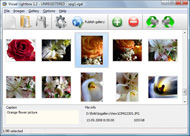
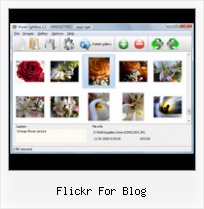
The following image set is generated by Flickr Gallery tool. Click any picture to run Lightbox gallery.

The photo gallery above is an in-page usage demo of Lightbox tool with Flickr images. The slideshow created with Flickr Gallery software is placed inside the html page. You can also check the full-page demo website gallery. This example takes whole browser area to show the Lightbox gallery that uses images from Flickr.Embed Flickr Galleries On My Website

How to Use

Step 1. Adding flickr images to your own gallery.


Locate the photo, photoset or photostream you want to use in your Flickr slideshow. Click on it to see the photo on its own page.

Copy URL of the flickr page.

Select Add images from Flickr... from the 'Add' button on the Toolbar.

Add images from Flickr

In the appeared window paste URL of the flickr page. Specify also the number of photos you want to add from the flickr page. Flickr Gallery will now include these photos in your project.

Add images from Flickr

If you have included the photos that you do not wish to be in your web gallery, you can easily remove them. Select all images that you wish to remove from photo gallery, and select Delete images. from the Images menu. You can pick and choose pictures by holding the CTRL while clicking the pictures you like.

Step 2. Adding caption.

The name of the photo on flickr page will automatically appear in the caption. When you select a photo you'll see the various info about it, such as: Path, Size, date of last change and Caption. You can add any comment or text about the photo (up to 512 symbols).

Step 3. Gallery properties.

Change the name of your flickr album, the size and quality of your pictures with Flickr Gallery. From the Gallery menu, select Properties or use "Edit Gallery Properties" button on the toolbar.

On the first tab of the Gallery Properties window you can change the name of your photo album and enable/disable the following properties: Slide Show, Auto play Slide Show, Zoom effect, Overlay Shadow. You can also set the Overlay shadow color and select the Engine you want to use (jQuery or Prototype + script.aculo.us).

On the second tab of the Gallery Properties window you can select the thumbnail you want to use, set the Thumbnails Resolution, Thumbnails Quality, Thumbnails Titles. Select Thumbnails Format (save in PNG or JPG format). Specify the Number of columns in you photo album and the Page color.

On the third tab of the Gallery Properties window you can select the template, Image resolution and Image quality of your pictures and change the Watermark.

You can set up the various sizes for exported images.

Control the quality of output PNG or JPEG format image by defining output "Image quality" and "Thumbnail quality" parameters (0%…100%).

Step 4. Save your photo gallery as project file.

When you exit Flickr Gallery application, you'll be asked if you want to save your project. The project consists of the pictures you choose to put on your web photo gallery and all your settings. It's a good idea to save the project, because that will allow you to change the project in case you decide to do something different with future galleries. So click Yes, then enter a name for your project. To select the location of your project, just click the Browse folders button and choose a different location. Then click Save.

Flickrshow Css Flickr For Blog

Download Flickr Gallery


Download Flickr Gallery Download Free Edition
for Windows
Download Flickr Gallery Download Free Edition
for MAC

Flickr Gallery is free for non - commercial use.

A small fee is required for business use. Flickr Gallery Business Edition additionally provides an option to remove the Flickr Gallery. Com credit string as well as a feature to put your own logo to images. After you complete the payment via the secure order form, you will receive a license key instantly by e-mail that turns the Flickr Gallery Free Edition into a Business one. You can select the most appropriate payment procedure: bank transfer, credit card, check, PayPal etc. Also you can get Business Edition for free if you help with translating Flickr Gallery into your native language, please contact us at for more info.

Joomla Flickr Unlimited Photo Plugin

Buy Flickr GalleryBuy Business Edition
for Windows

$49
Single Website
$69
Unlimited Websites
Buy Flickr GalleryBuy Business Edition
for MAC

$49
Single Website
$69
Unlimited Websites

Support

For troubleshooting, feature requests and general help contact Customer Support at . Make sure to include details on your Flickr Gallery version, operating system, browser and a link (or relevant code).Download Every Picture From Flickr Set

Feedback

    * I LOVE your free Lightbox2 software tool and will purchase the business version shortly. I have seen the Lightbox JS effect used with video tutorials and I was hoping you have a version for video that I can purchase.
Video LightBox: http://videolightbox.com

    * I have just bought this product and think it is great. As it is extremely easy to use it is something I could get my clients to purchase to upload their own portfolio and latest projects etc.

    * First of all, I love you Flickr Gallery. I think it's beautiful! I purchased the lightbox “business edition” yesterday, and I’m very happy how easy it is to use. Found this to be one of the fastest ways to get a gallery on the web. Thanks.Html Embed Flickr Slideshow Loop

    * I'd like to express my gratitude to your efforts on creating such a nice piece of program and best of all it's free! Keep out the good work and I hope to see new features in the near coming future to rate you 5 star!

FAQ

Q:How do I embed the lightbox image gallery into an existing page?

A:To install Flickr Gallery gallery on your page you should:

1. Create your gallery in Flickr Gallery and publish it on a local drive in any test folder.
2. Open index.html file from the saved folder in any text editor.
3. Copy code for the HEAD section and paste it inside the HEAD section of you own webpage, for example:

<head>
...
<!-- Start Flickr Gallery.com HEAD section -->
<link rel="stylesheet" href="engine/css/vlightbox.css" type="text/css" />
<style>#vlightbox a#vlb{display:none}</style>
<link rel="stylesheet" href="engine/css/Flickr Gallery.css" type="text/css" media="screen" />
<script src="engine/js/jquery.js" type="text/javascript"></script>
<script src="engine/js/jquery.tools.min.js" type="text/javascript"></script>
<script src="engine/js/visuallightbox.js" type="text/javascript"></script>
<!-- End Flickr Gallery.com HEAD section -->

...
</head>


4. Copy code for the BODY section and paste it inside the Body section of you own webpage in the place where you want to have a gallery, for example:

<body>
...
<!-- Start Flickr Gallery.com BODY section -->
<div id="vlightbox">
<a rel="lightbox_vlb" href="data/images/dscn6831.jpg" title="DSCN6831"><img src="data/thumbnails/dscn6831.png"><span></span></a>
<a rel="lightbox_vlb" href="data/images/dscn6823.jpg" title="DSCN6823"><img src="data/thumbnails/dscn6823.png"><span></span></a>
<a rel="lightbox_vlb" href="data/images/dscn6819.jpg" title="DSCN6819"><img src="data/thumbnails/dscn6819.png"><span></span></a>
<a id="vlb" href="http://Flickr Gallery.com">Photo Gallery For Web by Flickr Gallery.com v2.1</a>
</div>
<!-- End Flickr Gallery.com BODY section -->

...
</body>


5. Copy 'data' folder with images and thumbnails and 'engine' folder with .css and .js files into the same folder with your own webpage.
You can find the example on our website:
http://www.Flickr Gallery.com/#example


RELATED

FLICKR - Bits Blog - NYTimes.com MG Siegler of the blog TechCrunch has written regularly about the end of point-and-shoot cameras, and citing the latest data from Flickr, believes their days are numbered. " Six months ago, the data looked bad Apple's Tim Cook gets $5 million and stock for filling in as C.E.O. — blogs.zdnet.com

feeling stitchy I love Sew Lovely's Folk Art pattern set so it was great to see one of the designs from the set pop up in the Flickr Embroidery pool, stitched very charmingly by WithWhimsy. (and free - for personal use only) Little Red Riding Hood versus the Wolf pattern that is on their blog

Deep Focus " Flickr It was an experiment to develop and employ mobile technologies for teaching and learning with the expectation that the project might one day as a model for creating collaborative digital image projects with mobile devices and Flickr for a non

Posting Flickr Photos on WordPress (and other Blogs!) via For professional and casual photographers alike, Flickr provides the perfect place for you to store, share, and get feedback on 4) Click on Your Flickr upload email (this sets up email addresses for both blog and Flickr photo uploads)

Flickroom - A rich experience for browsing Flickr Thanks to Cris Stoddard of Flickr team for featuring Flickroom on the Flickr official blog. Win a Threadless Tee @Flickroom (the cool app for Flickr users): http://flickroom.org/blog/?p=138. 3) Multiple tweets would be counted as a single entry. 4) One lucky winner will be picked to receive the

Blogs That Flickr - Blog Tested flickr Listing Flickr members who blog. For those who love the community of fellow Flickr users. And that wish to let it be known. International Members & Non-Eng

Jeffrey Friedl

Photoblogging with Flickr and Blogger - Photoblog with Flickr The Which? guide to creating, customising and posting images to a photoblog, including how to send photos by email or from your mobile phone to Flickr, and then blog them using Blogger

Flickr Widget Blog : Flickr Gallery Flickr Widget Blog. Web photo album? With Flickr Gallery, you need just 4 simple steps to get your web photo album ready!. Ajax Flickers Joombla This is precisely what I was looking for for my new blog (the other flickr widgets and plugins just show current photos, when I really wanted random photos!

Flickriver - A new way to view Flickr photos and more Flickriver - view images as a 'river of photos' and more You can place your badge on your Flickr profile, Blog or Website. Add to your iGoogle or Netvibes page. Flickriver widget for iGoogle or Netvibes can display almost any Flickriver view - most interesting today, by user, by group,

Flickr Photo Blog - BrushedPixels BrushedPixels - Blogs for Photographers How is this different from Flickr? BrushedPixels makes your photos social with comments anyone can participate in, personalizes their presentation in your own blog with your own custom domain, and optimizes it all for SEO

Flickr Blog Companion blog to Flickr features downtime status, daily photos, and news and updates about new photo and video sharing features

Blogs That Flickr | Weblog Blogging webring for Flickr members. You can create a profile to further promote your blog - add photos, video and widgets to your page, plus add your blog post links on the blog!

How Every Flickr Photo Ended Up on Sale This Weekend " JMG ( See FlickrFan: A Heads-Up For License Conscious Flickr Photographers). I contacted Dave about this, but strangely he would only carry on a conversation through blog comments. He in essence refused my invitation to talk about how his application worked over the phone or via email

Flickr gives Geotagging a New Place | Eye-Fi For the complete scoop, check out the Flickr blog. We went to our Flickr accounts to get the sneak preview: In addition to a bigger image for single image views, Flickr is allotting extra space for the maps – not surprising, with the company's 130 million geotagged photos!

Flickr - Photo Sharing - Internet - Technology - news The self portrait has become as popular as ever, with phones and cameras that show us what our self-taken pics of ourselves look like before we click. What better backdrop for a self portrait than the scarlet designs For more Flickr Favorites, go visit Mitsy's blog

Flickrista.com - The Best Fashion Photography on Flickr Thousands of inspiring photos from the best fashion photographers and models. Fashion inspiration, digital photography, beautiful portraits, styling, nudes, studio and editorial photos featured daily

Code: Flickr Developer Blog A YUI3 Module for the Flickr API. Posted by standardpixel on February 23rd, 2011. During the redesign of our photo page, we created a YUI3 API module, used for all Flickr API transactions. This module has been designed to load component modules as needed, which makes for a speedy initial load

10 Amazing Wordpress Plugins for Flickr And just to make things that little bit easier here are 10 WP Plugins to integrate Flickr directly into your blog. Description: This Flickr plugin for WordPress will allow you to pull in your Flickr

Flickr | Profoto Blog We got a notification from Flickr today that Jason Perry had tagged Profoto's Flickr Group. Snapfactory Blog: Mark Wallace. StudioLighting.net (LightSource

flickr December was a busy month in our Flickr group. We welcomed about 20 new members and 100 new photos to the group. The team just convened to vote for our monthy photo contest winner for December, and while The A-Team: Hi Becky, for this blog I use Wordpress. For my personal photoblog (www

My Flickr App Blog My Flickr App Blog - Blog for the My Flickr web application (on Facebook, for now). Posting new features, neat new Flickr items, and popular Flickr photos

Flickr Scotland "Sorry for the multiple posts today - I'm just clearing out some images from my "to flickr" queue before I get on to some new stuff. The Flickr Scotland Blog. A Photo Blog where photographers from all around the Scotland,

Flickr Flickr is almost certainly the best online photo management and sharing application in the world. Show off your favorite photos and videos to the world, securely and privately show content to your friends and family, or blog the photos and videos

Flickr - Wikipedia, the free encyclopedia The other photos that were uploaded are still stored on the site and links to these images in blog posts remain active. Free users can also contribute to a maximum of 10 photo pools. If a free account is inactive for 90 consecutive days, Flickr

5 billionth photo uploaded to Flickr - CNN Flickr, the blog says, has been growing by a billion photos a year for three years. As the blog Social Photo Talk notes, Facebook has many uses and purposes, while Flickr is focused solely on uploading and organizing photos

