



Overview

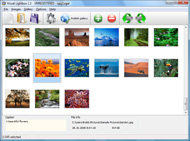
It's no secret that adding photos to your blog posts is one of the most effective ways to enhance your blog and attract attention to your writing. Flickr has millions of photos available in its database. A simple FREE tool called Flickr Gallery allows you to create a custom image gallery with a cool slide show of the most recent and most interesting photos from Flickr on your website or blog in a few easy steps. Just visit Flickr website and find photostream, photoset or a single photo you like. Enter the address of flickr page to add all photos from this page in your gallery, select the style of thumbnails and the overlay window and add the HTML embed code on your website or blog.
A few clicks and you'll see a stylish photo gallery with beautifull lightbox and zoom effects on your own website or blog!


Flickr Gallery for Windows   Flickr Gallery for MAC

Want more?

Example

Lightbox gallery sample

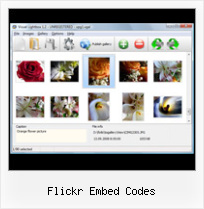
The following image set is generated by Flickr Gallery tool. Click any picture to run Lightbox gallery.

The photo gallery above is an in-page usage demo of Lightbox gallery that uses images from Flickr. The website gallery created with Flickr Gallery application is placed inside the page layout. You can also check the full-page demo slideshow. This example takes whole browser area to show the Lightbox gallery that uses images from Flickr.Flickr View On Black

How to Use

Step 1. Adding flickr images to your own gallery.


Locate the photo, photoset or photostream you want to use in your Flickr slideshow. Click on it to see the photo on its own page.

Copy URL of the flickr page.

Select Add images from Flickr... from the 'Add' button on the Toolbar.

Add images from Flickr

In the appeared window paste URL of the flickr page. Specify also the number of photos you want to add from the flickr page. Flickr Gallery will now include these photos in your project.

Add images from Flickr

If you have included the photos that you do not wish to be in your web gallery, you can easily remove them. Select all images that you wish to remove from photo gallery, and select Delete images. from the Images menu. You can pick and choose pictures by holding the CTRL while clicking the pictures you like.

Step 2. Adding caption.

The name of the photo on flickr page will automatically appear in the caption. When you select a photo you'll see the various info about it, such as: Path, Size, date of last change and Caption. You can add any comment or text about the photo (up to 512 symbols).

Step 3. Gallery properties.

Change the name of your flickr album, the size and quality of your pictures with Flickr Gallery. From the Gallery menu, select Properties or use "Edit Gallery Properties" button on the toolbar.

On the first tab of the Gallery Properties window you can change the name of your photo album and enable/disable the following properties: Slide Show, Auto play Slide Show, Zoom effect, Overlay Shadow. You can also set the Overlay shadow color and select the Engine you want to use (jQuery or Prototype + script.aculo.us).

On the second tab of the Gallery Properties window you can select the thumbnail you want to use, set the Thumbnails Resolution, Thumbnails Quality, Thumbnails Titles. Select Thumbnails Format (save in PNG or JPG format). Specify the Number of columns in you photo album and the Page color.

On the third tab of the Gallery Properties window you can select the template, Image resolution and Image quality of your pictures and change the Watermark.

You can set up the various sizes for exported images.

Control the quality of output PNG or JPEG format image by defining output "Image quality" and "Thumbnail quality" parameters (0%100%).

Step 4. Save your photo gallery as project file.

When you exit Flickr Gallery application, you'll be asked if you want to save your project. The project consists of the pictures you choose to put on your web photo gallery and all your settings. It's a good idea to save the project, because that will allow you to change the project in case you decide to do something different with future galleries. So click Yes, then enter a name for your project. To select the location of your project, just click the Browse folders button and choose a different location. Then click Save.

Flickr Rss Webpage Flickr Embed Codes

Download Flickr Gallery


Download Flickr Gallery Download Free Edition
for Windows
Download Flickr Gallery Download Free Edition
for MAC

Flickr Gallery is free for non-commercial use.

A small fee is required for business use. Flickr Gallery Business Edition additionally provides an option to remove the Flickr Gallery. Com credit line as well as a feature to put your own logo to images. After you conclude the payment via the secure order form, you will receive a license key instantly by e-mail that turns the Flickr Gallery Free Edition into a Business one. You can select the most suitable payment procedure: credit card, PayPal, check, bank transfer etc. Also you can get Business Edition for free if you help with translating Flickr Gallery into your native language, please contact us at for more info.

Jquery Flickr Gallery Autostart

Buy Flickr GalleryBuy Business Edition
for Windows

$49
Single Website
$69
Unlimited Websites
Buy Flickr GalleryBuy Business Edition
for MAC

$49
Single Website
$69
Unlimited Websites

Support

For feature requests, troubleshooting, general help contact Customer Support at . Make sure to include details on your operating system, browser, Flickr Gallery version and a link (or relevant code).Flickr Add Multiple Groups

Feedback

    * Let me start just congratulating you, good job, really. I am trying out the free version before I buy it. It works great.

    * I would like to say that Flickr Gallery is a stunning lil program! Its almost too good to be true i'd say! I've been looking for tutorials to create a lightbox gallery, but just couldnt come right. Im so glad i found Flickr Gallery!

    * I just tried the application, It is wonderful idea. Like you said in the website "few clicks without writing a single line of code" because most of the people is not web designers".Html Flickr Feed

    * I am thrilled with what this tool can do for me thanks for all the hard work that must have gone into it.

FAQ

Q:Is it possible to load a gallery from within image? So the gallery loads externally?

A:You should start the gallery onClick:

1) Add the following function into the <head> tag:

<script type="text/javascript">
function showLightBox()
{ Lightbox.start(document.getElementById('firstImage'));}
</script>

2) Specify the onClick event for the image (or link):
<img src="thumbnail_gr.jpg" onClick="javascript:showLightBox()" title="Click to see the demo" style="cursor: pointer;">
3) Set the ID for any image in your gallery (id="firstImage"), for example add it to the first image:
<a rel="lightbox_vlb" href="data/images/dscn6831.jpg" title="dscn6831" id="firstImage">
4) Use 'display: none;' property for your gallery in engine\css\vlightbox.css. Just change the following code:

#vlightbox a{
display:-moz-inline-stack;
display:inline-block;
zoom:1;
*display:inline;
position:relative;
vertical-align:top;
margin:3px;
width:160px;
font-family:Trebuchet,Tahoma,Arial,sans-serif;
font-size:11px;
font-weight:normal;
text-align:center;
opacity:0.87;
}

to:

#vlightbox a{
display:-moz-inline-stack;
display:none;
zoom:1;
*display:inline;
position:relative;
vertical-align:top;
margin:3px;
width:160px;
font-family:Trebuchet,Tahoma,Arial,sans-serif;
font-size:11px;
font-weight:normal;
text-align:center;
opacity:0.87;
}

RELATED

PmWiki | Cookbook / Flash Visitors can simply copy-and-paste the embed code from Flickr, click save (or save-and-edit), and the embed code will be automatically converted into the appropriate pmwiki markup. of FlickrSlideshow embed code - change it if you'd rather FlickrSlideshow embed code be

Flickr: Discussing Update embed code to properly attribute Flickr is almost certainly the best online photo management and sharing application in the world. Show off your favorite photos and videos to the world, securely and privately show content to your friends and family, or blog the photos and videos

embed Software - Free Download embed - Top 4 Download and the overlay window and add the HTML embed code on your website or blog. A few that allows professional and amateur web developers to embed superior html photo gallery with Flickr photos on their web sites and blogs. and the overlay window and add the HTML embed code on your website or blog

Flickr New Embeddable SlideShow Widget | Widgets Lab It was about time!. Flickr finally released a official Slide Show Widget. pass solutions have been embedding the regular Flickr Flash Slide Show into an also shows a very prominent and easy to see “share” option that gives you the URL for the Photostream and the embed code for the widget

Embed Flickr photostream Photography from amateur photographer Anthony Woodhouse, Llandudno, North Wales. Images captured from in and around beautiful North Wales Embed your Flickr photostream into your website, easily done with this code

Answers.com - What does embed code mean Web Usability question: What does embed code mean? It is the code that is used to show flash or video content. Useful tutorial on its google blog: http://funny-video-youtube.blogspot.com Embed code is

Flickr Embed Code : Flickr Gallery Flickr Embed Code. Create an effective online photo galleries with Flickr Slideshow!. Flickr Find My Photoset Id Enter the address of flickr page to add all photos from this page in your gallery, select the style of thumbnails and the overlay window and add the HTML embed code on your website or blog

Connections #003 - 'A Taste of LinkedIntelligence' : Scott Allen Download Mp3 [22:40m] Featured Guest: Scott Allen - Author, Blogger, Corporate Speaker & Trainer. Grab the code here: embed> Featured Guest: Scott Allen - Author, Blogger, Corporate Speaker & Trainer NOTE: Further Embed Codes

Accessing third-party content with oEmbed and PHP The oEmbed specification offers a way to display embedded representations of content from third-party content sharing sites in a web page. The oohEmbed service: Read more about this oEmbed-compatible provider of HTML embed codes for various web sites

How to Embed Photos and Slideshows from Picasa, Flickr and To overcome these limitations, try uploading your photos to a popular photo sharing service, and then use simple HTML code to embed them — either individually, as an album, or in a slideshow — on your site. Picasa, Flickr and Photobucket are popular photo sharing services

10 ways to easily improve your website using embed codes Companies (or third parties) can provide an embed code to make using a service as easy as copying and pasting. Flickr Slideshows. While Flickr allows you to share a slideshow through email and not lose any of its elegance, in four simple steps you can generate the embed code to place it on your web

Peter Liu Photography - How To Embed A Flickr Slideshow In A I was browsing some Facebook pages and came across one with Flickr slideshows embedded in a tab, and decided I had to know how it was done. From past experience, I knew it had to be Flickr's embed code wrapped somehow inside FBML (Facebook Markup Language)

Embed Flickr Photos | Megaleecher.Net Flickr Share. Flickrin.com is one of the most easiest and fastest way to embed flickr codes, the whole process takes less then a minute for creating the Flickr embed code for

Betaworks, Conway, And Sacca Embed $250,000 Into Embed.ly Connecting those embed codes with their underlying links is a Herculean task, one which Embed.ly is doggedly pursuing. Embed.ly currently supports 112 different embed-code publishers, including YouTube, Ustream, Flickr, Picassa, Scribd, PollDaddy, and even CrunchBase

flickr embed vista freeware, shareware, software download flickr embed vista freeware, shareware, software download - Best Free Vista Downloads - Free Vista software download - freeware, shareware and trialware downloads

embed-brainstorming · Microformats Wiki Sites such as YouTube, Flickr, Vimeo and others publish embed code' to aid users in copy+pasting content into their own repostings. This is especially useful for embedding of complex content such as Shockwave Flash movies, where the HTML code is not intuitive

chalki-tech-help | Screencast-O-Matic - Free online screen you can get the "embed code" and put it on your own site (eg blog, wiki etc. get embed code from flickr slideshow. flickr creates great slideshows

How to embed anything or use HTML in GoogleWave – Lena How to embed anything or use HTML in GoogleWave. Oct 8, 2009 // Blog Posts // Lena // 6 Comments. One of Google Wave's many quirks is that it doesn't currently auto-convert embed codes into YouTube videos, flickr photos, etc as most have grown to expect from modern web applications

Jing Learning Center - Customize Jing Buttons By all means, Jing can work with you and even return links to your content and custom embed code. Embed Jing Content Using Screencast.com. What is Screencast.com? Other Output Options

WordPress.com: How To Embed Video " Williamo's Blog Flickr: Explore Analog. Episode 28, Intro to Color Management on Vimeo. WordPress.com: How To Embed Video. Sep 25. Posted With the exception of YouTube, I always keep forgetting how to embed video into a WordPress.com blog post (hint: it's not the embed code)

Learning How to Embed Flickr Slideshows onto Your Website or Blog Learn the easy Flickr slideshow codes for how to embed flicker slideshows and customizing the slideshow on your site or blog

Embed Code Flickr | Flickr Slideshow Embed Code Flickr. jQuery Thickbox Alternative is an excellent program that is friendly to amateur web developers, but at the same time is powerful enough to meet the needs of more advanced users. slideshow con fotos de flickr

embed 64 bit download - freeware, shareware - X 64-bit Download embed 64 bit download - freeware, shareware - X 64-bit Download - x64-bit download - freeware, shareware and software downloads

Get Started With OEmbed | Webmonkey | Wired.com These codes work great for sites that offer them, but embed codes and options for To that end, what if there was a standard for grabbing a full multimedia embed code from a URL? Wouldn't it be nice if you could turn a simple URL link into an embedded Flickr image or YouTube video?

Download Flickr Gallery for Mac OS at All Freeware (Gallery Flickr Gallery for Mac OS 4.8 free download, review. A simple FREE Mac tool called Flickr Gallery allows you to embed a custom image gallery, or a cool slideshow with beautiful lightbox and zoom effects of the most interesting photos from Flickr

Video - Creating your own Share and Embed code (Jing Blog) Remember the awesome tutorial on writing your own Share and Embed code that Matt Dyer created back in November? tutorial that goes along with it; I'm hoping it will clarify some of the steps involved in creating your own Share and Embed code

