
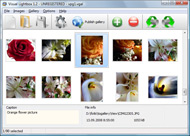



Overview

It's no secret that adding photos to your blog posts is one of the most effective ways to enhance your blog and attract attention to your writing. Flickr has millions of photos available in its database. A simple FREE tool called Flickr Gallery allows you to create a custom image gallery with a cool slide show of the most recent and most interesting photos from Flickr on your website or blog in a few easy steps. Just visit Flickr website and find photostream, photoset or a single photo you like. Enter the address of flickr page to add all photos from this page in your gallery, select the style of thumbnails and the overlay window and add the HTML embed code on your website or blog.
A few clicks and you'll see a stylish photo gallery with beautifull lightbox and zoom effects on your own website or blog!


Flickr Gallery for Windows   Flickr Gallery for MAC

Want more?

Example

Lightbox gallery sample

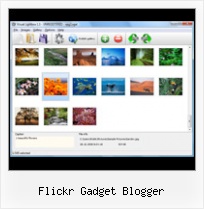
The following image set is generated by Flickr Gallery tool. Click any picture to run Lightbox gallery.

The example above is an in-page usage demo of Lightbox gallery that uses images from Flickr. The gallery created with Flickr Gallery application is placed inside the html page. You can also check the full-page demo gallery. This example takes whole browser area to show the slideshow.Flickr Widget In Drupal

How to Use

Step 1. Adding flickr images to your own gallery.


Locate the photo, photoset or photostream you want to use in your Flickr slideshow. Click on it to see the photo on its own page.

Copy URL of the flickr page.

Select Add images from Flickr... from the 'Add' button on the Toolbar.

Add images from Flickr

In the appeared window paste URL of the flickr page. Specify also the number of photos you want to add from the flickr page. Flickr Gallery will now include these photos in your project.

Add images from Flickr

If you have included the photos that you do not wish to be in your web gallery, you can easily remove them. Select all images that you wish to remove from photo gallery, and select Delete images. from the Images menu. You can pick and choose pictures by holding the CTRL while clicking the pictures you like.

Step 2. Adding caption.

The name of the photo on flickr page will automatically appear in the caption. When you select a photo you'll see the various info about it, such as: Path, Size, date of last change and Caption. You can add any comment or text about the photo (up to 512 symbols).

Step 3. Gallery properties.

Change the name of your flickr album, the size and quality of your pictures with Flickr Gallery. From the Gallery menu, select Properties or use "Edit Gallery Properties" button on the toolbar.

On the first tab of the Gallery Properties window you can change the name of your photo album and enable/disable the following properties: Slide Show, Auto play Slide Show, Zoom effect, Overlay Shadow. You can also set the Overlay shadow color and select the Engine you want to use (jQuery or Prototype + script.aculo.us).

On the second tab of the Gallery Properties window you can select the thumbnail you want to use, set the Thumbnails Resolution, Thumbnails Quality, Thumbnails Titles. Select Thumbnails Format (save in PNG or JPG format). Specify the Number of columns in you photo album and the Page color.

On the third tab of the Gallery Properties window you can select the template, Image resolution and Image quality of your pictures and change the Watermark.

You can set up the various sizes for exported images.

Control the quality of output PNG or JPEG format image by defining output "Image quality" and "Thumbnail quality" parameters (0%…100%).

Step 4. Save your photo gallery as project file.

When you exit Flickr Gallery application, you'll be asked if you want to save your project. The project consists of the pictures you choose to put on your web photo gallery and all your settings. It's a good idea to save the project, because that will allow you to change the project in case you decide to do something different with future galleries. So click Yes, then enter a name for your project. To select the location of your project, just click the Browse folders button and choose a different location. Then click Save.

Copy Flickr Photo To Blog Flickr Gadget Blogger

Download Flickr Gallery


Download Flickr Gallery Download Free Edition
for Windows
Download Flickr Gallery Download Free Edition
for MAC

Flickr Gallery is free for non-commercial use.

A small fee is required for business use. Flickr Gallery Business Edition additionally provides an option to remove the Flickr Gallery. Com credit string as well as a feature to put your own logo to images. After you conclude the payment via the secure form, you will receive a license key instantly by e-mail that turns the Flickr Gallery Free Edition into a Business one. You can select the most suitable payment procedure: PayPal, bank transfer, check, credit card etc. Also you can get Business Edition for free if you help with translating Flickr Gallery into your native language, please contact us at for more info.

Flickr Gallery Resolution

Buy Flickr GalleryBuy Business Edition
for Windows

$49
Single Website
$69
Unlimited Websites
Buy Flickr GalleryBuy Business Edition
for MAC

$49
Single Website
$69
Unlimited Websites

Support

For feature requests, troubleshooting, general help contact Customer Support at . Make sure to include details on your browser, operating system, a link (or relevant code) and Flickr Gallery version.Access Flickr In School

Feedback

    * I ran into your website wile looking for a JavaScript to manage a personal Photo Gallery. I downloaded the trial version and immediately fell in love with your Flickr Gallery, it is one of the best products I’ve ever found; it is very user friendly and easy to use and creates great Photo Galleries.

    * I am thrilled with what this tool can do for me thanks for all the hard work that must have gone into it.

    * Let me start just congratulating you, good job, really. I am trying out the free version before I buy it. It works great.Photograph Like Flickr

    * I find Flickr Gallery (and lightbox2) a great tool and was about to proceed in its purchase.

FAQ

Q:Is it possible to load a gallery from within image? So the gallery loads externally?

A:You should start the gallery onClick:

1) Add the following function into the <head> tag:

<script type="text/javascript">
function showLightBox()
{ Lightbox.start(document.getElementById('firstImage'));}
</script>

2) Specify the onClick event for the image (or link):
<img src="thumbnail_gr.jpg" onClick="javascript:showLightBox()" title="Click to see the demo" style="cursor: pointer;">
3) Set the ID for any image in your gallery (id="firstImage"), for example add it to the first image:
<a rel="lightbox_vlb" href="data/images/dscn6831.jpg" title="dscn6831" id="firstImage">
4) Use 'display: none;' property for your gallery in engine\css\vlightbox.css. Just change the following code:

#vlightbox a{
display:-moz-inline-stack;
display:inline-block;
zoom:1;
*display:inline;
position:relative;
vertical-align:top;
margin:3px;
width:160px;
font-family:Trebuchet,Tahoma,Arial,sans-serif;
font-size:11px;
font-weight:normal;
text-align:center;
opacity:0.87;
}

to:

#vlightbox a{
display:-moz-inline-stack;
display:none;
zoom:1;
*display:inline;
position:relative;
vertical-align:top;
margin:3px;
width:160px;
font-family:Trebuchet,Tahoma,Arial,sans-serif;
font-size:11px;
font-weight:normal;
text-align:center;
opacity:0.87;
}

RELATED

Lijit Networks Unveils Blog and Social Content Search Gadget Lijit Networks Unveils Blog and Social Content Search Gadget for Blogger(TM) Enabling readers of Blogger blogs to leverage search and discover a unified set of results across a publisher's blog as well as social content sources such as Twitter, Facebook, Flickr, LinkedIn and YouTube is

Liz Castro on HTML, XHTML, and CSS: How to create a Flickr It's not nearly as nice as Blogger's Slideshow gadget. So how do you get Blogger's Slideshow gadget to show only the photos from a particular Flickr set? Maybe you have several different blogs and you want each one to feature photos from a different set on Flickr

Blogmarks : Public marks with tag flickr Un Gadget Blogger pour afficher les photos d'un ensemble d'images (Photoset) de Flickr sur son Blog. by karlcow. A command line tool to transfer all photos from Flickr to

Lijit Networks Unveils Blog and Social Content Search Gadget Lijit Networks Unveils Blog and Social Content Search Gadget for Blogger™ Featured search widget unifies Blogs, Twitter, Flickr, YouTube, Del.icio.us and many other social content items for world's largest blogging platform Enabling readers of Blogger blogs to leverage search and discover a

Flickr Blogger : Flickr Gallery Flickr Blogger. Make superior ajax picture gallery for your web site with Flickr Gallery!. Flickr Album To Posts

Vanilla Blogger Gadget Demo | Flickr - Photo Sharing!

Photoblogging with Flickr and Blogger - Photoblog with Flickr The Which? guide to creating, customising and posting images to a photoblog, including how to send photos by email or from your mobile phone to Flickr, and then blog them using Blogger

Pigs, Gourds, and Wikis: Blogging Flickr photos (part 2) You can choose one from your computer by clicking on the Browse button or you can copy the URL of a photo out on the Web, for example, from Flickr. Selecting an image from your computer is a simple way to get an image into your Blogger blog, but it has a couple of disadvantages

How to Add a Flickr or Picasa Slideshow to Your Blogger Blog To Add a Slideshow to Your Blog using Flickr or Picasa. Go to your Blog dashboard press "Design", this will take you to "page elements" and the "Add and arrange page elements". Here you will see a "map" of the layout of your Blogger Blog. Add a Gadget

Blogger Buzz: Flickr Support for Blogger in beta Flickr is using a secure authentication method made possible by the new Blogger's use of Flickr (and other websites that support this technology) will never see your username or

Exposé : A Photo Blog : Blogger | Cinnamon Girl Studio Exposé - a fresh new design with the Flickr slideshow system for Blogger. Exposé was created with the minimalist in mind. It's clean and professional - a perfect blank slate to showcase your photos. From the top.. there is a logo gadget to add

Blogger Gadgets (Page Elements or widgets) ~ Blogger Book Blogger Gadgets (Page Elements or widgets) I have over a period of time received 3 queries pertaining to bloggers not being able to add a HTML When I go to add a gadget - Add a Slideshow - using Flickr (where I just uploaded photos in order to do this)

Chinson's: Google Gadget:Flickr Photos for iGoogle For people who want to hidden the profile, please use NSID in the gadget instead. It should be no problem to add it into the old blogger template. 5:06 PM, September 19, 2008. andrew said How come there are hundreds of flickr gadgets, but only a dozen which let you display your own tagged

Lijit Networks Unveils Blog and Social Content Search Gadget Lijit Networks Unveils Blog and Social Content Search Gadget for Blogger(TM). Featured search widget unifies Blogs, Twitter, Flickr, YouTube, Del.icio.us and many other social content items for world's largest blogging platform

Flickr Photostream gadget not working - Blogger Help As not much is going on here to help, I have done some search and found another way to ad my Flickr Photostream to my blog. http://bal00sblog.blogspot.com/2008/08/adding-flickr-gadget-to-blogger.html

Blogger Tutorial about Featured Gadgets | category Featured Gadgets.How to in blogger is the most complete blogger tutorial, blogger tricks, free blogger templates. Category page 0

Flickr Slideshow Generator Widget Plugin,embed in Wordpress Flash slide show maker gadget plugin is the best Yahoo Flickr slideshow widget to make free iamge galleries and embed into Facebook, Wordpress, Blogger blogspot

Gadgets For Vista - Flickr Gadget Gadgets for Vista is a library of gadgets for Windows Vista. Vista gadgets are small tools which install in the Windows sidebar on the desktop. There are several types of gadget, weather, news, search engines, videos, games, radio etc

Custom Slideshow Gadget for Blogger. ~ The Blog Doctor The Blog Doctor, blogger Hacks, Blog design, Blog Template, SEO, Adsense, Blogging Tips and Tricks, Making money through blogs, PPC gadget-for-blogger.html">Custom Slideshows. In the above code replace "PUT FEED URL HERE" with the link of the RSS feed of your pictures album at Flickr/Photobucket

Top Blogger Wants Flickr To Pay | Pinoy Tech Blog - The Anil Dash, top blogger and SixApart (the company which offers MovableType, TypePad, and not-so-recently, Livejournal) Vice-President, is asking why Yahoo-owned

Blogger Buster: Blogumus for your Flickr Photos! March 12, 2009 / Filed under: Gadgets. Roy Tanck's Flickr Widget requires Flash Player 9 or better. Get this widget at roytanck.com enhance your own Blogger powered blogs! Let us know what you think about Roy's Flickr widget by leaving your

Adding Gadgets on Blogger Video – 5min.com Adding Gadgets on Blogger - Gadgets are extra features that you can add to your Blogger blog. A gadget can be a photo-stream from Flickr, polls that your readers can participate in and even something as simple as a welcome message that your

Flickr Gadget - MediaMentalism From YouTube camcorders to Facebook phones, MediaMentalism focuses purely on gadgets that get the most out of social media

Gadgets for Blogger ~ Blogger Freebies Blogger tips and tricks for Google Blogger platform. Total blogger training, Blogger Hacks, Blogger Template and Search engine optimization

Add Flickr photostream/slideshow widget | Blogger Sentral It will use Blogger slideshow gadget as a base. The slideshow will display 20 of your most recent Flickr photos. The widget makes use of your Flickr photostream feed url, so your first step is to find that url. (for Picasa slideshow, read How to embed Picasa slideshow in a blog)

