



Overview

It's no secret that adding photos to your blog posts is one of the most effective ways to enhance your blog and attract attention to your writing. Flickr has millions of photos available in its database. A simple FREE tool called Flickr Gallery allows you to create a custom image gallery with a cool slide show of the most recent and most interesting photos from Flickr on your website or blog in a few easy steps. Just visit Flickr website and find photostream, photoset or a single photo you like. Enter the address of flickr page to add all photos from this page in your gallery, select the style of thumbnails and the overlay window and add the HTML embed code on your website or blog.
A few clicks and you'll see a stylish photo gallery with beautifull lightbox and zoom effects on your own website or blog!


Flickr Gallery for Windows   Flickr Gallery for MAC

Want more?

Example

Lightbox gallery sample

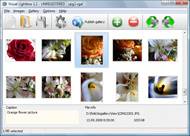
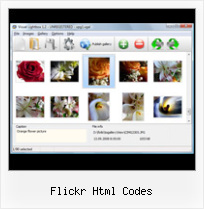
The following image set is generated by Flickr Gallery tool. Click any picture to run Lightbox gallery.

The photo gallery above is an in-page usage demo of Lightbox with images from Flickr. The web gallery created with Flickr Gallery software is placed inside the html page. You can also check the full-page demo slideshow. This example takes whole browser area to show the Lightbox gallery that uses images from Flickr.Add Logo To Flickr Image

How to Use

Step 1. Adding flickr images to your own gallery.


Locate the photo, photoset or photostream you want to use in your Flickr slideshow. Click on it to see the photo on its own page.

Copy URL of the flickr page.

Select Add images from Flickr... from the 'Add' button on the Toolbar.

Add images from Flickr

In the appeared window paste URL of the flickr page. Specify also the number of photos you want to add from the flickr page. Flickr Gallery will now include these photos in your project.

Add images from Flickr

If you have included the photos that you do not wish to be in your web gallery, you can easily remove them. Select all images that you wish to remove from photo gallery, and select Delete images. from the Images menu. You can pick and choose pictures by holding the CTRL while clicking the pictures you like.

Step 2. Adding caption.

The name of the photo on flickr page will automatically appear in the caption. When you select a photo you'll see the various info about it, such as: Path, Size, date of last change and Caption. You can add any comment or text about the photo (up to 512 symbols).

Step 3. Gallery properties.

Change the name of your flickr album, the size and quality of your pictures with Flickr Gallery. From the Gallery menu, select Properties or use "Edit Gallery Properties" button on the toolbar.

On the first tab of the Gallery Properties window you can change the name of your photo album and enable/disable the following properties: Slide Show, Auto play Slide Show, Zoom effect, Overlay Shadow. You can also set the Overlay shadow color and select the Engine you want to use (jQuery or Prototype + script.aculo.us).

On the second tab of the Gallery Properties window you can select the thumbnail you want to use, set the Thumbnails Resolution, Thumbnails Quality, Thumbnails Titles. Select Thumbnails Format (save in PNG or JPG format). Specify the Number of columns in you photo album and the Page color.

On the third tab of the Gallery Properties window you can select the template, Image resolution and Image quality of your pictures and change the Watermark.

You can set up the various sizes for exported images.

Control the quality of output PNG or JPEG format image by defining output "Image quality" and "Thumbnail quality" parameters (0%…100%).

Step 4. Save your photo gallery as project file.

When you exit Flickr Gallery application, you'll be asked if you want to save your project. The project consists of the pictures you choose to put on your web photo gallery and all your settings. It's a good idea to save the project, because that will allow you to change the project in case you decide to do something different with future galleries. So click Yes, then enter a name for your project. To select the location of your project, just click the Browse folders button and choose a different location. Then click Save.

Wp Plugins Album Flickr Flickr Html Codes

Download Flickr Gallery


Download Flickr Gallery Download Free Edition
for Windows
Download Flickr Gallery Download Free Edition
for MAC

Flickr Gallery is free for non-commercial use.

A small fee is required for business use. Flickr Gallery Business Edition additionally provides an option to remove the Flickr Gallery. Com credit line as well as a feature to put your own logo to images. After you complete the payment via the secure order form, you will receive a license key instantly by email that turns the Flickr Gallery Free Edition into a Business one. You can select the most appropriate payment procedure: check, PayPal, credit card, bank transfer etc. Also you can get Business Edition for free if you help with translating Flickr Gallery into your native language, please contact us at for more info.

Flickr Html Gallery Code

Buy Flickr GalleryBuy Business Edition
for Windows

$49
Single Website
$69
Unlimited Websites
Buy Flickr GalleryBuy Business Edition
for MAC

$49
Single Website
$69
Unlimited Websites

Support

For general help, troubleshooting and feature requests contact Customer Support at . Make sure to include details on your Flickr Gallery version, a link (or relevant code), operating system and a browser.Flickr Images

Feedback

    * Another programmes have incredible functionality but no fantastic interface like your product!

    * Just a quick thank you for the software though, It's not often you get a free software version of this quality and style! Well done and please continue this amazing gallery. Hope to see more advances.

    * I have installed Flickr Gallery to trial. All good, loving it!! I want to get an business version of your great programm. I love it - soo easy to use!!The Best Flickr Viewer

    * I have just bought this product and think it is great. As it is extremely easy to use it is something I could get my clients to purchase to upload their own portfolio and latest projects etc.

FAQ

Q:How do I control the SlideShow speed?

A:Open engine\js\visuallightbox.js and find the following code:

slideTime:3, // time to display images during slideshow

Set the time you need.

RELATED

Flickr Html Codes : Flickr Gallery Flickr Html Codes. Create an effective online photo galleries with Flickr Slideshow!. Flickr Gallery Static Fbml Enter the address of flickr page to add all photos from this page in your gallery, select the style of thumbnails and the overlay window and add the HTML embed code on your website or blog

Map Maker: Show off where you've been or where you're going Create a map of places you've visited (or want to visit or dream about or know people from) and get HTML code that you can embed in your profile on Flickr, Facebook, My Space, your blog or any other web page. Just click your countries and the map

ClustrMaps on Flickr " ClustrMaps 2. On your Admin page, you will see several boxes containing different versions of the HTML code. In this case you should use variation "[B]: Minimalist (for MySpace and other sites needing the plainest HTML)" this is best for Flickr also

Flickr Slideshow - create flickr photo slideshows for your The usage is very simple, open your Flickr photo web pages on the Internet Explorer, copy the web page address from the Address Bar, then paste on the "URL of User, Set or Group", click "Create Slideshow", and then you can get one HTML code form your photo album slide show

Flickriver - A new way to view Flickr photos and more Adds a 'Flickriver' button to your browser. While viewing any Flickr photos page, click on this button to open the same view on Flickriver. To link to this page, Copy and Paste the following HTML code:

ImageCodr.org HTML code for Flickr images Licenses Search Get code! Home. Searching for images. The search below ias a quick way to search for images licensed under Creative Commons on Flickr. It has some options predefined (only images will be found, no videos) and you can easily choose

Embed Flickr photostream Once your photostream has loaded, click on share on the top right hand side of the page and copy the HTML code to your clipboard Paste your Flickr photostream code into notepad and remove the section highlighted (this is your Flickr user id)

Flicoder - the best tool to get HTML code of your Flickr Flicoder - the best tool to get HTML code of your Flickr photostream. flicoder - simple & quick tool to get html/bb codes of photos from your flickr account!

Slideshow Codes : Free SlideShow Software Free Slideshow Creator! Slideshow Codes. Flickr Slideshow. The most powerful photo gallery maker on the Web!. Slideshow On Your Website Slideshow Codes Overview. This photo slideshow maker is a demonstration of Flash-like behavior implemented solely in Javascript, HTML, and CSS.You

Four Eyed Monsters HTML Codes Official selection of the 2005 slamdance film festival. 'Four Eyed Monsters' is about the fear of becoming mediocre, the challenge of finding inspiration, and the anxieties of learning to become emotionally intimate

Photos.html - as3flickrlib - Google Code notes:Notes  [read-only] upload:Upload  [read-only] Provide read-only access to the Upload method group in the Flickr API Implementation

Flickr Flash As2 - Flash Photo Gallery Flickr Flash As2. Create free flash web photo gallery for your Website with Flash Photo Gallery!. Flash Gallery With Navigation Sample Publish the flickr flash as2 to a local drive or directly to the Internet via a built-in FTP client and add the HTML embed code on your website or blog

quickr pickr Post Pictures to Xanga, Blogger, and other blogs! quickr flickr is a quickr way to pick multiple Flickr pictures, generate HTML code, and post them to Blogger, Xanga, or any blog

Flickr Grab Flickr Search: Search for Interestingness, User Photos, Contacts, Favorites, Tags. This website aggregates photos from flickr.com, and is in no way affiliated with Flickr or Yahoo. Website HTML & Code: © 2007-2008 Jan Oberst. Please E-Mail me with any problems

Flickr: HTML Code Writing on Flickr Flickr is almost certainly the best online photo management and sharing application in the world. 04 Jul 09 - See sample HTML codes below which you can use in your Flickr Group invitations, recognitions, and awards

How to Monitor Your Flickr Album - loose wire blog The best way to keep tabs on who is linking to your Flickr photo album is through Technorati, the blog-tracking service. code from the Technorati box into the Description field of your Flickr photo, deleting all the stuff that isn't the link: (Removing both other descriptions and the HTML

MapSack :: travel in the know MapSack Create flickr map HTML code. Simply fill out the form below, click and 'Generate Code'. Width. pixels. Height. pixels. Flickr username. Username or User id (this is optional if a group or photoset id is given) Group

How to Embed Photos and Slideshows from Picasa, Flickr and To overcome these limitations, try uploading your photos to a popular photo sharing service, and then use simple HTML code to embed them — either individually, as an album, or in a slideshow — on your site. Picasa, Flickr and Photobucket are popular photo sharing services

Flickr AllSizes for Greasemonkey Quickly access all sizes for a Flickr photo. Copy the photo's HTML (or BB Code), download the image sizes, and more. The script has customisable settings and auto-updates itself

Techno Paper: flickr Slide show flickrSLiDR allows you to add flickr slide shows on to your website or blog by simply adding some HTML code. The only requirement is the flickr URL address of the user, photo set or group you would like to display. There is also some attributes available to customize the slide show display

Bliss: peace via flickr Oh yes, those deadly HTML codes will make your head spin!! I have had mornings where it just seemed I could do no good! Sigh, HTML codes - it looks simple and then before you know it, you've just spent hours behind the computer only to

Flickr Follows Wikipedia – No Google Juice for External Websites And though Flickr has nofollowed all external links, they still want external websites (who post Flickr photos) to link to the original photo page without using the nofollow tag (check the HTML code generated by Flickr when you want to link to some photo)

Get HTML Code For Flickr Images Easily Get HTML Code For Flickr Images Easily. By Aatif on May 08 2010 Leave a comment. Being the image sharing giant that it is, Flickr hosts over 75 million images that are licensed under a Creative Commons license, and depending on the type of license those images can be used by others as well

A Cool Photo Widget for Flickr and Picasa " Learning Technologies Roy creates a form online so you can generate a Flash Flickr/Picasa widget for your website or blog using your Flickr or Picasa RSS feed. Simply completing the online form will create the HTML code that you can copy-paste code into any HTML page, blog post or a WordPress text widget

ClustrMaps Blog " ClustrMaps on Flickr 2. On your Admin page, you will see several boxes containing different versions of the HTML code. In this case you should use variation "[B]: Minimalist (for MySpace and other sites needing the plainest HTML)" this is best for Flickr also

Flickr Cursor This CSS/HTML Code of Flickr works on almost every website on the internet that allows, CSS and HTML coding. Like blogspot, forums, normal web page etc. Put Code At Top Of Webpage. Animated Cursors Only Work On Internet Explorer, if You Place On Your Web Page

