



Overview

It's no secret that adding photos to your blog posts is one of the most effective ways to enhance your blog and attract attention to your writing. Flickr has millions of photos available in its database. A simple FREE tool called Flickr Gallery allows you to create a custom image gallery with a cool slide show of the most recent and most interesting photos from Flickr on your website or blog in a few easy steps. Just visit Flickr website and find photostream, photoset or a single photo you like. Enter the address of flickr page to add all photos from this page in your gallery, select the style of thumbnails and the overlay window and add the HTML embed code on your website or blog.
A few clicks and you'll see a stylish photo gallery with beautifull lightbox and zoom effects on your own website or blog!


Flickr Gallery for Windows   Flickr Gallery for MAC

Want more?

Example

Lightbox gallery sample

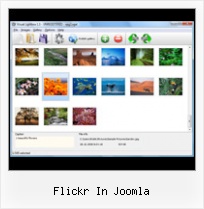
The following image set is generated by Flickr Gallery tool. Click any picture to run Lightbox gallery.

The photo gallery above is an in-page usage demo of Lightbox with images from Flickr. The website gallery created with Flickr Gallery software is placed inside the website page. You can also check the full-page demo gallery. This example takes whole browser area to show the slideshow.Rails Flickr Style Image Tagging

How to Use

Step 1. Adding flickr images to your own gallery.


Locate the photo, photoset or photostream you want to use in your Flickr slideshow. Click on it to see the photo on its own page.

Copy URL of the flickr page.

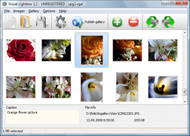
Select Add images from Flickr... from the 'Add' button on the Toolbar.

Add images from Flickr

In the appeared window paste URL of the flickr page. Specify also the number of photos you want to add from the flickr page. Flickr Gallery will now include these photos in your project.

Add images from Flickr

If you have included the photos that you do not wish to be in your web gallery, you can easily remove them. Select all images that you wish to remove from photo gallery, and select Delete images. from the Images menu. You can pick and choose pictures by holding the CTRL while clicking the pictures you like.

Step 2. Adding caption.

The name of the photo on flickr page will automatically appear in the caption. When you select a photo you'll see the various info about it, such as: Path, Size, date of last change and Caption. You can add any comment or text about the photo (up to 512 symbols).

Step 3. Gallery properties.

Change the name of your flickr album, the size and quality of your pictures with Flickr Gallery. From the Gallery menu, select Properties or use "Edit Gallery Properties" button on the toolbar.

On the first tab of the Gallery Properties window you can change the name of your photo album and enable/disable the following properties: Slide Show, Auto play Slide Show, Zoom effect, Overlay Shadow. You can also set the Overlay shadow color and select the Engine you want to use (jQuery or Prototype + script.aculo.us).

On the second tab of the Gallery Properties window you can select the thumbnail you want to use, set the Thumbnails Resolution, Thumbnails Quality, Thumbnails Titles. Select Thumbnails Format (save in PNG or JPG format). Specify the Number of columns in you photo album and the Page color.

On the third tab of the Gallery Properties window you can select the template, Image resolution and Image quality of your pictures and change the Watermark.

You can set up the various sizes for exported images.

Control the quality of output PNG or JPEG format image by defining output "Image quality" and "Thumbnail quality" parameters (0%…100%).

Step 4. Save your photo gallery as project file.

When you exit Flickr Gallery application, you'll be asked if you want to save your project. The project consists of the pictures you choose to put on your web photo gallery and all your settings. It's a good idea to save the project, because that will allow you to change the project in case you decide to do something different with future galleries. So click Yes, then enter a name for your project. To select the location of your project, just click the Browse folders button and choose a different location. Then click Save.

Jquery Flickrshow Js Flickr In Joomla

Download Flickr Gallery


Download Flickr Gallery Download Free Edition
for Windows
Download Flickr Gallery Download Free Edition
for MAC

Flickr Gallery is free for non-commercial use.

A small fee is required for business use. Flickr Gallery Business Edition additionally provides an option to remove the Flickr Gallery. Com credit line as well as a feature to put your own logo to images. After you finish the payment via the secure form, you will receive a license key instantly by email that turns the Flickr Gallery Free Edition into a Business one. You can select the most suitable payment mode: bank transfer, check, credit card, PayPal etc. Also you can get Business Edition for free if you help with translating Flickr Gallery into your native language, please contact us at for more info.

Importing Flickr Slideshows Into Blog

Buy Flickr GalleryBuy Business Edition
for Windows

$49
Single Website
$69
Unlimited Websites
Buy Flickr GalleryBuy Business Edition
for MAC

$49
Single Website
$69
Unlimited Websites

Support

For general help, troubleshooting and feature requests contact Customer Support at . Make sure to include details on your operating system, browser, a link (or relevant code) and Flickr Gallery version.Flickrwidget Swf

Feedback

    * This looks like EXACTLY what I need for my site. It would make my job much faster! Love your program. Thank you!!

    * I'd like to express my gratitude to your efforts on creating such a nice piece of program and best of all it's free! Keep out the good work and I hope to see new features in the near coming future to rate you 5 star!

    * Great product by the way and saved me loads of time. I really like your Flickr Gallery program! Very nice.Slideshow Flickr Gadget Windows 7

    * I ran into your website wile looking for a JavaScript to manage a personal Photo Gallery. I downloaded the trial version and immediately fell in love with your Flickr Gallery, it is one of the best products I’ve ever found; it is very user friendly and easy to use and creates great Photo Galleries.

FAQ

Q:I would like to have a few galleries in one website and even on one page.

A:To create several galleries on your page you should change following parameter in A tag for different galleries:

rel="lightbox_vlb"

For example, for the first gallery you should set rel="lightbox_vlb":

<!-- Start Flickr Gallery.com BODY section -->
<div id="vlightbox">
<a rel="lightbox_vlb" href="data/images/dscn6831.jpg" title="dscn6831" >
<img src="data/thumbnails/dscn6831.png" ><span></span></a>
<a rel="lightbox_vlb" href="data/images/dscn6823.jpg" title="dscn6823">
<img src="data/thumbnails/dscn6823.png"><span></span></a>
<a id="vlb" href="http://Flickr Gallery.com">Photo Gallery For Web by Flickr Gallery.com v2.0</a>
</div>
<!-- End Flickr Gallery.com BODY section -->

and for the second gallery rel="lightbox_vlb1":

<!-- Start Flickr Gallery.com BODY section -->
<div id="vlightbox">
<a rel="lightbox_vlb1" href="data/images/img_0501.jpg" title="img_0501">
<img src="data/thumbnails/img_0501.png"><span></span></a>
<a rel="lightbox_vlb1" href="data/images/img_0481.jpg" title="img_0481">
<img src="data/thumbnails/img_0481.png"><span></span></a>
<a id="vlb" href="http://Flickr Gallery.com">Photo Gallery For Web by Flickr Gallery.com v2.0</a>
</div>
<!-- End Flickr Gallery.com BODY section -->


RELATED

Embed Flickr Plugin | The atareao En fin, empiezo de nuevo. Bueno, bueno, bueno, no podía hacerse esperar, tanto tiempo con el plugin de Picasa, que finalmente tenía que hacer uno para Flickr

Mod Flickr A simple module for showing flickr galleries with mootools slimbox Mod Flickr. Thursday, 28 May 2009 13:05. Blog - Joomla. A simple module for showing flickr galleries with mootools slimbox. Tweet. Set as favorite. Bookmark. Email this. Hits: 426. Disclosure: Content posted to this site is in no way an

jFlickr - free jQuery Joomla flickr module | Joomlabamboo a free Joomla 1.5 flickr image gallery module - Free extension

Flickr In Joomla : Flickr Gallery Flickr In Joomla. Flickr Gallery! Enhance your website with online photo album software!. Flickr View On Black Html HyBing - HyBing You can set the Flickr parameters using default Joomla bot configuration screen, as well as, setting the parameters in the

Joomla Flickr "controller" Local File Inclusion Vulnerability A vulnerability has been discovered in the Joomla Flickr component for Joomla!, which can be exploited by malicious people to disclose sensitive information

Flickr Photos Realizzato dall'esperto in Ozio AlexRed il componente Ozio Gallery permette di visualizzare immagini all'interno di interessanti applicazioni flash

HyBing - HyBing You can set the Flickr parameters using default Joomla bot configuration screen, as well as, setting the parameters in the content. In addition, because Easy Flickr pulls images from Flickr, your content will look differently when a different image is displayed

How to Add Flickr to Joomla | eHow.com How to Add Flickr to Joomla. The core of any website is its content. Whether you are running your company's website or designing a personal blog, incorporating photos into your site is necessary. Most content management software

Joomla! | The Ultimate Showdown of Content Management System Ability to embed files, MP3 recordings, Video, etc., is "built in" to Tamka using Plugins. Documents can be uploaded, stored, and shared using Joomla!'s core Media Manager. Other social media content, such as Delicious links, embedded Flickr images, and Twitter streams are available in Tamka

Flickr: Joomla! Flickr is almost certainly the best online photo management and sharing application in the world. Show off your favorite photos and videos to the world, securely and privately show content to your friends and family, or blog the photos and videos

Paul Thompson's Joomla Code So I've added this as an option in the Plugin Parameters page (under Joomla Admin backend, Extensions > Plugin Manager). I've also added an option to disable the inclusion of the jQuery Flickr library, in case you happen to include that already as well

Flickr Module Bulletproof Templates ~ Based in the quiet Scottish town of Cumnock, nestled in the Ayrshire countryside, close to Ayr, Kilmarnock, Glasgow and Edinburgh, we design and develop Joomla websites. Contact us now on +44 (0) 1290 429141

roberto.aloi / joomla-flickr / overview — bitbucket.org 1.5 component allows you to create an eye-candy photo gallery within your Joomla! website. It uses the phpFlickr libraries to connect to the Flickr Web Servers and the lightbox and instant scripts to obtain cute graphic effects. The project is now in stable version

Flickr Video Plugin for Joomla! 1.5 labanex.com is a site of everything that I am. I love Flickr Video and this plugin allows me to insert Flickr Video without loosing the code when inserting it into the editors. This plugin has only been tested on Joomla! 1.5. Just insert {flickrvideo 4143861255|400|300} and it will appear like:

Universal Playground Joomla Extentions - News We are excited to let you know we have just released version 3.0 of the Flickr Slideshow plugin. It is available for Joomla 1.5 and Joomla 1.6, and has a major performance boost compared to older versions of the plugin. Optimized calls to the Flickr API, resulting in a dramatically

Support We build tools for Joomla that just work. RSS. TWITTER. FLICKR. Joomla! is a registered trademark of Open Source Matters, Inc. © 2006 -2010 Joomlatools | Privacy | Terms and conditions

Embed Flickr Into Joomla | Flickr Slideshow Embed Flickr Into Joomla. Make professional online photo album software in minutes with jQuery Thickbox Alternative! extension joomla flickr album

Joomla! flickr feed module by Andy Sharman - Andy Sharman's flickr feed module by Andy Sharman. Flickr feed Joomla module. Saturday, 13 June 2009 18:25. In addition to the Flickr Feed code I intend on releasing to everyone when I get back from holiday in a weeks time, I have additionally made it into a Joomla!

Flickr Module for Joomla & Mambo : random.geek() I had a hunt round the web but couldn't find a module that did this; which was suprising as I'd guessed that lot of people would be wanting to display their flickr images on their Joomla/Mambo website. So in the end I decided to write my own!

Flickr for Joomla - Joomla! Extensions Directory FOLLOW ME ON TWITTER FOR UPDATES: @prof3taNEW SCREENCAST ON HOW TO DOWNLOAD, INSTALL AND CONFIGURE THIS COMPONENT:http://aloiroberto.wordpress.com/2009/12/30/screencast-joomla-flickr-how-to/I'M GOING TO COMPLETELY REWRITE THIS COMPONENT

Options for Easily Adding Flickr Photos to Your Website This page shows a number of the leading options for quickly and easily adding your Flickr photos to your website or blog (WordPress, Joomla, TextPattern). They all offer some options and customizations

Universal Playground Joomla Extentions - Demo & Tutorial The Flickr Slideshow plug-in for Joomla is a plug-in to display photos from your Flickr account on your Joomla website. By means of expressions with a simple syntax, selections of photos can be defined for the plugin to display on your website

ARI Pretty Photo is nice Joomla! popup plugin and module ARI Pretty Photo is Joomla! component, extension for showing Flickr photos, YouTube videos, image galleries, remote page modules, image galleries, Flickr photos and Picasa albums in pretty popup. Main features:

New "Joomla! Picasa" and "Joomla! Flickr" " Roberto Aloi a couple of years ago I wrote a beta version of the two Joomla! components "Joomla! Picasa" and "Joomla! Flickr". In the past two years, the two packages have been downloaded and tried more than 70.000 times, generating lot of interest and discussions, even in their early stage of development

Best of Joomla - Flickr Badge Plugin for Joomla 1.5 Native Commercial and Free Joomla templates, Joomla 1.6 Templates, Joomla 1.5 Templates, Joomla Extensions, Joomla Resources,Joomla Hosting, Tutorials and news

Vernissage - Flickr Photos for Joomla! | Codingfish Codingfish Vernissage is a Flickr module for the Content Management System Joomla! Vernissage is a Flickr module for Joomla!. It displays Flickr photos of a specified user. It's available for FREE. Just register, log in, go to the download area and get

