




Overview

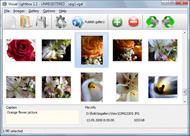
It's no secret that adding photos to your blog posts is one of the most effective ways to enhance your blog and attract attention to your writing. Flickr has millions of photos available in its database. A simple FREE tool called Flickr Gallery allows you to create a custom image gallery with a cool slide show of the most recent and most interesting photos from Flickr on your website or blog in a few easy steps. Just visit Flickr website and find photostream, photoset or a single photo you like. Enter the address of flickr page to add all photos from this page in your gallery, select the style of thumbnails and the overlay window and add the HTML embed code on your website or blog.
A few clicks and you'll see a stylish photo gallery with beautifull lightbox and zoom effects on your own website or blog!


Flickr Gallery for Windows   Flickr Gallery for MAC

Want more?

Example

Lightbox gallery sample

The following image set is generated by Flickr Gallery tool. Click any picture to run Lightbox gallery.

The photo gallery above is an in-page usage demo of Lightbox with images from Flickr. The web gallery created with Flickr Gallery tool is placed inside the website page. You can also check the full-page demo slideshow. This example takes whole browser area to show the slideshow.Drupal Flickr Thickbox

How to Use

Step 1. Adding flickr images to your own gallery.


Locate the photo, photoset or photostream you want to use in your Flickr slideshow. Click on it to see the photo on its own page.

Copy URL of the flickr page.

Select Add images from Flickr... from the 'Add' button on the Toolbar.

Add images from Flickr

In the appeared window paste URL of the flickr page. Specify also the number of photos you want to add from the flickr page. Flickr Gallery will now include these photos in your project.

Add images from Flickr

If you have included the photos that you do not wish to be in your web gallery, you can easily remove them. Select all images that you wish to remove from photo gallery, and select Delete images. from the Images menu. You can pick and choose pictures by holding the CTRL while clicking the pictures you like.

Step 2. Adding caption.

The name of the photo on flickr page will automatically appear in the caption. When you select a photo you'll see the various info about it, such as: Path, Size, date of last change and Caption. You can add any comment or text about the photo (up to 512 symbols).

Step 3. Gallery properties.

Change the name of your flickr album, the size and quality of your pictures with Flickr Gallery. From the Gallery menu, select Properties or use "Edit Gallery Properties" button on the toolbar.

On the first tab of the Gallery Properties window you can change the name of your photo album and enable/disable the following properties: Slide Show, Auto play Slide Show, Zoom effect, Overlay Shadow. You can also set the Overlay shadow color and select the Engine you want to use (jQuery or Prototype + script.aculo.us).

On the second tab of the Gallery Properties window you can select the thumbnail you want to use, set the Thumbnails Resolution, Thumbnails Quality, Thumbnails Titles. Select Thumbnails Format (save in PNG or JPG format). Specify the Number of columns in you photo album and the Page color.

On the third tab of the Gallery Properties window you can select the template, Image resolution and Image quality of your pictures and change the Watermark.

You can set up the various sizes for exported images.

Control the quality of output PNG or JPEG format image by defining output "Image quality" and "Thumbnail quality" parameters (0%…100%).

Step 4. Save your photo gallery as project file.

When you exit Flickr Gallery application, you'll be asked if you want to save your project. The project consists of the pictures you choose to put on your web photo gallery and all your settings. It's a good idea to save the project, because that will allow you to change the project in case you decide to do something different with future galleries. So click Yes, then enter a name for your project. To select the location of your project, just click the Browse folders button and choose a different location. Then click Save.

Audio Slideshow Flickr Flickr On Your Blog

Download Flickr Gallery


Download Flickr Gallery Download Free Edition
for Windows
Download Flickr Gallery Download Free Edition
for MAC

Flickr Gallery is free for non-commercial use.

A small fee is required for business use. Flickr Gallery Business Edition additionally provides an option to remove the Flickr Gallery. Com credit line as well as a feature to put your own logo to images. After you finish the payment via the secure order form, you will receive a license key instantly by e-mail that turns the Flickr Gallery Free Edition into a Business one. You can select the most suitable payment mode: credit card, PayPal, check, bank transfer etc. Also you can get Business Edition for free if you help with translating Flickr Gallery into your native language, please contact us at for more info.

Captioner Flickr

Buy Flickr GalleryBuy Business Edition
for Windows

$49
Single Website
$69
Unlimited Websites
Buy Flickr GalleryBuy Business Edition
for MAC

$49
Single Website
$69
Unlimited Websites

Support

For general help, troubleshooting and feature requests contact Customer Support at . Make sure to include details on your Flickr Gallery version, operating system, browser and a link (or relevant code).Auto Flickr Tag Wordpress Plugin

Feedback

    * Another programmes have incredible functionality but no fantastic interface like your product!

    * Great product by the way and saved me loads of time. I really like your Flickr Gallery program! Very nice.

    * First of all, your product is fantasitc. I looked at the others and your code generator app was insanely easy to use.Script For Download Flickr Album

    * I have installed Flickr Gallery to trial. All good, loving it!! I want to get an business version of your great programm. I love it - soo easy to use!!

FAQ

Q:I would like to center all the thumbnails and I cannot figure out how.Can you please help?

A:Try to use <div> tag or <table> tag to center your thumbnails. Flickr Gallery generates a special code.
Just paste it in <div> tag.
You can also place in <dierates a special code.
Just paste it in <div> tag.
You can also place in <div> tag your iframe.
And then use the alignment that you ned.


RELATED

flickr blog Software - Free Download flickr blog - Top 4 Download flickr blog Software - Free Download flickr blog - Top 4 Download - Free Download Software It's no secret that adding photos to your blog posts is one of the most effective ways to enhance your blog and attract attention to your writing

Mashing Flickr, Facebook & Your Blog Flickr.com is an exceptional tool for managing photographs and digital images. If used properly it can assist with marketing by bringing visibility to your products, services and company. But did you know that combining, or mashing, Flickr with

Flickr Adobe AIR Applications Flickroom on Flickr Blog! by Flickroom Team on Mar.09, 2010, under Announcements, Excerpt below: Flickroom is an application that brings Flickr to your desktop, allowing you to browse and search photographs of yours, your contacts, and the Flickrverse

Flickr: Your Blogs

YouTube - ‪How To Create A Flickr Slideshow In Your Blog Excellent Beth's Blog tutorial on creating and embedding a slideshow in your blog using Flickr. Check out Beth's blog at: http://beth.typepad.com/beths_blog

Flickrwire - Photo blogs for Flickr. See the story Flickrwire is a free photo-blogging platform for Flickr. Turn your photostream into blog posts that reveal the context and detail of a picture. Share more than just individual photographs, but the stories that they tell together

How to post photos from Flickr to your blog | Video " Wonder Post photos from Flickr to your blog | A quick and useful tutorial on how to post photos from Flickr to your blog and retain the creative commons license. Also watch more computers & programming how to videos including tips, tricks, advice, and

Add Flickr Photos to Your Wordpress Blog with Photo Dropper The Fastest Way to Add Awesome Photos to Your Blog: Photo Dropper With the Photo Dropper plugin, you can now search millions of Flickr photos and add them to your WordPress posts with just 1 click, all without leaving your WordPress

Flickr Blog : Flickr Gallery A simple FREE tool called Flickr Gallery allows you to create a custom image gallery with a cool slide show of the most recent and most interesting photos from Flickr on your website or blog in a few easy steps. Enter the address of flickr page to add all photos from this page in your gallery, select

Slickr Flickr Pro for Wordpress Terry White reviews Slickr Flickr Pro for Wordpress. This plug-in allows you to display select images from your Flickr Account on your Wordpress blog

Flickr Blog Companion blog to Flickr features downtime status, daily photos, and news and updates about new photo and video sharing features

Posting Flickr Photos on WordPress (and other Blogs!) via Flickr.com. For professional and casual photographers alike, Flickr provides the perfect place for you to store, share, and get feedback on your photographic work of art. Complete with tools to modify, send out, and print your photos - its a photographers delight. Who needs anything else?

Jeffrey Friedl's Blog " Jeffrey's "Export to Flickr Added a new section to the Publish Service settings dialog, on whether to refresh remote comments (at Flickr back into Lightroom) automatically or only manually. Be more robust to errors during the gallery-creation process. grant the plugin application permission to send tweets on your behalf

How To Use Flickr Photos On Your Blog ._/_., originally uploaded by anto-XIII. Using photos from flickr.com on your blog can make your writing come to life and provide your readers an

Flickr | mad dog in the fog One of the cool features of Flickr's new geotagging service is the ability to do a date based filter on the area that you are focusing in on. Set up a Private Group on flickr for your family photos. This option is better if you

flickrRSS RU – WP Plugin for Unlimited* and Random Images Integrate Flickr photos into your site. Random option and limit of 500 images. It supports user, set, favorite, group and community photostreams. This plugin allows you to easily display Flickr photos on your site. It supports user, set, favorite, group and community photostreams. The plugin is

Sweet Flickr-Blog Integration " American Peyote Creating and marketing fabulous pictures on Flickr is more or less the same as producing any fabulous web If you write about boring generic stuff on your blog, no one is going to care about clicking on your photo and heading to your Flickr account because they won't care about the story behind

Flickr | MailChimp Email Marketing Blog This morning I got this Halloween-ish email from ChoppingBlock that also used flickr in an interesting way: they invite you to post a high-res image from flickr to your blog, to see if you can name all the spooky characters in their latest tshirt:

Flickr tutorial for bloggers - posting images Video – 5min.com A quick and useful tutorial on how to post photos from flickr to your blog retaining the creative commons license

Photo Flash Gallery|PDF|Video: Embed the Flickr Photo Embed the Flickr Photo Slideshow to your Blog. Recently, I have been studying flickr and deeply in love with it. I upload a lot of my favorite photos and share them with friends on flickr. And I always wondered how to embed a flickr slideshow on my personal blog

Blogs That Flickr | Weblog: 06.05.2005 It is great to see all of these great blogs and Flickr members on the same page , eh? If you add a site to your links ---and they are in the system, your blog link is automatically added to their site

How to Let Others Share Your Flickr Photos via Blogs — Social How to Let Others Share Your Flickr Photos via Blogs. by Aaron on June 1, 2010. If you're new here, you can keep up with my latest photography information at Picture Pundit - subscribe to my newsletter for a FREE Report: A Guide to Twitter for Photographers

How To Share Your Flickr Photos On Your Blog Blogging has become a way for many to express their ideas and opinions. Some people, however, choose to use blog to keep their friends and family up to date on the happenings

Flickr Hosted Images to your Blog on Vimeo In this tutorial I show you how to get you images that are hosted on flickr over to you blog. Flickr Hosted Images to your Blog. by Corey Lack. 11 months ago 11 months ago: Thu, Feb 12, 2009 9:54pm EST (Eastern Standard Time)

Flickr Slidr Embeds Cool Slideshows in Your Blogs I'm all about blogging as my day job, but since I started my OnSugar blog, I've been blogging on my off-hours as well. If you have your own, you may know there are tons of ways to pimp out your blog, one of which is to embed a Flickr slideshow

Flickr Galleries for Your Blog | DailyApps Do you want to add that super cool Flickr Slideshow to your blog. While Flickr itself doesn't have any slideshow tool that you can embed in your blog. 123Flickr 123Flickr is a gallery creating utility that generates code for you to insert a cute

How To Add Flickr To Wordpress In 5 Simple Steps | A In today's tutorial, I will be showing you how to add your Flickr Photostream to your Wordpress blog using jSon and jQuery. I learned how to do this trick a few

